


 Video Converter Ultimate
 Screen Recorder
 Riparazione video
 Download sicuro
Come convertire M2TS in formati compatibili con iPad su Windows / Mac / Online
Puoi riprodurre direttamente i file M2TS su iPad? Purtroppo, la risposta è no. M2TS non è compatibile con iPad. Se vuoi riprodurre M2TS su iPad, devi installare un’app M2TS player su iPad, oppure puoi convertire M2TS in formato per iPad. Ovviamente, questo articolo sceglie la seconda soluzione. Continua a leggere per scoprire come cambiare il formato video in uno compatibile con iPad partendo da M2TS.

Parte 1: come convertire M2TS in iPad su Windows e Mac
Quali formati supporta iPad? In realtà, iPad accetta formati video comuni H.264, MP4, M4V, MOV, MPEG-4 e M-JPEG. Per mettere M2TS su iPad, devi prima convertire M2TS in formato video iPad.
Come convertire M2TS in iPad su Windows gratuitamente
FVC Free M2TS Converter è un convertitore batch da M2TS a iPad completamente gratuito. Puoi convertire in batch i file M2TS per iPad con una velocità fino a 50 volte superiore rispetto ai comuni convertitori M2TS. Dunque, non importa se devi convertire in massa grandi file video M2TS per iPad: il convertitore gratuito da M2TS a iPad può gestire il tutto alla perfezione.
Inoltre, puoi unire file M2TS e aggiungere temi prima della conversione da M2TS a iPad. La finestra di anteprima in tempo reale ti mostra immediatamente gli effetti video. In breve, puoi modificare e convertire AVCHD M2TS in iPad su Windows gratuitamente in un’unica soluzione.

Convertitore M2TS gratuito
113.456+ download- Converti M2TS in iPad H.264, MP4, MOV, MPEG-4 e altri formati compatibili.
- Velocità 50 volte superiore con il supporto della conversione batch.
- Mantieni un alto livello di qualità durante la conversione in iPad da tutte le videocamere HD.
- Il convertitore da M2TS a iPad funziona con computer Windows 10/8/7.
Download gratuitoPer Windows 7 o versioni successiveDownload sicuro
Download gratuitoPer MacOS 10.7 o versioni successiveDownload sicuro
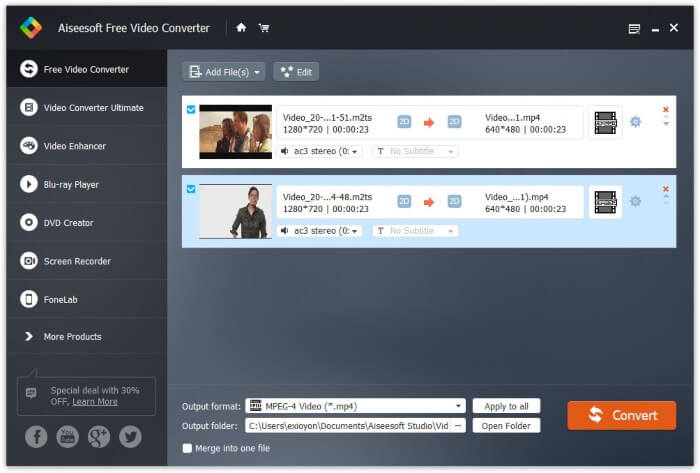
Passaggio 1: Scarica gratis, installa e avvia FVC Free M2TS Converter. Trascina e rilascia i file M2TS nell’interfaccia principale.

Passaggio 2: Apri l’elenco Formato di output vicino al fondo. Per convertire M2TS in iPad su Windows, puoi impostare direttamente il formato di output dalla categoria Apple iPad.

Passaggio 3: Fai clic sull’icona a forma di ingranaggio Impostazioni per regolare encoder video, frame rate e altro ancora. Infine, fai clic su Converti per convertire il video da M2TS a un formato per iPad.
Come convertire M2TS in iPad su Mac gratuitamente
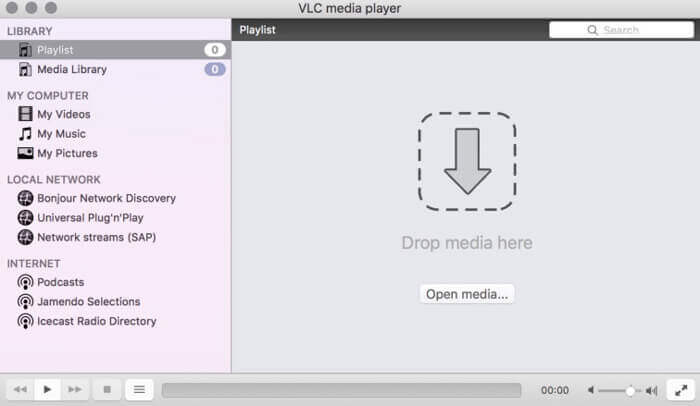
Se vuoi convertire gratuitamente i video M2TS in iPad su Mac, VLC Media Player può essere la tua buona scelta. È un lettore e convertitore M2TS gratuito e open source per multipiattaforma.
Passaggio 1: Apri VLC Media Player su Mac. Scegli Converti/Salva dal menu a discesa Media.
Passaggio 2: Clicca su Aggiungi per importare un file M2TS. Poi seleziona il file e clicca su Apri in basso per continuare.
Passaggio 3: Fai clic su Converti/Salva in basso per passare alla finestra successiva.
Passaggio 4: Scegli il formato iPad dal menu a discesa Profilo. Puoi fare clic sull’icona Strumenti accanto per regolare le impostazioni video.
Passaggio 5: Fai clic su Avvia per iniziare a convertire il file M2TS in iPad su Mac tramite VLC.
Parte 2: come convertire M2TS in iPad online
Per gli utenti mobili, anche utilizzare un convertitore online da M2TS a iPad è una buona scelta. Puoi convertire un file M2TS su iPad gratuitamente senza bisogno di download, installazione o registrazione.
Passaggio 1: Apri un convertitore online da M2TS a iPad, come ad esempio FVC Free Online Video Converter.

Passaggio 2: Scarica il FVC launcher facendo clic su Add Files to Convert e installalo.

Passaggio 3: Trova sul tuo computer il file M2TS da convertire. E non dimenticare di scegliere il formato di destinazione.

Passaggio 4: Clicca su Start Converting per convertire gratuitamente online M2TS in iPad.
Parte 3: domande frequenti sulla conversione di M2TS in iPad
Cosa succede all'improvviso senza audio nei file M2TS in iMovie?
M2TS non è supportato in modo nativo dai dispositivi Apple. È necessario convertire M2TS in formato Mac per risolvere il problema.
Come apro i file M2TS su iPhone e iPad?
AVCHD M2TS non è compatibile con i dispositivi iOS. Se insisti a riprodurre video M2TS su iPad, puoi utilizzare l'app VLC Media Player per ottenere la riproduzione video.
Qualche buona app per il lettore video per iPad?
Puoi ottenere uno schermo più grande su iPad rispetto a iPhone. Quindi anche l'esperienza di visione del video sarà migliore. I lettori video consigliati includono PlayerXtreme Media Player, KMPlayer, VLC, AirPlayer e altri. Puoi sceglierne uno qualsiasi per ottenere controlli video in modo flessibile.
Questo è tutto per convertire M2TS in iPad con strumenti online e offline. Questi convertitori video M2TS sono gratuiti e sicuri da usare. Non importa quanti file M2TS vuoi convertire in formati compatibili con iPad, qui puoi ottenere la massima velocità.
-
 Come convertire M2TS in MP4 senza ridurre la qualità
 Vuoi convertire il video dalla videocamera HD al comune MP4? Ecco 4 modi semplici e gratuiti per cambiare il file M2TS in MP4 su Windows e Mac.
-
 Come convertire M2TS in MKV senza perdere la qualità
 Vuoi convertire M2TS in MKV mantenendo la qualità originale? Questo post mostra metodi gratuiti e online per cambiare M2TS in MKV senza perdite.
-
 Qual è la differenza tra MTS e M2TS
 Cos'è il file MTS o M2TS? Qual è la differenza tra M2TS e MTS? Come posso guardare il file MTS o M2TS registrato dalla videocamera? Trova tutte le risposte in questo post.
