


 Video Converter Ultimate
 Screen Recorder
 Riparazione video
 Download sicuro
I 4 migliori modi gratuiti per convertire MTS in MOV
Ho catturato alcuni video con la mia videocamera Sony che ha esportato file MTS. Ho notato che MTS non può essere supportato dal mio lettore multimediale e da iMovie. Sto usando un Mac e voglio modificare questi video MTS catturati. Qualsiasi aiuto? C'è un modo semplice, soprattutto gratuito, per convertire MTS in MOV?
MTS è un formato video ad alta definizione ampiamente utilizzato dalle videocamere Sony e Panasonic, in quanto estensione di file di AVCHD (Advanced Video Coding High Definition). Dopo aver registrato un video con la tua videocamera digitale, è molto probabile che tu ottenga un file MTS. Supporta HD 720p/1080i e può offrire una qualità video superiore. Tuttavia, MTS non è un formato molto diffuso e non è supportato dalla maggior parte dei lettori multimediali o dei programmi di montaggio.

Quando hai la necessità di modificare file MTS in iMovie o di riprodurli con un lettore multimediale, dovresti convertire MTS in MOV o MP4 per una migliore compatibilità. In questo post ti mostreremo 4 convertitori MTS gratuiti per aiutarti a convertire MTS in MOV con facilità.
Parte 1. Il miglior modo gratuito per convertire MTS in MOV senza perdita di qualità
Esistono numerosi strumenti di conversione MTS disponibili su internet che possono aiutarti a convertire MTS in MOV con alta qualità. In questa prima parte, desideriamo consigliarti il miglior software gratuito per convertire MTS in MOV, Free MTS Converter.
È appositamente progettato per gestire tutti i tipi di conversioni. È compatibile con quasi tutti i formati video e audio come MP4, MOV, MKV, MTS, AVI, FLV, WMV, MP3, AAC, FLAC e altri. Puoi scaricarlo gratuitamente e seguire la seguente guida per convertire MTS in MOV gratuitamente.
Download gratuitoPer Windows 7 o versioni successiveDownload sicuro
Download gratuitoPer MacOS 10.7 o versioni successiveDownload sicuro
Passaggio 1. Innanzitutto, è necessario installare ed eseguire questo convertitore gratuito da MTS a MOV sul computer. Offre sia la versione Windows che quella Mac da scaricare.
Passo 2. Fai clic su Add File(s) per importare i file MTS che desideri convertire. Puoi convertire uno o più file MTS alla volta.
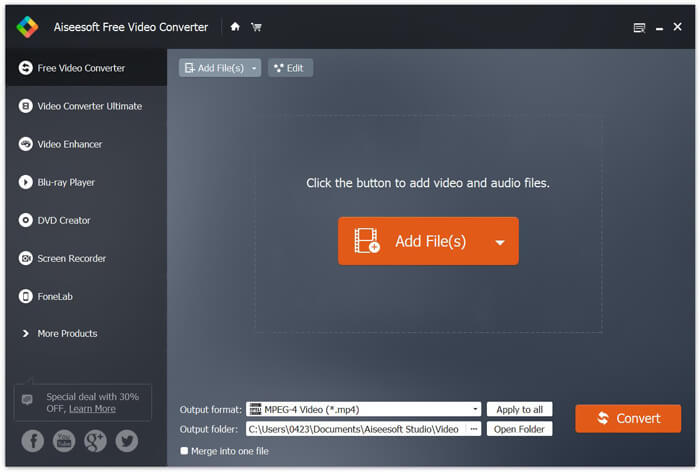
Passo 3. Seleziona MOV come formato di destinazione dall’elenco di Output format. Quindi fai clic sul pulsante Convert per avviare la conversione da MTS a MOV.
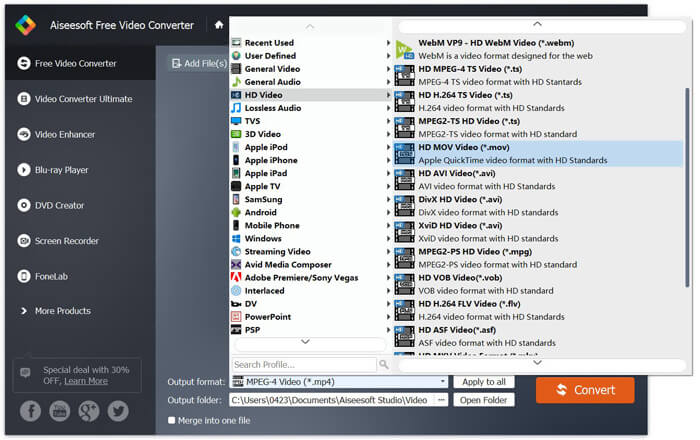
Come puoi vedere dall'alto, questo convertitore gratuito da MTS a MOV offre anche alcune funzionalità di modifica di base. Prima della conversione finale, puoi usarli per personalizzare il tuo file MTS. Rispetto ai convertitori online, questo convertitore video gratuito può darti una velocità di conversione più veloce e una qualità video di output più elevata. Ecco perché ne facciamo la nostra prima raccomandazione.
Parte 2. Il convertitore online gratuito ti aiuta a convertire facilmente i video
Quando cerchi su Google come convertire MTS in MOV, puoi trovare molti convertitori online gratuiti. Qui ti presentiamo un convertitore MTS in MOV online gratuito e facile da usare, FVC Free Online Video Converter. Senza installare alcun software, puoi convertire gratuitamente tutti i formati video più diffusi in MP4, AVI, MOV, ecc. E non devi preoccuparti di nulla perché la conversione è sicura e stabile. Nessun dato andrà perso durante il processo di conversione.
Passo 1. Apri il link qui sopra e fai clic sul pulsante Add Files to Convert. Prima di convertire, scarica e installa il FVC launcher. Richiede solo pochi secondi.

Passo 2. Dopo aver installato e aggiornato il launcher, seleziona semplicemente il video che desideri convertire. Quindi scegli il formato di cui hai bisogno e premi Convert.

Passo 3. Apri il link qui sopra e fai clic sul pulsante Add Files to Convert. Prima di convertire, scarica e installa il FVC launcher. Richiede solo pochi secondi.
Parte 3. Come convertire MTS in MOV online gratuitamente con ZAMZAR
ZAMZAR è uno dei software di conversione video online più popolari che può aiutarti a convertire gratuitamente MTS in MOV. È progettato con un'interfaccia concisa e una semplice funzione di conversione. Puoi prendere la seguente guida per effettuare la conversione video MTS.
Passaggio 1. Apri il browser e vai al sito ufficiale di ZAMZAR. Qui puoi andare direttamente alla pagina https://www.zamzar.com/convert/mts-to-mov/. Qui puoi convertire direttamente MTS in MOV senza fare altre impostazioni.
Passaggio 2. Fare clic sul pulsante Aggiungi file per caricare il file MTS che si desidera convertire. Puoi trascinare e rilasciare per il caricamento del file MTS. Una cosa che dovresti sapere è che questo convertitore MTS online gratuito ti consente solo di convertire un file MTS di meno di 150 MB.
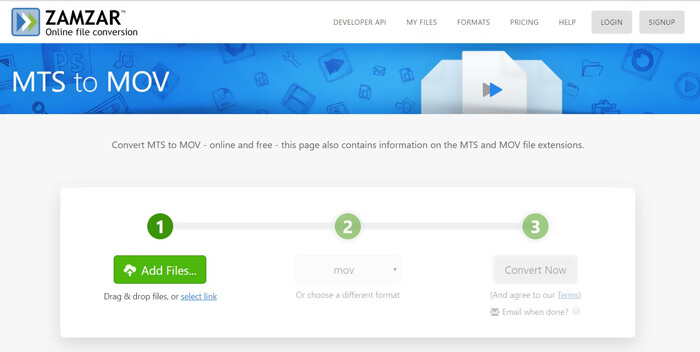
Passo 3. Dopo il caricamento, puoi fare clic sul pulsante Convert Now per iniziare a convertire gratuitamente MTS in MOV online.
Parte 4. Modo online per convertire MTS in MOV con FreeConvert
FreeConvert è un altro popolare convertitore video online in grado di effettuare gratuitamente la conversione da MTS a MOV. Questo convertitore gratuito da MTS a MOV supporta pienamente MTS e M2TS. Ti permette di caricare un file MTS fino a 1 GB. Inoltre, ti consente di caricare fino a 20 file MTS alla volta per la conversione. Ora puoi seguire i passaggi seguenti per convertire i tuoi MTS in MOV.
Passo 1. Per prima cosa, devi andare su FreeConvert.com nel tuo browser. Qui puoi andare direttamente su https://www.freeconvert.com/mts-to-mov per la conversione.
Passo 2. Fai clic sul grande pulsante blu Choose MTS Files per caricare il file MTS che desideri convertire in MOV. Come accennato sopra, qui puoi caricare uno o più file MTS per la conversione.
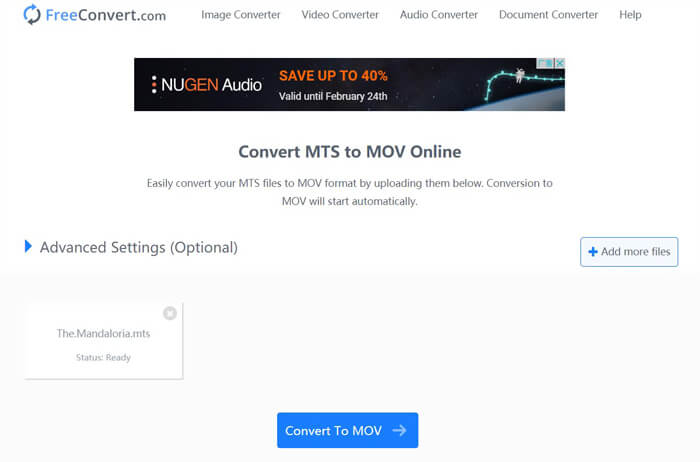
Passo 3. Fai clic sul pulsante Convert To MOV per avviare il processo di caricamento e conversione. Successivamente, devi fare clic sul pulsante Download per salvare il file convertito sul tuo computer.
Quando scegli convertitori online gratuiti per convertire MTS in MOV, devi considerare il tempo relativamente lungo necessario per il caricamento e la conversione. Quindi è meglio convertire file MTS di piccole dimensioni con software di conversione online. Se vuoi convertire un video MTS o M2TS di grandi dimensioni, dovresti affidarti al Free Video Converter altamente consigliato.
-
 6 semplici modi per convertire TS in AVI / MKV / MOV / WMV su Windows / Mac
 Vuoi convertire rapidamente i file TS in AVI / MKV / MOV / WMV? Questo articolo mostra convertitori video online e offline con guida completa. Forse puoi ottenere il miglior convertitore TS gratuito qui.
-
 MOV VS MP4 - Qual è il migliore
 MOV VS MP4, qual è il migliore? Questo post spiega la differenza tra MP4 e MOV, in modo da poter ottenere la scelta migliore da utilizzare per i tuoi file video.
-
 Come unire file MOV (QuickTime) gratuitamente
 Può essere difficile per i principianti unire più clip video MOV insieme. Quindi, esiste un modo semplice e veloce per combinare i file MOV? Se c'è, allora come usarlo? Questo post ti aiuterà a ottenere queste risposte.
