


 Video Converter Ultimate
 Screen Recorder
 Riparazione video
Modi importanti e utili per convertire 3GP in FLV [provato]
I file audio e video possono essere salvati nel formato 3GP, comunemente utilizzato nei telefoni 3G. Funziona anche su telefoni 2G e 4G. Tramite internet, questo contenitore basato su MP4 invia e riceve file multimediali. Tuttavia, molti servizi di video online e di streaming audio utilizzano FLV, un contenitore video compatibile con Flash. Oltre ad Adobe Flash Player, molti altri lettori video possono riprodurre file FLV. Per rendere i file 3GP più facilmente accessibili e di dimensioni ridotte, esistono diversi semplici metodi per convertirli in FLV. Di seguito sono riportati i convertitori che dovresti prendere in considerazione per convertire 3GP in FLV.

Parte 1. Metodi eccellenti per convertire 3GP in FLV [Offline]
Video Converter Ultimate è uno strumento perfetto per convertire file 3GP in FLV senza sacrificare la qualità. Utilizzando la tecnologia SuperSpeed del programma, gli utenti possono convertire anche file di grandi dimensioni in pochi minuti. Inoltre, l'app ti consente di modificare i tuoi file come meglio credi: ritaglia, ruota e taglia i tuoi video; regolare i parametri del colore; modificare la risoluzione video e il bitrate; o aggiungere i sottotitoli. Tutti i dispositivi più diffusi, inclusi iPhone, iPad, dispositivi basati su Android, Xbox e PlayStation, possono essere supportati da questo software. Ora che conosci una breve introduzione a questo software, è ora che tu capisca come convertire 3GP in FLV utilizzando questo software.
Passaggio 1: Per prima cosa scarica il software facendo clic su Download gratuito qui sotto. Hai la possibilità di scaricarlo su Windows o Mac. Dopo averlo scaricato, installa il software sul tuo computer ed eseguilo facendo clic su Avvia ora nella finestra che comparirà sullo schermo al termine dell’installazione.
Download gratuitoPer Windows 7 o versioni successiveDownload sicuro
Download gratuitoPer MacOS 10.7 o versioni successiveDownload sicuro
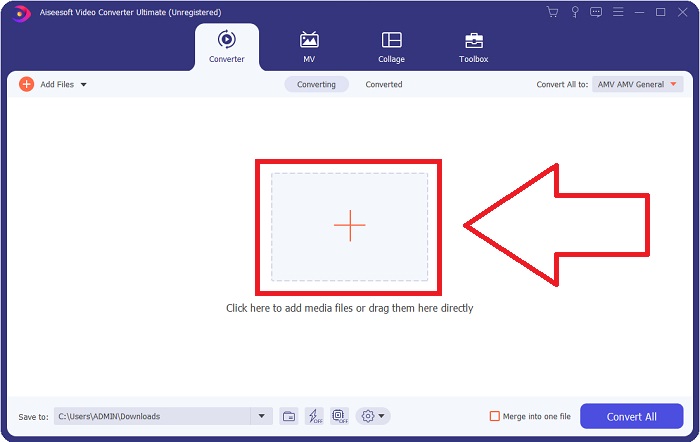
Passaggio 2: Per avviare la conversione, devi prima caricare un file; per farlo, fai clic sul pulsante + al centro dell’interfaccia del software, oppure trascina semplicemente i tuoi file video dal computer.
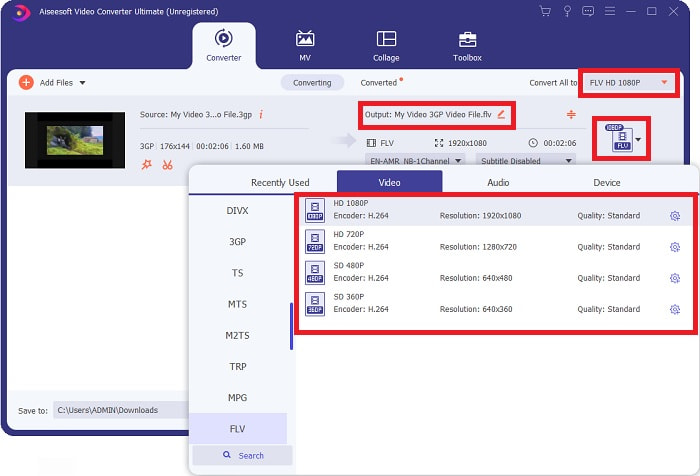
Passaggio 3: Dopo aver caricato un file, puoi ora scegliere il formato FLV nel selettore di formato situato nell’angolo destro dello schermo. Puoi scegliere il tipo di qualità che desideri, poiché verranno mostrati tutti i possibili parametri che potresti utilizzare.
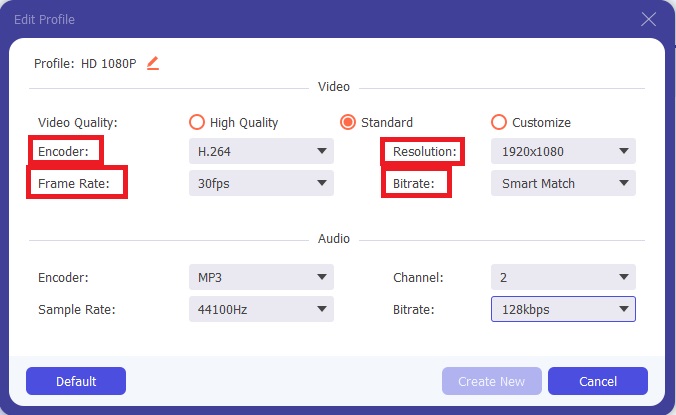
Passaggio 4: Oltre alle opzioni di qualità già presenti, puoi creare un profilo di qualità personalizzato se quella che preferisci non è disponibile. Fai clic sull’icona a forma di ingranaggio e modifica tutti i parametri visualizzati nella finestra che si aprirà. La risoluzione riguarda la qualità di visualizzazione dello schermo, il frame rate la frequenza di riproduzione dei fotogrammi video; il bit rate indica la quantità di dati codificati in un dato intervallo di tempo. Infine, il codec (encoder) definisce il modo in cui il formato video viene codificato e riprodotto.
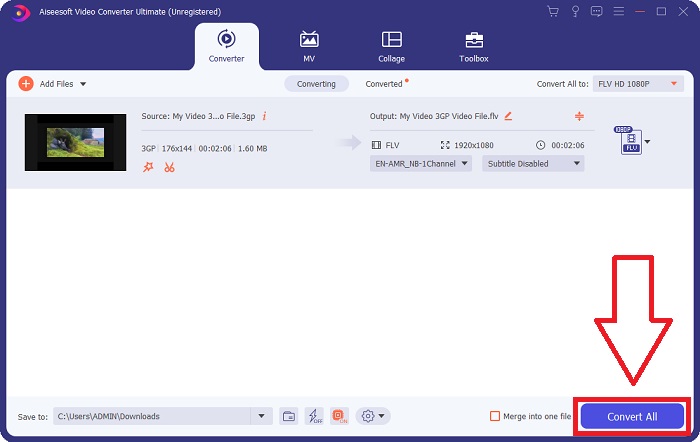
Passaggio 5: Infine, dopo aver regolato tutte le impostazioni necessarie per l’output video, puoi avviare la conversione facendo clic su Converti tutto.
Parte 2. Un altro metodo interessante per convertire 3GP in FLV [online]
Basta parlare del software: passiamo a questo strumento online che può sicuramente aiutarti a convertire 3GP in FLV. Ti presentiamo Free Video Converter Online, un convertitore online che supporta numerosi formati, tra cui 3GP e FLV. Puoi convertire un file direttamente dal tuo computer caricandolo. Per caricare un file di dimensioni superiori a 500 MB, puoi utilizzare questo strumento online per convertire 3GP in FLV. Gli utenti possono modificare molte impostazioni prima che inizi la conversione. Puoi, per esempio, cambiare il codec audio e il volume dell’audio. Puoi anche modificare la risoluzione video. Dopo tutte queste informazioni, vediamo ora tutte le procedure che devi conoscere.
Passaggio 1: Ecco il link allo strumento online. Cliccalo affinché la pagina principale si apra nel browser. Fai clic su Aggiungi file da convertire per scaricare il launcher che utilizzerai per far funzionare lo strumento online. Installa il launcher e inizia a caricare un file.
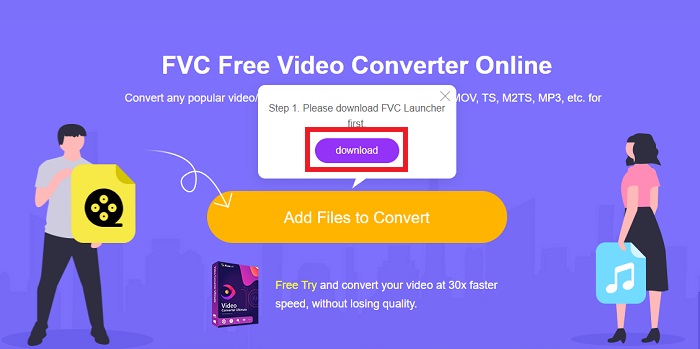
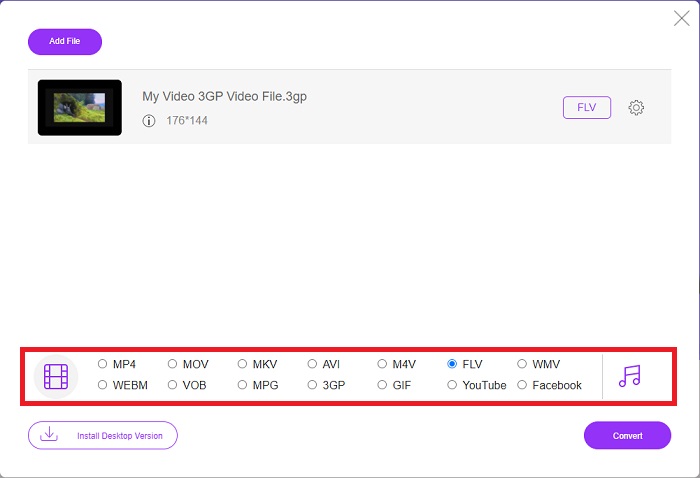
Passaggio 2: Per caricare un file, fai di nuovo clic su Aggiungi file da convertire. Dopo aver caricato un file, puoi scegliere il formato video FLV tra i formati video disponibili nella parte inferiore della finestra.
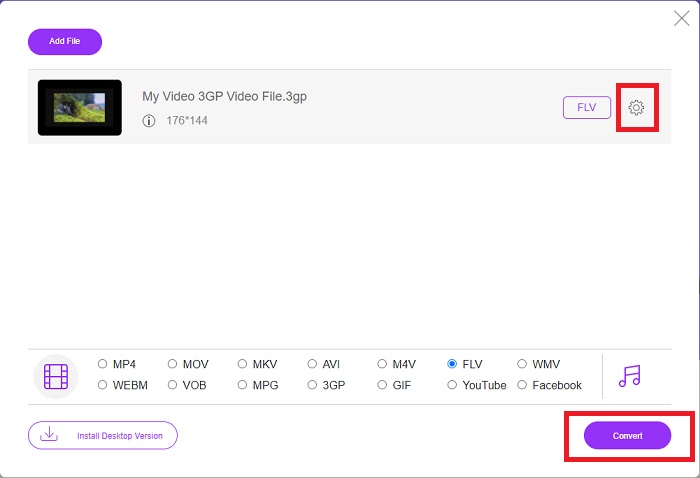
Passaggio 3: Puoi anche modificare la qualità del video o altre specifiche, come risoluzione, frame rate o bit rate, facendo clic sull’icona a forma di ingranaggio accanto al formato video selezionato, situata nell’angolo destro della finestra. Dopo aver regolato tutte le impostazioni che preferisci per l’output, puoi convertire il file facendo clic su Converti.
Parte 3. Panoramica: 3GP contro FLV
Se hai mai desiderato salvare un clip audio e video in un formato 3GP, sei nel posto giusto! (3GPP). Il formato file multimediale ISO funge da base per 3GPP, un formato contenitore multimediale. Sono supportati i flussi video H.263 o H.264 e i flussi audio AMR-WB, AMR-WB+, AMR-NB, HE-AAC v1, AAC-LC o Enhanced aacPlus. In genere, i file 3GP utilizzano telefoni cellulari 3G per acquisire video, ma gli utenti possono anche riprodurli su alcuni telefoni 2G e 4G. Sebbene i file 3GP siano ancora in uso, la loro popolarità è diminuita poiché formati video più efficienti hanno soppiantato il formato 3GPP.
Tuttavia, i file video salvati nel formato contenitore Adobe Flash Video (FLV) sono documenti FLV. I flussi audio e video possono essere codificati allo stesso modo del Flash standard. Il formato SWF e i pacchetti di metadati includono un'intestazione breve. Il plug-in Flash Video Exporter (disponibile con Adobe Animate) o un'applicazione che supporta i file FLV può produrre contenuto Flash Video ed esportarlo come file FLV. Adobe Media Encoder può anche codificare video nei formati QuickTime o Windows Media. Ora che hai un'idea su 3GP e FLV, forniamo una tabella di confronto per conoscere i dettagli in questioni specifiche.
| Estensione del file | 3GP | FLV |
| Tipo di file | File multimediale ISO | File video flash |
| Sviluppato da | Progetto di partenariato di terza generazione | Sistema Adobe |
| Professionisti | È più facile per gli utenti mobili condividere e archiviare file video perché il formato file 3GP riduce le dimensioni del video e i componenti audio. Sebbene il formato di file progettato 3GP utilizzi dispositivi compatibili con 3G, molti dispositivi 2G e 4G possono riprodurre questo formato. | Per i siti Web che desiderano includere animazioni ed elementi interattivi, Adobe Flash è una scelta eccellente. A lungo termine, può avere un impatto sostanziale. Durante il suo picco, Flash utilizzava giochi semplici. |
| Contro | Anche se i flussi video e audio possono essere compressi in un singolo file, la qualità e la risoluzione ridotta, gli utenti possono migliorare notevolmente l'esperienza dell'utente rispetto ad altri formati, come qualità audio, risoluzione dello schermo, velocità di riproduzione, ecc. | È uno svantaggio, ovviamente, che la popolarità di FLV sia diminuita negli ultimi anni. Ci vuole molto tempo e denaro per creare contenuti FLV. Un altro svantaggio di Flash è che non può essere visualizzato su dispositivi iOS, limitando gravemente la sua capacità di attirare nuovi fan. |
| I programmi aprono il formato video | QuickTime Player Windows Media Player | Lettore multimediale VLC Adobe Flash Player |
Parte 4. Domande frequenti sulla conversione da 3GP a FLV
Il 3GP è di buona qualità?
Bitrate variabile e supporto frame rate 3GP, proprio come in MP4. Il 3GP era un formato popolare per i telefoni cellulari quando erano ancora la forma di comunicazione più comune. Abbiamo bisogno di un video piccolo perché lo spazio era un lusso in passato. La qualità è alla pari con le fotocamere di qualità patata che avevamo nei telefoni all'epoca, quindi non è scioccante.
Perché 3GP non viene riprodotto?
Prova a riprodurre il file 3GP con VLC Media Player invece che con il tuo lettore multimediale predefinito, se quest’ultimo non supporta i codec 3GP. VLC è un eccellente lettore video open‑source perché è in grado di riprodurre praticamente qualsiasi file video. Oltre che per Windows e iOS, VLC è disponibile anche per Linux e Android.
FLV è un formato di registrazione adatto?
Adobe Flash Player utilizza il formato di file FLV. Come formato video universalmente supportato, è uno dei più diffusi in assoluto. Le piattaforme di streaming video online come YouTube traggono vantaggio dall’uso del formato FLV. È molto pratico perché le dimensioni dei file sono ridotte. Ecco i migliori registratori FLV che puoi provare.
Conclusione
In generale, tutti i convertitori forniti per te sono i software e i convertitori online migliori e più consigliati che dovresti considerare di utilizzare. Dal momento che hanno queste funzionalità professionali e intuitive, non puoi confrontare questi due con altri software e strumenti online. Divertiti ad usarlo e non dimenticare di mettere una recensione dopo averlo usato.
-
 I 4 modi più efficaci per convertire il formato 3GP in AVI [2025]
 Posso convertire i miei file 3GP in AVI? Bene, puoi convertirlo facilmente se provi questi strumenti disponibili poiché abbiamo raccolto tutte le possibili soluzioni al tuo problema di conversione da 3GP a AVI.
-
 Modi migliori per convertire VOB in FLV [gratuito e online inclusi]
 Vuoi convertire un file VOB in un file FLV? Puoi facilmente completare l'attività con convertitori desktop o online. Leggi questa guida e impara come trasformare VOB in FLV in modo facile e veloce.
-
 I 3 migliori modi per convertire DAT in FLV su desktop e online
 Vuoi convertire DAT in FLV ma non sai come fare? Controlla i nostri convertitori video da DAT a FLV consigliati e segui la nostra guida concreta per completare facilmente il lavoro.
