


 Video Converter Ultimate
 Screen Recorder
 Riparazione video
 Download sicuro
Come convertire i tuoi file video FLV in formato 3G2 su desktop e online
Si dice che la tecnologia cambi la vita e renda il nostro lavoro e la nostra vita quotidiana più semplici. Tuttavia, ogni medaglia ha due facce, e così anche la tecnologia. Il video digitale, per esempio, ci dà la possibilità di accedere a intrattenimento e informazioni ovunque e in qualsiasi momento. Il problema è il formato video. Secondo un recente sondaggio, esistono oltre cento formati video. Questa guida si concentra su come aiutarti a convertire FLV in 3G2 o 3GP su computer e online gratuitamente.

Parte 1: Come convertire FLV in 3G2 su PC/Mac
Metodo 1: Converti FLV in 3G2 con il convertitore FLV gratuito Free
Esistono solo pochi convertitori video che supportano il formato 3G2. FVC Free FLV Converter è uno di questi. Inoltre, può soddisfare le tue esigenze senza spendere un centesimo. Se hai molti file FLV, può elaborarli tutti contemporaneamente in modo rapido.
Caratteristiche principali del miglior convertitore da FLV a 3G2
- 1. Converti FLV in 3G2 senza perdita di qualità.
- 2. Gestire in batch più file FLV utilizzando la tecnologia multi-thread.
- 3. Offri una vasta gamma di strumenti bonus, come l'editing video.
Download gratuitoPer Windows 7 o versioni successiveDownload sicuro
Download gratuitoPer macOS 10.7 o versioni successiveDownload sicuro
Come convertire FLV in 3G2 in modalità batch gratuitamente
Passaggio 1: aggiungi file FLV
Quando hai bisogno di convertire FLV in 3G2, installa il miglior convertitore video gratuito sul tuo computer e avvialo. Fai clic sul pulsante Add File(s), trova tutti i file FLV che vuoi convertire e aprili.

Passaggio 2: selezionare il formato di output
Dopo il caricamento dei video, vai nell’area inferiore. Fai clic e amplia l’opzione Output format, cerca 3G2 tramite la barra di ricerca e selezionalo sul lato destro. Fai clic sul pulsante Open Folder e scegli una cartella specifica in cui salvare l’output.

Passaggio 3: converti FLV in 3G2
Infine, fai clic sul pulsante Convert per iniziare immediatamente a convertire FLV in 3G2. Dopo pochi minuti troverai i file 3G2 nella cartella che hai scelto.

Metodo 2: Come convertire FLV in 3G2 con VLC
VLC non è solo un lettore multimediale open source, ma anche un convertitore gratuito da FLV a 3G2. Ti permette di fare il convertitore video gratuitamente sia su Windows che su Mac. Ecco i passaggi:
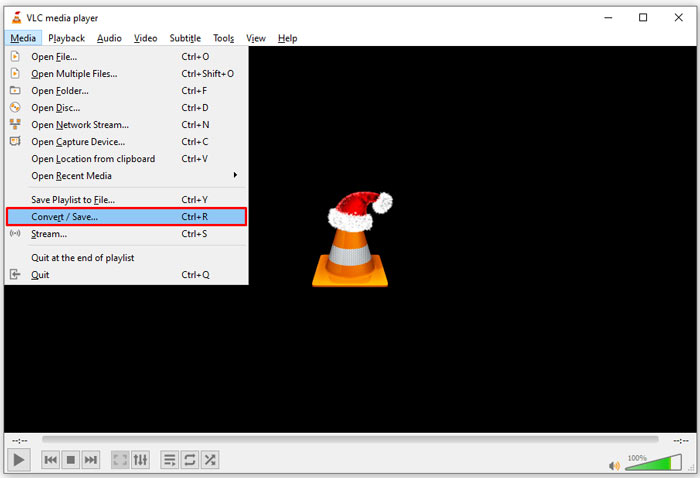
Step 1: Apri VLC, vai al menu Media sulla barra superiore e scegli Convert/Save.
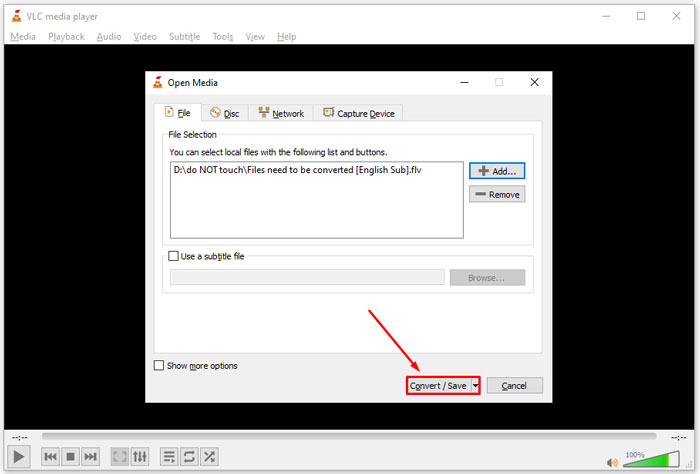
Step 2: Fai clic sul pulsante Add e apri il file FLV che intendi convertire in un altro formato. Premi il pulsante Convert/Save per proseguire.
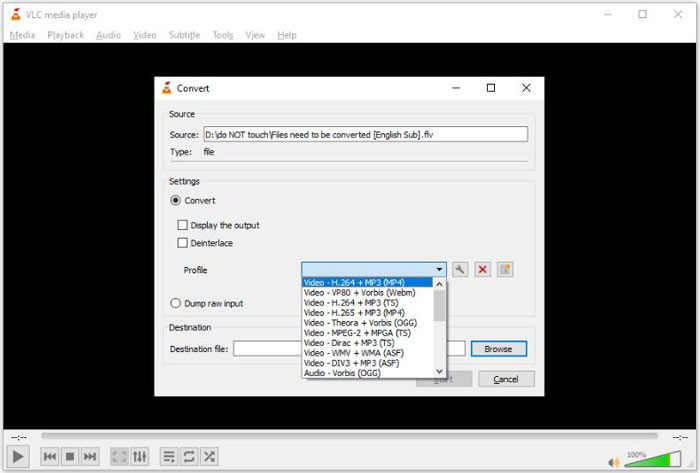
Step 3: Apri il menu dell’opzione Profile e seleziona 3G2 o un formato correlato. Quindi imposta la cartella di destinazione premendo il pulsante Browse.
Step 4: Una volta che fai clic sul pulsante Start, VLC convertirà FLV in 3G2. Ci vorrà un po’ di tempo e dovrai avere pazienza.
Parte 2: Come convertire FLV in 3G2 online
A volte hai solo bisogno di convertire FLV in 3G2 occasionalmente. In tali casi, un’applicazione web è una scelta conveniente, come FVC Free Online Video Converter. È gratuita, senza registrazione e senza limiti di dimensione dei file.
Step 1: Visita https://www.free-videoconverter.net/free-online-video-converter/ con qualsiasi browser. Fai clic sul pulsante Add Files to Convert e scarica il launcher.

Step 2: Al termine del download, il launcher si avvierà automaticamente. Fai clic sul pulsante Add File e carica i file FLV. Questa app web per la conversione video supporta la conversione in batch.
Se vuoi regolare i parametri, come risoluzione, framerate e altro, fai clic sull’icona a forma di Gear e apri la finestra di dialogo Settings.

Step 3: Vai in fondo e seleziona un formato di output appropriato nell’area dei formati. Quando sei pronto, fai clic sul pulsante Convert. Poi scarica il risultato sul tuo disco rigido.
Potrebbe interessarti anche:
Parte 3: Domande frequenti su FLV su 3G2
Cosa sono i file 3G2?
3G2, sta per 3rd Generation Partnership Project Group 2, è un'estensione per file multimediali basata su MPEG-4. È stato creato da un gruppo di sette organizzazioni di sviluppo standard per telefoni cellulari su reti CDMA. È molto simile al 3GP.
Windows Media Player può aprire 3G2?
No, WMP non può aprire o riprodurre file video 3G2 poiché manca dei codec corrispondenti. Hai tre scelte per aprire i file 3G2: convertirli in un formato video standard, scaricare un lettore video 3G2 o installare un pacchetto di codec extra per WMP.
FLV è migliore di 3G2?
La risposta dipende dal tuo scopo. Se guardi il video sul cellulare con rete CDMA, 3G2 è una scelta migliore. Per la condivisione di video, FLV è migliore di 3G2.
Conclusione
Ora dovresti capire cosa significa 3G2 e come convertire FLV in 3G2 senza perdita di qualità. VLC è un convertitore video gratuito che ha la capacità di cambiare i formati video. Tuttavia, FVC Free FLV Converter offre prestazioni migliori. È più facile da usare rispetto a VLC e completamente gratuito. Se hai più problemi, lascia un messaggio sotto questo post e ti risponderemo rapidamente.
-
 FLV in WAV - Converti FLV in WAV online gratuitamente e su Mac / PC
 Come posso convertire un file FLV? VLC può convertire FLV in WAV? Questo post dice 3 modi gratuiti per convertire FLV in WAV senza perdita di qualità.
-
 FLV in MPG - Come convertire FLV in MPG su Mac, PC e online gratuitamente
 Come convertire FLV in MPEG? Posso convertire FLV in MPG gratuitamente? Questo post condivide 3 convertitori video gratuiti per aiutarti a convertire FLV in MPG senza perdita di qualità.
-
 FLV in Xbox - Come convertire e riprodurre FLV su Xbox
 Non riesci a riprodurre file FLV su Xbox One o Xbox 360? Hai bisogno di convertire FLV in un formato supportato da Xbox come MP4, AVI, MOV o WMV? Questo post elenca 3 convertitori gratuiti da FLV a Xbox per riprodurre FLV su Xbox.
