


 Video Converter Ultimate
 Screen Recorder
 Riparazione video
 Download sicuro
Come convertire i video Flash (FLV) per la riproduzione su PSP in modo facile e veloce
Il file FLV è un file video salvato nel formato contenitore Adobe Flash Video (FLV). Puoi sempre trovare il video FLV incorporato su Internet come YouTube, Hulu, Vimeo e altri siti web. A volte vuoi convertire i tuoi file FLV preferiti per riprodurli su PSP. In questo post, condivideremo 3 soluzioni efficaci per convertire i file FLV in formati supportati da PSP sul tuo PC Windows e Mac.

Parte 1. Come cambiare i video Flash in PSP online gratis
FVC Free Online Video Converter is a free online FLV to PSP converter tool that helps convert any videos including FLV to MP4, WMV, AVI, MOV, MP3, etc. The whole conversion is proceeded without downloading any software package, with no registration or ads. You can view the detailed steps to change the Flash video to PSP supported format like MP4 online for free.
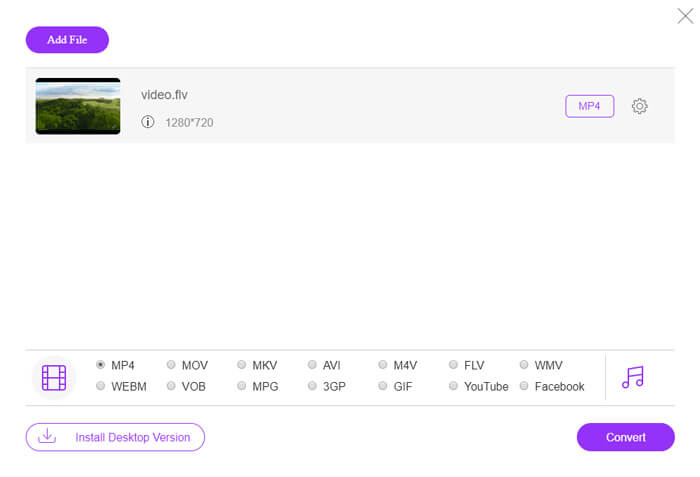
Step 1. Visit the official website of FVC Free Online Video Converter. You can click Add Files to Convert button to download and install the launcher. After that, you can select the FLV video file from local computer.

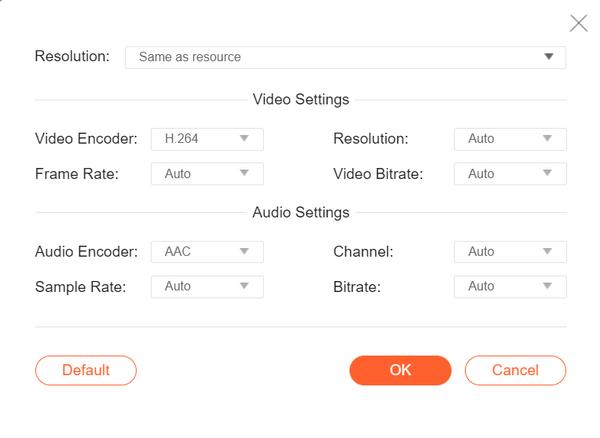
Step 2. Since MP4 is the recommended video format for PSP, you can move to the bottom area and check MP4 as the output format. If you want to adjust more settings, you can click the gear icon to adjust video encoder, resolution, frame rate, bitrate, and other audio settings like audio encoder, channel, sample rate, and bitrate.
Step 3. Finally, you can click the Convert button to start converting your FLV videos to PSP MP4 files.
Parte 2. Modo professionale per convertire gratuitamente FLV in PSP
A professional tool like FVC Free FLV to PSP Converter will help convert your flash video for playing on PSP. This free FLV converter can batch convert the FLV files to MP4, AVI, WMV, MOV, and more. Moreover, you can edit the FLV videos with the built-in video editing software before editing.

- Converti in batch FLV in MP4, MKV, AVI, WMV, ecc. a una velocità 50 volte maggiore.
- Converti FLV in formati supportati da PSP su Windows 10/8/7/Vista/XP e Mac OS X.
- Comprimi, unisci e aggiungi altri effetti video ai file FLV.
- Aggiungi temi speciali ai video flash, come vacanze, famiglia, compleanno.
Free DownloadFor Windows 7 or laterSecure Download
Free DownloadFor MacOS 10.7 or laterSecure Download
Passaggio 1. Aggiungi il file FLV
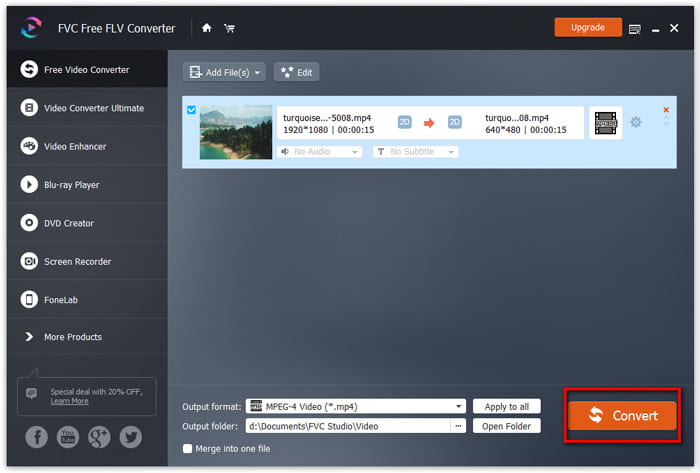
Free download, install and launch FVC Free FLV Converter. Click Add File(s) button to import your flash video file. You can also drag and drop multiple FLV files into the program at one time.

Passaggio 2. Modifica il file FLV
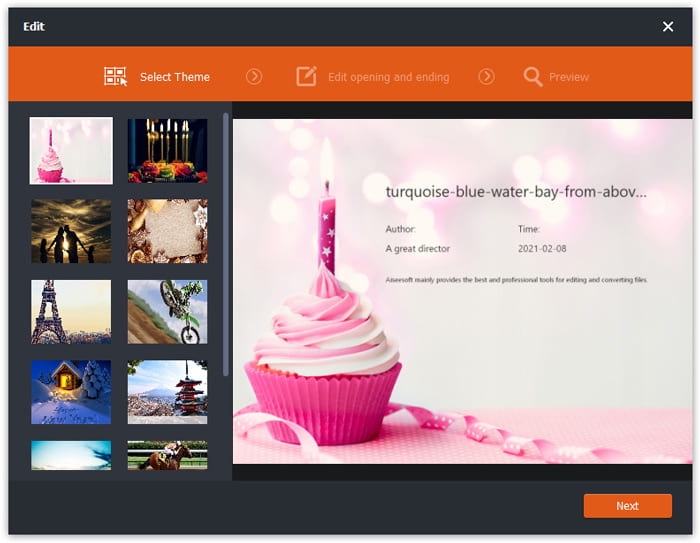
Click the Edit button to start editing your FLV file. You can select a certain theme, edit the title, author, time at the opening and ending of the FLV video clip.
Passaggio 3. Imposta il formato di output per PSP
Then go to the Output format area, scroll down to find and enter the PSP list. You can choose PSP Video MPEG (*mp4), PSP Video h.264 (*.mp4), or other format as the output format. There are various options you can choose from the PSP list.

Passaggio 4. Converti FLV in PSP
Finally, go to the Output folder area and choose the destination where the converted FLV file will be saved. You can click the Convert button to start converting FLV video to PSP for free.
Parte 3. Come convertire gratuitamente FLV in PSP con VLC
More than a media player, VLC Media Player can also work as an FLV to PSP video converter with multiple features. With VLC, you can convert the Flash videos to PSP videos for free on Windows computer or Mac. Moreover, it handles a wide range of supported video formats for conversion. It is free and without any limitations. Follow the step-by-step guide to convert your favorite FLV video for playing on PSP.
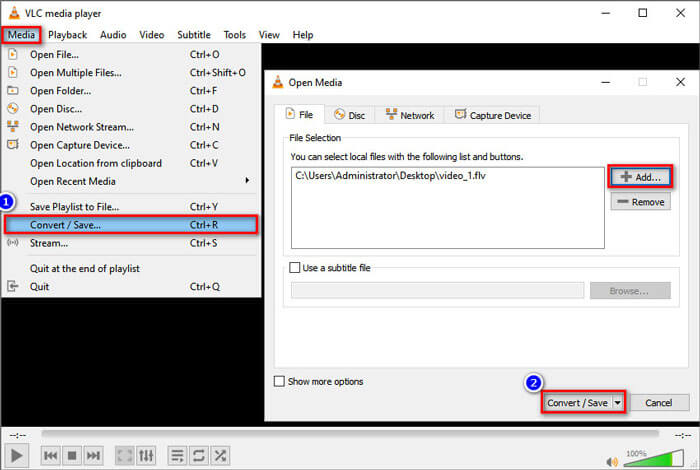
Step 1. Install and open VLC Media Player on your computer. Simply click the Media menu and select Convert/Save button.
Step 2. Click Add button to add the FLV files you want to convert, and click Convert/Save button to continue.
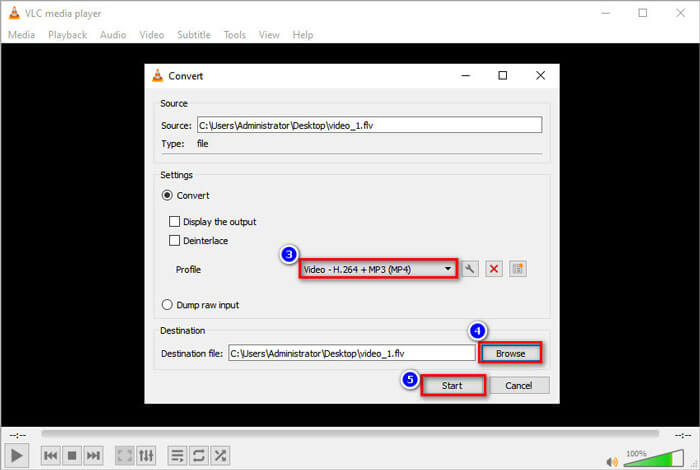
Step 3. In the Settings area, you can check Convert button and click the drop-down arrow next to Profile to select Video - H.264 + MP3 (MP4) as the output format.
Step 4. Then you can move to the Destination area and click the Browse button to set the output folder.
Step 5. Finally, you can click the Start button to start converting your FLV to PSP video in VLC.
Parte 4. Domande frequenti sulla conversione di FLV in PSP
Che cos'è un file FLV?
FLV è il formato di file video flash sviluppato da Adobe. Può memorizzare video, audio, testo, pedice e altro. È il formato standard per i video sui siti Web come YouTube, Hulu, ecc.
Come faccio ad aprire un video FLV?
Both Windows Media Player and QuickTime do not support FLV, so you have to use a third-party media player to open FLV, like VLC. There are many FLV players you can try to play FLV video, like FVC Free Video Player, FLV Media Player, DivX Player, RealPlayer, KMPlayer, and more.
Che tipo di file video può riprodurre la PSP?
PSP supporta MP4, H.264, AVI, Motion JPEG e DivX. MP4 è il formato video consigliato per la PSP.
Conclusione
In questo articolo abbiamo parlato principalmente di 3 metodi per convertire i video Flash in PSP. Spero che tutti ti aiutino molto. Puoi provare FVC Free FLV to PSP converter e cambiare facilmente i tuoi file FLV in formati supportati da PSP come MP4, AVI e altri ad alta velocità.
-
 4 100% Metodi di lavoro per convertire file video FLV in formato MP3
 Come convertire un FLV in un file MP3? Tutto quello che devi fare è leggere attentamente questo articolo, trovare il tuo metodo preferito e seguire la nostra guida passo passo per ottenere ciò che desideri.
-
 2 semplici metodi per comprimere i video FLV per un caricamento veloce
 Se non riesci a caricare i video FLV o ci vuole tempo per condividere i file, puoi ottenere maggiori dettagli su 2 semplici modi per comprimere i video FLV dall'articolo.
-
 Guida concreta per caricare i tuoi video FLV su YouTube
 Carica FLV su YouTube ma non è riuscito? Puoi risolvere questo problema da solo e convertire FLV in codec supportati da YouTube seguendo la nostra guida passo passo.
