


 Video Converter Ultimate
 Screen Recorder
 Riparazione video
Strumenti offline e online per la conversione da TRP a FLV che dovresti conoscere
TRP è un formato di file per l’archiviazione di registrazioni televisive. Poiché pochi player sono in grado di gestire questo tipo di file nella sua versione originale, potresti dover convertire il file in un altro formato prima di riprodurlo. Per effettuare la conversione dei file TRP in file FLV, è necessario utilizzare il software adatto. Fortunatamente, farlo è molto più semplice usando il nostro software o la sua versione online, che non ti causerà alcun inconveniente durante l’intero processo di conversione. Segui i passaggi che ti forniremo per convertire con successo i tuoi video TRP in formato FLV.

Parte 1. Metodo offline per convertire TRP in FLV
Il formato di file TRP è per lo più poco comune per chi guarda video ed è utilizzato raramente anche dai creatori. Per questo motivo la maggior parte dei software e degli strumenti online non supporta questo tipo di file video. Ecco perché Video Converter Ultimate è una soluzione da prendere in considerazione ogni volta che hai bisogno di convertire dei video da un formato a un altro. Questo software può convertire i tuoi file TRP in qualsiasi formato tu desideri con un solo clic.
Questo strumento di conversione video fornisce funzionalità di editing avanzate e ha un'interfaccia grafica semplice da usare anche se non hai conoscenze o abilità tecniche. Con l'aiuto di questa applicazione, puoi convertire file e beneficiare di tempi di conversione super veloci e output di alta qualità. Qui ti forniamo i semplici passaggi che devi seguire:
Passaggio 1: Scarica il file .exe facendo clic sul pulsante Download gratuito qui sotto, in base al sistema operativo che utilizzi. Una volta terminato il download, apri il file e avvia il processo di installazione. Attendi che l’installazione sia completata, quindi avvia il software.
Download gratuitoPer Windows 7 o versioni successiveDownload sicuro
Download gratuitoPer MacOS 10.7 o versioni successiveDownload sicuro
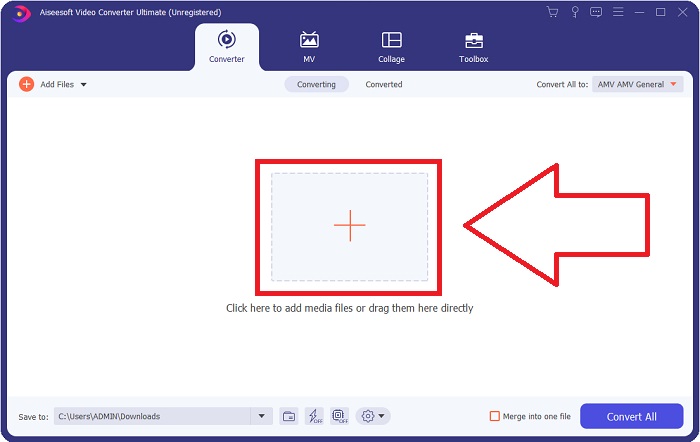
Passaggio 2. All’avvio del software apparirà un’interfaccia. Da lì, fai clic sul pulsante + al centro e inizia a importare il file video che vuoi convertire oppure trascina e rilascia direttamente il file.
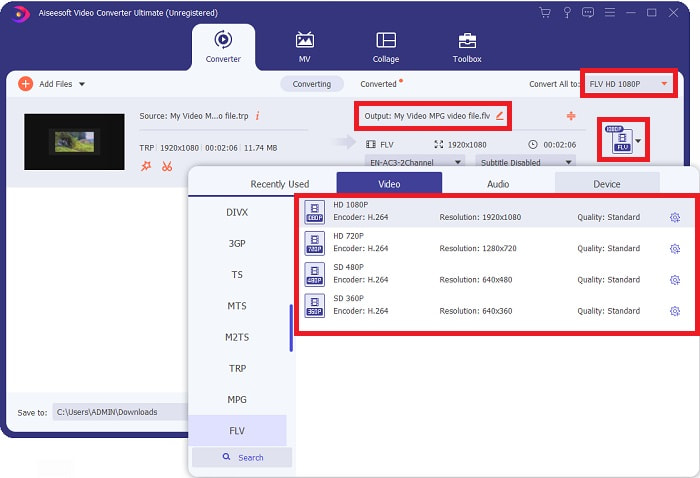
Passaggio 3: Vedrai il formato attuale del tuo video sul lato destro del file. Per scegliere il formato in cui verrà convertito il video, fai clic su di esso e appariranno tutti i formati disponibili. Cerca FLV oppure digitane il nome nella barra di ricerca. A destra sono disponibili anche diverse qualità video tra cui scegliere.
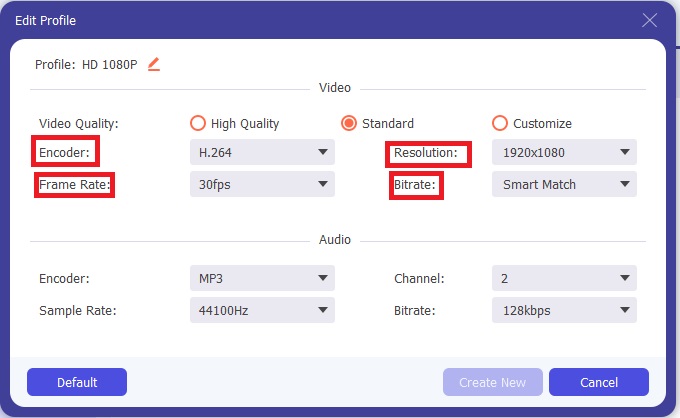
Passaggio 4: Per le funzioni aggiuntive di cui abbiamo parlato, fai clic sull’icona a forma di ingranaggio a destra della qualità video che hai scelto e si aprirà un’altra interfaccia. Da lì puoi modificare numerose impostazioni video e audio in base alle tue esigenze. Fai clic sul pulsante Crea nuovo per mantenere le modifiche.
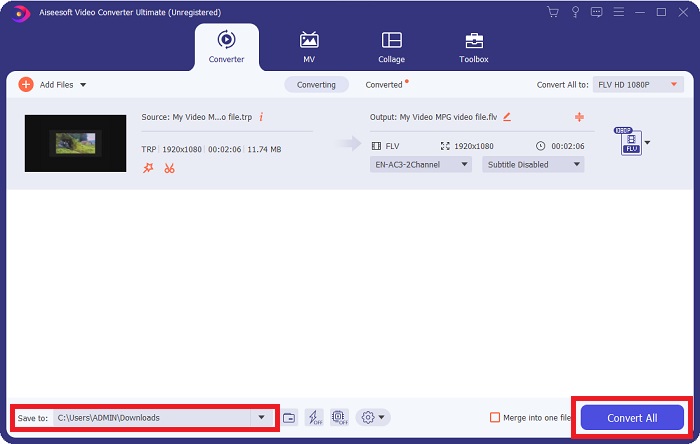
Passaggio 5: Una volta terminata la regolazione di tutte le impostazioni, fai clic sul pulsante Converti tutto nell’angolo in basso a destra dell’interfaccia per avviare il processo di conversione e attendi che venga completato.
Parte 2. Metodo online per convertire TRP in FLV
Convertire file video è un’altra possibilità da considerare se preferisci svolgere l’operazione tramite uno strumento web, senza installare il software completo. In questo caso, esiste anche la versione online del programma: FVC Free Video Converter Online. Offre ancora le opzioni aggiuntive presenti nel software, anche se non tutte le funzioni. Tuttavia, svolge comunque il suo compito nel tempo necessario in modo del tutto soddisfacente. Per usare questo strumento web, segui i passaggi qui sotto:
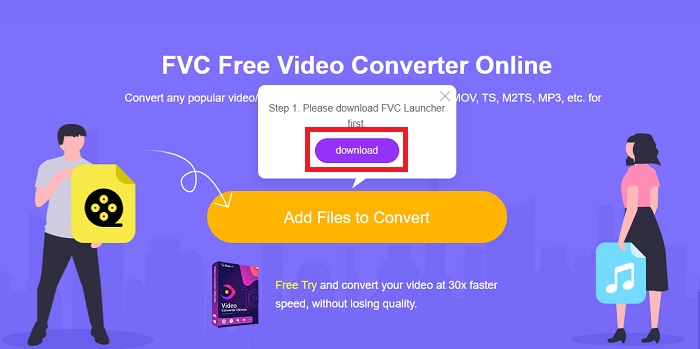
Passaggio 1: Vai al convertitore vero e proprio facendo clic su questo link. Da lì, puoi iniziare scaricando il launcher di cui hai bisogno per importare i tuoi file. Fai clic sul pulsante Aggiungi file da convertire al centro della pagina per iniziare il processo.
Passaggio 2: Fai di nuovo clic sul pulsante indicato e carica il file video che desideri convertire. Dopo aver importato un file, apparirà una nuova interfaccia che mostra tutti i formati disponibili tra cui scegliere. In questo caso, seleziona FLV.
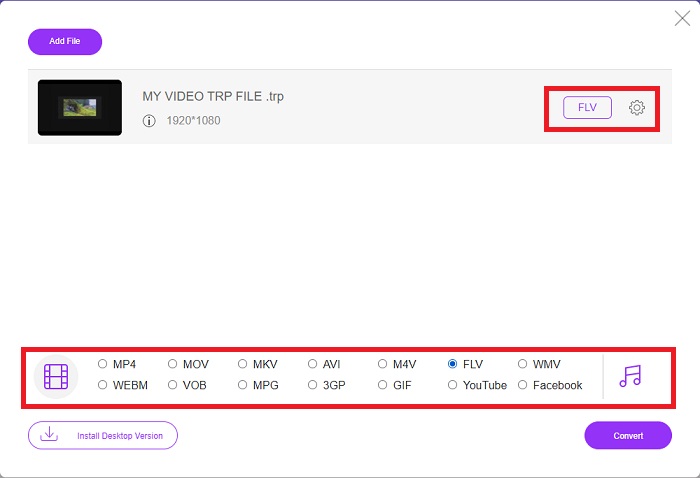
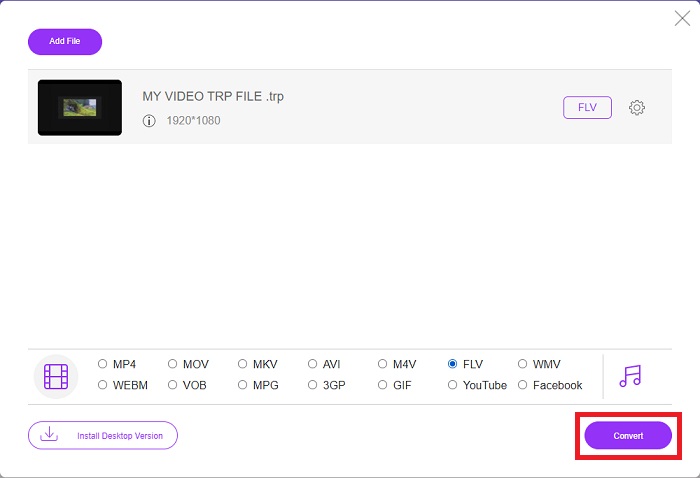
Passaggio 3: Per le opzioni aggiuntive, proprio come nel software, fai clic sull’icona a forma di ingranaggio sulla destra. Verranno visualizzate le impostazioni video e audio, che ti permetteranno di modificare ulteriormente il video in termini di risoluzione, frame rate e molto altro. Quando hai finito, fai clic su OK per salvare le modifiche. Infine, avvia il processo di conversione facendo clic sul pulsante Converti nell’angolo in basso a destra.
Correlato:
Parte 3. Conoscenza estesa di TRP e FLV
Per saperne di più sui due formati citati, ti forniamo brevi informazioni oltre a un confronto tra i due.
I file TRP sono generalmente associati al VLC di VideoLAN. L'estensione del nome file TRP può essere raccolta con MPEG-2 Part 1 che contiene film ad alta definizione. I file TRP possono contenere e archiviare pacchetti di dati inviati come video e audio digitali attraverso reti di trasmissione video digitale, frequenze radio o dispositivi di registrazione lineare come videoregistratori. Più flussi audio e video, nonché il codice di correzione degli errori, sono inclusi in un file TRP. Gli utenti possono anche includere metadati come tempo di acquisizione, ID fotocamera e origine nel contenuto del file.
D'altra parte, un file con estensione .flv sta per Flash Video. L'estensione del file FLV si riferisce a un file video o audio inviato su Internet utilizzando Adobe Flash Player o Adobe Air. Flash Video è stato a lungo il formato video principale per quasi tutti i video incorporati su Internet, inclusi i video su YouTube, Hulu e vari altri siti. I fornitori di streaming e gli sviluppatori di software, d'altra parte, hanno abbandonato Flash a favore di HTML5 e altri formati dopo l'interruzione formale di Adobe.
| TRP | FLV | |
| Estensione del file | .trp | .flv |
| Sviluppatore | Team di progetto VideoLAN | Adobe Systems Incorporated |
| Programmi di supporto | ◆ SMPlayer Lettore multimediale VLC Riproduttore Apple QuickTime | RealPlayer Riproduttore Apple QuickTime ◆ Giocatore Lettore multimediale VLC |
Parte 4. Domande frequenti sulla conversione da TRP a FLV
Come aprire il formato video TRP usando VLC?
Una volta che VLC Media Player è stato installato sul tuo computer, individua il file video TRP sul tuo disco rigido e selezionalo con il tasto destro del mouse. Seleziona "VLC media player" dal menu a discesa "Apri con". Il sistema aprirà il file video che verrà riprodotto da questo programma non appena verrà avviato.
Come posso convertire un file FLV in Windows Media Player?
Devi prima selezionare il file FLV che desideri convertire. Puoi scegliere WMV come formato in cui desideri convertire il tuo file FLV. Per convertire il tuo file FLV, seleziona "Converti" dal menu a discesa.
Posso giocare a TRP ovunque?
La conversione di TRP in MP4, AVI, MOV, MKV, FLV, WMV e altri formati ampiamente conosciuti è un'opzione suggerita se desideri riprodurre file TRP ovunque e su o su qualsiasi dispositivo o lettore multimediale.
Conclusione
Nel complesso, Video Converter Ultimate e la sua controparte di strumenti online sono quelli che stai cercando per completare l'intero processo di conversione fornendo tutte le funzionalità necessarie di cui hai bisogno. Non provoca inconvenienti, inoltre è disponibile in qualsiasi momento della giornata se il software è installato sul desktop. Non saprai mai quando avrai bisogno di un convertitore come questo, quindi ti consigliamo di utilizzare questo software per la tua comodità.
-
 La guida più semplice su come convertire TRP in AVI su Windows e Mac
 Forse non hai familiarità con il formato video TRP e ti chiedi come convertire TRP in AVI? Leggi anche questo articolo per conoscere i dettagli che riguardano il problema.
-
 3 soluzioni per convertire MTS in FLV gratuitamente e online
 Vuoi convertire MTS in FLV? Ecco 3 software di conversione da MTS a FLV gratuiti che puoi provare a convertire MTS in FLV su Mac OS X e Windows 10/8/7.
-
 Modi migliori per convertire VOB in FLV [gratuito e online inclusi]
 Vuoi convertire un file VOB in un file FLV? Puoi facilmente completare l'attività con convertitori desktop o online. Leggi questa guida e impara come trasformare VOB in FLV in modo facile e veloce.
