


 Video Converter Ultimate
 Screen Recorder
 Riparazione video
 Download sicuro
Come convertire gratuitamente VOB in FLV con soluzioni desktop e online nel 2022
I file in formato VOB sono solitamente memorizzati nella cartella VIDEO_TS nella directory principale di un DVD. I video VOB contengono la maggior parte dei dati presenti sul disco, inclusi video, audio, sottotitoli, menu DVD e altri contenuti di navigazione. Tuttavia, se vuoi caricare i file VOB sui social network, come YouTube, devi cambiare il formato dei file VOB in formati supportati dallo streaming video, ad esempio FLV, lo standard per lo streaming di contenuti multimediali su Internet. In questo articolo spiegheremo quindi come convertire VOB in FLV online o con un convertitore di file da VOB a FLV gratuito per uno streaming migliore.

Parte 1. Come convertire VOB in FLV con un software desktop gratuito
Per cambiare rapidamente il formato dei tuoi file VOB in FLV, prova FVC Free FLV Converter. Con questo freeware puoi trasformare i file video da VOB in FLV, MP4, AVI, WMV, MOV e molti altri formati. Inoltre, il programma è in grado di eseguire semplici operazioni di editing video, se necessario. Scarica semplicemente il convertitore di file da VOB a FLV e segui i semplici passaggi riportati di seguito.
Download gratuitoPer Windows 7 o versioni successiveDownload sicuro
Download gratuitoPer macOS 10.7 o versioni successiveDownload sicuro
Passaggio 1. Avvia FVC Free FLV Converter
Innanzitutto, scarica il convertitore da VOB a FLV per Windows o Mac. Dopo aver scaricato il file di installazione, fai doppio clic su di esso e segui le istruzioni sullo schermo. Successivamente, avvialo sul tuo computer e vedrai la sua interfaccia come di seguito.

Passaggio 2. Aggiungi i file VOB al programma
Fai clic sul pulsante Add File(s), seleziona i tuoi file VOB e fai clic su Next per continuare.

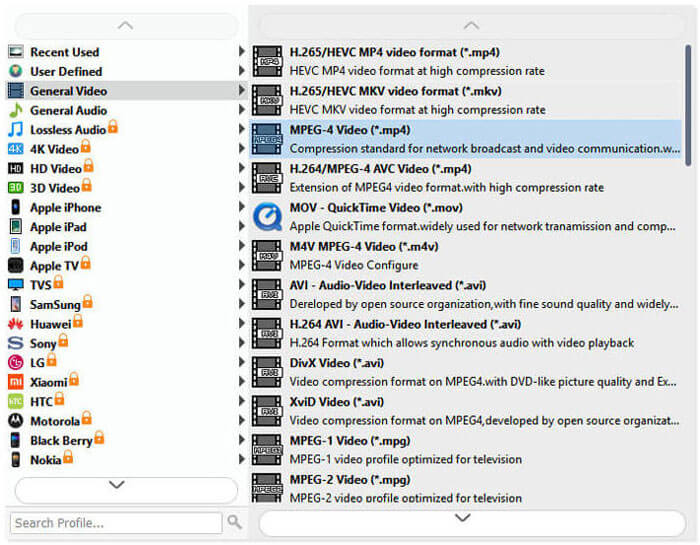
Passaggio 3. Scegli FLV come formato di output
Quindi scegli il formato di file FLV dal campo Output format.
Passaggio 4. Trasforma VOB in FLV
Fai clic sul pulsante Open Folder e scegli la cartella in cui desideri salvare i file convertiti. Per iniziare a convertire i tuoi file VOB in FLV, fai clic sul pulsante Convert. Una volta completata la conversione, la cartella che contiene i file convertiti si aprirà automaticamente.
Parte 2. Come convertire VOB in FLV online
Anche l'utilizzo di servizi online per trasformare VOB in FLV è una buona scelta. Abbiamo selezionato due convertitori online da VOB a FLV tra cui scegliere. Tutti questi strumenti online sono gratuiti e utilizzati frequentemente da molti utenti. Continua a leggere per sapere come convertire VOB in FLV sul tuo computer utilizzando gli strumenti online.
Convertitore video online gratuito FVC
FVC Free Online Video Converter è uno strumento online completo che supporta i formati video e audio più popolari. La conversione dei file con questo servizio online è sicura e i tuoi file convertiti verranno eliminati dal server non appena avrai scaricato il risultato. Non è necessario installare alcun software e l’intero processo di conversione è semplice.
Puoi seguire i passaggi seguenti per modificare i tuoi file VOB in FLV.
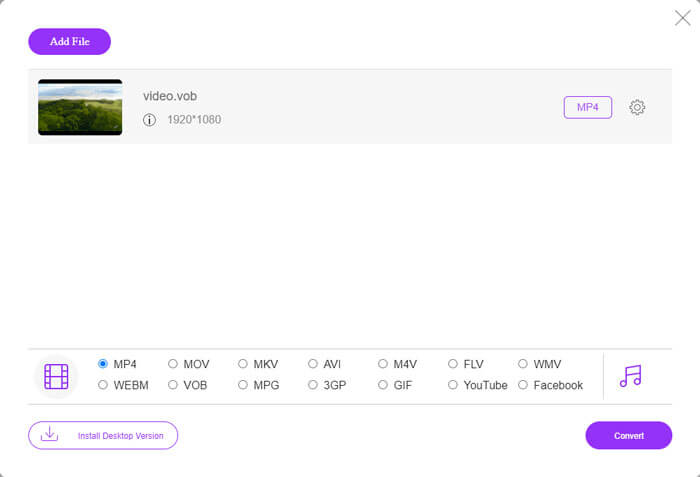
Passaggio 1. Nella pagina web di FVC Free Online Video Converter, fai clic sul pulsante Add Files to Convert per aggiungere i tuoi file VOB. La prima volta che utilizzi questo strumento, dovrai prima scaricare e installare il launcher.
Passaggio 2. Assicurati che FLV sia selezionato come formato di output nella categoria Video nella parte inferiore della finestra.
Passaggio 3. Premi il pulsante Convert, quindi scegli la cartella di destinazione. Al termine del processo di conversione, il file convertito verrà scaricato automaticamente e si aprirà la cartella che contiene i file convertiti.
ConvertFiles
ConvertFiles è un altro convertitore di file VOB in FLV gratuito online. Questo servizio può convertire vari tipi di file gratuitamente in pochi minuti. Questo servizio può inviare il collegamento per il download al file convertito al tuo indirizzo e-mail, se necessario. La conversione non richiede l'installazione di software e l'intero processo di conversione è semplice. Ma tieni presente che questo strumento online può convertire file di dimensioni fino a 250 MB.
Ecco come puoi utilizzare questo convertitore online da VOB a FLV.
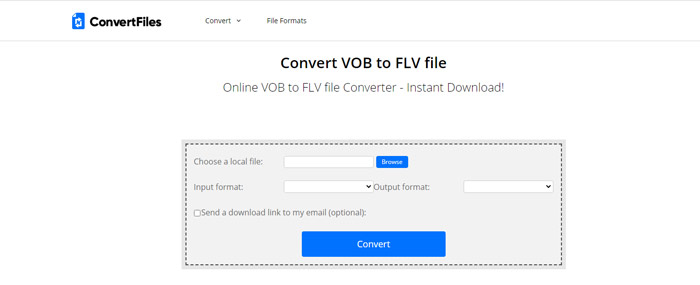
Passaggio 1. Visita la pagina web di ConvertFiles, fai clic su Browse e aggiungi i tuoi file VOB al programma.
Passaggio 2. Quindi seleziona Flash Video File (.flv) dall’elenco a discesa Output format.
Passaggio 3. Fai clic sul pulsante Convert per iniziare a convertire i file VOB in FLV. Quando il file è stato convertito correttamente, vedrai il link e potrai cliccarlo per andare alla pagina di download e scaricare i tuoi file convertiti.
Parte 3. Il confronto tra i formati VOB e FLV
| Parametro di confronto | VOB | FLV |
| Estensione del file | .vob | .flv |
| Sviluppato da | Forum DVD | Sistemi Adobe |
| Video 00codec | MPEG-1, MPEG-2 | On2 VP6, Sorenson Spark, Schermo video, Schermo video 2, H.264 |
| Codec audio | MP1, MP2, PCM, AC-3, DTS | MP3, ADPCM, Nellymoser, Speex, AAC |
| Programmi che aprono file VOB/FLV | Windows Media PlayerVLC Media Player | VLC Media Player Adobe Flash Player |
Parte 4. Domande frequenti sulla conversione da VOB a FLV
Cos'è VOB?
VOB (acronimo di video object) è il formato contenitore utilizzato nei DVD-Video. Un file VOB può contenere video, audio, sottotitoli, menu DVD con navigazione tra i capitoli su un disco DVD. Il formato VOB è solitamente codificato come MPEG-2 e può essere aperto da quasi tutti i lettori multimediali. Leggi Top 5 VOB Players for Windows 10/8/7 PC and Mac per conoscere altri lettori VOB.
Cos'è FLV?
FLV è un formato contenitore audiovisivo utilizzato per lo streaming di contenuti video digitali su Internet tramite Adobe Flash Player 6 o versioni successive. Puoi riprodurre i file FLV con Windows Media Player, VLC, Adobe Media Player, Winamp, RealPlayer o altri lettori FLV.
I file VOB contengono audio?
Sì. Un file VOB include video, audio, sottotitoli e menu DVD.
Conclusione
Come vedi, puoi trasformare MP4 in FLV mantenendo facilmente l'alta qualità del video originale con un convertitore di file VOB gratuito. Inoltre, puoi anche effettuare la conversione da VOB a FLV online. I suddetti convertitori desktop e online da VOB a FLV sono tutti gratuiti. Ci auguriamo che possiate trovare una soluzione soddisfacente che soddisfi al meglio le vostre esigenze.
-
 Che cos'è il file VOB e come trasformare un file VOB in GIF gratuitamente?
 Vuoi saperne di più sui file VOB e su come condividerli dopo essere stati copiati? o Perché hai bisogno di convertire VOB in GIF? Allora leggi attentamente questo articolo.
-
 Da VOB a MP4 - 3 modi per convertire i file VOB in MP4 gratuitamente in blocco
 Questo articolo introduce 3 convertitori gratuiti da VOB a MP4 e i relativi tutorial. Puoi convertire gratuitamente file VOB in MP4 gratuitamente su Windows / Mac / online con facilità.
-
 Come comprimere file VOB online e gratuitamente
 Stai cercando metodi per comprimere i file VOB? Scopri il modo migliore per ridurre le dimensioni dei file VOB in questo articolo.
