


 Video Converter Ultimate
 Screen Recorder
 Riparazione video
Scegli il miglior convertitore da GIF a AVI disponibile su PC e Mac
La conversione della tua GIF in formato file AVI è diventata possibile con l'aiuto di questi incredibili strumenti. Senza alcuna perdita di qualità e in qualche modo per renderlo migliore. Ma alcuni dei convertitori che potresti utilizzare non possono fornirti la migliore qualità che desideri utilizzare. Quindi, non devi preoccuparti se vuoi sostituire la tua GIF con un formato AVI. Converti il tuo video in un formato AVI senza perdita di qualità seguendo il passaggio fornito di seguito e scegli qual è il miglior convertitore che dovresti usare.

Parte 1. Il software gratuito e professionale per convertire GIF in AVI con passaggi dettagliati
1. Free Way - FVC Free Video to GIF Maker
FVC Free Video to GIF Maker è il miglior convertitore da GIF ad AVI gratuito offerto da FVC. Inoltre, con questo strumento puoi convertire gratuitamente qualsiasi video o audio in un nuovo formato. Questo strumento offre nello specifico il miglior convertitore gratuito. Sebbene la maggior parte delle funzioni principali della versione premium non sia disponibile gratuitamente, è comunque molto valido nella conversione. Per sapere come usare questo strumento gratuito devi seguire i passaggi indicati qui sotto per imparare a convertire la tua GIF.
Passaggio 1. Installa lo strumento sul tuo desktop.
Download gratuitoPer Windows 7 o versioni successiveDownload sicuro
Download gratuitoPer MacOS 10.7 o versioni successiveDownload sicuro
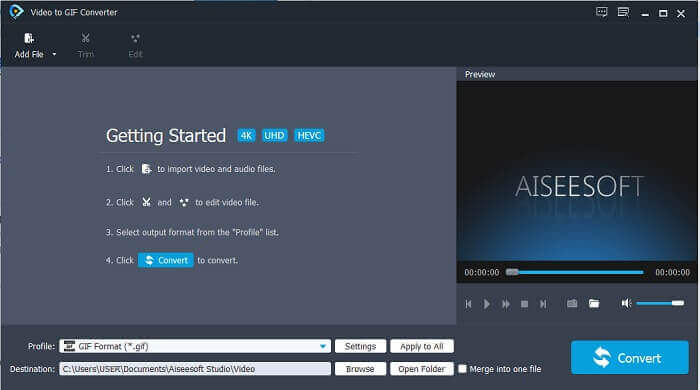
Passaggio 2. Questa è un’interfaccia di esempio che vedrai se hai già scaricato lo strumento.
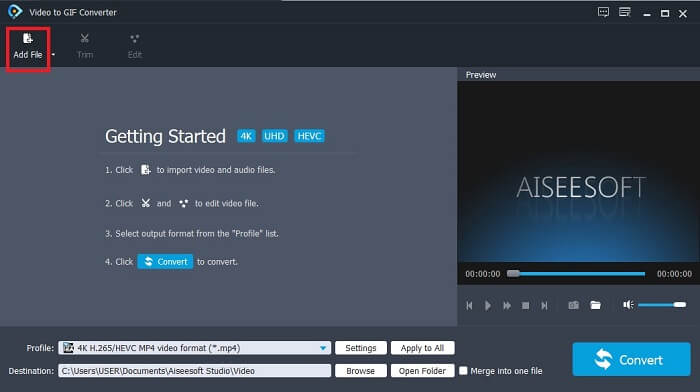
Passaggio 3. Clicca su Add File e seleziona il file GIF che vuoi convertire. Se il file è già selezionato, clicca su Open per inserirlo nell’interfaccia.
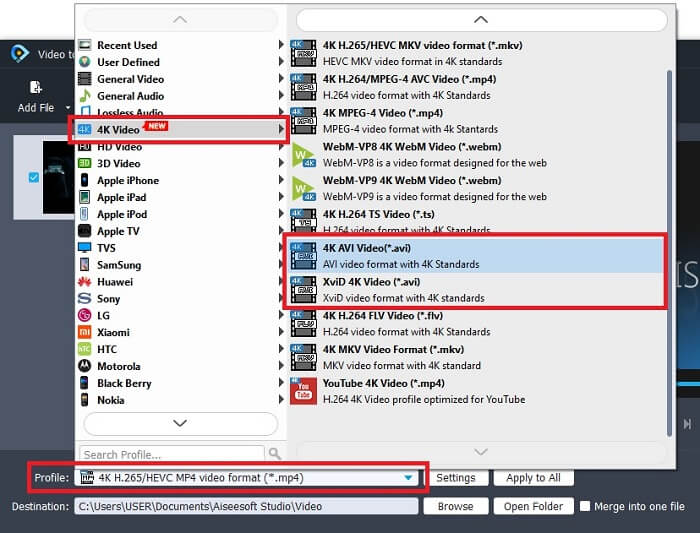
Passaggio 4. Cambia il formato in AVI nella sezione Profile. In 4K Video clicca sul formato AVI. Se è tutto pronto clicca su Convert per avviare la conversione.
Passaggio 5. La conversione della GIF non richiederà troppo tempo. Ora puoi goderti il tuo prodotto finale.
2. Modo professionale - Video Converter Ultimate
Forse ti stai chiedendo come trasformare una GIF in AVI o viceversa. E se esista uno strumento speciale che renda la conversione eccellente. Deve trattarsi di Video Converter Ultimate, perché supporta più formati rispetto allo strumento gratuito e ad altri convertitori premium. Inoltre offre più funzioni che puoi usare per migliorare il tuo video o audio e renderlo migliore. Solo usando questo convertitore ultimate puoi dare vita alla tua GIF. Impara a convertire il tuo formato GIF in AVI senza perdita di qualità e migliorando il video se dovesse risultare un po’ sgranato. Segui i passaggi sotto per conoscere il modo corretto di convertire il tuo file GIF preferito.
Passaggio 1. Clicca sul pulsante di download in base al tuo sistema operativo. Installalo sull’unità del desktop e modifica le preferenze prima di avviare lo strumento.
Download gratuitoPer Windows 7 o versioni successiveDownload sicuro
Download gratuitoPer MacOS 10.7 o versioni successiveDownload sicuro
Passaggio 2. Se lo strumento è già in esecuzione nel tuo programma, vedrai questa mini interfaccia ultimate sullo schermo, il che significa che è stato avviato.
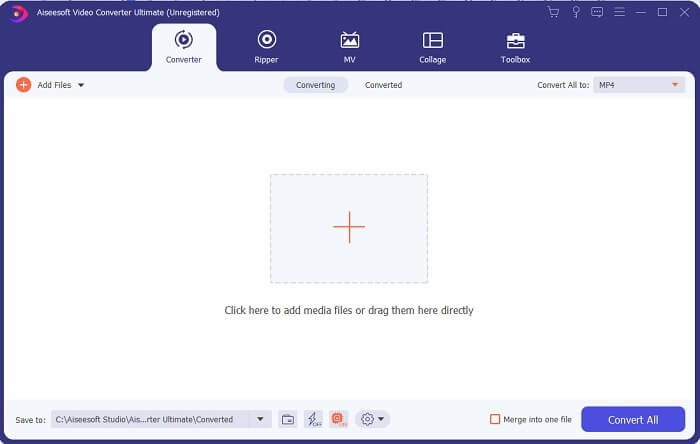
Passaggio 3. Clicca sul pulsante con il segno più per aggiungere il file, oppure trascina lì il file.
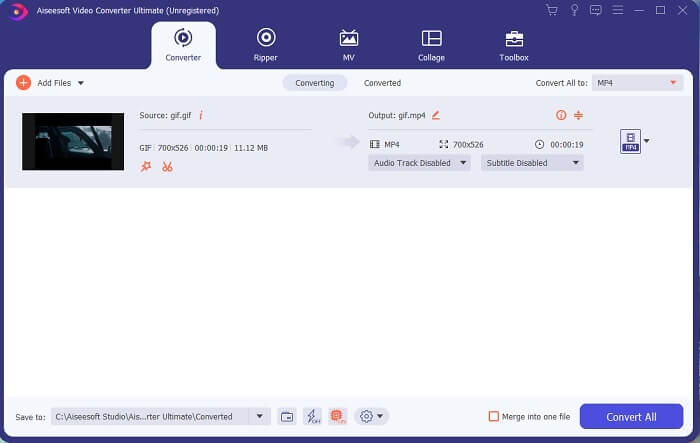
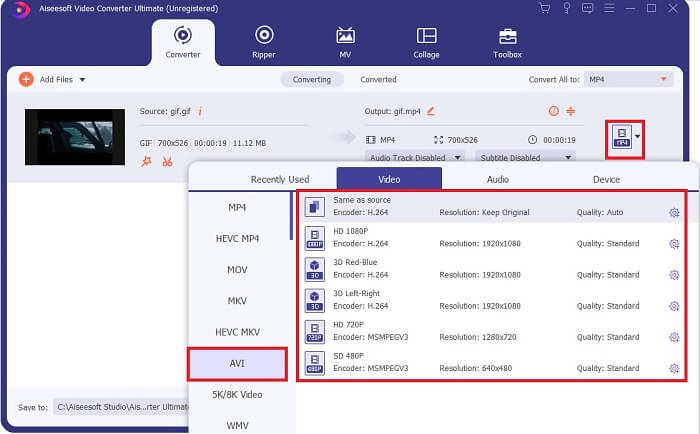
Passaggio 4. Clicca sul pulsante drop-down per cambiare il formato e impostarlo su AVI. Puoi anche selezionare codificatore, risoluzione e qualità dell’output. Quando è tutto pronto clicca su Convert All per avviare il processo di conversione.
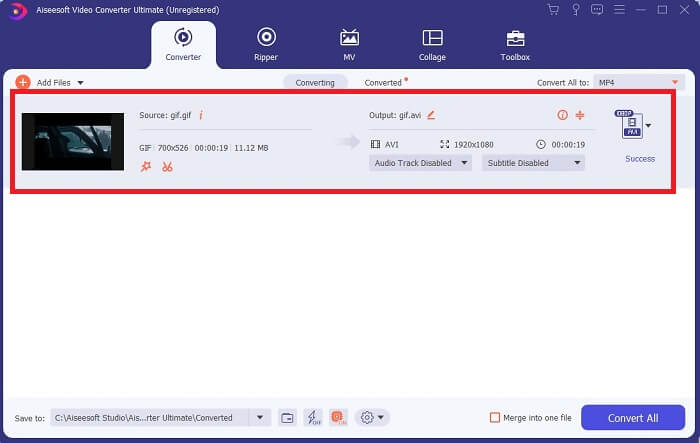
Passaggio 5. Questo strumento offre una velocità di conversione 30 volte superiore rispetto allo strumento gratuito e 100 volte superiore rispetto all’altro strumento, quindi non dovrai aspettare troppo. Al termine della conversione, un file manager si aprirà automaticamente sulla tua interfaccia.
Strumento bonus e passaggi per migliorare il video
Non tutti i convertitori premium offrono questo tipo di funzione. In alcuni casi, se converti una GIF in AVI, il risultato può essere un po’ sfocato perché il frame rate (fps) della GIF è inferiore a quello dell’AVI. Ma esiste un modo per migliorare il video e ottenere un risultato migliore. Segui questi passaggi per migliorare il video che hai già convertito.
Passaggio 1. Nella sezione Toolbox del software, clicca su Video Enhancer.
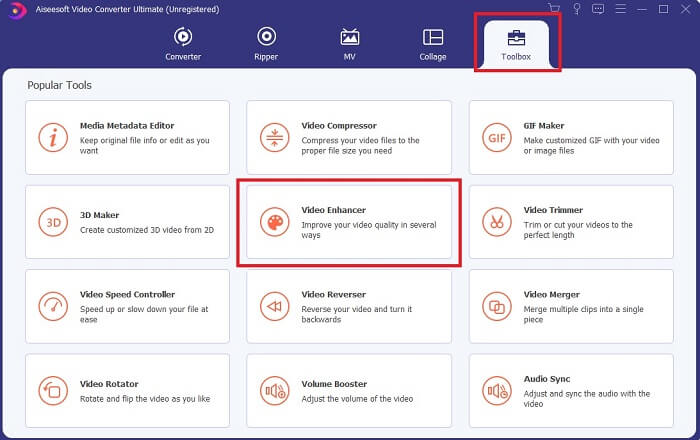
Passaggio 2. Clicca sul pulsante con il più e seleziona il video che vuoi migliorare. Clicca su Upscale Resolution per aumentare la qualità del video; puoi selezionare anche le altre opzioni per incrementare ulteriormente la qualità. Poi clicca su Enhance per avviare il processo.
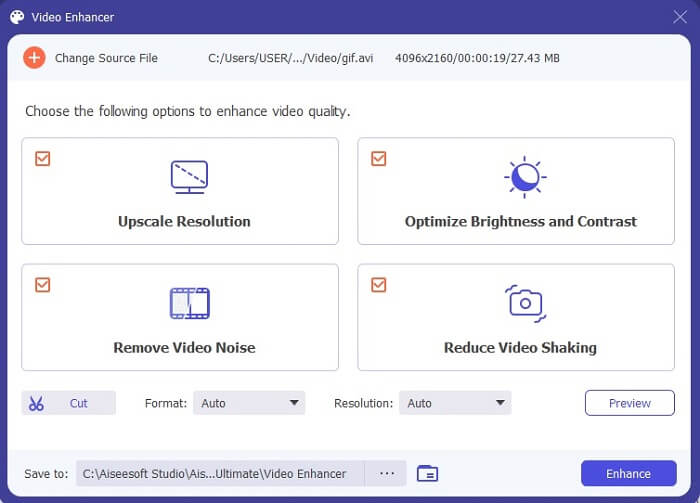
Passaggio 3. Il miglioramento del video sarà pronto in breve tempo. Dopo l’elaborazione, il file manager si aprirà automaticamente e potrai cliccare sul video per guardare una versione di qualità superiore.
Parte 2. Top 3: I migliori convertitori online disponibili sul Web.
1. CloudConvert
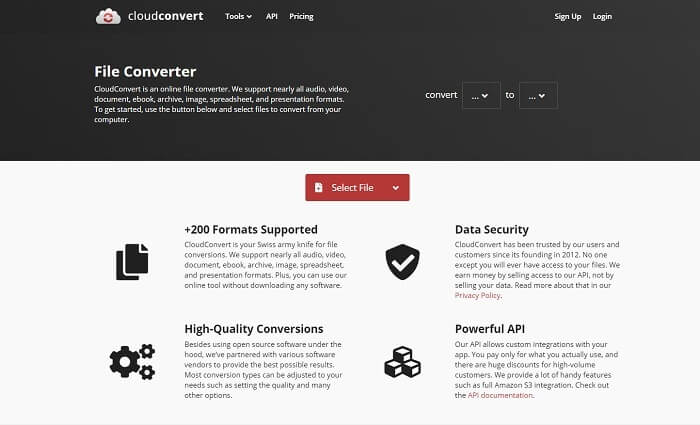
Il miglior convertitore da GIF ad AVI online è Cloud Convert. Questo strumento supporta quasi tutti i formati per video, audio, documenti, eBook, fogli di calcolo, presentazioni e anche immagini. Puoi usarlo senza installare nulla, perché è uno strumento online: ciò significa però che, se non hai una connessione a Internet, non puoi usarlo, a differenza degli altri due strumenti indicati sotto. L’interfaccia web è molto più informativa rispetto ad AnyConv. Inoltre, ha un’interfaccia migliore, molto interattiva da usare.
2. AnyConv
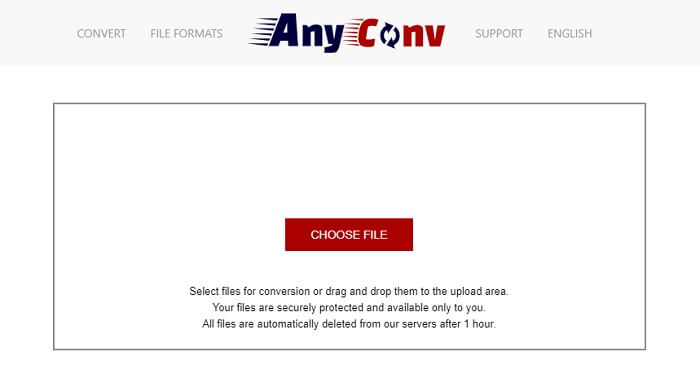
Il modo più sicuro per convertire i tuoi video è usare AnyConv. Puoi creare il tuo formato GIF animata in AVI con facilità. È noto come il convertitore più sicuro perché solo tu puoi accedere ai file convertiti. E tutti i file che sono stati convertiti con questo strumento online verranno automaticamente eliminati dopo la conversione. Il sito dello strumento è però poco informativo, quindi usarlo potrebbe creare confusione a causa della mancanza di indicazioni.
3. online-convert.com
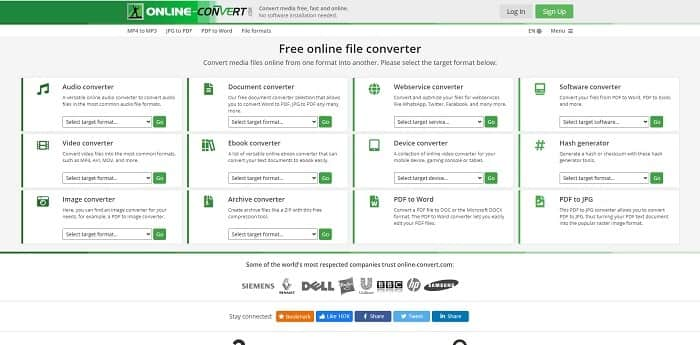
Un altro strumento che puoi usare come convertitore è online-convert.com. Questo strumento permette a utenti o clienti come te di convertire qualsiasi video, audio, immagine e altro ancora. È inoltre possibile convertire servizi web, dispositivi e software con questo strumento. Puoi anche usarlo per convertire AVI in GIF animata o viceversa. La pagina web dello strumento è informativa: presenta una breve descrizione di ogni strumento e su come usarlo correttamente. Tuttavia, la sua interfaccia risulta un po’ scadente a causa della tonalità di verde che trasmette all’utente.
Parte 3. Domande frequenti su GIF in AVI
Qual è il miglior ritaglio GIF disponibile in tutti i software? E come si fa?
Il ritagliatore di GIF ti offre la libertà di ritagliare la tua GIF in modo più preciso nei dettagli. Clicca su questo link per saperne di più.
Il formato AVI è compresso o non compresso?
È risaputo che l’AVI produce una qualità video più elevata rispetto a MPEG o MOV. Ma questo formato è non compresso, quindi aspettati dimensioni molto maggiori per ogni singolo file. Anche per un video di un solo minuto, lo spazio occupato può superare 1,5 GB o anche di più. Vuoi comprimere i tuoi grandi file AVI? Clicca qui per saperne di più.
Chi ha sviluppato AVI?
Lo sviluppatore del formato AVI è Microsoft; il suo rilascio iniziale era novembre 1992.
Conclusione
Per concludere i dettagli, si sa che scegliere lo strumento giusto per il lavoro giusto è un must soprattutto nel converting. Perché la conversione di un file in un nuovo formato è un po' delicata, il che significa che se usi il convertitore sbagliato aspettati di perdere alcuni dati. Ma se usi Ultimate Converter, puoi convertire qualsiasi file anche senza connessione a Internet e anche senza perdita di dati. Questo strumento è la scelta giusta da usare perché non è solo eccezionale per fare un lavoro ed è anche il migliore tra gli altri.
-
 5 migliori opzioni per registrare il formato GIF con i registratori GIF per PC e Mac
 Qual è il miglior registratore GIF che dovresti usare per registrare GIF? L'elenco seguente fornisce prove su quale sia il miglior registratore dello schermo.
-
 Come convertire MPG in formato GIF [online e offline]
 Vuoi esprimere un'emozione molto migliore? Quindi devi invece usare GIF. Questo articolo ti insegnerà come convertire un file MPG in GIF per esprimere molto meglio i tuoi sentimenti.
-
 [Aggiornato al 2021] 9 migliori editor GIF per PC, Mac, iOS e Android
 Hai bisogno di aggiungere un tocco personale alla tua GIF in modo che possa diventare più espressiva? Continua a leggere questo articolo per sapere come modificare e lo strumento migliore per il lavoro.
