


 Video Converter Ultimate
 Screen Recorder
 Riparazione video
 Download sicuro
Come ritagliare abilmente le GIF per migliorare la tua narrazione visiva
Le GIF, o immagini animate, sono diventate onnipresenti nella comunicazione online e nella creazione di contenuti. Sia che tu stia cercando di aggiungere un tocco visivo ai tuoi post sui social media, creare materiali di marketing accattivanti o semplicemente esprimerti attraverso un'animazione divertente, non si può negare il fascino di una GIF ben fatta. Tuttavia, con la popolarità di queste immagini animate nasce la necessità di modificarle e personalizzarle per adattarle alle tue esigenze specifiche.
Uno degli aspetti più importanti quando si lavora con le GIF è sapere come tagliarle in modo efficace. Per fortuna, esistono numerosi strumenti disponibili sia online che offline che rendono il processo di taglio delle GIF semplice e intuitivo. Dalle opzioni più adatte ai principianti ai software avanzati per i professionisti, c’è qualcosa per chiunque desideri portare le proprie capacità di editing delle GIF al livello successivo. Dunque, analizziamo insieme come tagliare le GIF online e offline.

Parte 1. Taglia GIF offline
1. Convertitore video FVC Ultimate
La funzione di taglio delle GIF presente in FVC Video Converter Ultimate è rivoluzionaria per chiunque voglia creare GIF di qualità professionale. Questo strumento è l’opzione migliore per rifilare le GIF, sia che tu sia un video editor che realizza animazioni per un cliente, sia che tu sia un social media marketer in cerca di nuove idee per i post.
Con esso, puoi impostare i punti di inizio e fine del tuo file GIF. Questa funzione è particolarmente utile quando il tuo file GIF è troppo lungo. Inoltre, ti consente di dividere una GIF con grande facilità. Inoltre, puoi applicare effetti come dissolvenza in apertura e dissolvenza in chiusura. Se desideri imparare a tagliare le GIF offline o sul tuo PC, segui i passaggi indicati:
Passaggio 1. Scarica e installa il programma
Per prima cosa, fai clic su uno dei pulsanti Download gratuito riportati di seguito per iniziare. Quindi, segui la procedura guidata per completare l’installazione del software sul tuo dispositivo. Una volta installato, avvia il programma per accedere all’interfaccia principale.
Download gratuitoPer Windows 7 o versioni successiveDownload sicuro
Download gratuitoPer MacOS 10.7 o versioni successiveDownload sicuro
Passaggio 2. Carica un file GIF
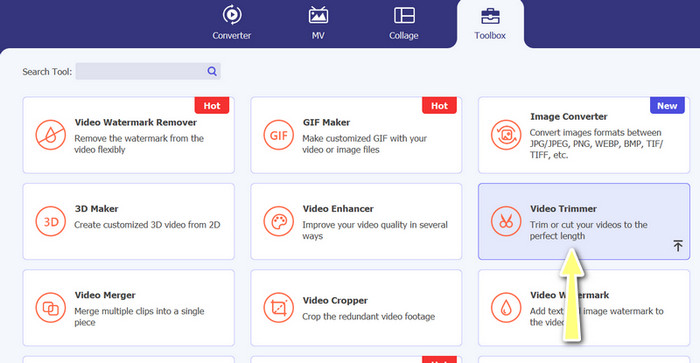
Ora vai alla scheda Toolbox e accedi all’opzione Video Trimmer. Quindi puoi caricare un file GIF facendo clic sul pulsante con il segno più.
Passaggio 3. Taglia il file GIF
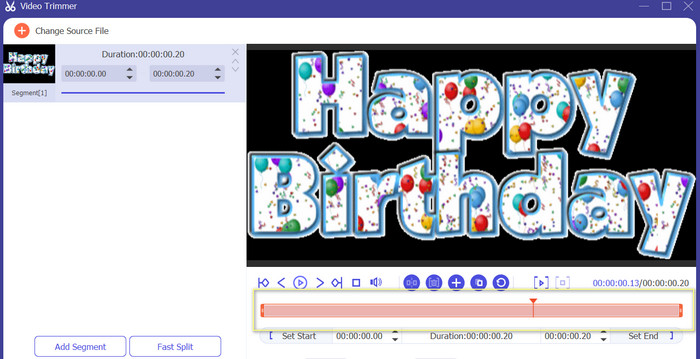
Una volta caricata la GIF, la vedrai dall'interfaccia di modifica del programma. Usando il dispositivo di scorrimento identifica l'inizio e la fine del file GIF che desideri rimuovere.
Passaggio 4. Salva il file GIF
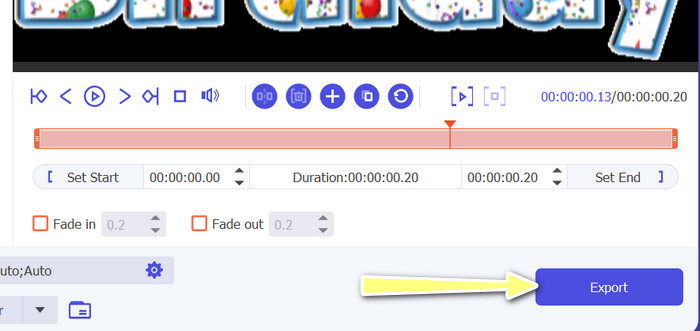
Una volta terminato di tagliare le parti della GIF, premi il pulsante Esporta situato in basso a destra dell’interfaccia per avviare il rendering del file.
2. Creatore di GIF
Creare una GIF può essere una sfida per chi non ha esperienza nell'editing video o nella progettazione grafica. È qui che entra in gioco GIF Maker, fornendo un modo semplice ed efficiente per creare, modificare, condividere e tagliare GIF animate. Inoltre, questo programma consente agli utenti di tagliare GIF, regolare la velocità di riproduzione e aggiungere testo o altri effetti per creare la GIF perfetta per le loro esigenze. Ecco i passaggi su come tagliare le GIF animate offline utilizzando il telefono
Passaggio 1. Per prima cosa, scarica il programma dal Play Store digitandone il nome nella barra di ricerca. Poi installalo sul tuo dispositivo mobile.
Passaggio 2. Ora avvia l’app mobile sul tuo dispositivo. All’apertura, il programma mostrerà tutto ciò che è memorizzato sul dispositivo, incluse le tue GIF. Quindi seleziona la GIF che ti interessa.
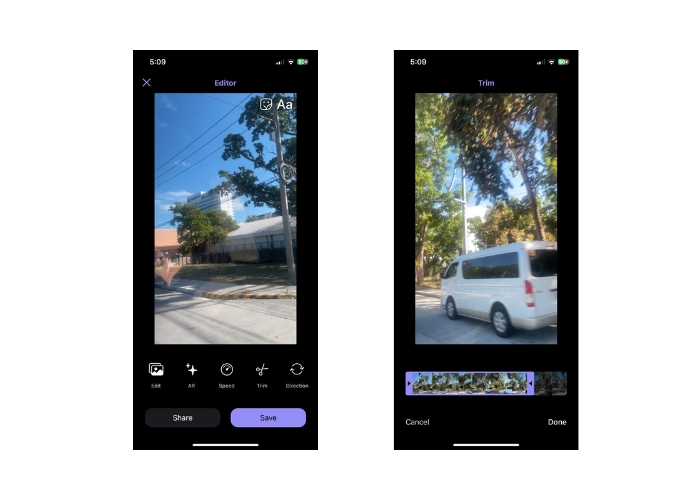
Passaggio 3. Successivamente, il file GIF verrà caricato. Tocca quindi il pulsante Trim e imposta il punto di inizio e di fine della GIF regolando il cursore.
Passaggio 4. Infine, tocca il pulsante Done per completare il processo di taglio delle GIF.
Parte 2. Taglia GIF online
1. EZGIF
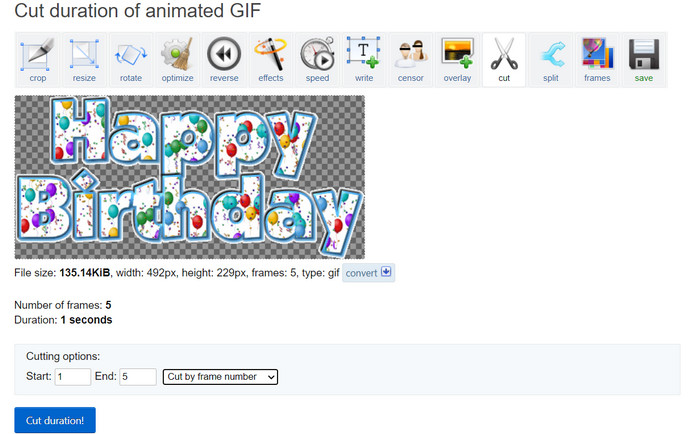
Se desideri una procedura semplice per tagliare e modificare file GIF online dal tuo computer, puoi usare EZGIF. Le sue principali funzionalità includono la possibilità di ritagliare o ridimensionare la GIF, regolare la velocità di riproduzione, aggiungere testo o adesivi, ottimizzare le dimensioni del file e persino convertire la GIF in altri formati come MP4 o WebM. Segui i passaggi semplificati per imparare come tagliare le GIF online usando EZGIF.
Passaggio 1. Apri il tuo browser preferito sul computer e vai sul sito ufficiale di EZGIF.
Passaggio 2. Ora vai all’opzione Cut per tagliare la durata della GIF online. Quindi fai clic sul pulsante Scegli file, seguito dal pulsante Upload.
Passaggio 3. Nella sezione delle opzioni di taglio, definisci il punto di inizio e di fine tramite il numero di fotogramma.
Passaggio 4. Una volta impostati, premi il pulsante Cut duration per iniziare a tagliare il file GIF.
2. GIPHY
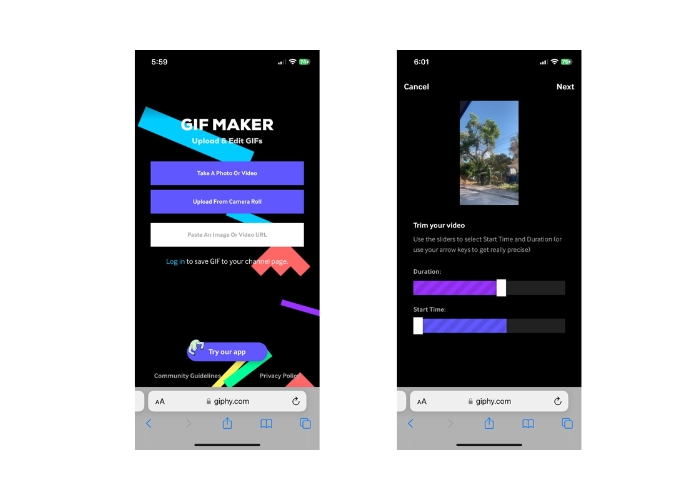
Puoi anche provare a utilizzare l'app mobile di GIPHY per modificare o tagliare GIF online utilizzando il tuo telefono. Con l'app mobile Giphy, gli utenti possono accedere e condividere facilmente le loro GIF preferite, nonché creare le proprie GIF personalizzate utilizzando la fotocamera dello smartphone o i file video esistenti. Inoltre, questa app offre funzionalità di modifica come il taglio e il taglio. Senza ulteriori indugi, ecco i passaggi da seguire per tagliare le GIF online sul tuo dispositivo mobile:
Passaggio 1. Scarica e installa l’app Giphy dal tuo app store. Apri l’app e seleziona il file GIF che vuoi modificare dal rullino o dalla galleria del telefono.
Passaggio 2. Usa il cursore per selezionare i punti di inizio e fine della sezione che vuoi conservare. Puoi anche aggiungere testo o adesivi alla GIF.
Passaggio 3. Dopo aver effettuato le modifiche, tocca il pulsante Next e apporta ulteriori regolazioni secondo i tuoi gusti. Quindi potrai condividere il tuo lavoro online con gli altri.
Parte 3. Domande frequenti sul taglio di GIF online
Posso annullare le modifiche apportate a una GIF utilizzando un cutter online?
Dipende dallo specifico GIF cutter online che stai utilizzando, ma molti offrono un pulsante Annulla o un'opzione per annullare le modifiche apportate a una GIF. Tuttavia, vale la pena notare che non tutti i GIF cutter online possono offrire la possibilità di annullare le modifiche, quindi è sempre una buona idea salvare un backup del file originale prima di apportare modifiche.
Posso collaborare con altri a un progetto di editing GIF utilizzando un cutter online?
La maggior parte dei tagliatori di GIF online sono progettati per l'uso individuale e potrebbero non offrire funzionalità di collaborazione integrate. Tuttavia, alcuni strumenti online ti consentono di caricare e condividere le tue GIF modificate con altri fornendo un collegamento o un codice di incorporamento che può essere condiviso su piattaforme o siti web di social media. Inoltre, puoi utilizzare strumenti di collaborazione di terze parti come Google Drive o Dropbox per condividere il file GIF originale e qualsiasi versione modificata con altri per feedback o ulteriori modifiche.
Posso convertire una GIF in un altro formato di file utilizzando un cutter online?
Sì, molti tagliatori di GIF online offrono la possibilità di convertire GIF in formato video, come MP4, AVI, WebM o MOV. La conversione di una GIF in un altro formato di file può essere utile se desideri utilizzarla in un progetto di editing video o caricarla su una piattaforma che supporta solo determinati tipi di file.
Conclusione
Tagliare le GIF online è un modo rapido e semplice per modificare e personalizzare file GIF animati senza bisogno di software specializzati o competenze tecniche. I cutter di GIF online offrono numerose funzionalità, come il taglio, il ridimensionamento, la regolazione della velocità di riproduzione, l’aggiunta di testo e adesivi, l’ottimizzazione delle dimensioni del file e la conversione in altri formati. Gli strumenti offline, invece, non sono limitati dalla potenza di elaborazione di un sito web o di un server e possono essere eseguiti in locale sul tuo computer o dispositivo. Di conseguenza, gli strumenti offline possono offrire controlli di editing più precisi, output di qualità superiore e maggiori possibilità di personalizzazione. Per fortuna, esistono numerosi strumenti online e offline che ti aiutano a tagliare le GIF.
-
 I 5 software più recenti che puoi utilizzare per creare un'incredibile GIF inversa
 Vuoi sapere come migliorare la tua GIF? Quindi prova a invertire la GIF per aggiungere effetti incredibili con l'aiuto di questi strumenti.
-
 5 dei migliori ridimensionatori GIF disponibili su tutte le piattaforme [2023]
 Vuoi conoscere i ridimensionatori GIF che puoi utilizzare? In tal caso, le informazioni fornite di seguito parleranno dei ridimensionatori che puoi utilizzare sulle tue GIF su tutte le piattaforme.
-
 [Gratuito] 4 semplici modi per ritagliare GIF animate online e offline
 Vuoi ritagliare facilmente le GIF? Bene, puoi farlo con l'aiuto di questi ritagliatori GIF disponibili in questo articolo, leggilo bene e impara come farlo.
