


 Video Converter Ultimate
 Screen Recorder
 Riparazione video
 Download sicuro
Converti TGA in PNG: scopri i 3 migliori convertitori eccezionali da TGA a PNG
Truevision Inc. ha creato il formato TGA per il montaggio e l’animazione. Tuttavia, questo formato di file non è diventato popolare rispetto ad altri formati (come PNG e JPG). Alcuni utenti non riescono nemmeno ad aprire questo file su altre piattaforme o con altri programmi. Di conseguenza, alcuni non sanno cosa fare né come usare e aprire questo tipo di immagine. In tal caso, vuoi sapere come convertire il tuo file TGA in formato PNG? Fortunatamente, questa guida ha la risposta migliore per te. Ti offriremo ottimi metodi per convertire TGA in PNG con l’aiuto di convertitori di immagini. Quindi, se non vedi l’ora di scoprire queste eccellenti soluzioni, leggi l’articolo dall’inizio alla fine.

Parte 1.Come convertire TGA in PNG su FVC Free Image Converter
Poiché il formato di file TGA non è molto diffuso, è difficile aprirlo con altri programmi. Tuttavia, se vuoi utilizzare l’immagine, la cosa migliore da fare è convertirla in un altro formato di immagine. Se cerchi una soluzione per convertirla, utilizza FVC Free Image Converter. Con l’aiuto di questo convertitore di immagini online, puoi trasformare il tuo file TGA in un altro formato standard come PNG. Inoltre, puoi convertire più file TGA in PNG in un’unica procedura. Questo perché il convertitore di immagini offre un processo di conversione in batch. In questo modo, puoi convertire più file in un breve lasso di tempo. Inoltre, supporta vari formati di input, tra cui BMP, JPG, PNG, BMP, TIFF, SVG e altri ancora. Puoi quindi caricare qualsiasi immagine su questo strumento online. Dopo il caricamento delle immagini, lo strumento le convertirà automaticamente nel formato di output desiderato.
Ma aspetta, c'è di più. FVC Free Image Converter non richiede installazione. Significa che puoi iniziare a convertire le immagini direttamente nei browser. Puoi accedere allo strumento su tutti i browser, rendendolo più conveniente per gli utenti. Inoltre, non otterrai oggetti indesiderati dalle tue immagini dopo il download. Lo strumento non inserirà filigrane, loghi, adesivi e altro. Garantirà anche la tua privacy. Lo strumento eliminerà automaticamente le tue foto dopo aver salvato le immagini convertite. Usa le semplici istruzioni di questo convertitore online qui sotto per convertire TGA in PNG.
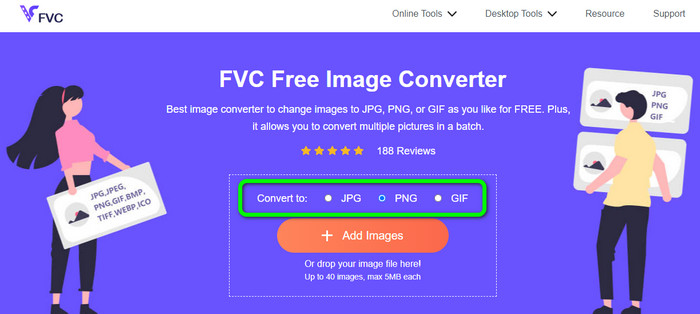
Passaggio 1. Apri un qualsiasi browser sul tuo desktop e visita il sito ufficiale di FVC Free Image Converter. Successivamente, seleziona il formato di file PNG dall’opzione Converti in al centro dell’interfaccia.
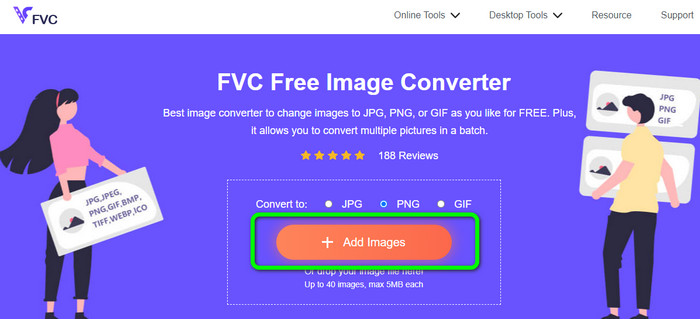
Passaggio 2. Dopo aver selezionato il formato di output desiderato, fai clic sul pulsante Add Images. Quando si apre la cartella del computer, seleziona il file in formato TGA che vuoi convertire e aprilo. Tieni presente che puoi inserire più di un file immagine. Puoi anche trascinare direttamente il file e rilasciarlo nell’area apposita.
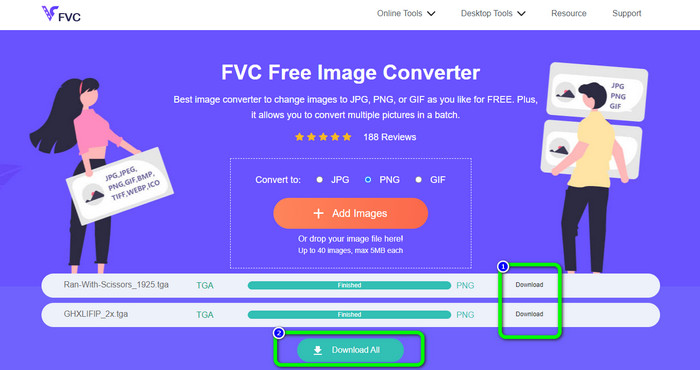
Passaggio 3. Una volta terminato il caricamento, vedrai che lo strumento convertirà automaticamente le immagini. Al termine del processo di conversione, fai clic sul pulsante Download per salvare le immagini una per una. Se vuoi scaricarle con un solo clic, premi il pulsante Download All.
Parte 2. Come convertire TGA in PNG su Zamzar
Zamzar è un altro convertitore online da TGA a PNG che puoi utilizzare. Tutti gli utenti, in particolare i principianti, troveranno questo convertitore web ancora più accessibile grazie alla sua interfaccia semplice da usare. Con questo strumento puoi caricare foto in formati CR2, ARW, PNG, 3FR, JPG, GIF, ERF, TIFF e altri formati di input. Puoi anche convertire il tuo file immagine in molti formati, come BMP, EPS, PDF, PNG, JPG e WBMP, per renderlo più semplice da gestire per tutti gli utenti. Puoi attendere che compaiano i link della pagina di download oppure aprire il file convertito tramite un’email. È ottima la possibilità di caricare foto fino a 50 MB di dimensione. Puoi caricare il file dal tuo computer, da Dropbox, da Google Drive oppure da un altro sito inserendo il relativo URL. Zamzar è disponibile in quasi tutti i browser, come Google, Firefox, Edge e altri. Questo strumento può anche aiutarti a convertire SVG in PNG.
Tuttavia, presenta alcuni inconvenienti. Il processo di conversione è molto lungo. Il processo richiede molto tempo in questa situazione. Inoltre, ogni sessione è limitata a due conversioni di foto. Segui i passaggi seguenti per convertire TGA in PNG usando Zamzar.
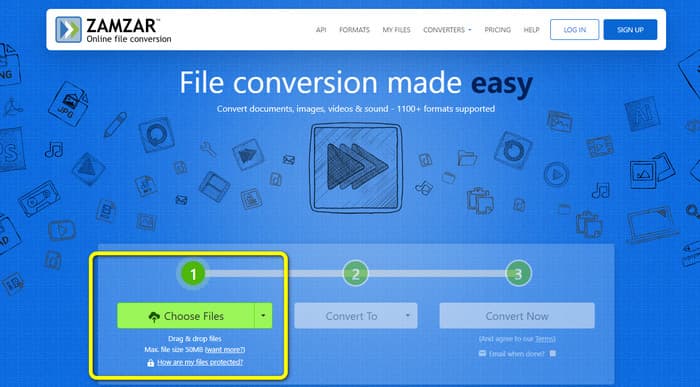
Passaggio 1. Apri il browser e vai al sito principale di Zamzar. Fai clic sul pulsante Choose Files nella pagina web per caricare il file immagine TGA. Un altro modo per caricare l’immagine è trascinare direttamente il file all’interno dello strumento.
Passaggio 2. Dopo aver caricato il file immagine TGA, vai alle opzioni Convert to. Quando compaiono le opzioni dei formati, seleziona PNG come formato di output.
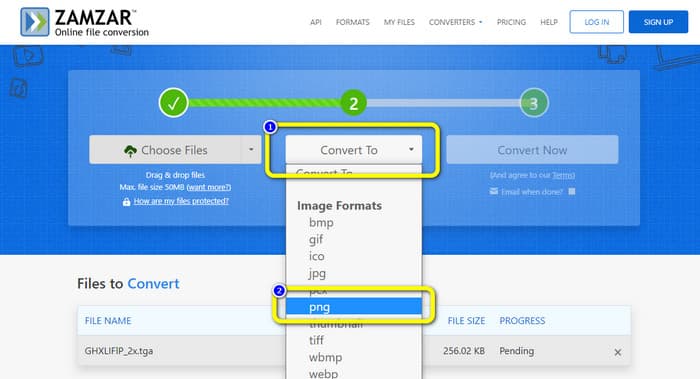
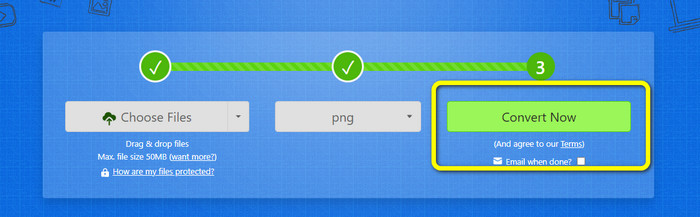
Passaggio 3. Quindi fai clic sul pulsante Convert Now per avviare il processo di conversione. Infine, premi il pulsante Download per salvare l’immagine convertita sul tuo desktop al termine della conversione.
Parte 3. Come convertire TGA in PNG utilizzando Convertio
Se stai cercando un altro convertitore efficace da TGA a PNG, utilizza Convertio. Questo convertitore di immagini online può trasformare il tuo file TGA in PNG. I principianti lo troveranno semplice da capire grazie al suo layout intuitivo. Con Convertio puoi convertire facilmente le immagini. Inoltre, supporta molti formati di immagine, tra cui PNG, GIF, BMP e SVG. Questo convertitore di immagini supporta anche la modalità di conversione in batch. Con questo ottimo strumento puoi convertire immediatamente molte immagini contemporaneamente. Oltre alle foto, puoi convertire anche file video, musicali e documenti. In questo modo non hai bisogno di cercare un altro strumento online. Puoi anche usare questo strumento per convertire WebP in PNG.
Tuttavia, la versione gratuita ha un limite di caricamento di 100 MB. Per aggiungere la dimensione del file più grande, è necessario acquistare un piano di abbonamento. Nella versione gratuita, puoi convertire solo due file contemporaneamente utilizzando un metodo di conversione batch. Un pacchetto costoso è anche un'opzione se si desidera accedere a tutti i servizi. Puoi utilizzare i semplici passaggi seguenti per convertire il file TGA in formato PNG utilizzando Convertio.
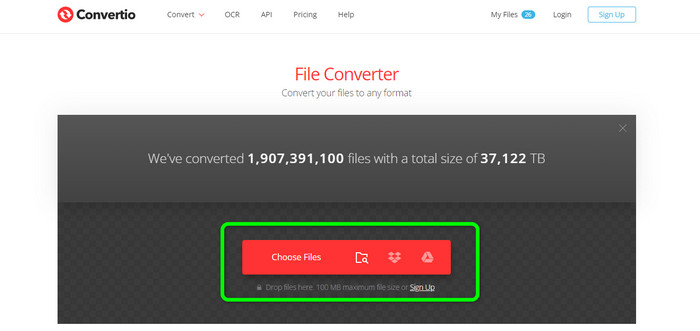
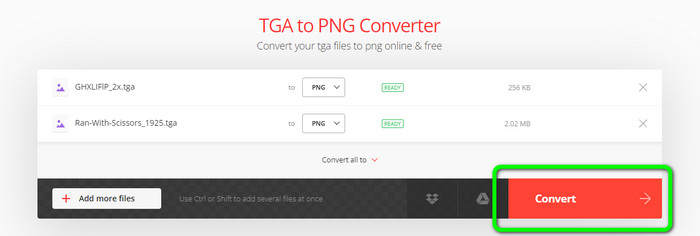
Passaggio 1. Dal browser, cerca e apri il sito ufficiale di Convertio. Quando sei sulla pagina web, fai clic sul pulsante Choose Files. Quindi apri il file immagine TGA dalla cartella del computer. Con la versione gratuita puoi caricare fino a due immagini.
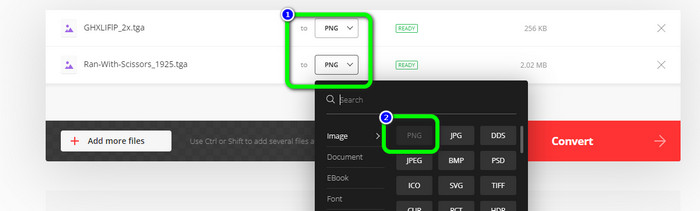
Passaggio 2. Dopo aver caricato le immagini TGA, vai alle opzioni dei formati. Dopo aver fatto clic, seleziona il formato di output desiderato, ovvero PNG.
Passaggio 3. Dopo aver modificato il formato di output dalle opzioni dei formati, fai clic sul pulsante Convert. Attendi il processo di conversione: richiederà solo pochi secondi.
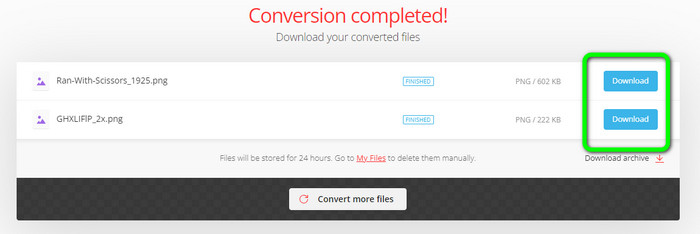
Passaggio 4. Infine, per salvare le immagini convertite, fai clic sul pulsante Download. Dopodiché, potrai aprire le immagini convertite dalla cartella Download.
Parte 4. Domande frequenti sulla conversione di TGA in PNG
1. .TGA numero opzione 1
Un file di immagine dell'adattatore grafico Truevision ha l'estensione del file TGA. L'acronimo TARGA sta per Truevision Advanced Raster Graphics Adapter. Il formato Targa Graphic consente l'archiviazione di immagini compresse e non compresse. Potrebbe essere scelto per icone, disegni al tratto e altri elementi grafici semplici. Si ritiene che i file di immagine utilizzati nei videogiochi siano correlati a questo formato.
2. Perché le immagini TGA sono così grandi?
Le immagini TGA in genere sono costituite da file di grandi dimensioni a causa dell'uso di bit per la rappresentazione dei pixel. La dimensione dei file in questo formato dipende dalla profondità del colore.
3. Come posso visualizzare le foto TGA?
È possibile visualizzare le immagini TGA su Adobe Photoshop, GIMP e TGA Viewer.
Conclusione
Poiché il formato di file TGA non è molto diffuso, alcuni programmi non lo supportano. La soluzione migliore per aprirlo è convertirlo in un formato più noto, come PNG. Pertanto, l’articolo ti ha fornito i metodi migliori per convertire TGA in PNG. Tuttavia, alcuni strumenti online richiedono un piano in abbonamento per poter sfruttare appieno le loro straordinarie funzioni. In tal caso, utilizza FVC Free Image Converter. Questo convertitore di immagini online ti permette di usufruire gratuitamente di tutte le sue funzionalità.
-
 Modi facili da capire per convertire PSD in PNG o JPG
 Questo post ti fornirà passaggi gestibili per convertire PSD in JPG o PNG. Ci sono vari convertitori che puoi usare per convertire i tuoi file. Leggi di più per scoprire.
-
 Metodi principali su come convertire EPS in PNG e JPG
 I metodi più importanti per convertire EPS in PNG e JPG sono qui. Leggiamo questa guida per ottenere i modi con l'aiuto dei convertitori di immagini.
-
 Metodi più semplici per convertire BMP in formati JPG e PNG
 Scopri i metodi migliori per convertire BMP in JPG o PNG utilizzando ottimi convertitori. Scoprirai anche la differenza tra i formati di file BMP, JPG e PNG.
