


 Video Converter Ultimate
 Screen Recorder
 Riparazione video
 Download sicuro
Come convertire WebP in GIF con l'aiuto di convertitori notevoli
C’è un motivo valido per cui le GIF stanno diventando sempre più popolari. Sono un modo eccellente per dare personalità al tuo sito web e condividerle sui social è semplicissimo. Ma che dire del formato WebP? Ne sai qualcosa? Non preoccuparti se desideri maggiori informazioni su questo formato. Questa guida ti fornirà informazioni sufficienti su questi due formati di file. Inoltre, scoprirai i modi migliori per convertire i file WebP in GIF senza difficoltà. Dunque, senza ulteriori indugi, leggi questo articolo e scopri tutti i metodi migliori a tua disposizione.

Parte 1. WebP contro GIF
| Formato del file | WebP | GIF |
| Estensione del file | .webp | .gif |
| Sviluppato da | Compuserve | |
| Nome e cognome | Immagine sul sito web | Formato di interscambio grafico |
| Descrizione | Un formato di immagine sviluppato è chiamato a WebP file. Sono disponibili compressioni lossless e lossy superiori. Sono incluse anche la trasparenza e l'animazione alfa. I metodi di compressione lossless e lossy aiutano a ridurre la quantità di dati. Riduce le dimensioni del file di 26% e 34% rispetto a JPG e PNG. | GIF è un formato utilizzato per la trasmissione di immagini. È un formato grafico usato che utilizza 256 colori e comprime i dati in un formato privo di qualità. Nel 1987, CompuServe ha sviluppato il formato GIF. Serve per il trasferimento di grafica raster su reti (GIF87a). |
| Compressione | Con perdita e senza perdita | Senza perdita |
| Programmi/browser associati | Google Chrome, Internet Explorer, Microsoft Edge, Mozilla Firefox | Spettacoli Picosmos, Paint, GIMP, Twitter, Facebook, Tumblr |
Parte 2. Modi migliori per convertire WebP in GIF online e offline
Converti WebP in GIF utilizzando FVC Free Image Converter
Tra i migliori convertitori di immagini online per la conversione da WebP a GIF c’è FVC Free Image Converter. Questo strumento può convertire qualsiasi formato di file in JPG, PNG e GIF. L’applicazione supporta vari formati di input, tra cui JPG, PNG, JPEG, TIFF, BMP, WEBCO, ICO e altri. Offre inoltre tre semplici modalità di conversione, adatte a tutti gli utenti. Un’altra funzione di FVC Image Converter è la conversione in blocco, che ti consente di convertire molte immagini tutte insieme. FVC Free Image Converter è compatibile con tutti i browser: funziona con Google, Mozilla, Microsoft Edge, Internet Explorer, Safari e altri ancora.
Passaggio 1: Nel browser, visita il sito ufficiale di FVC Free Image Converter. Scegli il formato di output. Seleziona il formato file GIF dalle opzioni Convert to o dalle impostazioni del formato.
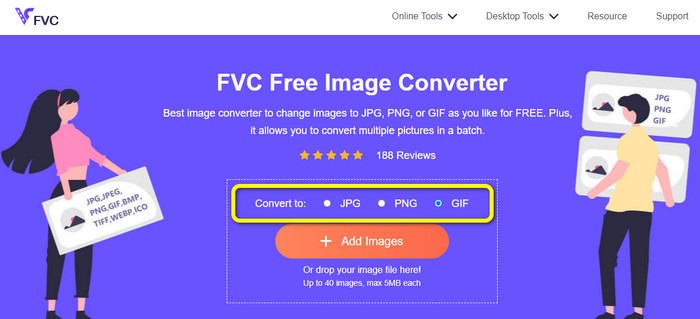
Passaggio 2: Successivamente, fai clic sul pulsante Add Images al centro dell’interfaccia. Quando si apre la finestra dei file del computer, scegli le immagini WebP che vuoi convertire. Poi fai clic sul pulsante Open. Puoi anche trascinare il file immagine nella casella per caricarlo.

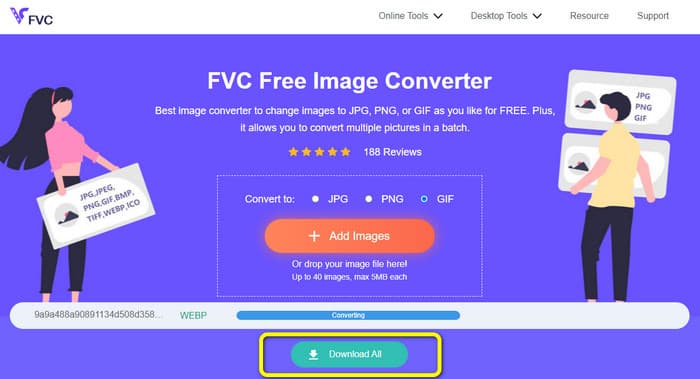
Passaggio 3: Dopo aver caricato l’immagine, il programma convertirà automaticamente le tue immagini WebP in formato GIF. Quando il processo è terminato, fai clic sul pulsante Download All.
Converti WebP in GIF usando FreeConvert
FreeConvert è un convertitore online da WebP a GIF affidabile. Il procedimento è semplice e l’interfaccia è facile da capire. Sia gli utenti esperti sia i principianti possono usare questo strumento. Inoltre, può convertire più di 500 formati di immagine diversi, come JPG, PNG, WebP e altri. Anche i file immagine RAW delle fotocamere possono essere convertiti facilmente. Questo convertitore di immagini è accessibile da qualsiasi browser web: Chrome, Firefox, Edge, Safari, ecc. Garantisce privacy e sicurezza dei file: dopo aver salvato le immagini convertite, lo strumento elimina i tuoi dati. Tuttavia, presenta alcune limitazioni, soprattutto nella versione gratuita. La dimensione massima del file che puoi caricare è di 1 GB. Se vuoi caricare immagini senza queste restrizioni, la soluzione migliore è acquistare il servizio. Inoltre, questo convertitore mostra alcuni annunci sulla pagina web, cosa che può risultare fastidiosa per gli utenti. È richiesta una connessione a Internet per ottenere prestazioni ottimali.
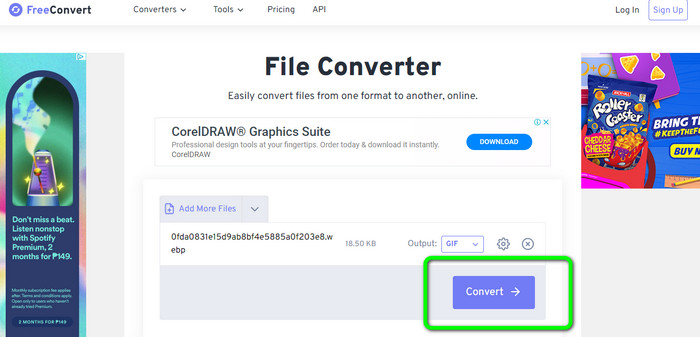
Passaggio 1: Vai al sito web di FreeConvert con il tuo browser. Clicca sul pulsante Choose Files nella pagina per aggiungere le immagini WebP. Puoi caricare due o più immagini per eseguire una conversione in blocco.
Passaggio 2: Dopo aver caricato la foto, vai alle opzioni di formato. Quindi seleziona il file GIF come formato di output. Puoi anche fare clic sull’icona Settings per ridimensionare l’immagine di output.
Passaggio 3: Al termine del processo di conversione, fai clic sul pulsante Download. In questo modo potrai salvare il file convertito sul tuo computer.
Converti WebP in GIF usando Ezgif
Puoi utilizzare anche Ezgif come convertitore da WebP a GIF. Grazie al semplice procedimento di questo convertitore di immagini, puoi trasformare i tuoi file WebP in GIF. Inoltre, ha un’interfaccia intuitiva che rende tutto chiaro, permettendo a qualsiasi utente di servirsi di questo strumento. Anche la procedura di conversione è molto rapida: puoi convertire le immagini in pochi secondi. Ezgif è disponibile su tutti i browser; puoi usarlo su Google, Firefox, Explorer e altri. Ezgif offre anche ulteriori funzionalità: oltre a convertire le immagini, puoi convertire file video, nonché ritagliare e ruotare liberamente le tue immagini. Tuttavia, lo strumento presenta alcuni limiti: puoi caricare solo fino a 50 MB. Inoltre, in alcuni casi il servizio può non funzionare correttamente, soprattutto con una connessione Internet scarsa.
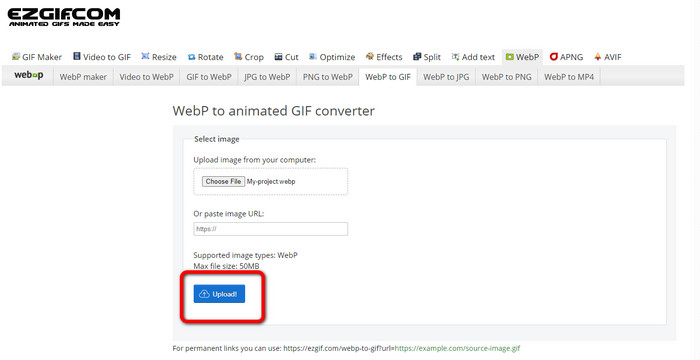
Passaggio 1: Vai al sito web di Ezgif. Clicca sul pulsante Choose Files. Apri le immagini WebP dal tuo computer. Puoi caricare l’immagine anche tramite link.
Passaggio 2: Dopo aver caricato l’immagine WebP, fai clic sul pulsante Upload.
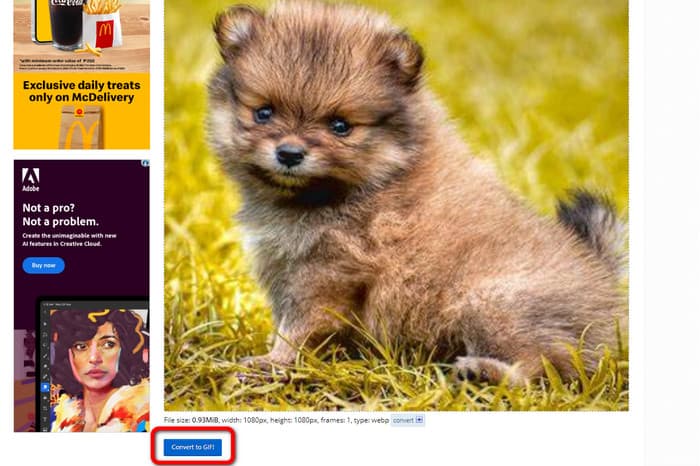
Passaggio 3: La tua immagine apparirà sullo schermo. Clicca sul pulsante Convert to GIF per avviare il processo di conversione. Poi fai clic su Save.
Come convertire WebP in GIF utilizzando gli strumenti Picosmos
Hai bisogno di un altro convertitore sul computer per trasformare i file WebP in GIF? Prova Picosmos Tools. Il programma di conversione funziona su Windows e ti permette di convertire rapidamente un file WebP in GIF gratuitamente. Inoltre, sul file convertito non verrà applicata alcuna filigrana. Non è solo un convertitore da WebP a GIF: include anche un potente editor di immagini che ti consente di modificare, progettare e comporre facilmente le tue foto. Tuttavia, l’interfaccia del programma è poco intuitiva e può risultare complessa, soprattutto per i principianti. Inoltre, l’installazione sul computer richiede un po’ di tempo.
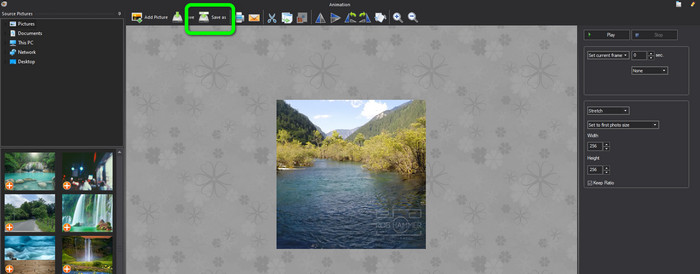
Passaggio 1: Dopo aver avviato il programma, fai clic su Add Picture e aggiungi l’immagine WebP.
Passaggio 2: Quando l’immagine è visibile sullo schermo, fai clic sul pulsante Save as. In questo modo puoi salvare le tue immagini WebP come GIF animate. Clicca qui per scoprire come convertire i file WebP in JPG.
Parte 3. Domande frequenti sulla conversione di WebP in GIF
1. Qual è il vantaggio di WebP rispetto a una GIF animata e viceversa?
WebP è un nuovo formato che offre una compressione migliore rispetto a GIF. Significa file di dimensioni inferiori e tempi di caricamento più rapidi. Tuttavia, WebP è supportato dai browser, quindi non è sempre la scelta migliore. GIF è un formato precedente supportato dai browser e da molti dispositivi. Pertanto, GIF è anche una scelta popolare per animazioni semplici. Tuttavia, sono spesso più grandi in termini di dimensioni del file rispetto alle immagini WebP, il che porta a tempi di caricamento più lenti.
2. Perché la dimensione della GIF è maggiore di WebP?
WebP viene utilizzato per le immagini statiche, mentre GIF viene utilizzato per le immagini animate. Questo è il motivo per cui GIF ha un file più grande di WebP. Inoltre, la GIF è senza perdite, il che significa che conserva tutte le informazioni dalla foto originale.
3. Discord accetta WebP?
Purtroppo no. Discord non supporta il formato WebP. Quindi, se vuoi aprire un file immagine su Discord, devi prima convertirlo in un altro formato. A questo scopo, utilizza FVC Free Image Converter. Può aiutarti a convertire le immagini WebP in formati JPG, PNG e GIF.
Conclusione
Ora sai come convertire i file WebP in GIF. Tuttavia, alcuni convertitori di immagini online e offline richiedono un abbonamento e impiegano molto tempo per funzionare. Se desideri un convertitore di immagini semplice e gratuito, usa FVC Free Image Converter.
-
 Metodi perfetti per convertire WebP in PNG senza sforzo
 Informati sugli straordinari metodi di conversione di WebP in PNG. Questa guida ti fornirà i convertitori di immagini più utili che puoi provare.
-
 Come convertire HEIC in formato GIF [modi migliori]
 Vuoi convertire il formato di file HEIC in GIF? Quindi questi strumenti ti aiuteranno a convertire facilmente il tuo file HEIC in GIF.
-
 5 modi migliori per cambiare l'immagine in GIF animata [Aggiornato 2023]
 Hai bisogno di un'immagine convertitore in GIF? Questo articolo fornirà i cinque migliori convertitori che possiamo trovare sul mercato. Quindi, scopriamo questi strumenti leggendo questo articolo.
