


 Video Converter Ultimate
 Screen Recorder
 Riparazione video
 Download sicuro
Scopri come convertire HEIC in GIF con i migliori convertitori gratuiti
Vuoi trasformare le tue immagini HEIC in GIF animate? Allora abbiamo la soluzione per te. I file HEIC sono immagini di alta qualità che non occupano molto spazio di archiviazione. Tuttavia, le immagini HEIC sono solo immagini statiche. Quindi, per trasformare un file immagine in immagini animate, devi convertire il tuo file HEIC in formato GIF. I formati GIF possono essere immagini statiche o animate. Pertanto, leggi questo articolo per conoscere i migliori strumenti HEIC to GIF per convertire il tuo file senza perdita di qualità.

Parte 1. 4 Migliori strumenti per convertire HEIC in GIF
Quando si tratta di comodità, è sicuro che i convertitori online siano i migliori perché non è necessario scaricare nulla. E se stai cercando i migliori convertitori online da HEIC a GIF, abbiamo provato alcuni dei migliori convertitori da HEIC a GIF disponibili su Internet. Quindi, in questa parte, conoscerai i tre migliori convertitori online da HEIC a GIF.
Convertitore di immagini gratuito Aiseesoft online
Se stai cercando il miglior convertitore online da HEIC a GIF, questo è lo strumento che fa per te. Aiseesoft Free Image Converter Online è uno strumento online gratuito che ti consente di convertire immagini HEIC in formato GIF, PNG e JPG. È noto per essere il convertitore online da HEIC a GIF più veloce che si possa trovare su internet. Inoltre, a differenza di altri convertitori online, non contiene pubblicità e ha un processo di caricamento rapido.
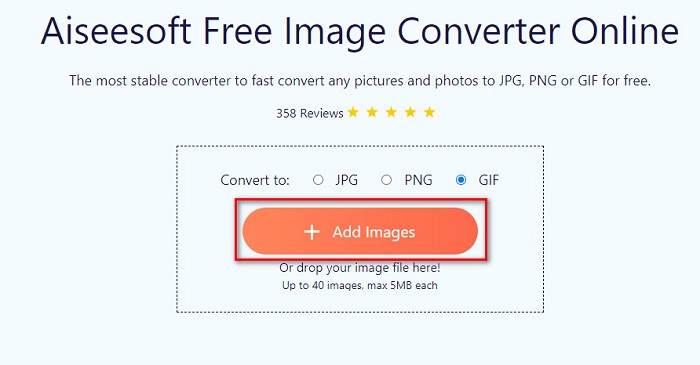
Passo 1. Cerca Aiseesoft Free Image Converter Online, oppure fai clic su questo link per andare direttamente alla loro pagina web. Poi, sulla prima interfaccia, fai clic sul pulsante Add Images.
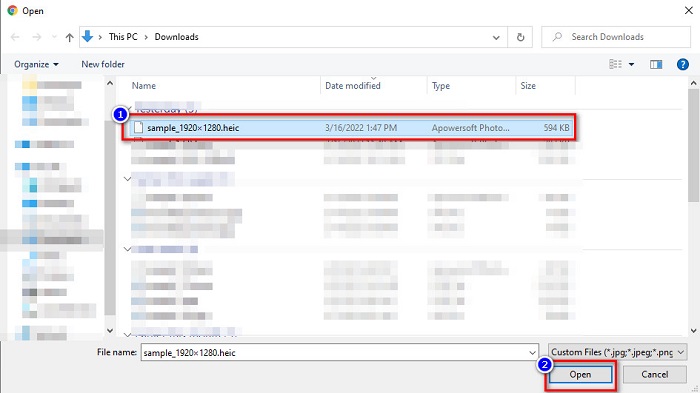
Passo 2. Si apriranno i file del tuo computer, trova la tua immagine HEIC e fai clic su Open.
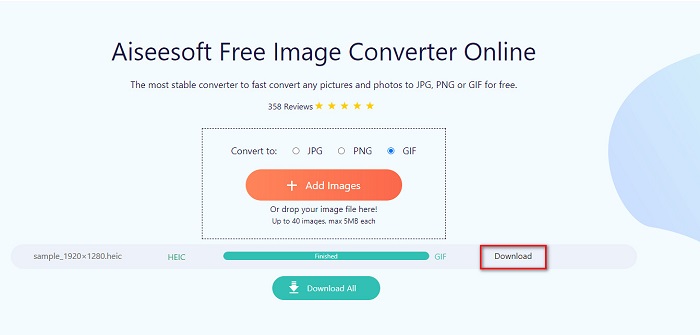
Passo 3. Fai clic sul pulsante Download per scaricare l’immagine GIF come passaggio finale.
Professionisti
- Ha un processo di conversione ultra veloce.
- Non contiene annunci inquietanti.
- Può convertire qualsiasi file immagine in PNG, JPG e GIF.
- Accessibile su tutti i browser web, inclusi Google, Firefox e Safari.
Contro
- Potresti riscontrare un lento processo di conversione quando la tua connessione Internet è lenta.
CloudConvert
Uno dei convertitori più usati su internet è CloudConvert. Questo convertitore può facilmente trasformare file HEIC in GIF grazie alla sua interfaccia utente semplice. Inoltre, supporta molti formati immagine, tra cui HEIC, GIF, BMP, JPG, ICO e altri. Puoi anche regolare la risoluzione, la dimensione del file e la qualità dell’immagine. Sebbene sia un’applicazione web, non contiene pubblicità.
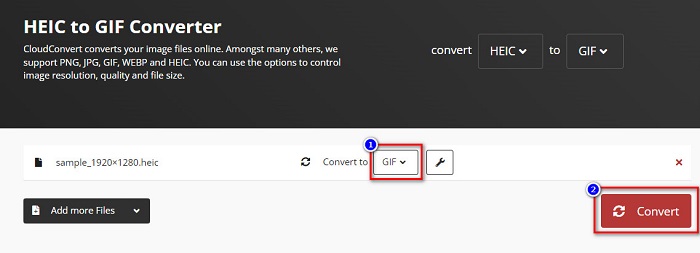
Passo 1. Nel tuo browser, cerca il convertitore CloudConvert HEIC to GIF. Poi, sull’interfaccia principale del software, fai clic sul pulsante Select. Si apriranno i file del tuo computer per permetterti di selezionare il file HEIC da caricare.
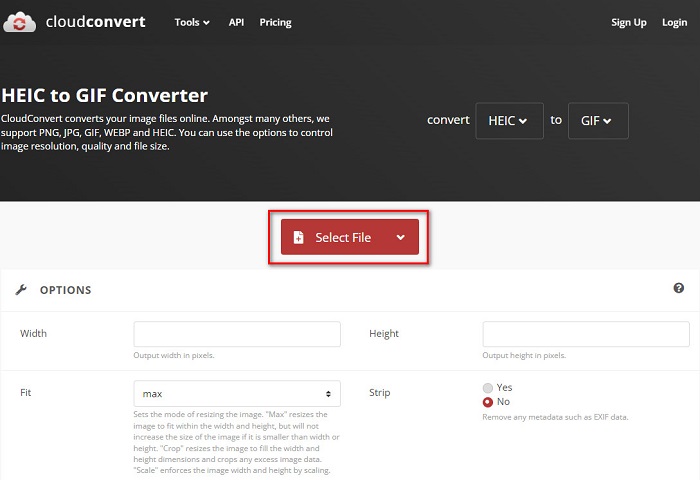
Passo 2. Successivamente, fai clic sul pulsante drop-down accanto a Convert to, quindi seleziona il formato di output che desideri. Poi fai clic sul pulsante Convert per iniziare a convertire il tuo file HEIC in formato GIF.
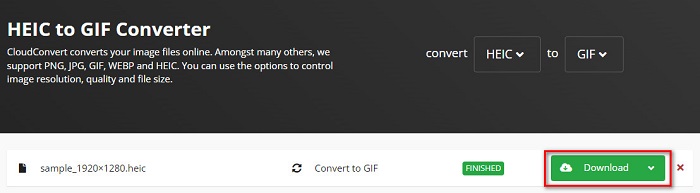
Passo 3. Infine, fai clic sul pulsante Download per scaricare il file GIF quando la conversione è terminata.
Professionisti
- Ha un processo di conversione veloce.
- Non contiene annunci fastidiosi.
- Supporta vari formati di file, inclusi HEIC, GIF, JPG, PNG, ecc.
- Accessibile su quasi tutti i motori di ricerca come Google e Safari.
Contro
- Quando la connessione Internet è lenta, potresti riscontrare un processo di conversione lento.
OnlineConvertGratis
Un altro convertitore online da HEIC a GIF che vale la pena provare è OnlineConvertFree. Questo convertitore ha un’interfaccia semplice da usare e un processo di conversione veloce. Inoltre, se stai cercando un convertitore che possa comprimere e ridimensionare il tuo file, questo strumento offre anche queste funzioni.
Tuttavia, contiene annunci che disturbano molti utenti. Tuttavia, questo convertitore può ancora convertire comodamente HEIC in GIF.
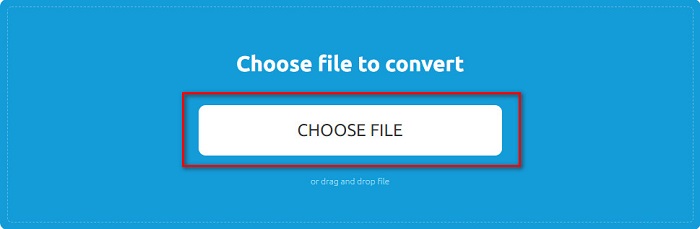
Passo 1. Per prima cosa, cerca OnlineConvertFree nel tuo browser. Sull’interfaccia principale del software, fai clic su Choose Files. Poi si apriranno i file del tuo computer, dove selezionerai il file HEIC da caricare.
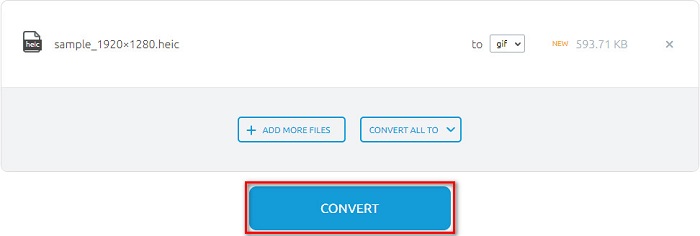
Passo 2. In secondo luogo, fai clic sul Convert button per convertire il tuo file HEIC in un file GIF. Apparirà quindi una nuova interfaccia.
Passo 3. Infine, scorri verso il basso e fai clic sul pulsante Download per scaricare il tuo file GIF.

Professionisti
- Ha una semplice interfaccia utente.
- È sicuro da usare.
Contro
- Contiene annunci.
CDKM
CDKM è uno strumento online che ti aiuta a convertire file HEIC in GIF. Questo convertitore online è uno strumento facile da usare che lo rende uno strumento adatto ai principianti. Inoltre, supporta formati di file standard come HEIC, GIF, PNG, JPG e SVG. Tuttavia, questo convertitore contiene annunci che potrebbero disturbarti. Tuttavia, può convertire rapidamente il tuo file, quindi è un convertitore da provare.
Passo 1. Nel tuo browser, cerca CDKM e vai alla loro pagina web. Sull’interfaccia principale del software, fai clic sul pulsante Choose Files. Quando si aprono le cartelle del tuo computer, seleziona il file HEIC e caricalo nell’interfaccia principale.
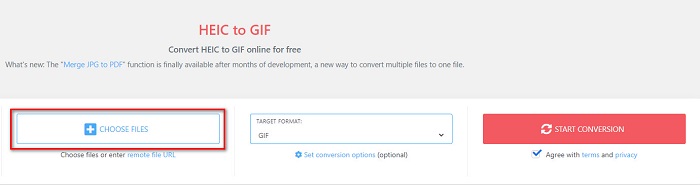
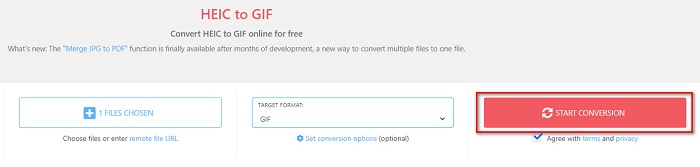
Passo 2. Successivamente, fai clic sul pulsante Start Conversion per convertire il file HEIC in un file GIF. Poi procedi al passaggio successivo.
Passo 3. Quindi, scarica il tuo file GIF facendo clic sul pulsante Download qui sotto.

Parte 2. Grafico di confronto tra HEIC e GIF
HEIC è un formato di file immagine creato da Apple. Quando scatti una foto usando un dispositivo Apple, vedrai che l’estensione dell’immagine è .heic. Inoltre, questi file immagine hanno un’ottima qualità e dimensioni ridotte, il che li rende molto diffusi. Tuttavia, i file HEIC non sono compatibili con molti dispositivi. È facile aprire e visualizzare i file HEIC sui dispositivi Apple, ma devi convertirli in altri formati se vuoi visualizzarli su altre piattaforme.
D'altra parte, i file GIF sono formati di immagine senza perdita di dati animati. Questi formati di immagine possono essere immagini animate o statiche. Inoltre, quasi tutte le piattaforme multimediali supportano i formati GIF.
| HEIC | GIF | |
| Compresso/Non compresso | compresso | compresso |
| Disponibilità | Disponibile su dispositivi Apple. | Disponibile su tutte le piattaforme multimediali |
| Senza perdite/No | Senza perdita | Senza perdita |
| Qualità dell'immagine | Alta qualità dell'immagine | Hanno una qualità inferiore rispetto alle immagini HEIC |
| Ideale per | Ideale per scattare foto | Ideale per animare brevi clip video. |
Parte 3. Domande frequenti sulla conversione di HEIC in GIF
Riesci a riprodurre GIF animate su un dispositivo Mac?
Sì. I dispositivi Mac possono riprodurre GIF animate; tuttavia, a volte può capitare che non le riproducano correttamente, quindi in quel caso devi usare un visualizzatore online.
Posso convertire immagini JPG in GIF?
Esistono molti modi per convertire JPG in GIF. I convertitori online citati sopra ti permettono di convertire file immagine JPG in GIF.
Puoi salvare GIF sul tuo iPhone?
Fortunatamente, i dispositivi iPhone supportano i file GIF. Pertanto, puoi salvare GIF sul tuo iPhone. Ma se non riesci a salvare un file GIF, assicurati di riavviare il tuo iPhone e prova a scaricare di nuovo.
Conclusione
Come mostrato sopra, esistono moltissimi modi per convertire HEIC in GIF. Tuttavia, non tutti i convertitori online offrono un processo di conversione ultrarapido. Quindi, se stai cercando il miglior convertitore online da HEIC a GIF, usa Aiseesoft Free Image Converter Online.
-
 Che cos'è il file VOB e come trasformare un file VOB in GIF gratuitamente?
 Vuoi saperne di più sui file VOB e su come condividerli dopo essere stati copiati? o Perché hai bisogno di convertire VOB in GIF? Allora leggi attentamente questo articolo.
-
 I 3 migliori convertitori da non perdere per convertire PNG in GIF animate
 Vuoi dare vita al tuo PNG? Quindi prova a convertire il formato animato PNG in GIF con gli utili strumenti disponibili e i passaggi su come farlo.
-
 5 modi migliori per cambiare l'immagine in GIF animata [Aggiornato 2022]
 Hai bisogno di un'immagine convertitore in GIF? Questo articolo fornirà i cinque migliori convertitori che possiamo trovare sul mercato. Quindi, scopriamo questi strumenti leggendo questo articolo.
