


 Video Converter Ultimate
 Screen Recorder
 Riparazione video
 Download sicuro
7 semplici modi per convertire rapidamente HEIC in PNG in pochi secondi
Want to make your HEIC file widely compatible with other devices? We have what you are looking for! This article shows you the best ways to convert your HEIC file to PNG without having a hard time. So buckle up as we indulge in knowing the best ways to convert HEIC to PNG effortlessly.

Parte 1. Perché convertire HEIC in formato PNG
Il formato di file HEIC è un formato di immagine creato da Apple. È un formato di immagine comunemente utilizzato dai dispositivi Apple. Sebbene abbia una risoluzione di alta qualità, non occupa troppo spazio sul tuo dispositivo. Tuttavia, i file HEIC non sono compatibili con dispositivi non Apple. Al contrario, PNG, che sta per Portable Graphics Format, è un formato di file immagine creato per sostituire i formati GIF.
È il formato di immagine non compresso più utilizzato, il che significa che ha una dimensione del file enorme. Tuttavia, quasi tutti i dispositivi supportano questo formato di file immagine. Quindi, se vuoi aprire la tua immagine HEIC su altri dispositivi oltre a Apple, è meglio convertirla in un formato di file PNG.
Parte 2. 5 semplici modi per convertire il tuo file HEIC in file PNG online
Cercare i modi migliori per convertire HEIC in PNG è piuttosto difficile. Tuttavia, abbiamo cercato i metodi migliori e più semplici per modificare HEIC in un formato di file PNG.
Usa il convertitore FVC gratuito da HEIC a PNG
The most excellent way to convert HEIC to PNG is to use a converter tool. And The best tool that we found on the internet is FVC Free HEIC to PNG Converter. This converter is an online tool that conveniently converts your HEIC file to PNG file format. In addition, if you want to batch convert your HEIC file to PNG, this tool has that feature for you.
È anche accessibile in quasi tutti i browser comuni, rendendolo uno strumento senza limiti di browser. Inoltre, ha un'interfaccia software semplice e non ha limiti di dimensione del file, quindi puoi convertire i file HEIC senza pensare alla dimensione del file. Pertanto, segui la semplice guida di seguito se sei interessato a utilizzare questo convertitore online da HEIC a PNG.
Step 1. On your browser, search FVC Free HEIC to PNG Converter. You can also click this link to go directly to their webpage. This is what the first interface looks like:

Step 2. Next, click the Add HEIC/HEIF File(s) button. Your computer folders will appear, where you will select your HEIC file.
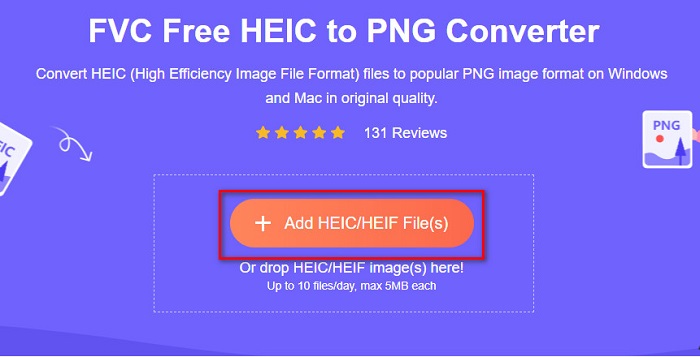
Step 3. Then, your computer folders will appear, where you will select your HEIC file. Press Open. Then your HEIC to PNG conversion will start.

Step 4. Lastly, the software’s interface, click the Download button, to download your PNG file.

Semplice, non è vero? Puoi convertire il tuo file HEIC in un file PNG seguendo questi semplici passaggi.
Usa Xconvert.com
Xconvert is a free online HEIC to PNG Converter that easily converts HEIC files to PNG files. This online converter has an easy-to-use software interface beneficial for beginner users. Moreover, you can change the image resolution of your image when using this online converter. However, since it is an internet-dependent tool, you may experience a slow conversion process when the internet is slow. It also contains ads that might be disturbing for you.
Step 1. Search Xconvert.com in your browser. On their website, click the Add Files button, then your computer files will appear, and then select your HEIC file.

Step 2. Your image will be uploaded to the software’s interface. After uploading, click the Convert button located at the bottom right corner of the software interface. And then wait for your file to be ready to download, then proceed to the next step.
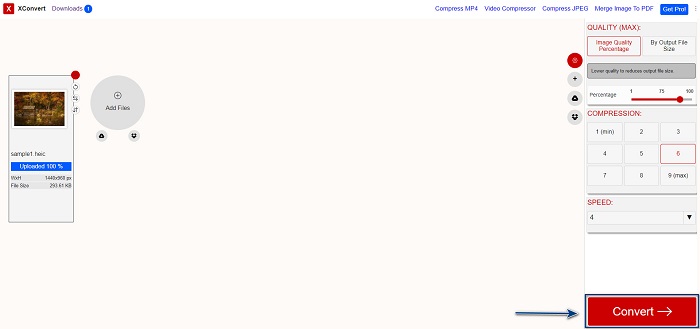
Step 3. When your file is ready, click the Download button to download your PNG file; above the download button, you will also see the output size and how long it took to convert.

Usa Zamzar
Another way to convert HEIC to PNG online is using Zamzar online converter. You probably have seen this converter when searching for a HEIC to PNG converter. This converter is accessible in almost all browsers available. In addition, it has a simple user interface making it a user-friendly tool. However, your file may be corrupted when the internet is interrupted during your conversion process. Nevertheless, many users use this converter to change HEIC to a PNG file.
Step 1. On the browser that you use, search Zamzar. On their website, click the Add Files button. Your computer files will appear, then upload your HEIC image.

Step 2. After uploading your HEIC file, click the drop-down button, then select PNG as your file output format.

Step 3. Finally, click the Convert Now button to convert your HEIC file to PNG file format. Then download your PNG file. Just wait for a couple of seconds, and that’s it!

Usa Conversion Tools.io
Conversion Tool is an online HEIC to PNG converter with a simple user interface. It can convert your HEIC file to PNG at high speed. Furthermore, it does not contain many ads, unlike other online converters. But the downside of it is that you can only convert ten files a day, and it has a file size limit. But if you are converting a small file, then this tool may be suited for you.
Step 1. Search Conversion Tools.io in your browser. Then, click the Browse button on the software’s main interface, or drag and drop your HEIC file on the Browse button.

Step 2. After, click the Run Conversion button to begin converting your HEIC file to a PNG file. And then wait for your image file to load, then proceed to the next step.

Step 3. To end, click the Download button to download your PNG file.

Usa CDKM
One last tool that we will present to you is CDKM. This tool allows you to convert HEIC files to PNG with just a few clicks. However, using this online converter may take a few seconds to convert, depending on your internet speed. It also contains ads that may be irritating for you. Nonetheless, it does not have any file size limit, so it is worth trying.
Step 1. On your browser, search CDKM online converter. On the software’s main interface, click the Choose Files button. Your computer folders will appear, then select your HEIC file to upload.

Step 2. Next, click the Start Conversion button to start the conversion process.

Step 3. Lastly, scroll down a little and see the Download button. Click the Download button to download your PNG file.

Parte 3. Converti HEIC in PNG su Mac
I dispositivi Apple supportano i formati di file HEIC e, utilizzando il Mac, puoi aprire in modo nativo un file HEIC. Ma se vuoi convertire il tuo file HEIC in PNG, puoi cambiarlo usando l'app Foto in Mac. Di conseguenza, se sei un utente Mac, è meglio leggere questa parte.
Step 1. First, drag and drop your HEIC file to the Photo App. Then, preview your HEIC photo and click the File > Export button > Export 1 Photo.

Step 2. After, on the Photo Kind, click the output format that you want. Select PNG file format.

Step 3. And then, click the Export button, then select the destination of your file output. You will see that your HEIC file is changed to PNG file format.

Parte 4. Converti file HEIC in PNG su iPhone
Se stai utilizzando un iPhone, puoi aprire un file HEIC sul tuo dispositivo. Ma se vuoi convertire il tuo file HEIC in PNG utilizzando un dispositivo iPhone, allora abbiamo un modo per te. Seguendo questi semplici e facili passaggi di seguito, puoi convertire HEIC in PNG senza sforzo.
Step 1. On the Photo App on your iPhone, tap the Select button located at the top of your screen. And then, select your HEIC file, then click the Share icon.
Step 2. Slide up your screen; you will see the Copy Photo option, then click it.
Step 3. Finally, go to the Files app, tap the browse button and select your desired output location (click iCloud Drive or On my iPhone). Then paste your HEIC file there.

Dopo aver incollato il file, vedrai che il tuo file verrà automaticamente convertito in un file PNG.
Parte 5. Conoscenze estese su file HEIC e file PNG
Se hai ancora dei dubbi se desideri convertire il tuo file HEIC in PNG, ti forniamo una tabella di confronto per aiutarti a distinguere le differenze tra questi due file. Inoltre, offre una chiara panoramica delle caratteristiche HEIC e PNG. Leggi attentamente per conoscere la differenza tra file HEIC e file PNG.
| HEIC | PNG | |
| Compatibilità | Solo il dispositivo Apple supporta questo formato di file. | Quasi tutti i dispositivi supportano questo file, inclusi i dispositivi Apple. |
| Dimensione del file | File di piccole dimensioni. | Può raggiungere dimensioni di file enormi. |
| Qualità dell'immagine | Alta qualità dell'immagine. | Ha una buona qualità, ma non migliore del file HEIC. |
| Compresso/Non compresso | compresso | Non compresso |
| La modifica | Mantiene la qualità dell'immagine durante la modifica. | La qualità potrebbe peggiorare durante la modifica. |
Parte 6. Domande frequenti sulla conversione di HEIC in PNG
La conversione di HEIC in PNG influirà sulle dimensioni del file?
Sì. Quando converti HEIC in PNG, aumenterà la dimensione del file, anche se non sarà elevata.
Puoi aprire file PNG su Adobe Photoshop?
Certamente. Puoi aprire file PNG su Adobe Photoshop perché Adobe Photoshop supporta il formato di file PNG.
Puoi aprire il formato di file PNG sui dispositivi Apple in modo nativo?
Sì. Quando acquisisci screenshot dal tuo iPhone, questi verranno automaticamente salvati sul Rullino fotografico come file PNG.
Conclusione
At last! We are now to the end of our adventure. This article gives you the best solutions to convert your HEIC file to PNG file format. And all the online HEIC to PNG converters that are shown above can effectively convert your file effortlessly. Moreover, there are also other options that you can use if you are a Mac or iPhone user. But if you are looking for the best HEIC to PNG converter with the outstanding features to use, then FVC Free HEIC to PNG converter is the best choice for you.
-
 Come aprire il file HEIC su Windows, Mac e online
 Stai cercando un modo per aprire i file HEIC? Questo articolo fornisce le migliori soluzioni per aprire file HEIC su Windows, Mac e online.
-
 JPG VS GIF: 3 semplici modi per convertire JPG in GIF
 Vuoi conoscere la differenza tra JPG e GIF? O vuoi passare da JPG al formato animato GIF? Allora leggi questo articolo per farti un'idea.
-
 5 modi migliori per cambiare l'immagine in GIF animata [Aggiornato 2022]
 Hai bisogno di un'immagine convertitore in GIF? Questo articolo fornirà i cinque migliori convertitori che possiamo trovare sul mercato. Quindi, scopriamo questi strumenti leggendo questo articolo.
