


 Video Converter Ultimate
 Screen Recorder
 Riparazione video
 Download sicuro
Che cos'è Joyoshare HEIC Converter: revisione completa del software
Nativamente, le immagini che acquisisci con il tuo dispositivo iOS vengono codificate in formato HEIC o HEIF, che consente di risparmiare molto spazio di archiviazione. Con l’introduzione recente di questo formato, tutti hanno iniziato a prestare attenzione alle sue capacità di elaborare le immagini mantenendo al contempo un’elevata qualità in uscita. Altri sistemi operativi, però, non supportano i file HEIC nonostante questo nuovo tipo di compressione con perdita. Se trasferisci un file immagine in questo formato su Windows o Android e provi ad aprirlo per visualizzarlo, riceverai una finestra di dialogo pop‑up che ti avvisa che il file non è supportato oppure è danneggiato. Non scoraggiarti: esiste una soluzione a questo problema convertendo il file in formato JPEG. Uno dei migliori converter che puoi usare su Windows e Mac è Joyoshare HEIC Converter.
Quindi, oggi esamineremo il software e vedremo se è la scelta migliore per convertire HEIC in JPEG. Le informazioni che aggiungiamo di seguito sono da davanti a dietro in modo che possiamo capirle e svelare la verità sul convertitore.

Parte 1. Recensione completa del convertitore Joyoshare HEIC
Joyoshare HEIC to JPG Converter è un convertitore leggero che puoi utilizzare su Windows e Mac. Può convertire il formato dei tuoi file HEIC in un normale JPEG oppure in un qualsiasi altro formato immagine di tua scelta. Puoi anche usare il software per caricare e convertire contemporaneamente più file HEIC. Inoltre, questo strumento offre anche altre funzioni, tra cui:
◆ Imparare a usarlo è facile e supporta anche le funzionalità di trascinamento della selezione per caricare facilmente il file HEIC.
◆ Modifica qui la risoluzione e la qualità del video senza sforzo.
◆ Può mantenere le proporzioni dell'immagine ei metadati del file HEIC originale.
◆ Supporta altri formati di immagine, come JPG, BMP, PNG, BMP, TIFF, GIF e WebP.
Professionisti
- Non avresti bisogno di competenze tecniche per utilizzare il convertitore.
- È un convertitore ideale per convertire più file HEIC contemporaneamente.
- Esporta il file HEIC convertito sull'unità e non sul cloud.
Contro
- Una volta completata la conversione, lascia una filigrana sulla versione gratuita.
- Sarà necessario acquistare il software prima di utilizzare il suo pieno potenziale.
Come convertire HEIC in JPG usando Joyoshare HEIC Converter:
Passaggio 1. Scarica il software su Windows o Mac prima di utilizzarlo.
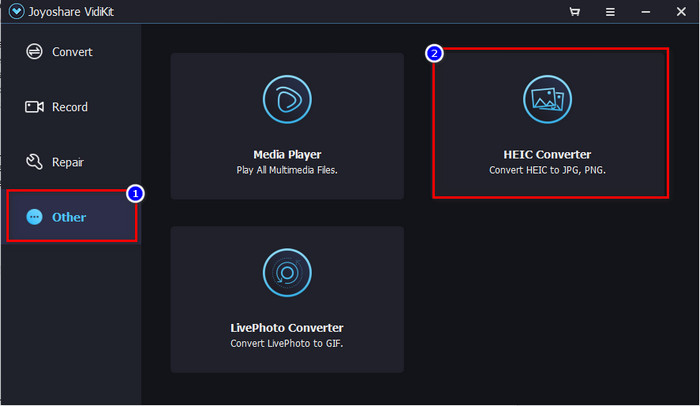
Passaggio 2. Apri il software, vai su Others al suo interno e fai clic su HEIC Converter.
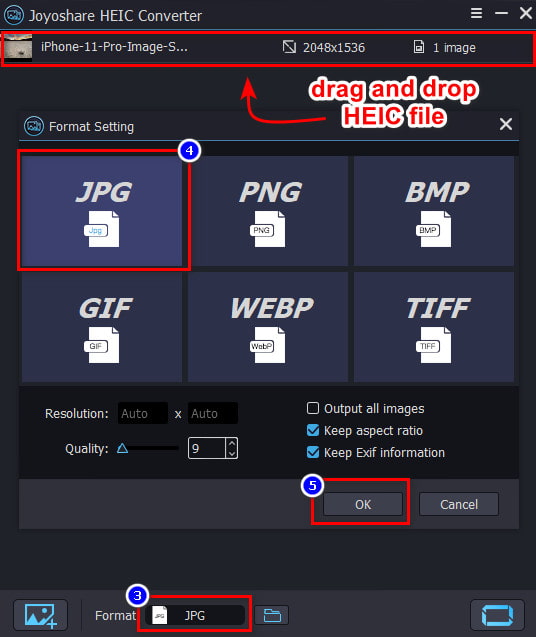
Passaggio 3. Trascina e rilascia qui il file per caricare l’HEIC. In Format, scegli l’estensione che desideri e fai clic su OK.
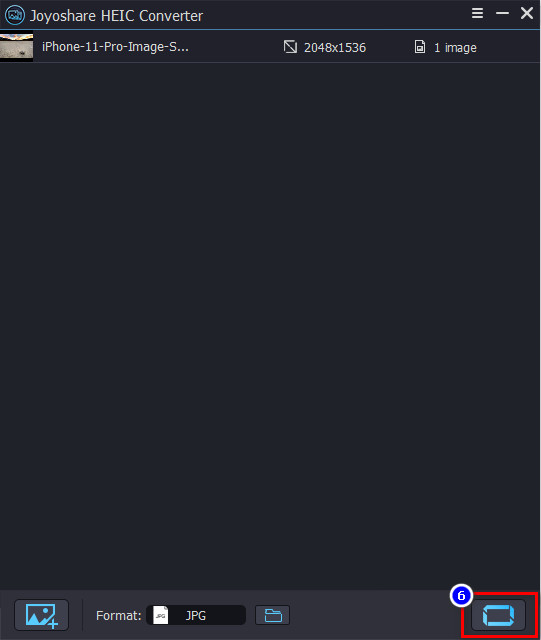
Passaggio 4. Fai clic sul pulsante convert per avviare il processo. Al termine della conversione, sullo schermo si aprirà una cartella con il file HEIC convertito.
Parte 2. 3 delle migliori alternative per Joyoshare HEIC Converter sul Web
Sebbene il software che abbiamo menzionato sopra sia eccezionale, la cosa negativa è che inserisce una filigrana sul file HEIC convertito che hai caricato qui. Ma nel complesso, il software è di gran lunga migliore dell'altro convertitore HEIC che puoi avere su Windows e Mac. Questa parte introdurrà lo strumento web che puoi utilizzare per convertire HEIC in JPG senza lasciare una filigrana alla fine dell'immagine. Queste sono le migliori alternative per Joyoshare HEIC Converter sul web.
FVC Convertitore gratuito da HEIC a JPG
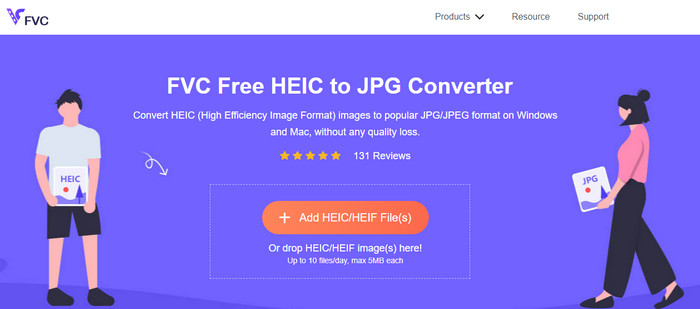
FVC Free HEIC to JPG Converter è un convertitore HEIC in JPG completo, comodamente accessibile dal web. A differenza del convertitore HEIC di cui abbiamo parlato sopra, questo strumento online non aggiunge alcuna filigrana al file esportato e non richiede alcun pagamento, perché è completamente gratuito. Puoi convertire il file HEIC in JPG presente nella tua memoria con un solo clic, sia che tu utilizzi Windows sia che tu utilizzi Mac. Inoltre, puoi aggiungere qui più file HEIC, perché è in grado di convertire contemporaneamente numerose immagini mantenendo i dati EXIF associati ai tuoi file. Quindi, se desideri la migliore alternativa online a Joyoshare, questa è un’ottima scelta.
In tal caso, non è necessario pensarci due volte perché questo è il convertitore che devi utilizzare per risolvere il problema di compatibilità del tuo HEIC.
HEIC in linea
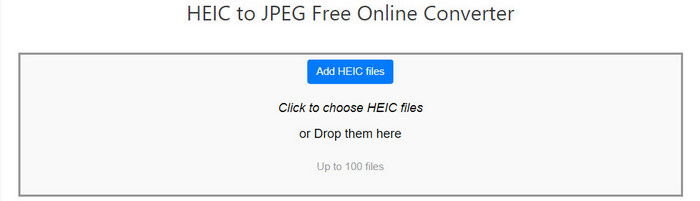
Come primo strumento web, HEIC Online ti offre una mano per convertire HEIC in un JPEG come può fare il convertitore Joyoshare HEIC in JPG. Questo strumento web è gratuito e non aggiungerà una filigrana al prodotto finale. Invece di scaricare un convertitore sul desktop, puoi risparmiare spazio utilizzando uno strumento web. Oltre alle sue capacità di conversione, puoi anche utilizzare questo convertitore online per manipolare la qualità dell'output finale. Hai la possibilità di rimuovere o meno il file EXIF nel tuo file HEIC. Anche se lo strumento ha molto da offrire, ci sono molti annunci sul sito Web se si tenta di accedervi e utilizzarlo.
Sebbene gli annunci possano essere fastidiosi per la maggior parte del tempo, è comunque facile da usare. Quindi, se pensi che gli annunci non ti diano fastidio, potresti provare a utilizzare questo convertitore HEIC per cambiare il formato in JPG.
Fileproinfo – Convertitore da HEIC a JPG

Senza dubbio, Fileproinfo – HEIC to JPG Converter può rivelarsi molto utile per convertire il tuo file HEIC in JPG o in un altro formato immagine a tua scelta. Questo convertitore non richiede registrazione, pagamento o installazione di alcun file aggiuntivo prima dell’uso. Numerosi utenti conoscono già questo convertitore online, che è una delle scelte migliori per trasformare i file nel formato desiderato. Nonostante sia un convertitore gratuito online, tuttavia, la pubblicità finisce per penalizzarne l’uso.
Durante l'utilizzo, aspettati che molti annunci pop-up vengano visualizzati su ogni azione che fai qui. Ed è spiacevole che ci siano sorprendentemente annunci pubblicitari durante la conversione. Anche se non lo converti e lo visiti, ci sono annunci sui lati su cui potresti fare clic accidentalmente. Tuttavia, il convertitore fa quello che dovrebbe: convertire l'HEIC in un JPEG.
Parte 3. Domande frequenti su Joyoshare HEIC Converter
Perché la qualità dell'immagine diminuisce dopo la conversione su Joyoshare HEIC Converter?
Prima di convertire HEIC in JPG, devi estendere la qualità fino al massimo per aspettarti che la qualità non diminuisca nemmeno leggermente. Dopo aver fatto clic su Formato, è possibile individuarlo, trascinare il dispositivo di scorrimento a destra per ingrandirlo ea sinistra per abbassarlo, quindi fare clic su OK per salvarlo.
Perché c'è una filigrana dopo l'esportazione su Joyoshare HEIC Converter?
Poiché la prova gratuita è attivata, lascerà una filigrana sull'immagine che esporti e converti qui. Quindi, per rimuovere la filigrana, devi acquistare il software e ogni volta che esporti l'immagine, alla fine non verrà aggiunta alcuna filigrana.
Quanto dura la prova gratuita di Joyoshare HEIC Converter?
Non ci sono limiti alla prova gratuita di Joyoshare HEIC Converter, quindi puoi massimizzare l'utilizzo del software nella versione gratuita. Ma puoi acquistare il convertitore sul suo sito ufficiale per usarlo senza alcuna limitazione, a differenza della versione gratuita.
Conclusione
Dopo aver letto questo articolo, ora hai un’idea complessiva su Joyoshare HEIC Converter, sulle sue funzioni, i pro e i contro e su come utilizzarlo. Per ogni lettore è diventato più semplice capire se sia la scelta migliore per convertire i file HEIC in JPG o in altri formati che desidera ottenere. Sebbene il software sia complessivamente eccellente, presenta comunque alcuni svantaggi. Sta quindi a te decidere se questo è lo strumento adatto alle tue esigenze; in caso contrario, puoi scegliere una delle alternative che abbiamo elencato sopra.
-
 Il modo migliore per stampare foto HEIC utilizzando la stampante che hai
 Vuoi sapere come stampare foto HEIC in alta qualità? Fortunatamente questo articolo fornisce i passaggi per stampare l'immagine HEIC che hai.
-
 Recensione corretta per il convertitore HEIC gratuito di Apowersoft che devi conoscere [2022]
 Che cos'è il convertitore HEIC di Apowersoft? Per sapere di cosa tratta il software, di seguito includiamo i dettagli completi sul software.
-
 3 Approcci per convertire HEIC in JPG su Android gratuitamente
 Devi convertire HEIC in JPG su Android? In tal caso, ti forniremo le prime 3 app che puoi utilizzare sui tuoi dispositivi Android per completare l'attività.
