


 Video Converter Ultimate
 Screen Recorder
 Riparazione video
 Download sicuro
Recensione completa di WaltR HEIC Converter e delle sue migliori alternative [2022]
Non c’è dubbio che le immagini HEIC siano tra i formati più diffusi che puoi trovare su internet, grazie alle loro dimensioni ridotte e all’alta qualità di risoluzione. Con l’arrivo di iOS 11, molte persone hanno avuto difficoltà con questo formato di immagine, perché non è possibile visualizzarlo in altre applicazioni e nel sistema Windows. Di conseguenza, molti lo convertono in altri formati di immagine come JPG. Uno dei convertitori HEIC in JPEG più popolari è WaltR HEIC Converter. In questo articolo scoprirai le sue caratteristiche e come puoi convertire HEIC in JPG usando il WaltR HEIC Converter.

Parte 1. WaltR HEIC Converter: il miglior strumento per convertire HEIC in JPEG
WaltR HEIC Converter è uno dei migliori convertitori per trasformare i file HEIC in formato JPEG. Questo strumento online ti permette di convertire HEIC in JPG comodamente anche offline. È uno strumento facile da usare, perché dispone di un’interfaccia software semplice e intuitiva. Inoltre, puoi convertire più file HEIC con un solo clic. Oltre a ciò, è gratuito e può convertire i tuoi file HEIC in modo estremamente rapido. E se vuoi convertire la tua immagine HEIC in formato PNG, anche questo strumento può farlo per te.
Pro e contro del convertitore WaltR HEIC
Professionisti
- Ha una semplice interfaccia utente.
- Può convertire in batch le tue immagini HEIC in immagini JPEG e PNG.
- È 100% gratuito da usare.
- Disponibile su tutte le piattaforme multimediali, inclusi Windows e Mac.
Contro
- Supporta solo i formati di file JPEG e PNG.
Come utilizzare il convertitore HEIC di WaltR
Facci sapere come convertire il formato di file HEIC in JPEG utilizzando WaltR HEIC Converter.
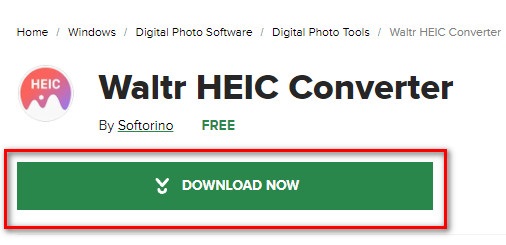
Passaggio 1. Per scaricare l’applicazione WaltR HEIC Converter, cerca WaltR HEIC Converter. Poi segui la procedura di installazione ed esegui l’applicazione.
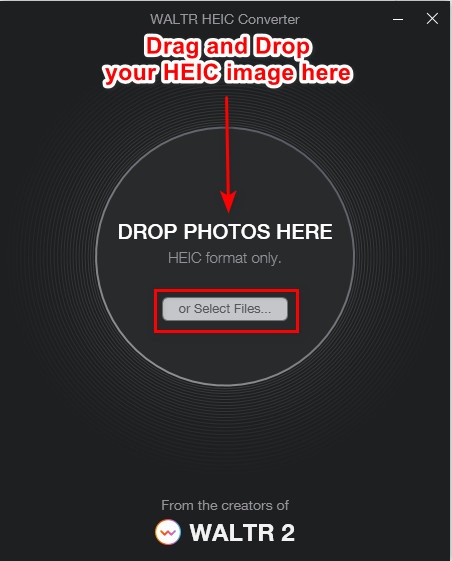
Passaggio 2. Trascina e rilascia la tua immagine HEIC nell’interfaccia principale del software oppure fai clic sul pulsante Select Files per caricare la tua immagine HEIC in coda. Quindi attendi il completamento del caricamento dell’immagine HEIC e procedi al passaggio successivo.
Passaggio 3. Successivamente, fai clic sul pulsante drop-down accanto a Format per selezionare il formato di output desiderato. Fai clic su JPEG.

Passaggio 4. Infine, fai clic sul pulsante Convert per convertire la tua immagine HEIC in formato JPEG. Poi scegli la cartella di destinazione dell’immagine, e il gioco è fatto!
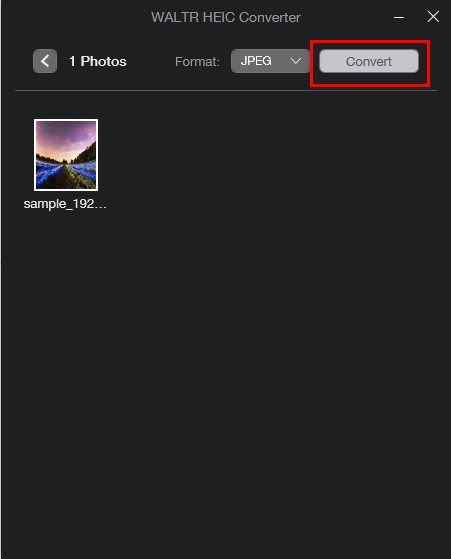
Facile, vero? È possibile convertire l'immagine HEIC in un'immagine JPEG seguendo i passaggi precedenti.
Parte 2. 4 Migliori alternative al convertitore WaltR HEIC
Tuttavia, se stai cercando un modo più conveniente per convertire HEIC in JPEG, che non è necessario scaricare, la soluzione per te è utilizzare un convertitore online da HEIC a JPEG. Abbiamo cercato i migliori convertitori online da HEIC a JPEG su Internet e abbiamo scoperto che questi strumenti sono i migliori da usare. Pertanto, continua a leggere questo articolo per conoscere le due migliori alternative per WaltR HEIC Converter.
Alternativa 1. Convertitore FVC gratuito da HEIC a JPEG
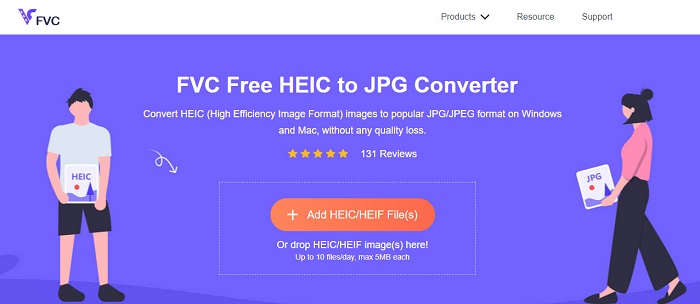
FVC Free HEIC to JPEG Converter è il miglior strumento per convertire HEIC in JPEG online. Questo convertitore può trasformare la tua immagine HEIC in JPEG senza perdere la qualità dell’immagine. Ti consente inoltre di convertire in blocco le tue immagini HEIC in JPEG/JPG con un solo clic. Inoltre, durante la conversione delle immagini, mantiene i dati EXIF come dimensioni, risoluzione, data/ora di scatto e impostazioni di esposizione. È anche completamente 100% gratuito e sicuro da usare. E, a differenza di molti altri strumenti online, FVC Free HEIC to JPEG Converter non contiene fastidiose pubblicità.
Professionisti
- Ha un'interfaccia software facile da usare.
- Può convertire in batch le tue immagini HEIC in formato immagine JPEG.
- È sicuro da usare e 100% gratuito.
- Accessibile su tutti i browser web, inclusi Google, Firefox e Safari.
Contro
- Potresti riscontrare un processo di conversione lento quando la tua connessione Internet è lenta.
Alternativa 2. OnlineConvert.com

OnlineConvert.com è anch’esso uno strumento popolare per convertire immagini HEIC in JPEG. Questo convertitore HEIC in JPEG online ti permette di modificare dimensioni e qualità dell’immagine di output. Inoltre, è uno strumento facile da usare perché ha una GUI semplice. Tuttavia, contiene pubblicità invadenti che potrebbero risultare fastidiose. Nonostante ciò, molte persone continuano a utilizzare questo convertitore per trasformare le loro immagini HEIC in JPEG.
Professionisti
- Ha un'interfaccia software intuitiva.
- Ti permette di ridimensionare e regolare la qualità della tua immagine.
Contro
- Contiene annunci.
- Il tuo file potrebbe essere danneggiato quando la connessione Internet viene interrotta.
Alternativa 3. CloudConvert
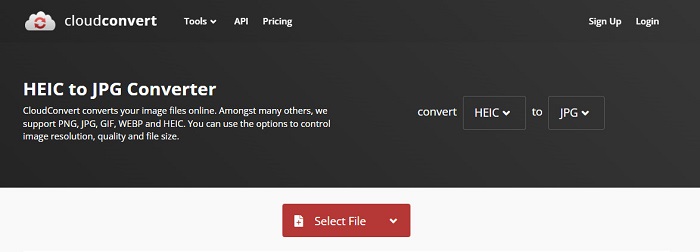
CloudConvert è un convertitore online che può anch’esso trasformare immagini HEIC in JPEG. Questo convertitore ha un’interfaccia semplice, che lo rende uno strumento facile da usare. Con questo servizio puoi modificare larghezza, altezza e qualità dell’immagine di output. Inoltre, supporta numerosi formati di file come HEIC, JPEG, PNG, GIF e WebP.
Nonostante ciò, quando si utilizza questo convertitore, la connessione a Internet deve essere veloce in modo da non aspettare troppo durante la conversione dell'immagine HEIC. Tuttavia, è ancora uno degli strumenti più efficienti che puoi trovare su Internet.
Professionisti
- È sicuro da usare e gratuito.
- Ti consente di modificare la qualità dell'output dell'immagine.
- Ha un'interfaccia facile da usare.
Contro
- Il processo di conversione sarà lento, a seconda della velocità di Internet.
Alternativa 4. FreeToolOnline.com
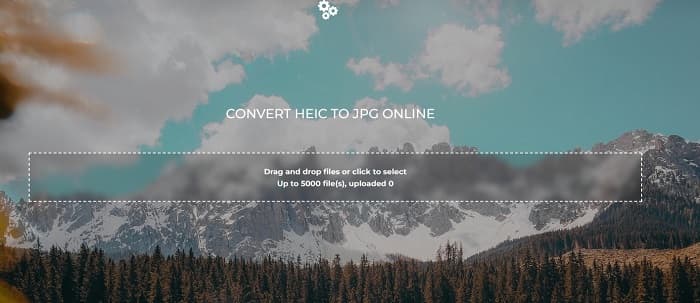
Un altro convertitore online da HEIC a JPEG che dovresti provare è FreeOnlineTool.com. Questo strumento può convertire immagini HEIC in formato JPEG e PDF. È inoltre sicuro da usare e gratuito. E se vuoi convertire più immagini HEIC in JPEG in un’unica operazione, questo convertitore offre anche questa funzione. Inoltre, dispone di un’interfaccia intuitiva e facile da usare. Tuttavia, come altri convertitori, contiene pubblicità che potrebbero disturbarti durante l’utilizzo.
Professionisti
- Supporta la conversione di HEIC in formato JPEG e PFD.
- Ha una semplice GUI.
- Ti consente di convertire in batch le immagini HEIC in immagini JPEG.
Contro
- Contiene annunci.
Parte 3. Domande frequenti su WaltR HEIC Converter
Il convertitore WaltR HEIC è disponibile su dispositivi mobili?
Sfortunatamente, WaltR HEIC Converter non è scaricabile su nessun dispositivo mobile.
Puoi convertire HEIC in GIF usando WaltR HEIC Converter?
No. WaltR HEIC Converter non supporta i file immagine GIF. Ma se vuoi convertire la tua immagine HEIC in formato GIF, puoi usare questo strumento, Aiseesoft Free Image Converter Online, per convertire una immagine HEIC in GIF.
WaltR HEIC Converter ha una versione online?
Il convertitore WaltR HEIC non ha una versione online. Pertanto, se desideri convertire HEIC in JPEG online, utilizza le alternative di cui sopra.
Conclusione
Waltr HEIC Converter è davvero uno strumento eccellente per la conversione da HEIC a JPEG. Grazie alle sue migliori funzionalità, non c’è da stupirsi che sia usato da così tante persone. Ma se non vuoi scaricare un’app per convertire HEIC in JPEG, allora la soluzione migliore è usare uno strumento online. E ti consigliamo di utilizzare il miglior strumento sul mercato, FVC Free HEIC to JPEG Converter.
-
 Converti HEIC in PDF utilizzando i 4 metodi migliori migliorati nel 2022
 Per conoscere maggiori informazioni sul miglior convertitore da HEIC a PDF puoi scaricare questo 2022. Puoi leggere questo articolo poiché abbiamo fornito una recensione su di essi.
-
 5 dei migliori convertitori da HEIC a JPG scelti questo 2022
 Con il convertitore da HEIC a JPC puoi facilmente cambiare il formato dell'immagine in un JPG portatile. Vuoi sapere quali sono questi 5 strumenti? Leggi questo articolo.
-
 5 modi migliori per cambiare l'immagine in GIF animata [Aggiornato 2022]
 Hai bisogno di un'immagine convertitore in GIF? Questo articolo fornirà i cinque migliori convertitori che possiamo trovare sul mercato. Quindi, scopriamo questi strumenti leggendo questo articolo.
