


 Video Converter Ultimate
 Screen Recorder
 Riparazione video
 Download sicuro
Applicazioni di ingrandimento foto online e offline da non perdere
Ridimensionare un’immagine può essere un po’ rischioso perché, quando la ingrandisci, potresti perderne la qualità. Alcune persone desiderano ridimensionare le proprie foto per ottenere una qualità migliore. Un’immagine è composta da migliaia di pixel e, quando cerchi di ingrandirla, potresti rovinarne la qualità perché, aumentando le dimensioni, i pixel diventano visibili. Quindi, se vuoi ingrandire la tua immagine ma non vuoi perdere qualità, abbiamo a disposizione degli strumenti fantastici per te. Per conoscere i migliori strumenti di photo enlarger, leggi attentamente questo articolo.

Parte 1. I migliori ingranditori di foto online
È la scelta migliore per utilizzare un ingranditore di foto online perché risparmierai spazio sul tuo dispositivo. Uno strumento online non richiederà il download di nulla sul tuo dispositivo, purché tu disponga di una velocità Internet elevata. Inoltre, la maggior parte delle applicazioni online sono accessibili gratuitamente. Detto questo, ecco i primi tre migliori ridimensionatori di immagini online.
Upscaler di immagini senza FVC
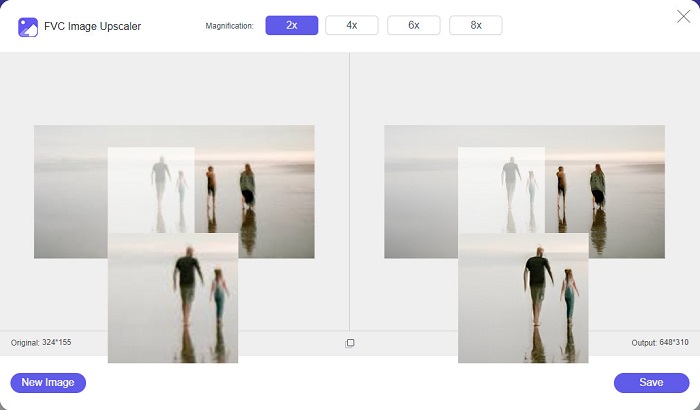
FVC Free Image Upscaler è il primo della lista tra i migliori ridimensionatori di immagini online. Questa applicazione web è gratuita e sicura da usare. Puoi migliorare o ingrandire la tua immagine con fattori di ingrandimento 2x, 4x, 6x e 8x senza perdere qualità. Inoltre, supporta quasi tutti i formati di immagine, come PNG, JPG, JPEG e BMP. Ciò che rende questo strumento ancora più interessante è che utilizza una tecnologia di intelligenza artificiale (AI) che rileva automaticamente le parti sfocate dell’immagine e le migliora. Inoltre, è accessibile da tutti i browser web, inclusi Google, Firefox e Safari. FVC Free Image Upscaler è uno strumento adatto ai principianti, quindi, se sei alle prime armi, questo potrebbe essere l’opzione migliore per te.
Professionisti
- Ingrandisce la tua immagine senza perdite.
- Ha un processo di upscaling veloce.
- Ti consente di correggere i pixel persi, le trame di colore e altro ancora.
- Puoi usarlo sul tuo dispositivo Windows o Mac.
Contro
- È uno strumento dipendente da Internet.
Photo Enlarger.com
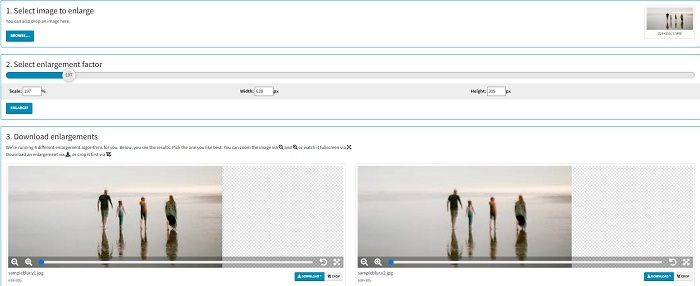
Photo Enlarger.com è un ingranditore di foto online utilizzato da molti principianti grazie alla sua interfaccia semplice. Questo ridimensionatore di foto online ti consente di ingrandire l’immagine selezionando il fattore di ingrandimento. Inoltre, puoi regolare la scala e la percentuale di larghezza e altezza della tua immagine. Photo Enlarger.com ti fornirà quattro risultati con diverse risoluzioni e diversi fattori di ingrandimento. Puoi anche scegliere di scaricare facilmente queste immagini.
Inoltre, puoi ritagliare le immagini ingrandite per rimuovere le parti non necessarie dell'immagine. Tuttavia, contiene molti annunci fastidiosi che potrebbero disturbare mentre ingrandisci un'immagine. Tuttavia, è uno strumento efficace per ingrandire la tua immagine.
Professionisti
- Supporta i formati di immagine più comuni, come PNG e JPG.
- È gratuito e sicuro da usare.
- Puoi usarlo su quasi tutti i browser web, inclusi Google e Firefox.
Contro
- È dipendente da Internet.
- Ha molti annunci.
Image Enlarger.com
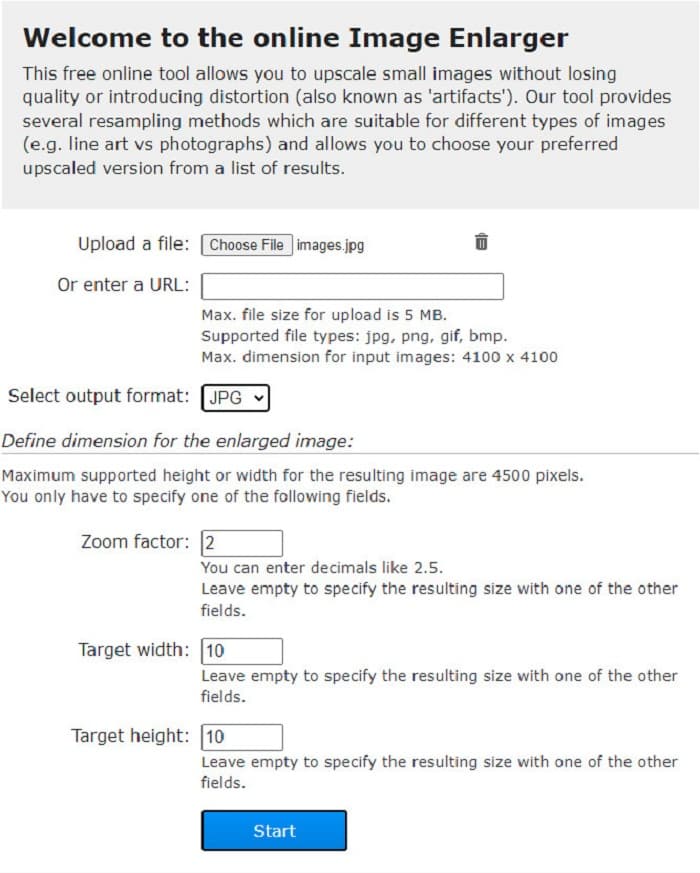
Un altro espansore di immagini online gratuito che puoi usare per ingrandire le tue foto è Image Enlarger.com. Questo ridimensionatore di immagini online ti permette di regolare il fattore di zoom, la larghezza e l’altezza dell’immagine. Inoltre, possiede un’interfaccia intuitiva, che lo rende uno strumento facile da usare. Supporta anche i formati di immagine più comuni, come PNG e JPG. Image Enlarger.com ha un’altezza e una larghezza massime supportate fino a 4500 pixel. Inoltre, offre diversi metodi di ricampionamento adatti a vari tipi di immagini. Lo svantaggio di questo strumento online è che potresti avere difficoltà a ingrandire le immagini quando la connessione Internet è lenta.
Professionisti
- È uno strumento sicuro da usare.
- È gratuito da usare.
Contro
- Contiene annunci che potrebbero distrarti.
- Non è possibile visualizzare in anteprima l'output dell'immagine.
Parte 2. I migliori ingranditori di foto offline
Le persone a volte preferiscono utilizzare un software di ingrandimento delle immagini invece di un normale editor di immagini perché potrebbe rovinarne la qualità quando si utilizza un editor di immagini standard per ingrandire un'immagine. Ecco perché abbiamo cercato i migliori ingranditori di immagini offline sul mercato e abbiamo selezionato i migliori tra loro. Questi ingranditori di foto che presenteremo sono disponibili per il download su dispositivi Windows o Mac. Ecco i primi tre più potenti ridimensionatori di foto offline senza ulteriori indugi.
Smilla Ingranditore
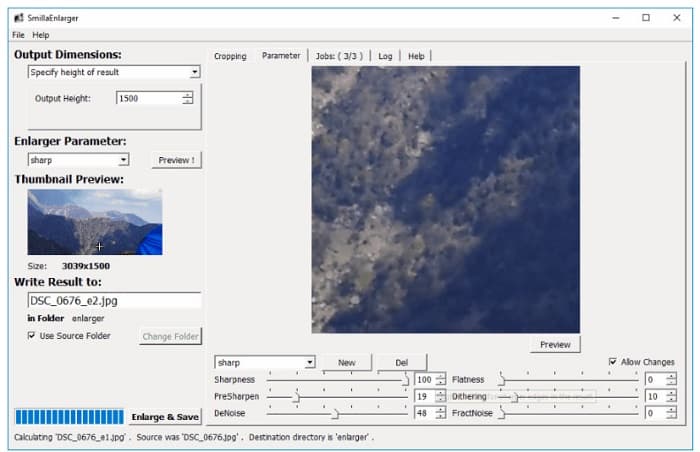
Smilla Enlarger è un ingranditore di immagini offline che puoi usare per ridimensionare facilmente le tue foto. Questo software è un’applicazione gratuita e open source per computer Windows. Inoltre, puoi usare le sue opzioni di ritaglio per ingrandire qualsiasi immagine supportata dallo strumento. Puoi anche impostare le dimensioni dell’immagine e i parametri di ingrandimento per regolare la nitidezza e il rumore. Tutte queste opzioni ti aiutano a ottenere il tipo di ingrandimento che desideri.
Inoltre, supporta quasi tutti i formati di immagine, come i formati PNG, JPEG, JPG e WebP. Inoltre, puoi visualizzare il tuo output con questo strumento perché ti consente di visualizzare in anteprima l'immagine. Lo svantaggio di questa app è che devi acquistare l'app prima di accedere alle sue altre funzionalità uniche.
Professionisti
- È uno strumento facile da usare.
- È gratuito da scaricare su un computer Windows.
- Ha profili di miglioramento per migliorare la tua immagine.
Contro
- A volte ha un processo di caricamento lento.
Ridimensiona l'ingrandimento dell'immagine
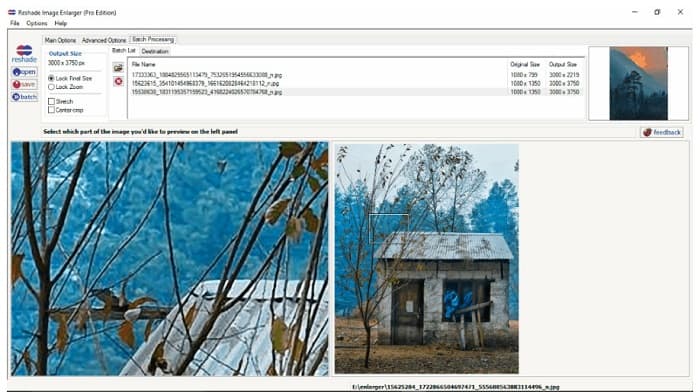
Reshade Image Enlarger è un’app per ingrandire le foto che puoi scaricare se vuoi ampliare o migliorare le tue immagini. Reshade Image Enlarger è anche un ingranditore di immagini basato su AI, perché migliora automaticamente l’immagine usando la sua tecnologia di intelligenza artificiale. Inoltre, questo strumento ingrandisce l’immagine impostando la larghezza e l’altezza personalizzate che preferisci, abilitando funzioni di ritaglio, riduzione del rumore, diminuzione degli artefatti e altro ancora. Ancora più interessante, le opzioni avanzate di questa applicazione ti permettono di controllare la compressione JPEG, la fedeltà di elaborazione e la morbidezza delle sfumature nell’immagine in uscita. Per usare la funzione di elaborazione in batch, vai alla scheda Batch Processing.
Professionisti
- Puoi scaricarlo su tutte le piattaforme multimediali, inclusi Windows e Mac.
- Ha un processo di ingrandimento batch.
- Ha funzionalità avanzate da utilizzare.
Contro
- Ha un'interfaccia utente difficile da usare.
Un ridimensionamento più nitido
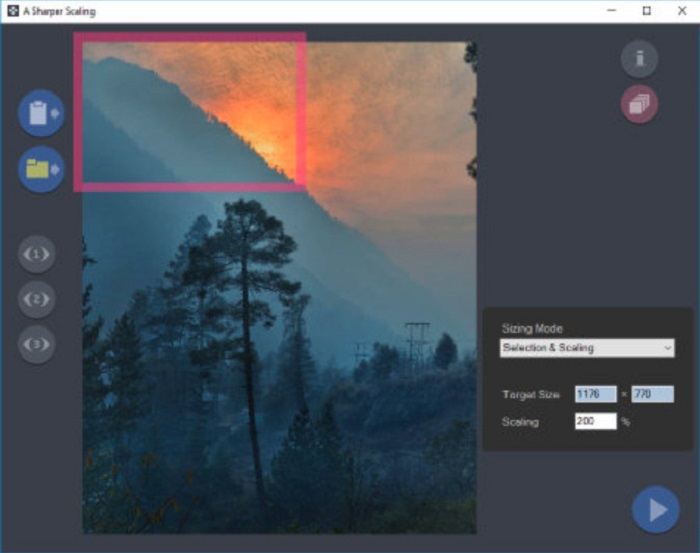
Un altro ingranditore di foto che merita di essere provato è l’app A Sharper Scaling. Questo software è uno strumento eccellente se vuoi ridimensionare le tue immagini. Sebbene sia un po’ più avanzato rispetto ad altri strumenti offline presentati sopra, riesce comunque a offrire ottimi risultati. Inoltre, A Sharper Scaling ingrandisce una porzione dell’immagine e la rende più nitida senza aggiungere rumore, così la foto avrà un aspetto definito e pulito. È notevole anche la sua capacità di elaborare rapidamente in batch più immagini, ingrandendole senza perdita di qualità. Inoltre, possiede un’interfaccia facile da usare, il che lo rende adatto anche ai principianti. Pertanto, se vuoi ridimensionare velocemente le tue immagini, A Sharper Scaling sarà sicuramente d’aiuto.
Professionisti
- È possibile selezionare le modalità per ingrandire l'immagine.
- Può ingrandire molte immagini contemporaneamente
- Supporta i formati di file standard, come PNG, JPG e JPEG.
Contro
- Ha alcune opzioni di modifica da utilizzare.
- Ha un lento processo di esportazione.
Kneson Imagener
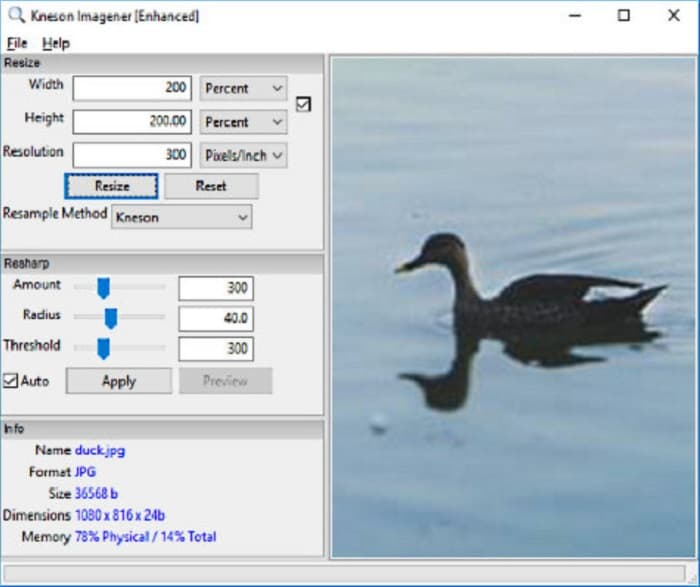
Kneson Imagener rientra anch’esso tra i migliori photo enlarger per PC. Questa ottima applicazione è gratuita e può essere scaricata su quasi tutte le principali piattaforme. Inoltre, ti consente di ingrandire le immagini in base alla percentuale, ai pixel, ai pollici o ai centimetri. Puoi anche modificare la risoluzione per migliorarne la qualità. Puoi usare questo strumento anche se vuoi ridurre le dimensioni dell’immagine per risparmiare spazio sul dispositivo.
Inoltre, ecco i metodi di ricampionamento disponibili che puoi utilizzare per ingrandire la tua immagine: Normale, Bilineare, Bicubico, Kenson e Kenson Progressive. Ma tieni presente che se desideri scaricare questa applicazione software, devi registrare un ID e-mail funzionante sul suo sito Web per una newsletter. Successivamente, riceverai un link per il download sulla tua e-mail in cui puoi scaricare completamente l'app.
Professionisti
- Ha una funzione di ritaglio.
- Puoi regolare la quantità, il raggio e la soglia di nitidezza dell'immagine.
- Ha una semplice interfaccia utente.
Contro
- Devi iscriverti a un'e-mail funzionante per scaricarlo.
Correlato a:
I 7 migliori Pixel Enhancer per tutti i browser web da utilizzare
Le migliori app Photo Resizer online, offline, per Android e iPhone
Parte 3. Domande frequenti sulle app di ingrandimento delle foto
Posso ridurre le dimensioni della mia immagine?
Sì. Regolando la risoluzione, i pixel e il formato dell'immagine. La risoluzione, i pixel e il formato dell'immagine ne determinano le dimensioni. Quindi, se vuoi comprimere le dimensioni della tua immagine, usa uno strumento di compressione delle foto.
Posso ingrandire la mia foto in Adobe Photoshop?
Adobe Photoshop è l'ideale per molti professionisti perché puoi ingrandire la tua immagine senza perdita di dati e con una qualità eccellente. Tuttavia, molte persone hanno difficoltà a utilizzare questo strumento per ingrandire una foto perché ha un'interfaccia difficile da usare.
Kapwing Photo Resizer è un'app eccellente per ingrandire le immagini?
Kapwing Photo Resizer è un ingranditore di immagini online gratuito consigliato da molte persone. È anche un'ottima app per migliorare o ingrandire la tua immagine senza perdita di dati.
Conclusione
Tutti questi photo enlarger presentati sopra sono tra i più eccellenti strumenti di ingrandimento immagini che puoi trovare su Internet. Inoltre, ti assicuriamo che le applicazioni menzionate sono sicure da usare e che tutte le descrizioni sono accurate. Tuttavia, se preferisci usare uno strumento gratuito e online, ti consigliamo il miglior ingranditore di immagini online, FVC Free Image Upscaler.
-
 Ripristino di vecchie foto online e offline [semplici passaggi]
 Vuoi ripristinare una vecchia foto? Con questi strumenti, conoscerai il vecchio processo di restauro delle foto. Leggi questo post per imparare i metodi più semplici.
-
 Come correggere la qualità dell'immagine online e su Adobe Photoshop
 Se hai un'immagine di bassa qualità, devi correggere la risoluzione della tua foto. Se vuoi imparare come correggere la qualità dell'immagine, leggi questo articolo per intero.
-
 I migliori 7 pixel Enhancer per tutti i browser Web che devi utilizzare
 Se vuoi conoscere i migliori potenziatori di pixel da utilizzare, è meglio che tu dai un'occhiata a questo post. Questo articolo elenca i sette migliori ottimizzatori di pixel fotografici per tutti i browser web.
