


 Video Converter Ultimate
 Screen Recorder
 Riparazione video
 Download sicuro
Rimuovere professionalmente la filigrana Shootproof con questi strumenti fantastici
Shootproof è una galleria fotografica per clienti e un sito web di portfolio. Se cerchi immagini meravigliose online, Shootproof può aiutarti. Questo sito offre una quantità di splendide foto prodotte dai venditori. Shootproof è un noto servizio di condivisione di gallerie per fotografi. Inoltre, consente ai fotografi di creare un negozio online per le proprie foto. Tuttavia, molti venditori aggiungono filigrane alle loro immagini affinché altri non possano appropriarsene facilmente. Quindi, se sei uno degli utenti che sta cercando come rimuovere la filigrana di Shootproof, continua a leggere questo articolo.

Parte 1. 2 Metodi su come rimuovere la filigrana a prova di tiro senza sforzo
Rimuovere la filigrana Shootproof non è difficile se si dispone di un dispositivo di rimozione filigrana adatto. E per aiutarti a scegliere il miglior dispositivo di rimozione della filigrana, abbiamo cercato online il dispositivo di rimozione della filigrana gratuito più utilizzato. Per conoscere questo strumento, leggi questa parte in modo completo.
Rimozione filigrana senza FVC
FVC Free Watermark Remover è tra i più conosciuti strumenti online per rimuovere filigrane. Questa applicazione web è gratuita e sicura da usare. Inoltre è accessibile da tutti i browser, come Google, Firefox e Safari. Supporta i formati immagine standard, tra cui PNG, JPEG, JPG, BMP e altri. Nella funzione di rimozione della filigrana, puoi scegliere tra diversi strumenti di selezione per rimuovere la filigrana dalla tua immagine.
Inoltre, molti principianti possono utilizzare questo solvente per filigrane perché è facile da usare. Inoltre, quando esporti l'immagine, avrà il formato file originale. Questo strumento inoltre non richiede l'accesso o la registrazione.
Come rimuovere la filigrana Shootproof usando FVC Free Watermark Remover:
Passaggio 1. Innanzitutto, apri il browser e cerca FVC Free Watermark Remover nella barra di ricerca.
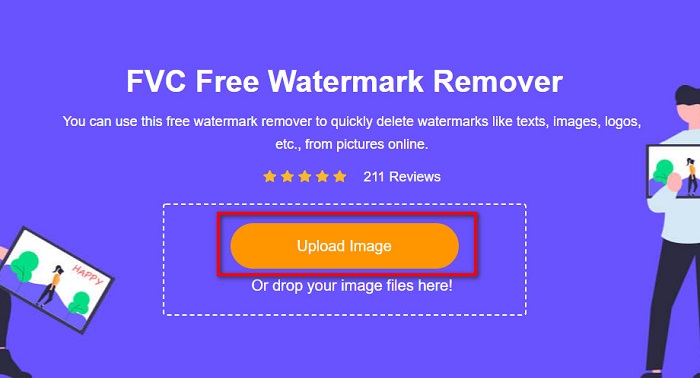
Passaggio 2. Poi, fai clic sul pulsante Upload Image nell’interfaccia principale per caricare l’immagine da cui vuoi rimuovere la filigrana.
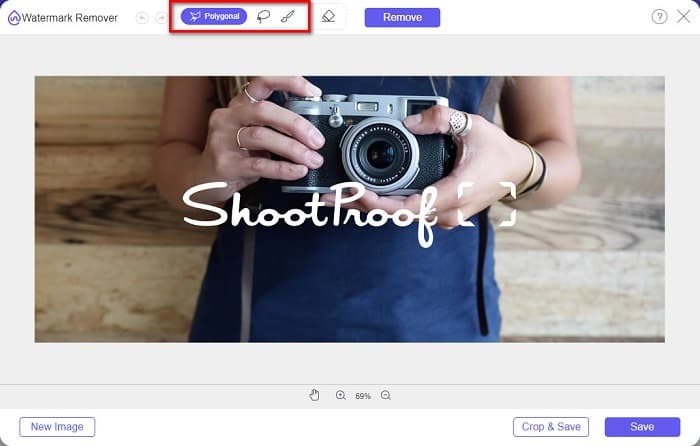
Passaggio 3. Successivamente, scegli lo strumento di selezione che desideri usare per rimuovere la filigrana dalla tua immagine. Puoi scegliere tra Polygonal, Lasso e Brush.
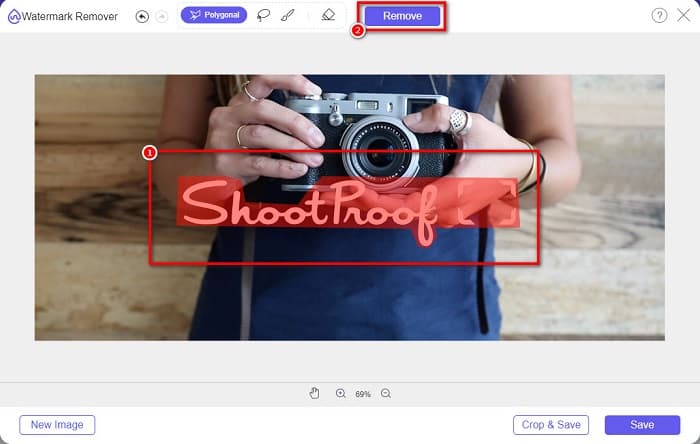
Passaggio 4. Quindi, traccia l’area della filigrana sulla tua immagine. Poi fai clic sul pulsante Remove una volta selezionata. Vedrai che la filigrana è scomparsa.
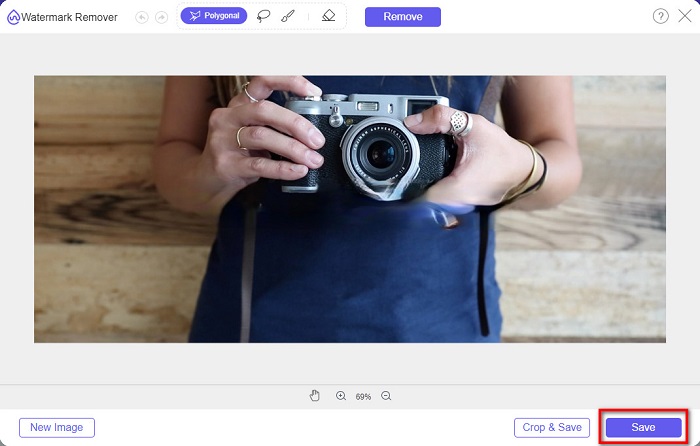
Passaggio 5. Infine, fai clic sul pulsante Save per salvare il risultato sul tuo dispositivo. E questo è tutto! Con questi semplici passaggi puoi ottenere un’immagine Shootproof senza filigrana.
Apowersoft Rimozione filigrana online
Apowersoft Online Watermark Remover è una nota app online per rimuovere qualsiasi filigrana dalle tue immagini. È un’applicazione web facile da usare perché dispone di un’interfaccia intuitiva. Inoltre supporta i principali formati immagine standard, come PNG e JPG. Non devi nemmeno preoccuparti della sicurezza dei tuoi file, perché questo strumento online è sicuro da usare. Dispone anche di una funzione con cui puoi rimuovere le filigrane dai video. Tuttavia, se la tua connessione internet è lenta, potresti riscontrare lentezza nel caricamento e nell’esportazione.
Come rimuovere la filigrana Shootproof utilizzando Apowersoft Online Watermark Remover:
Passaggio 1. Cerca Apowersoft Online Watermark Remover nel tuo browser, quindi vai alla pagina principale. Nell’interfaccia principale fai clic sull’opzione Remove Watermark From Image.
Passaggio 2. Poi, nella schermata successiva, vedrai una watermark remover box e la posizionerai sull’area della filigrana.
Passaggio 3. Per rimuovere la filigrana dalla tua immagine, fai clic sul pulsante Erase.
Parte 2. Suggerimenti sull'utilizzo della funzione di filigrana a prova di tiro
Utilizzando la funzione filigrana di Shootproof, puoi aggiungere e rimuovere filigrane sull'immagine. Se vuoi impedire ad altri utenti di possedere la tua foto, puoi aggiungere del testo all'immagine che funge da filigrana.
Come aggiungere una filigrana su Shootproof:
Passaggio 1. Vai su Photos, quindi fai clic sull’opzione Watermarks.
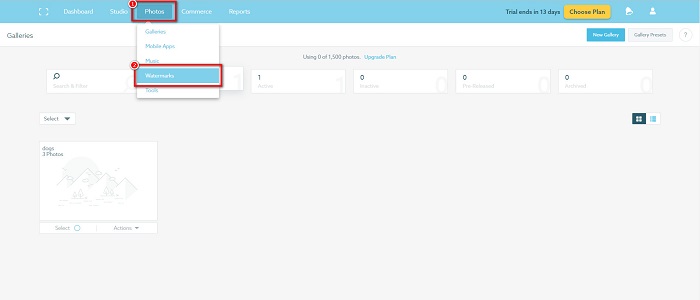
Passaggio 2. Quindi scegli tra una filigrana text o image.
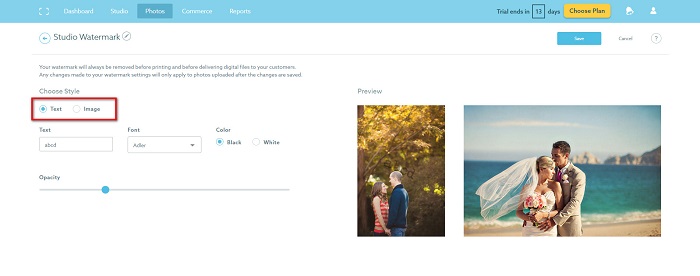
Se desideri utilizzare la filigrana dell'immagine, ti consigliamo di caricare un file PNG ad alta risoluzione con uno sfondo trasparente. Puoi anche usare file JPG.
Passaggio 3. Successivamente, regola le Watermark Settings. Nelle impostazioni della filigrana puoi selezionare la posizione della filigrana sulla tua foto. Puoi anche regolare la dimensione e l’opacità della filigrana.
Passaggio 4. Infine, fai clic sul pulsante Save per applicare le impostazioni che hai configurato.
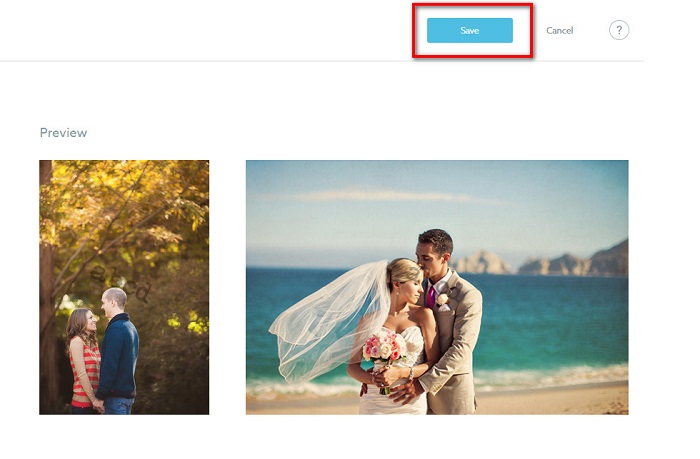
Applica una filigrana alle immagini che carichi.
Nella pagina Filigrana, puoi scegliere una filigrana predefinita. Puoi anche attivare le filigrane per tutti i tuoi caricamenti futuri. Puoi cambiarlo prima di caricare nuove immagini.
E quando carichi nuove foto nella tua galleria tramite l'uploader basato sul Web o Desktop Uploader, puoi selezionare la filigrana che desideri utilizzare nella schermata di caricamento.
Come rimuovere la filigrana in Shootproof
Ricorda sempre che la modifica o l'aggiunta di una filigrana esistente influirà solo sui tuoi caricamenti futuri. Le modifiche che hai apportato non influiranno sulle immagini già presenti nella tua galleria. Ma se vuoi cambiare la filigrana o rimuovere la filigrana Shootproof, puoi aggiornare la filigrana per aggiornarla nella tua galleria. Ecco come rimuovere o modificare la filigrana Shootproof.
Passaggio 1. Vai su Photos > Galleries, quindi fai clic sulla tua galleria.
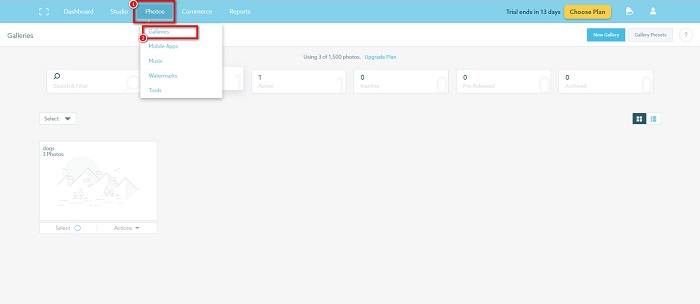
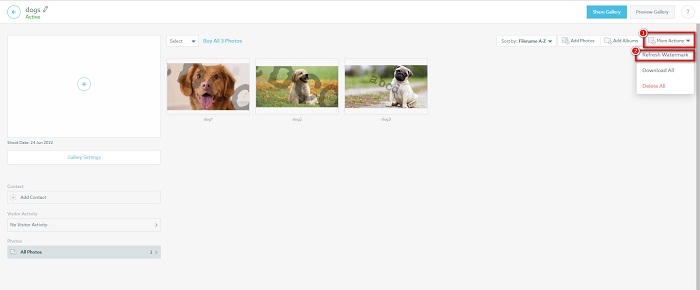
Passaggio 2. Nella galleria, fai clic sul pulsante More Actions nell’angolo in alto a destra dell’interfaccia.
Passaggio 3. Quindi seleziona Refresh Watermark per rimuovere le filigrane da ogni immagine che carichi.
Passaggio 4. Per rimuovere la filigrana, disattiva la barra di scorrimento. E se vuoi solo cambiare la filigrana, seleziona New Watermark.
Passaggio 5. Infine, fai clic su Apply Change per salvare le modifiche effettuate.
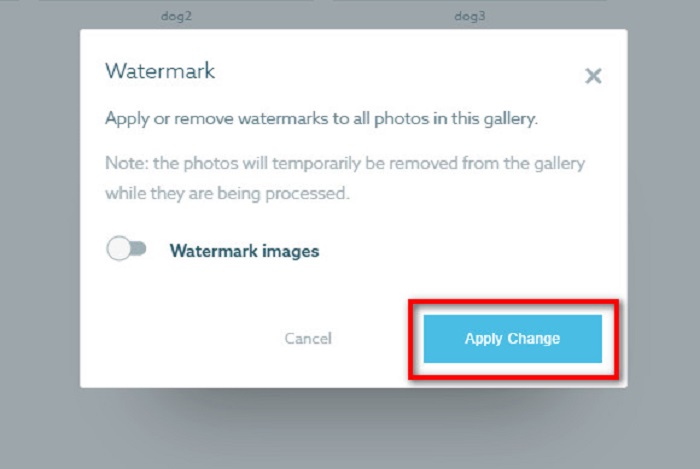
Vedrai che le foto verranno visualizzate automaticamente come elaborazione. Quando le modifiche verranno applicate, vedrai che le immagini torneranno nella tua galleria.
Correlato a:
Straordinari Arnold Maya Watermark Removers da non perdere
123rf Watermark Removers – Recensione approfondita degli strumenti definitivi
Parte 3. Domande frequenti su Shootproof Remove Watermark
Puoi rimuovere le filigrane digitali?
Rimuovere le filigrane digitali invisibili è difficile. Ad esempio, quelli incorporati dal plug-in Digimarc Photoshop sono difficili da rimuovere. Il ritaglio, il ridimensionamento, l'aggiunta di disturbo e la sfocatura moderata potrebbero non funzionare con le filigrane digitali.
Puoi rimuovere una filigrana del logo da un video?
Sì. È possibile rimuovere una filigrana del logo sul tuo video. Molti strumenti per la rimozione di filigrane ti consentono di rimuovere i loghi dai tuoi video. Se vuoi rimuovere un logo sul tuo video, usa Video Converter Ultimate.
Shootproof mostra se fai uno screenshot?
Shootproof adotta diverse misure per proteggere le foto del venditore. Tuttavia, Shootproof non può impedire alle persone di acquisire screenshot della tua immagine nella tua galleria.
Conclusione
E questo è tutto! Seguendo i metodi sopra menzionati, ora puoi rimuovere la filigrana di Shootproof dalla tua immagine. Sebbene rimuovere la filigrana su Shootproof sia gratuito, la procedura può risultare piuttosto complicata. Quindi, se vuoi rimuovere facilmente la filigrana di Shootproof dalla tua immagine, usa FVC Free Watermark Remover.
-
 Eccezionale rimozione di filigrane Photobucket online e offline
 Scopri come rimuovere la filigrana Photobucket dalle tue foto usando questo straordinario dispositivo di rimozione della filigrana Photobucket. Leggi questo articolo per imparare i modi.
-
 Rimuovi facilmente la filigrana dal PDF con semplici passaggi
 Rimuovi la filigrana dal PDF seguendo questi semplici passaggi. Scopri come rimuovere facilmente le filigrane dal tuo file PDF utilizzando questi fantastici strumenti.
-
 Semplici modi per rimuovere la filigrana dalle immagini di laurea
 Vuoi conoscere i modi migliori per rimuovere le filigrane dalle foto di laurea? Leggendo questo articolo, sarai in grado di sapere come rimuovere facilmente le filigrane sulle foto dei laureati.
