


 Video Converter Ultimate
 Screen Recorder
 Riparazione video
Scopri come convertire AMV in MOV senza degradare la qualità
AMV è un formato video proprietario utilizzato per archiviare riproduzioni video sui lettori multimediali S1 MP3 e MP4. Questa estensione di file .amv è a bassa risoluzione ed è compressa per poter mantenere il file su questo lettore multimediale portatile. Sebbene il formato esista ancora, è difficile trovare un lettore multimediale compatibile per il telefono, perché questo formato è obsoleto. Invece di cercare un lettore compatibile, perché non convertire i file AMV in un nuovo formato ampiamente supportato come il MOV? Quindi, se vuoi conoscere il modo migliore per convertire AMV in MOV, iniziamo l’analisi.

Parte 1. Breve introduzione su AMV e MOV
L'idea di Action Media Video o AMV è quella di sostituire MP4 come formato universale perché questo formato è migliore e molto più compresso. Inoltre, questo formato è la versione migliore del formato AVI. Ma il formato è stato ignorato durante questa nuova era perché non riceve alcun aggiornamento per migliorare la qualità della risoluzione. E ora, se memorizzi questo formato sui nostri dispositivi mobili e lo riproduci, aspettati di non poterlo riprodurre perché il formato non è supportato. Quindi, se vuoi riprodurre un video in questo formato, devi scaricare un lettore multimediale di terze parti per AMV. Sebbene MOV, questo formato ottiene molto supporto perché è il formato di file nativo sviluppato da QuickTime.
Parte 2. Converti AMV in MOV con il software desktop definitivo
FVC Video Converter Ultimate
Converti AMV in MOV con l’aiuto di questo convertitore video professionale che produce risultati straordinari, senza rivali: FVC Video Converter Ultimate. Questo convertitore è disponibile su PC e Mac, e su entrambe le piattaforme offre le stesse funzioni avanzate. Inoltre, la conversione rapida e l’accelerazione hardware disponibili su PC sono presenti anche su Mac. Molti utenti hanno già scelto questo software come prima scelta per risolvere i loro problemi di conversione. Inoltre, prima di poter usare questo strumento, dovrai acquistarlo dal sito FVC. Sebbene sia a pagamento, non dovrai spendere centinaia di dollari e il prezzo sarà adeguato al valore offerto. Senza ulteriori indugi, mettiamo alla prova questo strumento per vedere se possiamo ottenere la conversione “ultimate”, come promesso dal nome.
Passaggi su come convertire AMV in MOV con FVC Video Converter Ultimate:
Passaggio 1. Scarica FVC Video Converter Ultimate sul desktop facendo clic sul pulsante qui sotto; installa il software al termine del download.
Download gratuitoPer Windows 7 o versioni successiveDownload sicuro
Download gratuitoPer MacOS 10.7 o versioni successiveDownload sicuro
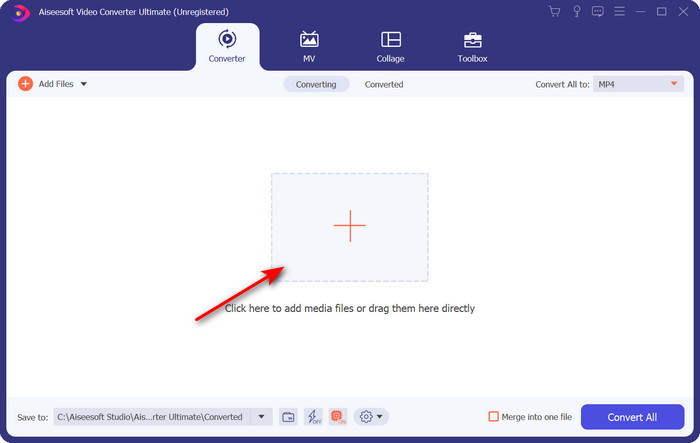
Passaggio 2. Apri il software per utilizzarlo e, per caricare il file .amv, fai clic sul segno +. Cerca il file nella cartella e premi Apri per inserirlo.
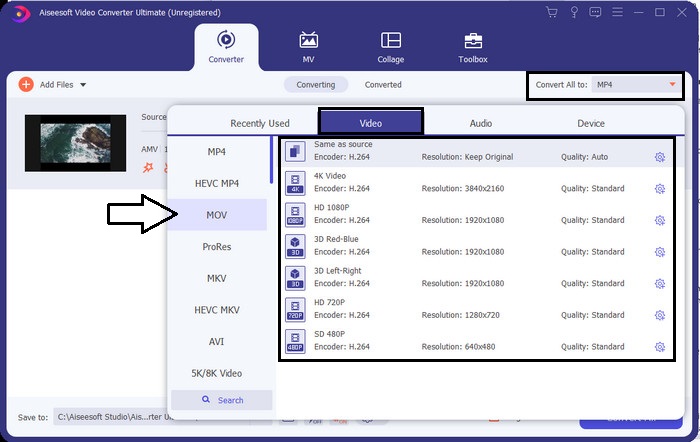
Passaggio 3. Per cambiare il formato in MOV, fai clic su Converti tutti in: e scegli MOV o un altro formato a tua scelta.
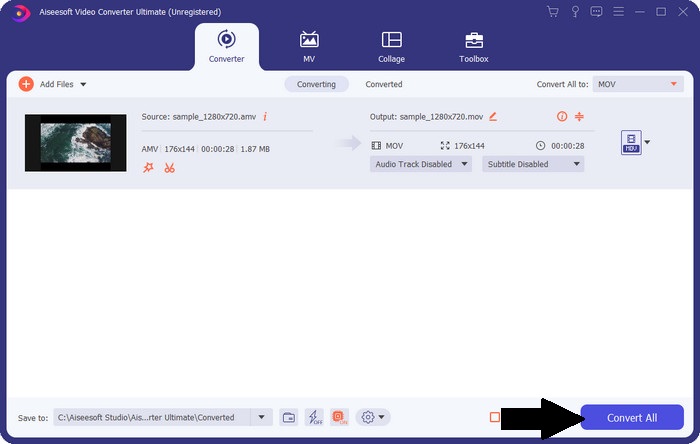
Passaggio 4. Per trasformare il file AMV in MOV, fai clic su Converti tutti per avviare il processo di conversione.
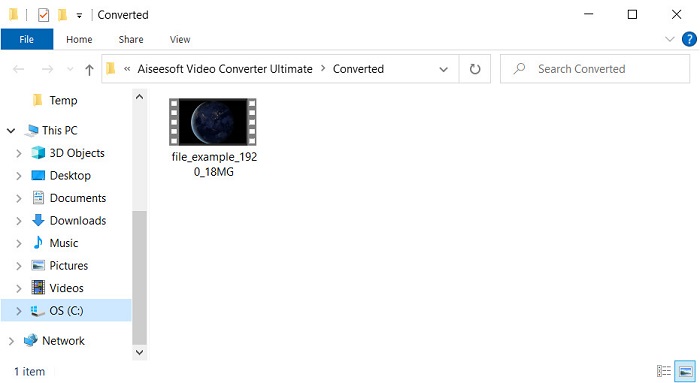
Passaggio 5. La conversione del file richiederà solo pochi secondi. Attendi quindi che si apra la cartella con il file .mov che hai appena creato; fai clic sul file per guardarlo con il tuo lettore multimediale predefinito.
Parte 3. Converti AMV in MOV con il convertitore di servizi online 2 disponibile
1. Converti file
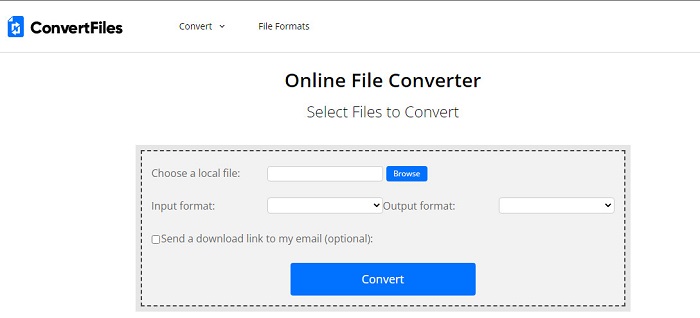
Uno dei migliori convertitori online a cui puoi accedere dal tuo browser preferito è ConvertFiles. Questo strumento online può convertire il tuo file in un nuovo formato senza alcuna difficoltà. Inoltre, questo strumento supporta un piccolo insieme di formati tra cui puoi scegliere. Tuttavia, il download del file convertito richiede molto tempo, perché non offre una conversione rapida. Un altro aspetto negativo è la pubblicità: ce n’è molta nell’interfaccia. Nonostante i problemi con il processo di download e con gli annunci, questo strumento funziona bene come soluzione online gratuita.
Passaggi su come convertire AMV in MOV con ConvertFiles:
Passaggio 1. Apri il tuo browser preferito e cerca ConvertFiles.
Passaggio 2. Una volta aperto il sito web, fai clic su Browse per individuare il file nella cartella; in Output Format, trova MOV e fai clic su Convert.
Passaggio 3. Quando la conversione è terminata, fai clic sul collegamento evidenziato in blu per scaricare il file sul computer.
2. Convertitore
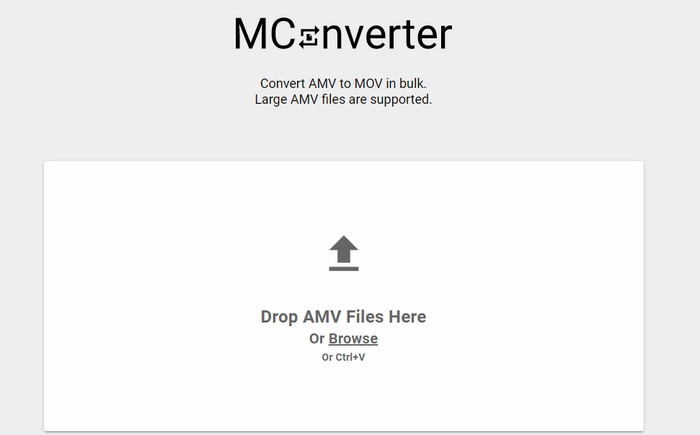
Non vuoi pubblicità sull’interfaccia per poter convertire AMV in MOV in tutta tranquillità? Allora prova a usare MConverter, disponibile sul tuo browser. Inoltre, questo strumento supporta la conversione in batch per rendere il processo efficiente, proprio come FVC Video Converter Ultimate. Tuttavia, lo svantaggio di questo strumento online è che non puoi superare la dimensione di file di 200 MB. Quindi, se vuoi convertire un video lungo e la dimensione del file supera il limite supportato, questo non è lo strumento adatto. Ma se vuoi un’esperienza di conversione migliore rispetto a ConvertFiles, segui i passaggi qui sotto.
Passaggi su come convertire AMV in MOV con MConverter:
Passaggio 1. Cerca MConverter con il tuo motore di ricerca e aprilo.
Passaggio 2. Fai clic sul pulsante Upload per inserire il file, attendi un momento che lo strumento web carichi, cerca MOV e fai clic su di esso. La conversione del file inizierà dopo che avrai selezionato il formato MOV.
Passaggio 3. Premi Download All per salvare il file.
Parte 4. Domande frequenti su AMV e MOV
Posso trasformare il mio MP4 in AMV?
Puoi convertire i tuoi MP4 in AMV per trasferire rapidamente i file online. Soprattutto se il video dura un’ora, ti suggeriamo di convertire i file .mp4 in .amv, perché le dimensioni sono decisamente inferiori rispetto all’altro formato.
VLC supporta AMV?
Per fortuna puoi usare VLC Media Player per riprodurre i file .amv su questo lettore multimediale, anche se è ormai datato. Ma sapevi che esistono lettori multimediali che superano questo programma? Se vuoi sapere quali sono, fai clic su questo link per scoprire i 5 lettori multimediali alternativi a VLC.
Come faccio a trasformare il mio AMV in AVI?
AMV è una versione migliorata di AVI; tuttavia, se parliamo di qualità, AVI offre prestazioni straordinarie rispetto a questo vecchio formato. Inoltre, AVI è altamente compatibile con tutte le piattaforme. Quindi, se vuoi guardare i tuoi AMV in una versione migliore e su tutte le piattaforme, devi imparare come convertire AMV in AVI.
Conclusione
La discussione deve finire qui; anche se vogliamo archiviare un file AMV sul nostro disco, il problema di compatibilità è uno dei motivi per cui dobbiamo convertirlo. Dopotutto, si dice che AMV fosse popolare prima a causa del modo in cui questo contenitore comprime il file. Tuttavia, oggi devi considerare di convertirlo in un nuovo formato per usarlo ancora. Inoltre, le soluzioni fornite qui convertono efficacemente. Tuttavia, FVC Video Converter Ultimate ha prestazioni fenomenali rispetto agli altri due strumenti. Quindi, se vuoi provare lo strumento migliore, è necessario scaricarlo sul tuo computer e copiare i passaggi forniti sopra.
-
 4 migliori metodi per convertire facilmente MOV in MP3 su Windows e Mac
 Quando si desidera estrarre i file audio MP3 dai file MOV, è possibile ottenere ulteriori informazioni sui 4 convertitori da MOV a MP3 più efficienti per ottenere i file desiderati dall'articolo.
-
 MKV to MOV - Come convertire MKV in MOV
 Come posso convertire MKV in MOV su Mac? IMovie può leggere MKV? Cosa significa formato MOV? Questo post spiega 2 semplici modi per aiutarti a convertire MKV in MOV con convertitori video online e professionali gratuiti.
-
 FLV in MOV - Come convertire FLV in MOV su Mac / PC / online gratuitamente
 Come convertire FLV in MOV? Come posso convertire FLV in MOV su Mac? C'è un modo gratuito per convertire YouTube FLV in MOV online? Questo post condivide 3 convertitori FLV in MOV per cambiare i file FLV in MOV.
