


 Video Converter Ultimate
 Screen Recorder
 Riparazione video
Come convertire MOV in MKV gratuitamente online e offline su Mac
Hai difficoltà a riprodurre i file MOV con VLC Media Player? VLC Media Player riconosce a fatica i file MOV. Pertanto, è necessario convertire il file MOV in un formato che VLC Media Player possa riprodurre nativamente, ovvero il file MKV. Fortunatamente, abbiamo trovato i migliori e più semplici converter per trasformare il tuo file MOV in formato MKV. Se vuoi saperne di più sulla conversione da MOV a MKV gratis, leggi questo articolo per maggiori dettagli.

Parte 1. Conversione da MOV a MKV utilizzando FVC Video Converter Ultimate su Mac
FVC Video Converter Ultimate è un convertitore offline disponibile su Mac. Questo convertitore di file è uno dei migliori disponibili sul Web. Ti consente di convertire numerosi formati di file, tra cui MOV, MKV, AVI, MP4, M4V, WMV, VOB e oltre 1000 altri. E se vuoi creare un video 3D, questo convertitore offre anche questa funzione. Inoltre, questo strumento offre una conversione ultra‑rapida che può convertire MOV in MKV su Mac in un lampo.
Ecco i passaggi per convertire il tuo file MOV in MKV usando FVC Video Converter Ultimate:
Passaggio 1. Sul tuo Mac, scarica FVC Video Converter Ultimate facendo clic sul pulsante Download qui sotto per macOS. Quindi apri l’applicazione.
Download gratuitoPer Windows 7 o versioni successiveDownload sicuro
Download gratuitoPer MacOS 10.7 o versioni successiveDownload sicuro
Passaggio 2. Dopo aver aperto l’applicazione, fai clic sul pulsante Add Files o sul pulsante con il segno +. Appariranno così i file del tuo computer, dai quali selezionerai il tuo file MOV. Il tuo file verrà quindi caricato sull’interfaccia principale del software.
Scarica la Versione Desktop per convertire i file in batch.
Passaggio 3. Dopo aver caricato il file MOV, fai clic sul pulsante Convert All to per selezionare il formato di output. Quindi fai clic sul formato MKV.
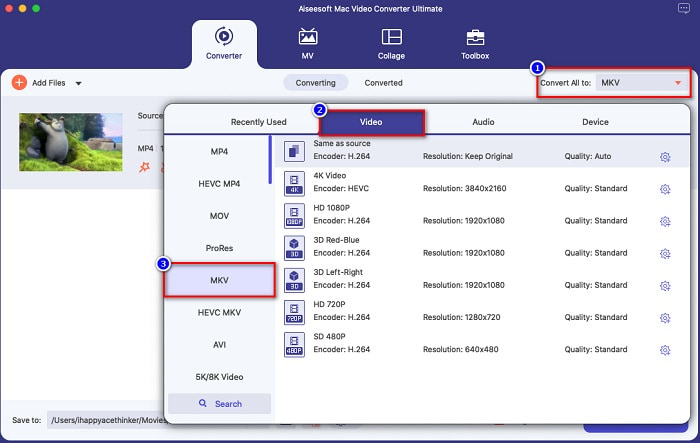
Passaggio 4. Per concludere, fai clic sul pulsante Convert All, così inizierà la conversione del tuo file da MOV a MKV. Attendi qualche secondo ed è fatto!
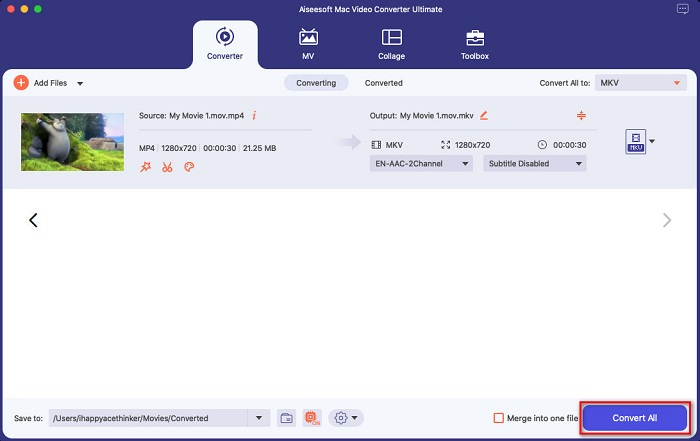
Puoi convertire facilmente MOV in MKV su Mac seguendo questi semplici e facili passaggi.
Professionisti
- Può convertire formati video 4K, 1080P e 720P.
- Offre la conversione batch per unire più file in uno,
- Supporta oltre 1000+ formati di file disponibili sul web.
- Ha una funzione per modificare, migliorare e comprimere i tuoi file.
Contro
- Per utilizzare le sue caratteristiche speciali, devi prima acquistarlo.
Parte 2. Conversione da MOV a MKV utilizzando strumenti online e gratuiti
Usa il convertitore video online gratuito FVC [Online]
Quando cerchi converter da MOV a MKV nel browser, nella pagina dei risultati di ricerca vedrai un elenco di converter online. Qui ti presentiamo il miglior convertitore gratuito da MOV a MKV, FVC Free Online Video Converter. Questo convertitore online può trasformare molti formati di file standard disponibili su Internet. È anche facile da usare, così i principianti non avranno difficoltà a utilizzarlo. Tuttavia, poiché è uno strumento che dipende da Internet, a volte potresti riscontrare un processo di conversione lento. Ciononostante, è considerato uno dei migliori converter online e più comodi presenti sul Web.
Come usare FVC Free Online Video Converter:
Passaggio 1. Cerca FVC Free Online Video Converter nel tuo browser oppure fai clic su questo link per andare direttamente alla sua pagina web.
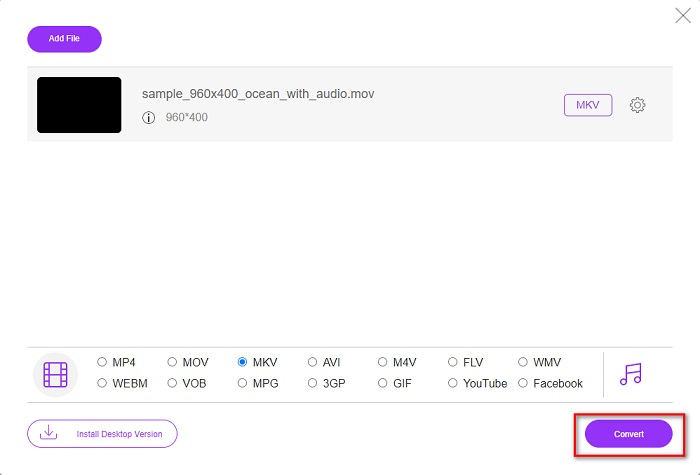
Passaggio 2. Avvia l’applicazione web, quindi fai clic sul pulsante Add Files to Convert. Appariranno quindi le cartelle del desktop, dove potrai selezionare il tuo file MOV.
Scarica la Versione Desktop per convertire i file in batch.
Passaggio 3. Dopo che il file è stato caricato, scegli il formato di output situato sotto la seconda interfaccia del software. Fai clic sul formato file MKV.
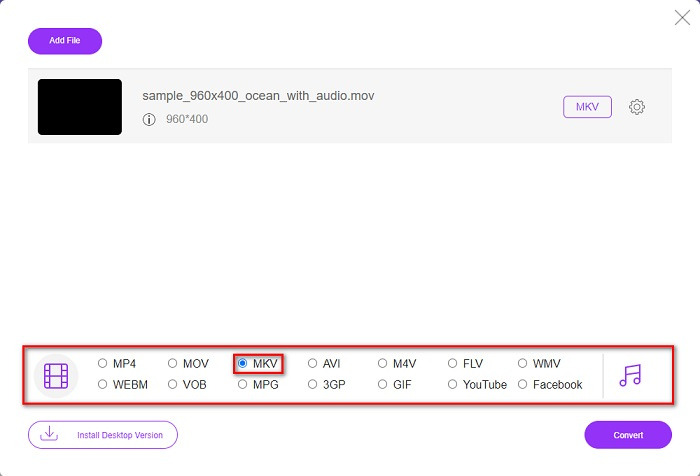
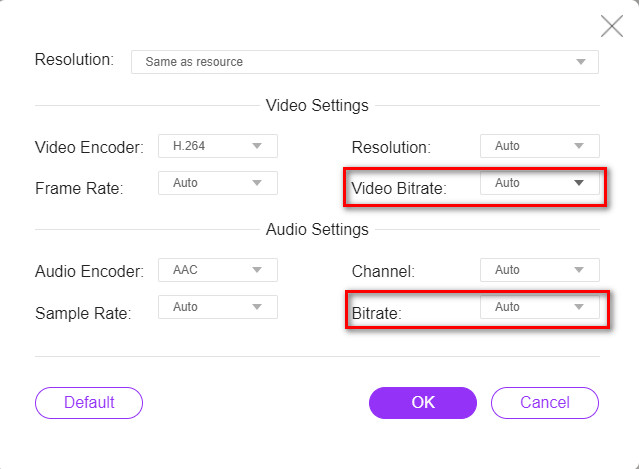
Opzionale. Se vuoi modificare il bitrate video e audio del tuo file, fai clic sul pulsante Setting accanto al riquadro del formato di output. Poi modifica il bitrate video o audio come desideri. Fai quindi clic sul pulsante OK per salvare le modifiche.
Passaggio 4. Per iniziare a convertire il tuo MOV in un file MKV, fai clic sul pulsante Convert. Quindi attendi il completamento del processo di conversione.
Usa HandBrake [Freeware]
Se vuoi convertire MOV in MKV usando un freeware, questo strumento potrebbe essere la soluzione per te. HandBrake è un convertitore freeware che ti consente di convertire quasi tutti i formati di file standard in MKV, MP4 e WebM. Questo convertitore è fantastico perché ti permette di eseguire una scansione in batch dei tuoi file MOV. Tuttavia, ha un’interfaccia difficile da usare, quindi potresti dover dedicare un po’ di tempo a comprendere i suoi controlli e le sue funzioni.
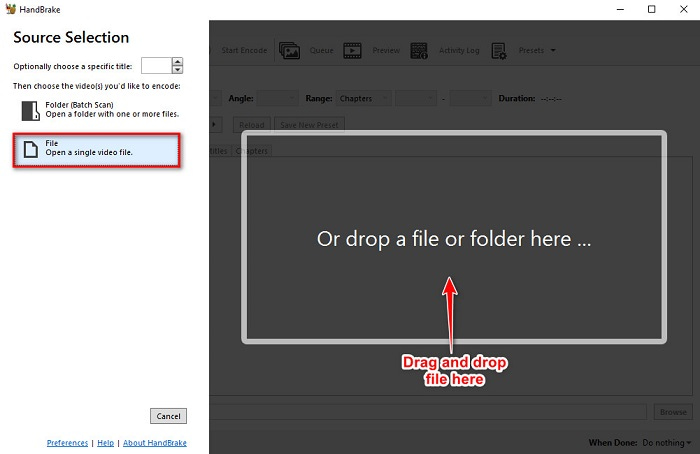
Passaggio 1. Scarica gratuitamente HandBrake cercandolo nel tuo browser, quindi apri l’app. Fai clic sul pulsante File per caricare il tuo file MOV. Oppure puoi trascinare e rilasciare il file nel riquadro rettangolare.
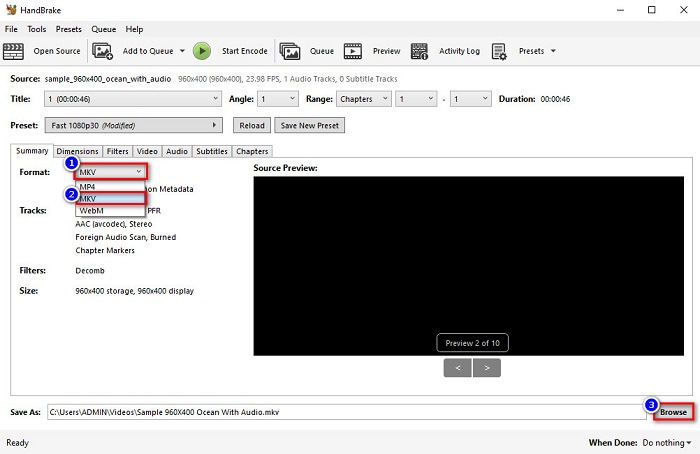
Passaggio 2. Poi seleziona MKV come formato di output dal pulsante drop‑down. Quindi fai clic sul pulsante Browse per scegliere la cartella di destinazione del file di output.
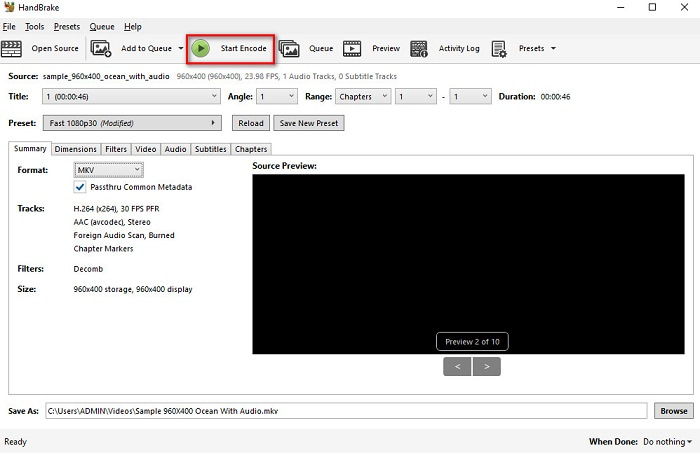
Passaggio 3. Infine, fai clic sul pulsante Start Encode affinché il tuo file MOV venga convertito in MKV.
Ed è così che puoi convertire MOV in MKV usando un convertitore online e freeware.
Parte 3. Differenze tra MOV e MKV
Il file MOV è un formato multimediale sviluppato da Apple ed è uno dei formati di file più comuni presenti in ogni dispositivo o software Apple. Inoltre, questo file può contenere film, brevi clip video e persino programmi TV. Questo tipo di formato è ampiamente supportato dal lettore multimediale QuickTime. Inoltre, questo file offre una delle migliori qualità in rapporto alle dimensioni. Se il tuo lettore QuickTime non riesce ad aprire i video MOV, fai clic qui per trovare le soluzioni.
D'altra parte, un file MKV o un file Matroska è un contenitore di file multimediali che memorizza dati di tracce audio, video e sottotitoli. Questo tipo di file non sarà obsoleto perché è realizzato per essere a prova di futuro. Inoltre, questo formato può gestire più flussi di sottotitoli e tracce audio in varie lingue.
MOV contro MKV
Il formato MOV può essere utilizzato per memorizzare un film, un programma TV, un breve video clip o un filmato amatoriale. In realtà viene salvato nel formato QuickTime File Format (QTFF), introdotto da Apple nel 1991. I file MOV vengono spesso utilizzati quando le persone vogliono salvare un video di alta qualità.
Il formato contenitore multimediale Matroska, rilasciato nel 2002, è un formato open source che può includere numerose tracce video, audio, immagini e sottotitoli. Quindi, puoi usarlo per archiviare facilmente brevi video clip, programmi TV e film. È abbastanza popolare per i sottotitoli dei fan degli anime.
Parte 4. Domande frequenti sulla conversione di MOV in MKV
Puoi riprodurre file MKV usando QuickTime Player?
Purtroppo non puoi riprodurre un file MKV nei lettori multimediali QuickTime, perché QuickTime non supporta i file MKV. Ma se vuoi riprodurre un file MKV sul tuo Mac, puoi convertire MKV in MOV. Fai clic su questo link per saperne di più sulla conversione da MKV a MOV.
Puoi convertire MOV in MKV senza perdite?
Assolutamente sì. Usando FVC Video Converter Ultimate puoi convertire il tuo file MOV in MKV senza perdita di qualità.
MOV è meglio di MKV?
Se sei un utente mac, scoprirai che MOV è migliore dei file MKV semplicemente perché MOV è un file ampiamente supportato da macOS. Tuttavia, se sei un utente Windows, il file MKV potrebbe essere una scelta migliore per te.
Conclusione
Quindi, se vuoi convertire il tuo file MOV in MKV, usa i modi presentati sopra. Tutti i convertitori gratuiti da MOV a MKV hanno caratteristiche distinte l'uno contro l'altro. Inoltre, se stai cercando un convertitore con molte fantastiche funzionalità in grado di convertire in batch, modificare i tuoi video MOV e molte cose straordinarie che altri convertitori non possono fornire, usa FVC Video Converter Ultimate. Scaricalo ora gratuitamente.
-
 2 semplici modi per convertire i file MOV in FLV su Windows/Mac
 Come convertire gratuitamente MOV in FLV? Ecco i migliori convertitori video su desktop e online per convertire il tuo file MOV in FLV in pochi secondi senza pagare un centesimo.
-
 MOV in GIF – Come convertire MOV in GIF animate su Mac, PC e online gratuitamente
 Che cos'è una GIF? Come convertire video in GIF? Come cambiare MOV in GIF animate online? Questo post indica 3 modi per convertire MOV in GIF online, su Mac/PC.
-
 4 modi efficienti per convertire MOV in AVI su PC e Mac [2021]
 Vuoi sapere qual è il miglior convertitore da MOV a AVI sul web? E perché FVC Ultimate Video Converter potrebbe essere quello che fa per te.

