


 Video Converter Ultimate
 Screen Recorder
 Riparazione video
Linee guida da seguire per convertire MXF in MOV con alta qualità
MXF sta per Material Exchange Format. OMF è un formato di file aperto che consente lo scambio di materiale audiovisivo e dei relativi dati e metadati. Il design iniziale di MXF è stato definito da un gruppo di importanti aziende nel settore Broadcast e della Produzione Digitale. L’obiettivo di MXF è standardizzare i formati di file, facilitare la compatibilità tra diversi fornitori di hardware e software ed eliminare, alla lunga, la necessità del nastro. Se stai cercando un convertitore adatto per trasformare il MXF in MOV, ecco alcune opzioni tra cui scegliere quella più adatta a te.

Parte 1. Una panoramica: MXF e MOV
MXF è un’ottima scelta sia per l’acquisizione che per la distribuzione. Tuttavia, l’uso della compressione inter-frame non è ideale per la produzione cinematografica. La decompressione della compressione inter-frame richiede più tempo, poiché molti metodi necessitano di informazioni sub-pixel per una precisione fotogramma per fotogramma in AE. Quando si utilizza la compressione inter-frame, durante la decompressione è necessario ricostruire alcuni fotogrammi, ed è qui che After Effects incontra difficoltà.
L’estensione di file MOV rappresenta invece il formato video QuickTime di Apple. Questo contenitore multimediale può anche memorizzare più tracce con dati diversi (audio, video, sottotitoli). Funzioni come la separazione dei dati multimediali dagli offset, i riferimenti ai dati astratti e le liste di modifica delle tracce lo rendono ideale per il montaggio video. Il contenitore video MOV è anche ampiamente utilizzato per la distribuzione di video online.
Parte 2. Metodi eccellenti da utilizzare per convertire MXF in MOV
Utilizzando il più recente e potente software chiamato Video Converter Ultimate, ora puoi convertire MXF in MOV offline in un’ampia varietà di formati che possono essere ripristinati. Con questo software puoi convertire MXF in MOV in modo più veloce rispetto ad altri convertitori. La qualità del video può anche essere modificata prima della conversione. Puoi inoltre migliorare il tuo file video sfruttando le varie funzioni del convertitore. Usando questa app, non dovrai più preoccuparti di convertire formati video incompatibili con quello che preferisci. Dopo aver conosciuto il miglior convertitore, ecco cosa devi fare:
Passaggio 1. Clicca sul pulsante Download gratuito qui sotto per iniziare il download! Una volta completato, puoi scegliere se installare il software su Windows o Mac. Devi prima installare il software sul desktop del tuo computer e poi cliccare su Start Now per iniziare a usarlo.
Download gratuitoPer Windows 7 o versioni successiveDownload sicuro
Download gratuitoPer MacOS 10.7 o versioni successiveDownload sicuro
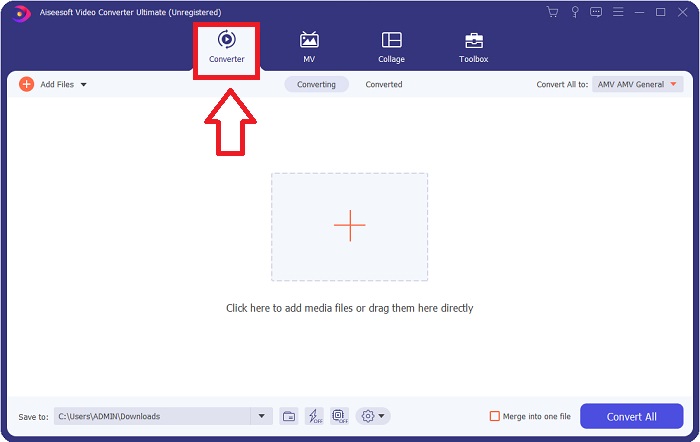
Passaggio 2. Avvia il programma scaricato cliccando sul relativo pulsante. L’interfaccia Converter verrà visualizzata non appena avvierai il software per la prima volta. Qui inizierai il processo di transcodifica del tuo video.
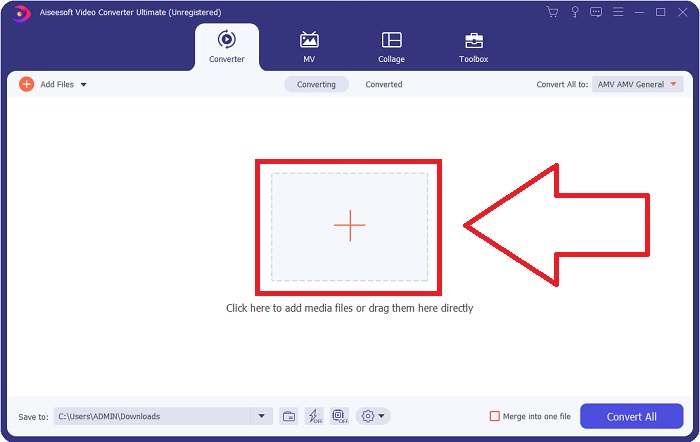
Passaggio 3. Inizia il processo di conversione importando i tuoi file nel convertitore. Il file video che desideri convertire può essere trascinato e rilasciato sull’icona +.
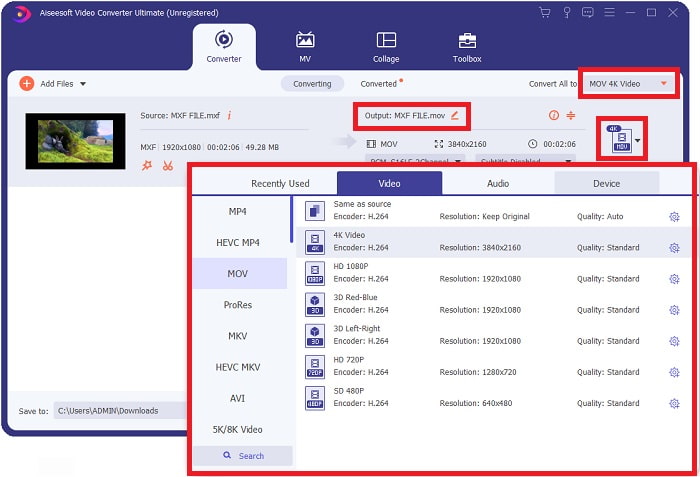
Passaggio 4. Quindi seleziona il formato MOV dal menu a tendina di Converti tutti in. Una volta scelto il file MOV, avrai accesso a diverse opzioni di qualità video. Se tuttavia il tipo di output che desideri non è presente nell’elenco, puoi modificare le impostazioni di qualità in base alle tue esigenze. Selezionando l’icona a forma di ingranaggio, puoi regolare la risoluzione, il frame rate e persino la qualità audio. Clicca sul pulsante Crea nuovo per salvare le modifiche.
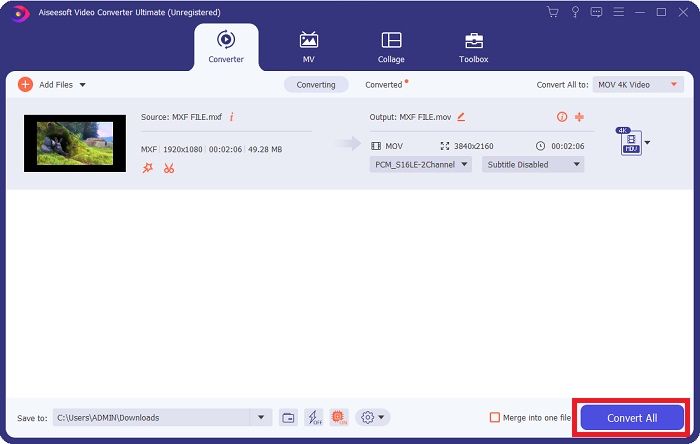
Passaggio 5. Convertire il tuo video è semplice come cliccare su Converti tutto quando hai terminato di modificarne qualità, risoluzione, frame rate, ecc.
Parte 3. Un altro consiglio per convertire MXF in MOV [Online]
Usare il Free Video Converter Online è il modo migliore per convertire in breve tempo una vasta gamma di formati video. A differenza di altri convertitori online, questo strumento non ha praticamente restrizioni sui formati che può accettare. Per questo motivo è un’ottima opzione per alcuni principianti. Ecco i passaggi da seguire per scoprire come funziona questo strumento web online.
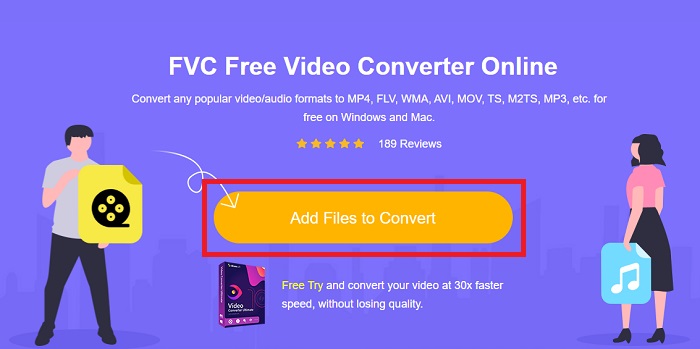
Passaggio 1. Accedi alla home page del convertitore FVC cliccando su questo link.
Passaggio 2. Per ottenere il launcher per il tuo computer, clicca sul pulsante Add Files to Convert se è la prima volta che utilizzi lo strumento. Non appena verrà riscaricato, si avvierà di nuovo automaticamente. Apri il file dalla cartella dei download selezionandolo e cliccando su Open.
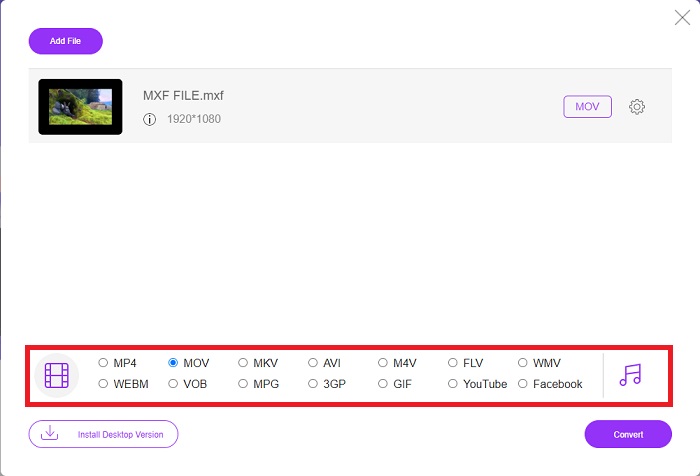
Passaggio 3. Dopo aver selezionato il formato MOV che desideri utilizzare, cliccaci sopra per avviare il processo di conversione.
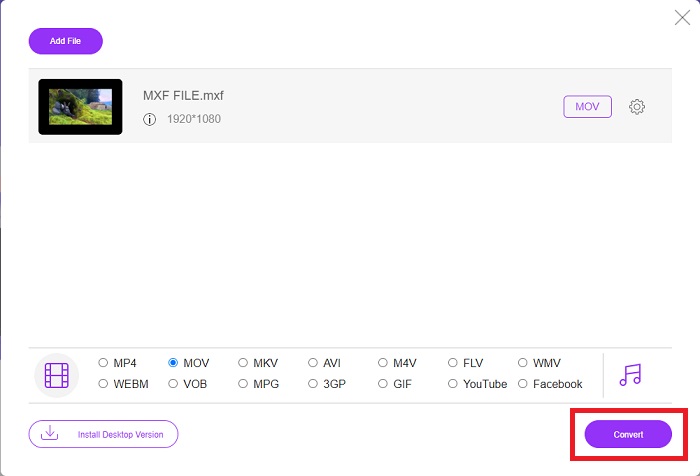
Passaggio 4. Puoi avviare la conversione cliccando sul pulsante Convert dopo aver selezionato il formato MOV.
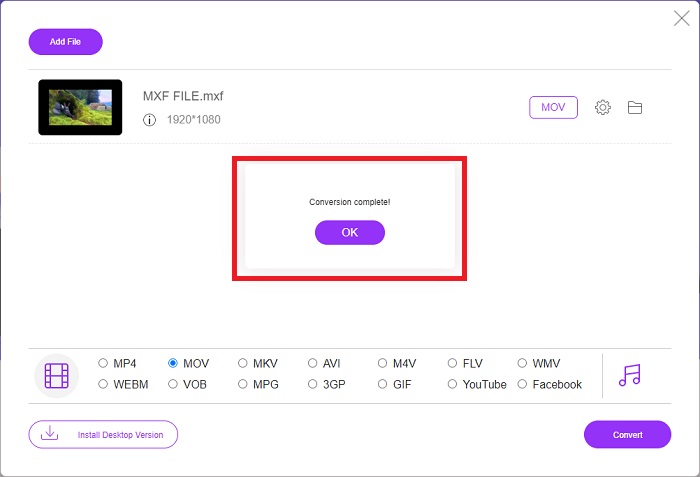
Passaggio 5. Nel giro di pochi minuti, quando il file convertito apparirà in una cartella sul desktop del tuo computer, potrai iniziare a guardarlo semplicemente cliccandoci sopra.
Parte 4. Domande frequenti sulla conversione da MXF a MOV
MXF è uguale a MOV?
Anche nel mondo digitale questo è un problema. Il formato di scambio dei materiali e il formato video QuickTime rientrano entrambi nel termine generico "formati contenitore". Quando un programma video supporta un determinato formato contenitore, può utilizzare strumenti standard per manipolare i contenitori, come l'apertura del file, la ricerca di un momento specifico e la riproduzione o l'avanzamento rapido o il riavvolgimento, utilizzando standard e librerie comunemente disponibili. Non sono necessari un nuovo formato di file o nuove librerie per la manipolazione dei media.
Il MOV è grezzo?
Quando si lavora con video RAW, i tipi di file più comuni sono AVI (. avi) e MOV (. mov); poiché si tratta di video non compressi, le dimensioni dei file possono essere estremamente grandi, fino a un gigabyte o più, a seconda della lunghezza e della qualità del video.
Che cos'è il file MXF Pro Tools?
Utilizzando le funzionalità Quicktime di Pro Tools, SoundCode Exchange MXF può scambiare file MXF. Pro Tools può visualizzare i file MXF come filmati Quicktime grazie a un componente Quicktime e un'utilità di trascinamento della selezione. È possibile creare una traccia video in pochi secondi utilizzando la funzione Quicktime Import di Pro Tools, in grado di riprodurre file MXF ad alta definizione o definizione standard. Usando una scheda video Blackmagic, ora puoi vedere il metraggio come una finestra in Pro Tools o inviarlo a uno schermo esterno. Allo stesso tempo, le tracce audio MXF possono essere importate come file WAV per l'editing e il missaggio in Pro Tools.
Conclusione
In conclusione, hai a disposizione un’ampia gamma di opzioni, sia che tu utilizzi un software sia che tu scelga un servizio web per convertire i tuoi video da un formato all’altro. Tuttavia, in termini di possibilità o comodità offerte, questi strumenti si completano a vicenda. Alcuni si limitano a svolgere il lavoro di base, mentre altri offrono numerose funzioni aggiuntive. Questo articolo si concentra su questi aspetti per aiutarti a decidere quale utilizzare in base alla tua situazione. Poiché non si sa mai quando potresti aver bisogno di funzioni extra come il reverse, il miglioramento, la fusione, ecc., consigliamo soprattutto Video Converter Ultimate. Invece di cercare continuamente un convertitore online, puoi mantenere questo software sempre installato sul tuo computer.
-
 4 modi gratuiti per convertire Camcorder MXF in MP4 per la riproduzione universale
 Questo post è la guida dettagliata per convertire MXF in MP4 su computer. Puoi ottenere 4 convertitori gratuiti da MXF a MP4 per transcodificare la videocamera da MXF a MP4 in semplici passaggi.
-
 I 4 migliori convertitori MXF per convertire MXF in AVI [gratuito ea pagamento]
 Che cos'è un file MXF? Come convertire MXF in AVI? Queste sono le poche domande a cui rispondiamo. Quindi, se hai la stessa domanda, leggi questo articolo.
-
 Come convertire AVI in MOV con semplici passaggi e strumenti
 Vuoi sapere come convertire AVI in un MOV riproducibile? Devi seguire questo articolo per sapere come farlo e suggerimenti per avere una conversione di successo.
