


 Video Converter Ultimate
 Screen Recorder
 Riparazione video
 Download sicuro
Converti AAC in MP3 e viceversa con i migliori strumenti per tutte le piattaforme
I file audio sono diventati una componente essenziale della società moderna. Dipendiamo da vari tipi di file audio, come musica, podcast, audiolibri e memo vocali, per scopi di intrattenimento, istruzione e comunicazione. Data l'abbondanza di formati audio esistenti, può rivelarsi difficile individuare un file che sia universalmente compatibile con tutti i nostri dispositivi. AAC e MP3 sono due formati di compressione audio comunemente usati.
Questo post illustrerà il processo di conversione da AAC a MP3 e da MP3 ad AAC, consentendo l’ottimizzazione dei file audio per adattarli a vari dispositivi e piattaforme. Includerà un’analisi approfondita dei vantaggi di ciascun formato, degli strumenti più efficaci per la conversione e delle linee guida complete per facilitare l’ottimizzazione dei tuoi file audio. Se hai bisogno di comprimere i file per risparmiare spazio o migliorarne la compatibilità, continua a leggere.

Parte 1. Confronto tra AAC e MP3
Per avere una decisione informata su quale formato prendere o meno, ecco una tabella comparativa che ti aiuterà.
| AAC | MP3 | |
| Qualità | Qualità generalmente migliore rispetto a MP3 a bitrate inferiori | Qualità inferiore a AAC a bitrate inferiori |
| Dimensione del file | File di dimensioni inferiori rispetto a MP3 con lo stesso bitrate | File di dimensioni maggiori rispetto ad AAC con lo stesso bitrate |
| Intervallo di velocità in bit | In genere varia da 8 a 230 kbps | In genere varia da 8 a 320 kbps |
| Compatibilità | Ampiamente supportato sulla maggior parte dei dispositivi e software moderni | Ampiamente supportato sulla maggior parte dei dispositivi e software, ma alcuni dispositivi meno recenti potrebbero non supportare |
| Frequenza di campionamento | Solitamente varia da 8 a 96 kHz | Solitamente varia da 8 a 48 kHz |
Parte 2. Guida per convertire AAC in MP3 o MP3 in AAC su Windows e Mac
1. Convertitore video FVC Ultimate
Il FVC Video Converter Ultimate è un software potente e facile da usare progettato per la conversione video. Ti permette di convertire sia file video che audio in molteplici formati. Inoltre puoi convertire AAC in MP3 e MP3 in AAC, insieme a molti altri formati audio e video, con grande facilità.
Inoltre, fornisce una varietà di funzionalità supplementari, tra cui l'elaborazione in batch, un rapido tasso di conversione e un'interfaccia user-friendly che facilita la facilità d'uso. Inoltre, il software supporta un'ampia gamma di formati di input e output, inclusi i formati audio più diffusi come AAC, MP3, WAV, FLAC e molti altri. Puoi anche personalizzare le impostazioni di conversione, come bitrate, frequenza di campionamento e canali, per ottenere la qualità di output desiderata. Scopri come funziona questo convertitore da AAC a MP3.
Passaggio 1. Scarica il software
Scarica Video Converter Ultimate dal suo sito Web ufficiale selezionando un programma di installazione dalle opzioni fornite. Successivamente, procedere attraverso tutti i prompt per ottenere un'installazione corretta. Procedi con l'esecuzione del programma e conduci un'esplorazione delle sue funzionalità.
Download gratuitoPer Windows 7 o versioni successiveDownload sicuro
Download gratuitoPer MacOS 10.7 o versioni successiveDownload sicuro
Passaggio 2. Carica i file audio
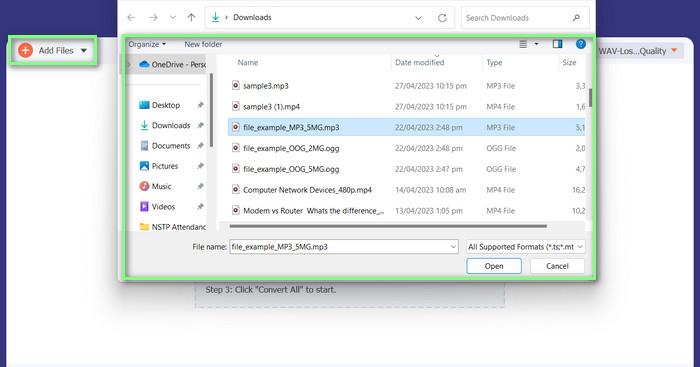
Per caricare un video, tocca Aggiungi file o l’icona con il segno più, quindi trova il file audio nei tuoi file. Per importare il video nel software, fai gentilmente doppio clic su di esso. Un altro modo è trascinare direttamente il video dai tuoi file e rilasciarlo nel programma.
Passaggio 3. Modifica il formato audio e converti
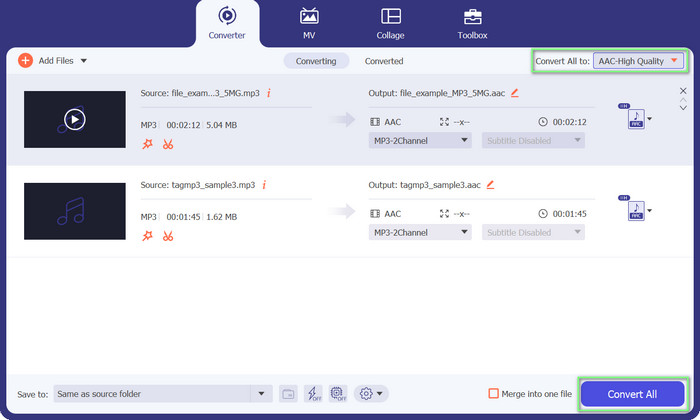
È evidente che il formato del file audio è MP3. Ora lo convertiremo in AAC. Accedi all’opzione Converti tutto situata nell’angolo in alto a destra dell’interfaccia dello strumento. Quindi vai alla scheda Audio e trova il formato AAC. Successivamente, avvia il processo di conversione selezionando l’opzione Converti tutto.
Professionisti
- Ha una conversione batch di file.
- Può modificare il bitrate, la frequenza e il numero di canali di una traccia audio.
- Viene fornito con un editor di metadati di file audio.
Contro
- Supporto limitato per alcuni formati di file più oscuri.
2. Convertitore MP3 online gratuito
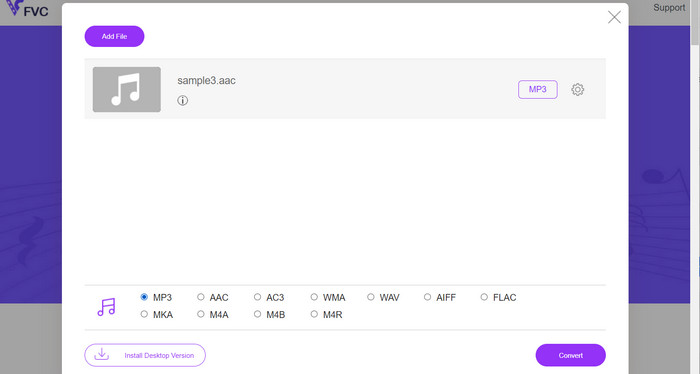
Con il Convertitore MP3 Online Gratuito, puoi convertire i tuoi file audio in vari formati, inclusi quelli più popolari come AAC e MP3. Sappi che puoi effettivamente personalizzare le impostazioni di conversione. Questo significa che puoi regolare bitrate, frequenza di campionamento e canali per ottenere esattamente la qualità di output che desideri. Abbastanza interessante, vero? Inoltre, puoi convertire AAC in MP3 e MP3 in AAC senza spendere soldi per il software, perché è uno strumento gratuito. Hai visto questa guida su come usare questo convertitore da AAC a MP3 online? È facilissimo!
Passaggio 1. Vai alla pagina Free MP3 Converter Online di FVC all’indirizzo https://www.freevideoconverter.online/audio-converter.
Passaggio 2. Seleziona il file AAC che vuoi modificare facendo clic sul pulsante Aggiungi file da convertire. Puoi anche trascinare e rilasciare il file nell’area indicata sulla pagina.
Passaggio 3. Una volta caricato il file, scegli MP3 dal menu a discesa sotto Formato audio come formato in cui desideri che il file venga convertito.
Passaggio 4. In alternativa, puoi fare clic sull’icona Impostazioni per modificare elementi come bitrate, frequenza di campionamento e opzioni dei canali per l’output. Per avviare il processo di conversione, fai clic sul pulsante Converti.
Professionisti
- Supporta vari formati audio di input e output.
- Gratuito da usare.
Contro
- Nessuna funzionalità di editing audio avanzata, come la normalizzazione del volume.
3. FFmpeg
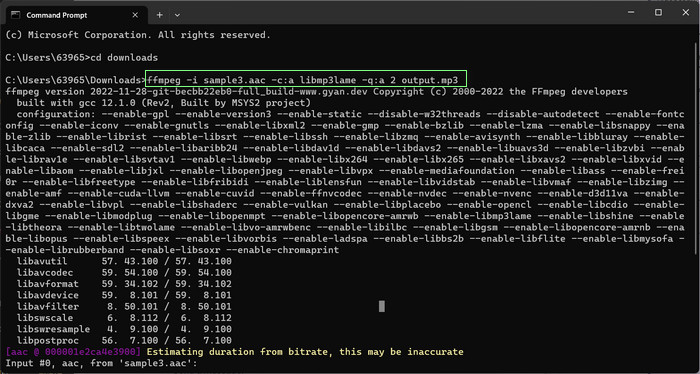
Se ti piace un programma gratuito di conversione da AAC a MP3, non dovresti perderti FFmpeg. Questo strumento è davvero ottimo per l'elaborazione di audio e video. Puoi usarlo per convertire facilmente AAC in MP3 e MP3 in AAC. Ehilà! Se hai dimestichezza con l'utilizzo della riga di comando, ti piacerà quanta flessibilità e personalizzazione puoi ottenere con la conversione audio utilizzando questo strumento. Detto questo, dai un'occhiata al tutorial di conversione da AAC a MP3 FFmpeg qui sotto:
Passaggio 1. Apri un terminale sul tuo computer. Vai alla cartella in cui si trova il file audio di input usando il comando cd.
Passaggio 2. Usa il seguente comando per convertire AAC in MP3: ffmpeg -i input.aac -c:a libmp3lame -q:a 2 output.mp3
Questo comando prenderà il file input.aac e lo convertirà in un file output.mp3 utilizzando il codec libmp3lame, con un'impostazione di qualità pari a 2. È possibile regolare l'impostazione della qualità secondo necessità per ottenere la qualità di output desiderata.
Usa il seguente comando per convertire MP3 in AAC: ffmpeg -i input.mp3 -c: a aac -b: a 128k output.aac
Questo comando prenderà il file input.mp3 e lo convertirà in un file output.aac usando il codec AAC, con un bitrate di 128k. È possibile regolare il bitrate secondo necessità per ottenere la qualità di output desiderata.
Professionisti
- Accessibile a tutti.
- Elevato grado di flessibilità e personalizzazione.
Contro
- Richiede alcune conoscenze tecniche da utilizzare in modo efficace.
4. iTunes
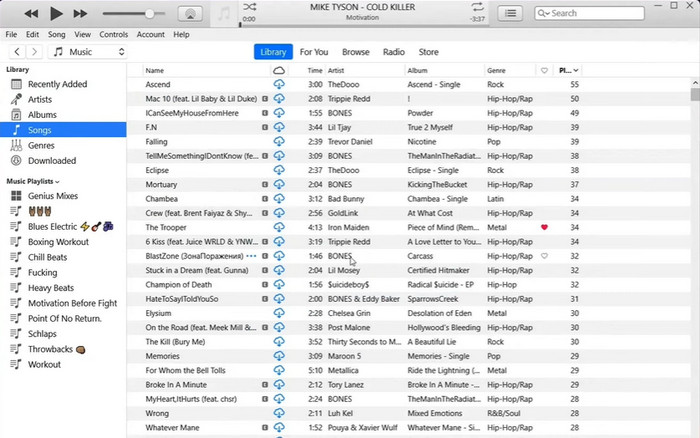
La conversione di file audio da un formato all'altro, come MP3 in AAC e AAC in MP3, è una funzionalità integrata di iTunes. La sua funzione principale è la gestione e la riproduzione della musica, ma può anche essere utilizzata per guardare video e ascoltare podcast e audiolibri.
Passaggio 1. Avvia iTunes sul tuo computer. Quindi seleziona l’opzione Preferenze dal menu Modifica.
Passaggio 2. Per accedere alle Impostazioni di importazione nella finestra Preferenze, vai alla scheda Generale e seleziona il pulsante Impostazioni di importazione.
Passaggio 3. Nella schermata delle Impostazioni di importazione, puoi selezionare l’opzione Codificatore AAC o Codificatore MP3 dal menu a discesa Importa utilizzando, a seconda del formato desiderato per la conversione.
Passaggio 4. Seleziona l’opzione OK per chiudere la finestra Impostazioni di importazione. Scegli dall’elenco di iTunes i file MP3 o AAC che desideri convertire.
Passaggio 5. Per generare una versione AAC/MP3 del file, vai al menu File e scegli l’opzione Converti, quindi seleziona Crea versione AAC/MP3 in base alle tue impostazioni di importazione. È così semplice convertire AAC in MP3 in iTunes.
Professionisti
- Funziona meglio come convertitore da AAC a MP3 su Mac.
- Interfaccia user-friendly.
Contro
- È un software ad alta intensità di risorse.
Parte 3. Come convertire AAC in MP3 o MP3 in AAC su iOS e Android
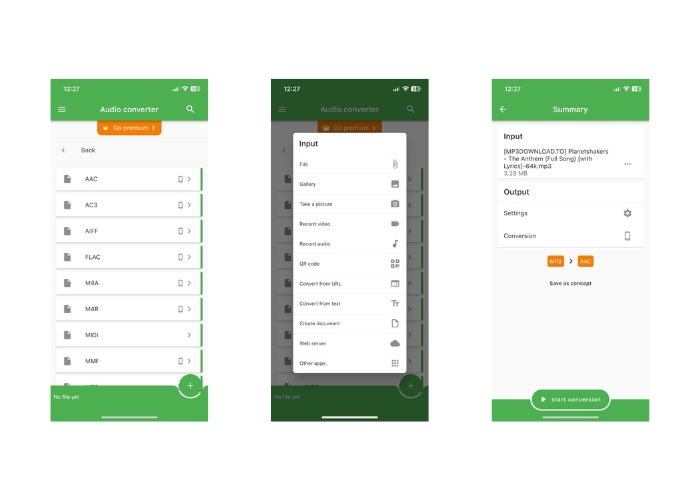
File Converter è accessibile su entrambi i sistemi operativi iOS e Android e facilita la conversione di diversi formati di file audio, come AAC e MP3. Pertanto, se stai cercando un convertitore da AAC a MP3 per Android o iOS, non cercare oltre. Il software offre un'esperienza user-friendly e presenta un'interfaccia semplificata per facilitare la conversione dei file rapida ed efficace.
Passaggio 1. Installa l’app File Converter sul tuo dispositivo iOS o Android.
Passaggio 2. Avvia l’app e seleziona l’opzione Convertitore audio dall’elenco dei tipi di conversione. Quindi seleziona come formato di output AAC dall’elenco delle opzioni disponibili.
Passaggio 3. Se vuoi regolare il bitrate o altre impostazioni di conversione, puoi farlo toccando il pulsante Impostazioni.
Passaggio 4. Dopo aver selezionato il formato di output e le impostazioni, tocca il pulsante avvia conversione per iniziare il processo di conversione.
Ulteriori letture:
Converti FLAC in MP3 per Preservare la Qualità Audio
5 strumenti per tagliare file MP3 e modificare facilmente qualsiasi audio [Aggiornato 2023]
Parte 4. Domande frequenti sulla conversione di MP3 e AAC
È legale convertire file audio protetti da copyright?
Generalmente non è legale convertire file audio protetti da copyright senza l'autorizzazione del detentore del copyright.
Ci sono limitazioni all'utilizzo di strumenti di conversione gratuiti?
Alcuni strumenti di conversione gratuiti potrebbero avere limitazioni sulla dimensione o sul numero di file che puoi convertire e potrebbero anche avere opzioni di personalizzazione limitate.
Posso convertire i file audio in altri formati oltre ad AAC e MP3?
Sì, ci sono molti altri formati di file audio che puoi convertire, inclusi WAV, FLAC, OGG e altri.
Conclusione
La capacità di convertire tra i formati AAC e MP3 può rivelarsi fondamentale in situazioni che coinvolgono diversi lettori multimediali e dispositivi. Esistono numerosi strumenti che possono essere utilizzati per la conversione da AAC a MP3 o da MP3 ad AAC, ciascuno con i propri distinti vantaggi e svantaggi.
-
 5 editor di metadati AAC dedicati che dovresti conoscere [2023]
 Scopri l'editor di metadati AAC più comune che puoi utilizzare disponibile in questo articolo. Tutti gli strumenti sono stati selezionati e rivisti a fondo per fornirti fatti.
-
 Come convertire MP3 in M4A per una migliore qualità del suono
 Migliora la qualità dei tuoi file musicali convertendo MP3 in M4A con i nostri suggerimenti e trucchi degli esperti. La nostra guida offre istruzioni dettagliate e software consigliato.
-
 Eccezionali convertitori da MP3 a AIFF per Windows e Mac
 Questo tutorial ti guiderà attraverso ogni fase della conversione di MP3 in AIFF utilizzando strumenti affidabili. Visitali per saperne di più.
