


 Video Converter Ultimate
 Screen Recorder
 Riparazione video
Scopri i migliori convertitori da video a MP3 su Web, desktop e telefoni cellulari
La musica è una delle migliori forme di intrattenimento che il mondo possa offrirci. Per alimentare il nostro amore per la musica, soprattutto per gli artisti che ascoltiamo ogni giorno. In alcuni casi capita che tu voglia disperatamente ascoltare la tua canzone preferita ma non hai Internet. Nessun problema: puoi salvarti scaricando il video musicale. Tuttavia, la dimensione del file del video musicale che scarichi è molto più grande rispetto al solo file audio. Per risolvere questo problema, analizziamo i diversi strumenti che puoi usare per convertire i video in formato MP3 e risparmiare spazio. Puoi fare affidamento su questo articolo perché fornisce prove solide per risolvere questo caso, quindi mantieni il ritmo e cominciamo.

Parte 1. Miglior convertitore da video a MP3 per Windows e Mac con grafico di confronto
Convertitore MP3 gratuito FVC
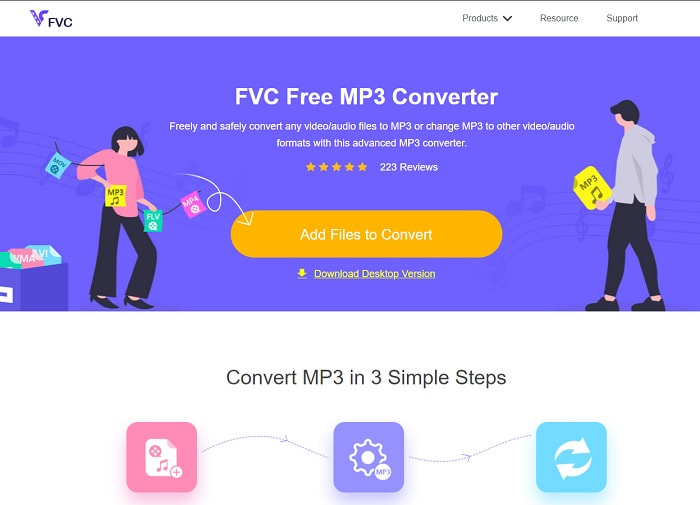
Se stai cercando un convertitore da video a MP3 gratuito, allora FVC Free MP3 Converter fa al caso tuo. Sebbene questo strumento offra molte funzioni simili al convertitore per dispositivi mobili e ad altri convertitori web, resta comunque il re dei convertitori online per la sua funzione di conversione rapida e accurata. Tuttavia questo strumento supporta solo un numero limitato di formati, il che potrebbe ridurre la tua libertà di convertire come desideri. Nonostante ciò, rimane comunque un buon convertitore. Per saperne di più sullo strumento, continua a leggere i passaggi qui sotto su come usarlo.
Passaggio 1. Fai clic sul collegamento ipertestuale sopra che rimanda allo strumento web principale.
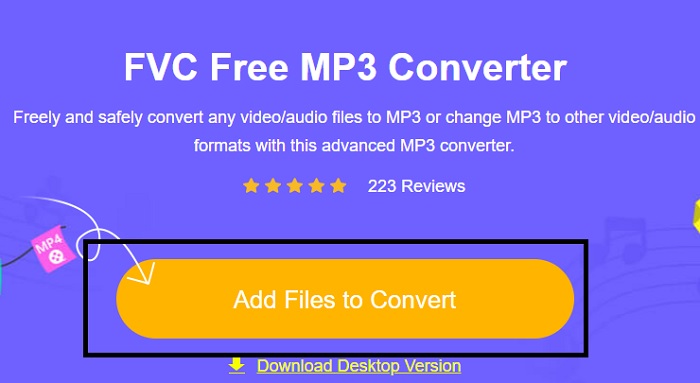
Passaggio 2. Successivamente, fai clic su Add Files to Convert per aprire e avviare lo strumento.
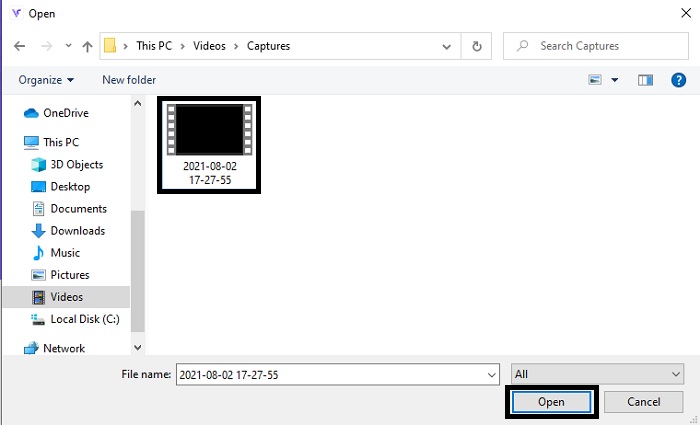
Passaggio 3. Individua il file video che vuoi convertire e fai clic su Open per inserirlo.
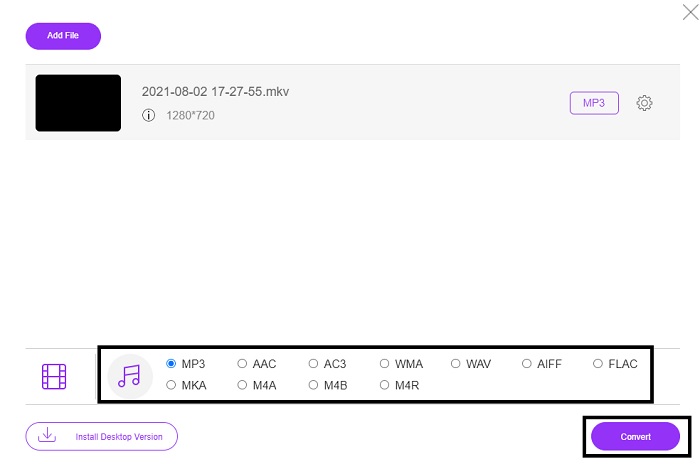
Passaggio 4. Scegli qui il formato audio in cui desideri convertirlo. Quando sei pronto per iniziare la conversione, fai clic su Convert.
Passaggio 5. Se vuoi ascoltare il file convertito, puoi fare clic su questa folder per visualizzare la schermata con il file.
FVC Video Converter Ultimate
Se il primo strumento non ti offre la conversione che desideri, puoi usare FVC Video Converter Ultimate, un convertitore preferito da sempre. Diversamente da qualsiasi convertitore che tu abbia già usato o meno, questo convertitore è unico in tutte le sue funzioni. Si afferma che nulla possa superare questo strumento nella conversione, nel montaggio, nella creazione, nel miglioramento, ecc. Ma forse pensi che questo strumento non sia facile da usare, e ti sbagli. È decisamente semplice da utilizzare e, anche se non sei un professionista della conversione, puoi comunque ottenere un risultato magnifico. Dunque, come detto, vediamo come convertire i video in MP3 con l’aiuto del miglior convertitore che tu possa desiderare.
Passaggio 1. Prima di tutto, scarica questo strumento per desktop sul tuo disco. Modifica la configurazione se vuoi e fai clic su Finish per salvare le modifiche.
Download gratuitoPer Windows 7 o versioni successiveDownload sicuro
Download gratuitoPer MacOS 10.7 o versioni successiveDownload sicuro
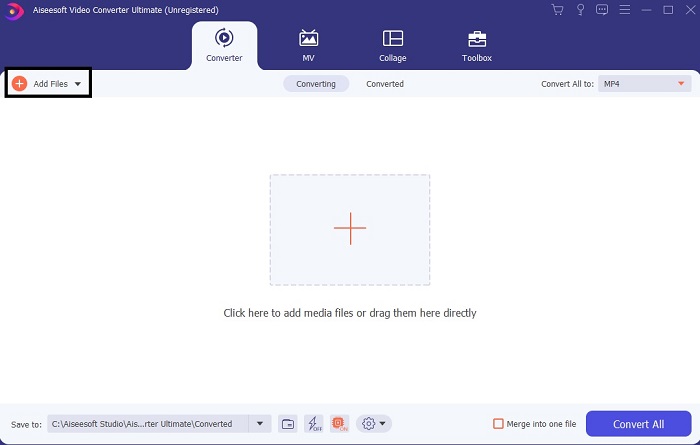
Passaggio 2. Sullo schermo apparirà un’interfaccia come questa. Premi Add Files o il segno più per inserire il file nell’interfaccia.
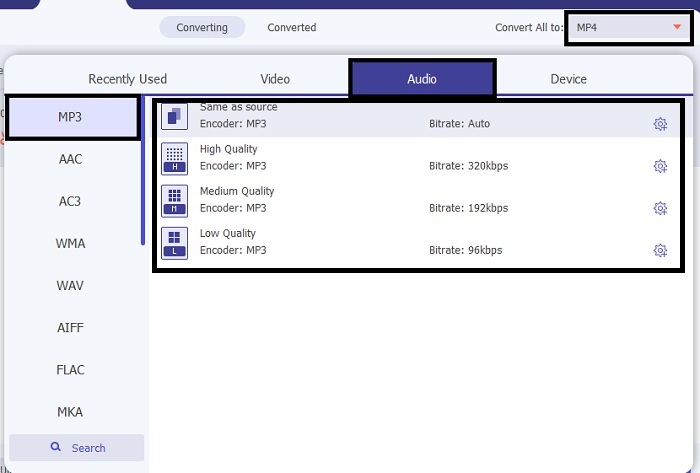
Passaggio 3. Dopo aver scelto il file che vuoi convertire, fai clic sul menu a discesa accanto all’opzione Convert All to e scegli tra più di 500 formati.
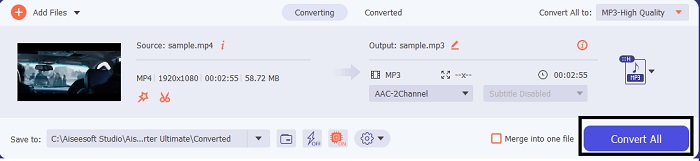
Passaggio 4. Poi fai clic su Convert All per avviare la conversione da video a MP3.
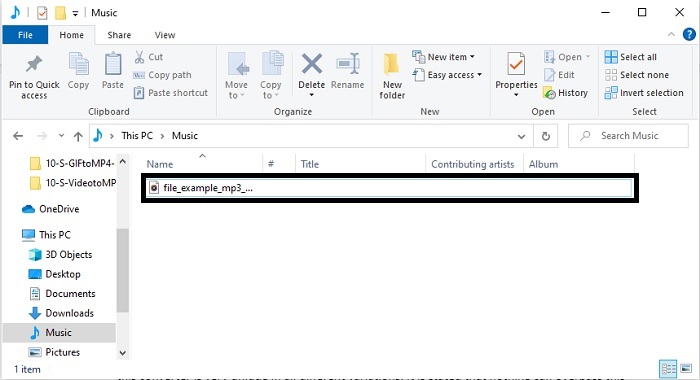
Passaggio 5. Quando tutto è finito, sullo schermo apparirà un file manager. Fai clic sul file che hai convertito per ascoltarlo e godertelo.
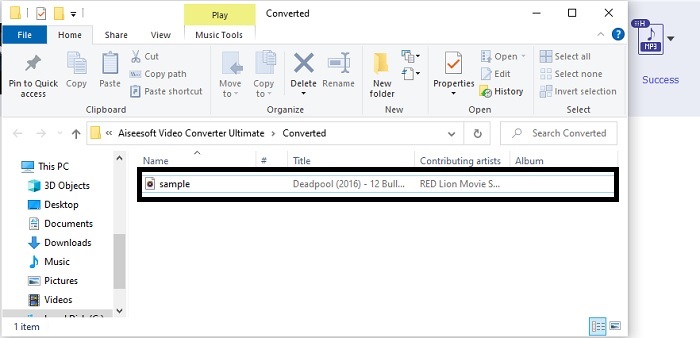
Ulteriori passaggi per potenziare l'audio prima della conversione con l'aiuto di FVC Video Converter Ultimate
Modifica l’audio con una delle funzioni di FVC Video Converter Ultimate. Prima di convertire il file video è meglio migliorare l’audio, così dopo potrai ascoltarlo molto meglio. Per sapere come fare, devi seguire la procedura passo dopo passo per potenziare l’audio con il Volume Booster.
Passaggio 1. Se hai già installato lo strumento, vai alla Toolbar e lì fai clic su Volume Booster.
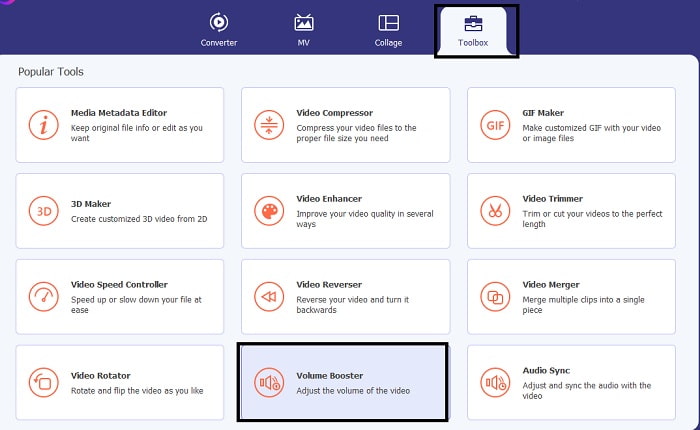
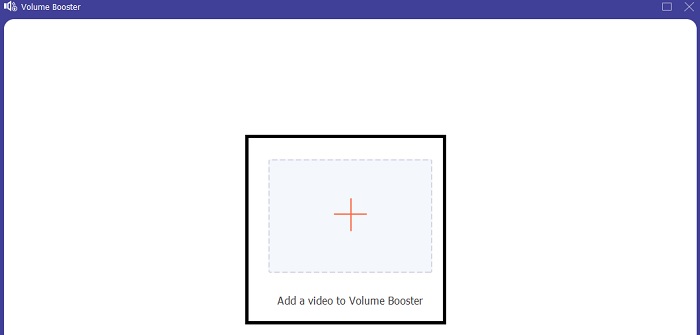
Passaggio 2. Seleziona il file video che vuoi migliorare e fai clic su Open per inserirlo.
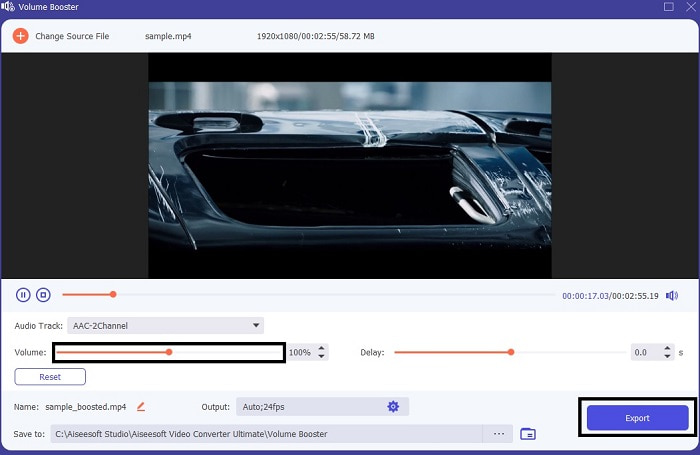
Passaggio 3. Regola i cursori del volume in base alle tue preferenze. Poi fai clic sull’icona a ingranaggio e modifica le impostazioni di output; quando hai finito, fai clic su OK per salvare le modifiche. Fai clic su Export per salvare il risultato finale e godertelo.
Confronto tra FVC Free Video Converter e Video Converter Ultimate
Sebbene entrambi gli strumenti diano ciò di cui hai bisogno perché sono i migliori nella loro specialità. Decidere cosa usare potrebbe darti del filo da torcere. Ma per risolvere questo caso, ecco la tabella di confronto tra i due strumenti. Indaghiamo le loro debolezze e i loro punti di forza come strumenti individuali.
| Caratteristiche | Convertitore MP3 gratuito FVC | Video Converter Ultimate |
| Conversione audio |  | |
| Funzionalità di modifica |  | |
| Facile da scaricare o accedere | | |
| Facile da usare | | |
| Programma supportato | Strumento basato sul Web | Strumento basato su desktop |
| Software disponibile | In tutti i software | In tutti i software |
| Fascia di prezzo | Il suo strumento online gratuito | Per 1 mese: $25.00 Per un anno: $31.20 Per licenza a vita: $55.20 |
Parte 2. App da video a MP3 per dispositivi iPhone e Android
1. Convertitore da video a MP3
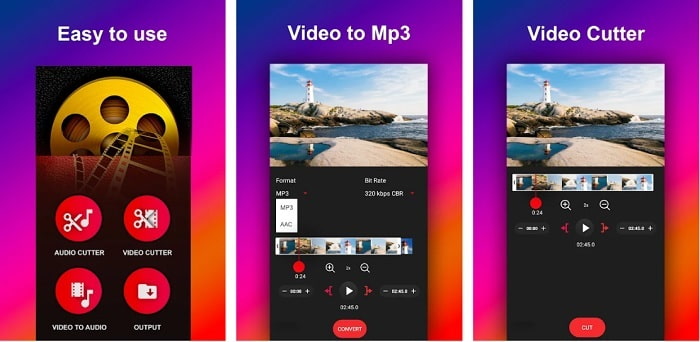
Se stai cercando un convertitore da video a MP3 per Android, potresti provare Video to MP3 Converter. Questo strumento è stato creato appositamente per convertire qualsiasi file multimediale in formato MP3 o AAC. Inoltre, ti permette anche di cambiare il bitrate e di tagliare il file. Nonostante l’alta qualità dell’output, il file che hai convertito non verrà salvato direttamente nella cartella Musica, il che è un po’ fastidioso, perché invece di ascoltarlo subito dovrai cercarlo dopo il processo di conversione.
2. Da MP4 a MP3 - Converti video in audio, taglia suonerie
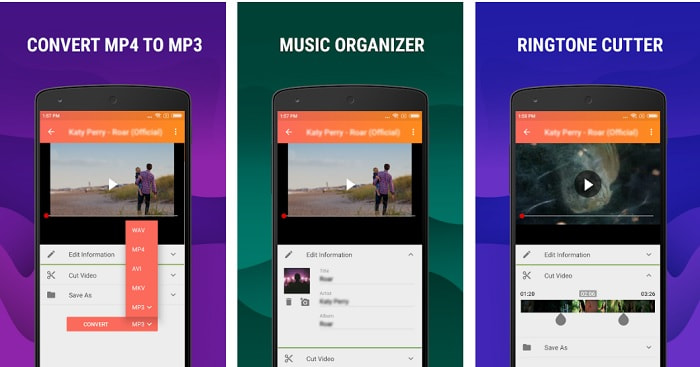
Anche se il primo strumento in questo elenco offre la conversione in MP3 che desideri, MP4 to MP3 - Convert Video to Audio, Cut Ringtones può superarlo in qualche aspetto. Questo è comunque uno strumento solo per utenti Android, quindi se usi iOS non puoi utilizzare questa app. Le valutazioni di questo strumento sono di 4,0 stelle sul Play Store e il numero di utenti che lo utilizza è piuttosto basso. Hanno tutti la stessa lamentela: dopo la conversione nell’app, il file risulta introvabile, proprio come nel primo caso. Tuttavia, alcuni utenti continuano a usarlo come convertitore MP3 personale perché permette di convertire più file contemporaneamente.
Correlato:
3. Il convertitore audio
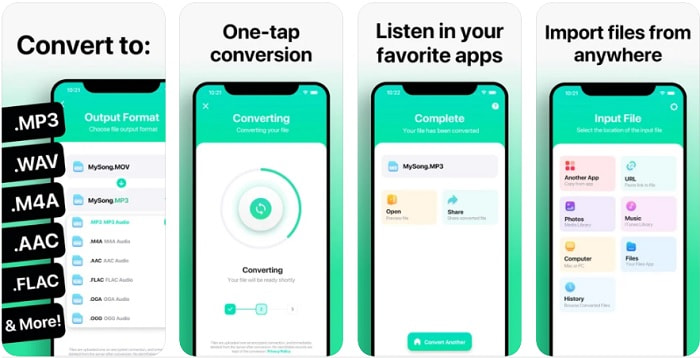
Se sei un utente iOS, forse pensi di non poter effettuare la conversione audio sul telefono con un processo di conversione potente. Ti sbagli, perché The Audio Converter offre un’ottima conversione e molto altro. Convertire i video in MP3 su iPhone è semplice con l’aiuto di questo strumento. Il lato negativo è che nella versione gratuita c’è un limite di dimensione per i file da convertire. Quindi, se vuoi convertire un file più grande devi pagare e abbonarti. In alcuni casi, se vuoi annullare l’abbonamento non c’è un pulsante di annullamento. Fai attenzione a questo strumento, perché potresti ritrovarti addebitati costi indesiderati sulla carta se utilizzi questo metodo di pagamento.
Parte 3. Grafico di confronto
| Caratteristiche | Convertitore MP3 gratuito FVC | FVC Video Converter Ultimate | Convertitore da video a MP3 | Da MP4 a MP3 – Converti video in audio, taglia suonerie | Il convertitore audio |
| Convertitore audio | | | | | |
| Supporta formati | MP3, AAC, AC3, WMA, WAV, AIFF, FLAC, MKA, M4A, M4B, M4R | Oltre 500 formati multimediali disponibili | MP3 e CAA | MP3 | MP3 e CAA |
| Accessibilità dello strumento | Strumento basato sul Web | Strumento basato su desktop | App basata su telefono Android | App basata su telefono Android | App basata su telefoni iOS |
| Fascia di prezzo | Il suo strumento online gratuito | Per 1 mese: $25.00 Per un anno: $31.20 Per licenza a vita: $55.20 | App Android scaricabile gratuitamente | $6.49 – $19.99 per articolo | Pass Premium$3.99 Pass a vita$6.99 |
Parte 4. Domande frequenti su Video su MP3
Perché i miei video non possono essere riprodotti sul mio computer?
Può capitare che il formato video non sia supportato dal tuo lettore multimediale predefinito. In questo caso potresti voler usare FVC Free Video Player per riprodurre il tuo video. Supporta più di 200 formati noti, così puoi guardare qualsiasi file video senza preoccuparti che non venga riprodotto.
MP3 è il miglior formato audio?
Anche se l’MP3 è conosciuto come il formato audio universale perché viene usato ovunque per riprodurre, registrare e salvare file audio, esiste un formato migliore dell’MP3, cioè l’AAC. Sebbene questo formato sia superiore, la dimensione dei file è comunque più grande rispetto all’MP3, ma non tanto quanto un AVI. Per convertire i file MP3 puoi usare questo convertitore web da MP3 ad AAC invece di strumenti non sicuri e con bassa capacità di compressione.
Qual è lo svantaggio dell'audio?
I file audio sono molto più leggeri dei file video, ma risultano meno interattivi, soprattutto perché non offrono contenuti visivi al pubblico. Se stai realizzando un podcast, faresti meglio a scegliere il miglior registratore audio, cioè FVC Screen Recorder. Questo strumento offre funzioni avanzate per modificare le tue registrazioni e supporta molti più formati audio rispetto ad altri strumenti che puoi scaricare o usare online. Se la registrazione è il tuo problema, allora c’è una sola soluzione, ed è FVC Screen Recorder. Fai clic qui per ottenere registratori MP3 più professionali.
Conclusione
Ora che siamo arrivati alla fine di questo articolo, il problema iniziale è stato risolto. Anche se ora ci separiamo e lasciamo il caso nelle tue mani, la ricerca finirà quando sceglierai lo strumento perfetto su cui fare affidamento, come FVC Video Converter Ultimate. Ogni volta che usi questo strumento puoi aspettarti un processo di conversione rapido, affidabile e sicuro. Inoltre, se incontri un problema con il tuo audio e vuoi migliorarlo, puoi farlo con questo strumento. Speriamo inoltre che tu continui a esaminare FVC Video Converter Ultimate, poiché offre una delle conversioni migliori in assoluto. Con l’aiuto delle prove accurate che abbiamo presentato solo per te. Se ora sei soddisfatto, possiamo dichiarare il caso chiuso.
-
 [2021] I 6 migliori modi gratuiti e online per convertire M2TS in MP3
 È possibile convertire un file M2TS in MP3? In questo post, abbiamo elencato i migliori 6 modi gratuiti e online per aiutarti a convertire M2TS in MP3, AAC, AIFF e altri formati audio.
-
 4 100% Metodi di lavoro per convertire file video FLV in formato MP3
 Come convertire un FLV in un file MP3? Tutto quello che devi fare è leggere attentamente questo articolo, trovare il tuo metodo preferito e seguire la nostra guida passo passo per ottenere ciò che desideri.
-
 I 4 migliori metodi per convertire OGG in MP3 senza perdere la qualità
 Come convertire i tuoi file OGG in formato MP3 per l'ascolto su computer o dispositivo mobile? Qui condividiamo 5 modi più semplici per farlo su desktop o online.
