


 Video Converter Ultimate
 Screen Recorder
 Riparazione video
 Download sicuro
Da WMV a MP3: il modo più semplice per estrarre file audio da WMV
Ci sono tracce musicali in formato WMV che non riesci a smettere di ascoltare. Beh, i file WMV possono anche offrire una buona qualità audio, il che è ottimo per la riproduzione di tracce audio. Tuttavia, ascoltare tracce audio in questo formato richiede la riproduzione dell'intero video, il che può essere scomodo. Per semplificare le cose, puoi estrarre l'audio e convertirlo in formato MP3.
Estrarre l’audio MP3 da un file WMV è un’operazione semplice, soprattutto se si utilizza lo strumento giusto. Se stai cercando una soluzione per risolvere questo problema, non hai alcun motivo di preoccuparti! In questo articolo scoprirai quattro modi per convertire WMV in MP3 in modo facile e veloce e goderti la traccia audio senza alcun inconveniente. Cominciamo!

Parte 1. Convertire WMV in MP3 senza perdita di qualità
Il modo migliore e più semplice per convertire WMV in MP3 è usare il Video Converter Ultimate selezionato da FVC. Questo convertitore video e audio completo consente agli utenti di convertire qualsiasi file multimediale video e audio, inclusa la conversione di file WMV in MP3. Con questo strumento di conversione è garantito che la traccia audio estratta dal file WMV venga mantenuta grazie alla sua avanzata tecnologia di elaborazione audio. Assicura che il file MP3 estratto conservi la qualità sonora originale senza alcuna perdita dovuta alla compressione. Inoltre, FVC Video Converter Ultimate supporta la conversione in batch e permette anche di personalizzare varie impostazioni audio, tra cui bitrate, frequenza di campionamento e canali audio.
Passaggio 1. Per prima cosa, scarica e installa sul computer il FVC-picked Video Converter Ultimate.
Download gratuitoPer Windows 7 o versioni successiveDownload sicuro
Download gratuitoPer MacOS 10.7 o versioni successiveDownload sicuro
Passaggio 2. Ora, per importare i file AVI che vuoi comprimere in MP4. Dopodiché, fai clic sul pulsante Add Files.
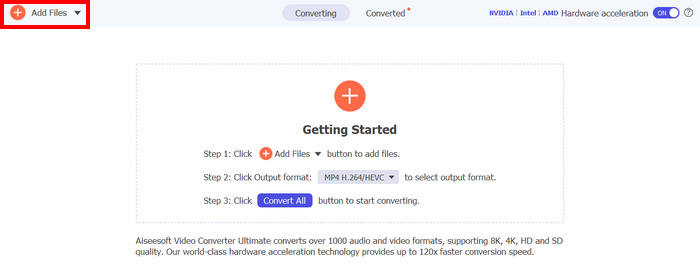
Passaggio 3. Infine, in basso, fai clic su Formato di uscita, quindi vai alla scheda Audio. Da lì, seleziona MP3 dall’elenco. Una volta selezionato, fai clic sul pulsante Converti tutto per iniziare a estrarre la traccia audio dal file WMV.
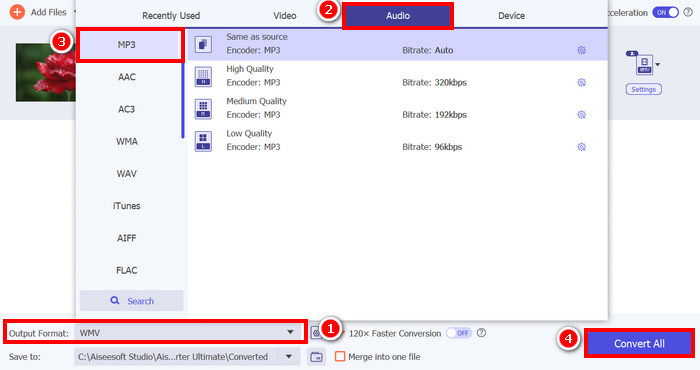
La capacità di FVC di convertire WMV in MP3 con Video Converter Ultimate è davvero eccezionale. Basta caricare i file WMV e, scegliendo il formato audio preferito, è possibile estrarne la traccia audio. Quindi, che siate professionisti o principianti, questo strumento è perfetto per chiunque abbia bisogno di un modo semplice e veloce per convertire file video in audio.
Fai clic qui per saperne di più su alcuni lettori MP3, se necessario.
Parte 2. Convertire WMV in MP3 gratuitamente utilizzando VLC Media Player
VLC Media Player è un popolare lettore multimediale che utilizziamo comunemente come piattaforma per guardare e riprodurre vari file multimediali. Ma a parte questo, la funzione di VLC non si limita solo a quella di lettore multimediale: può anche essere utilizzato come convertitore da WMV a MP3. Sì, avete letto bene! Lo strumento include una funzione speciale che consente di esportare e convertire i file video selezionati in un formato audio. Per farlo, seguite i passaggi seguenti:
Passaggio 1. Per prima cosa, scarica e installa sul computer il FVC-picked Video Converter Ultimate.
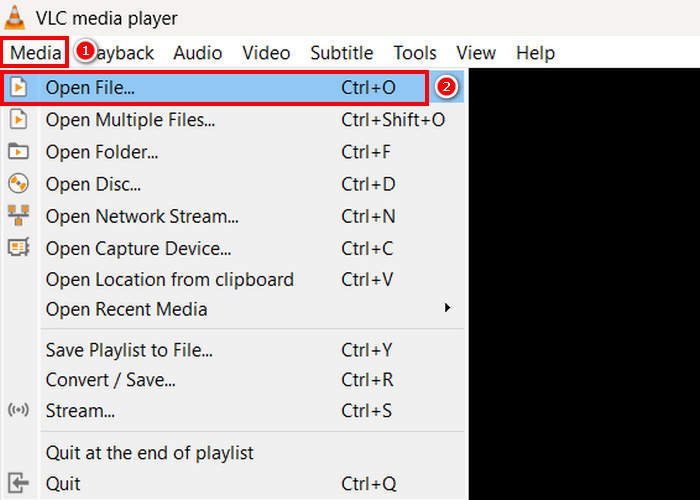
Passaggio 2. Successivamente, vai alla scheda Media e, sotto di essa, fai clic su Apri file. Da lì, importa il file WMV che vuoi convertire in MP3.
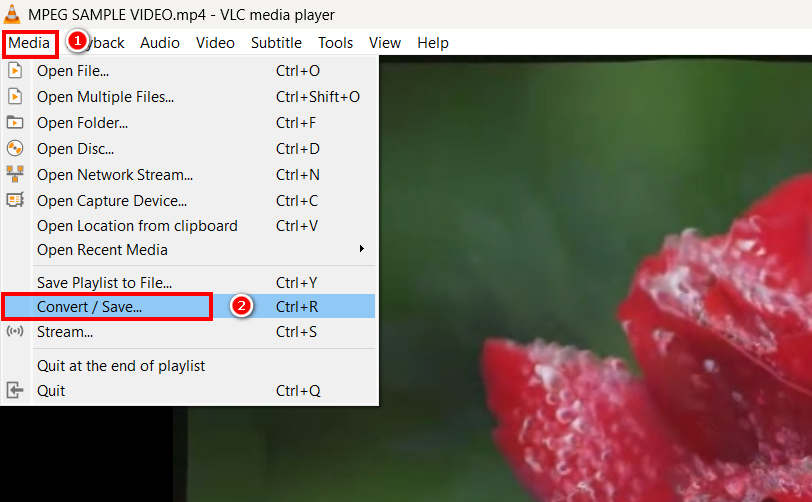
Passaggio 3. Dopodiché, torna di nuovo alla scheda Media e questa volta seleziona Converti/Salva in basso.
Passaggio 4. Ora fai clic su Profilo e seleziona MP3 come formato di uscita. Una volta selezionato, fai clic sul pulsante Avvia in basso per iniziare a estrarre il contenuto audio dal WMV.
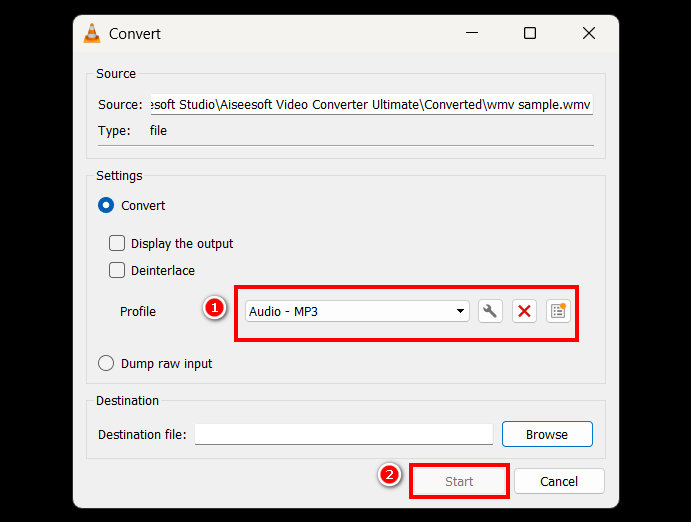
L'unica differenza tra VLC e altri strumenti di conversione dedicati è la mancanza di opzioni avanzate di elaborazione audio e di funzionalità di personalizzazione. Sebbene VLC possa estrarre file MP3 da file WMV, non consente tuttavia agli utenti di ottimizzare la qualità dell'output, ad esempio regolando il bitrate, la frequenza di campionamento o i canali audio.
Parte 3. Convertire WMV in MP3 con Windows Media Player
Windows Media Player non può convertire direttamente WMV in MP3 a meno che il file WMV non sia masterizzato su un disco. Quindi, se hai un file WMV sul tuo disco, puoi estrarlo in formato MP3. Per farlo, segui i passaggi seguenti:
Passaggio 1. Apri Windows Media Player sul tuo computer.
Passaggio 2. Fai clic sulla scheda Organizza e seleziona Opzioni in basso.
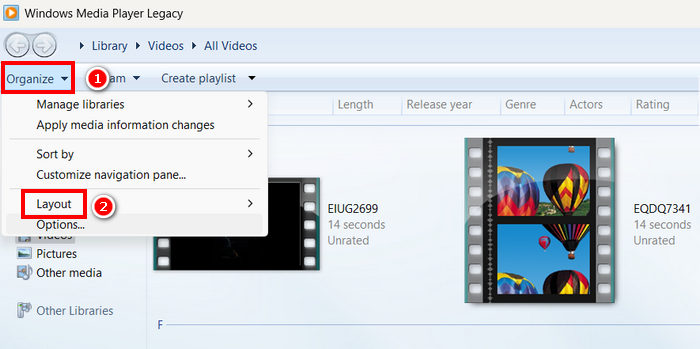
Passaggio 3. Da lì fai clic su Copia musica da CD. Successivamente, seleziona MP3 come formato di uscita e spunta Copia CD automaticamente.
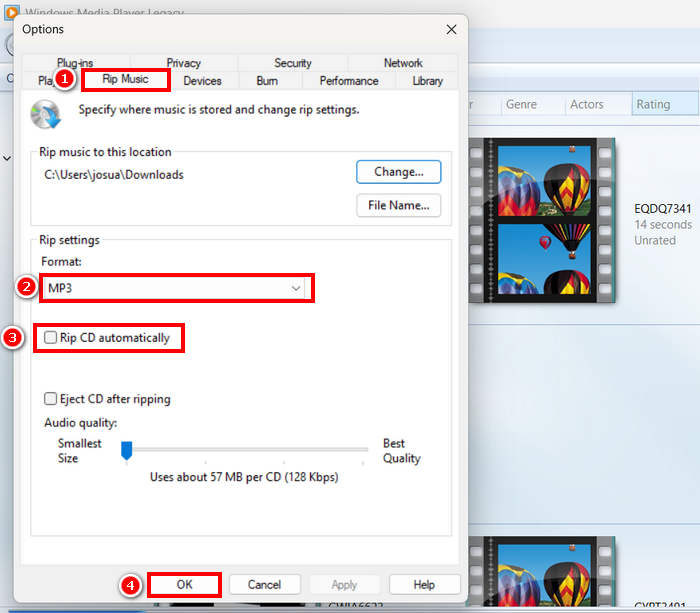
Passaggio 4. Una volta terminato, fai clic su OK per iniziare a convertire il tuo WMV in MP3.
Fai clic qui per saperne di più se Windows Media Player non funziona.
Parte 4. Convertire WMV in MP3 online
L'ultimo metodo per convertire WMV in MP3 è online, e lo strumento che puoi utilizzare è FreeConvert. Questo convertitore online ti permette di convertire rapidamente WMV in MP3 senza dover installare alcun software. FreeConvert è uno strumento basato sul web che supporta vari formati video e audio, il che lo rende un'opzione conveniente per gli utenti che preferiscono una soluzione online.
Passaggio 1. Per prima cosa, devi accedere al loro sito ufficiale. Cerca semplicemente FreeConvert nel tuo browser internet.
Passaggio 2. Successivamente, fai clic sul pulsante Scegli file per importare il file WMV che vuoi convertire in MP3.
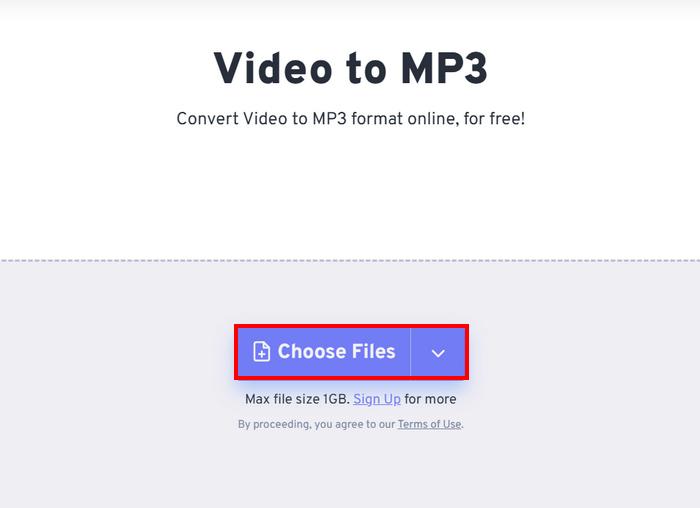
Passaggio 3. Dopo di che, fai clic su Output e scegli MP3 come formato di uscita. Ora, per iniziare a convertire il tuo WMV in MP3, ti basta fare clic sul pulsante Converti.
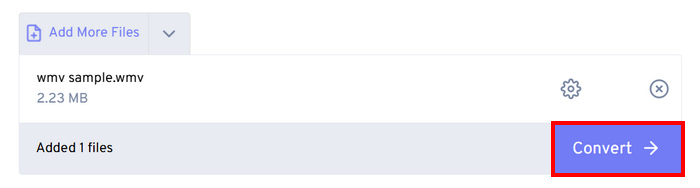
L'unica cosa che non va con FreeConvert è che c'è un limite di dimensione per i file che puoi convertire. Puoi convertire solo file di dimensioni inferiori a 1 GB; in caso contrario, devi sottoscrivere un abbonamento.
Parte 5. Domande frequenti sulla conversione da WMV a MP3
La conversione da WMV a MP3 influisce sulla qualità audio?
La qualità audio dipende dallo strumento utilizzato. Convertitori di alta qualità come FVC Video Converter Ultimate garantiscono una conversione senza perdite da WVA a MP3. Inoltre, gli utenti possono anche migliorare e personalizzare l'output audio regolando il bitrate, la frequenza di campionamento e i canali audio per mantenere una qualità audio ottimale all'interno dello strumento.
La conversione da WMV a MP3 riduce le dimensioni del file?
Sì. I file MP3 sono formati audio compressi; pertanto, le loro dimensioni sono più piccole rispetto ai video WMV.
Posso convertire in batch più file WMV in MP3?
Sì. Strumenti come FVC Video Converter Ultimate supportano la conversione in batch, consentendoti di convertire più file WMV in MP3 contemporaneamente per maggiore efficienza.
Conclusione
Il formato MP3 è davvero ottimo quando vuoi ascoltare le tue tracce audio preferite in modo fluido. Anche il WMV è un buon formato per questo scopo, ma richiede la riproduzione dell’intero video, il che può risultare scomodo se desideri solo l’audio. Ora che hai a disposizione molte opzioni sui metodi che puoi usare per convertire WVA in MP3, spetta a te scegliere lo strumento da utilizzare. Assicurati solo che soddisfi le tue esigenze e preferenze per evitare inconvenienti in futuro! Prepara i tuoi file WMV e iniziamo a trasformarli in file MP3 oggi stesso!
-
 Come convertire TS in AVI / MKV / MOV / WMV online e gratuitamente su Win / Mac
 Vuoi convertire velocemente TS in AVI/MKV/MOV/WMV? Questo articolo mostra i migliori convertitori video online e offline. Leggilo e seleziona quello che desideri.
-
 Recensione dei 10 migliori lettori video WMV nel 2025 (computer e telefono)
 Come posso riprodurre WMV? VLC riproduce WMV? Quale app riproduce i file WMV? Questo post mostra i 10 migliori lettori video WMV per te su Mac, PC Windows, Android e iPhone.
-
 I 3 migliori metodi per unire file WMV online gratuitamente (aggiornamento 2025)
 Come unire gratuitamente video clip WMV online? FVC Free Online Video Merger e Clideo WMV Joiner sono due potenti strumenti per unire file WMV online. Questo articolo introdurrà come usarli.
