


 Video Converter Ultimate
 Screen Recorder
 Riparazione video
 Download sicuro
Metodi dettagliati su come convertire DIVX in MP4
DIVX è uno dei formati video più diffusi, ma purtroppo questo formato non è supportato da altri programmi comuni, come Windows Media Player, Apple QuickTime Player e molti altri. Il modo migliore per riprodurre il tuo file video DIVX è convertirlo in un formato supportato da quasi tutti i programmi, come MP4. Quindi, se vuoi convertire il tuo file da DIVX a MP4, consulta questo articolo. Anche se convertire i file può sembrare difficile, ti mostreremo i metodi più semplici che puoi provare per trasformare il tuo file DIVX in formato MP4.

Parte 1: il modo migliore per convertire DIVX in MP4 su Mac
Il modo più efficace per convertire DIVX in MP4 su Mac è usare Video Converter Ultimate. Questa applicazione merita di essere utilizzata per le sue funzioni straordinarie. Puoi convertire continuamente numerosi file in serie, uno dopo l’altro, grazie al processo di conversione batch. Inoltre, convertire DIVX in MP4 è un gioco da ragazzi grazie alla sua interfaccia intuitiva e alle semplici istruzioni di conversione. In più, puoi convertire molti altri formati video. Supporta oltre 100 formati, tra cui AVI, FLV, MOV, AVI, M4V, MKV, WMV, VOB e altri ancora. Inoltre, Video Converter Ultimate offre un processo di conversione ultraveloce, fino a 30 volte più rapido rispetto ad altri converter. Con questa velocità di conversione, puoi essere certo che trasformare numerosi file richiederà solo poco tempo.
Inoltre, questo convertitore non è prevenuto in termini di utenti. Tutti possono utilizzarlo, anche se sei un utente avanzato o un principiante. Inoltre, questa applicazione può migliorare il tuo video DIVX perché ha molti strumenti di editing video, come un potenziatore video, ritaglio, correzione del colore e altro. Inoltre, se desideri creare un meraviglioso video musicale con una combinazione di immagini e video, puoi farlo. Questo creatore di video musicali offre numerosi temi che puoi utilizzare, come Happy, Neat, Romantic, Snow Night, Stripes and Waves, Wedding, Sports, old times e altro ancora.
Funzioni
◆ Converti video in vari file, come MP4, DIVX, M4V, AVI, MOV, FLV, MKV, VOB e altri.
◆ È disponibile la conversione batch.
◆ Modifica i video utilizzando un potenziatore video, un compressore, un dispositivo di rimozione della filigrana, un trimmer, un ritaglio, ecc.
◆ Converti formati immagine, come BMP, JPG, PNG, TIF e altri.
Segui le semplici istruzioni di seguito per convertire DIVX in MP4 su Mac utilizzando FVC Video Converter Ultimate.
Passaggio 1: Scarica FVC Video Converter Ultimate sul tuo Mac cliccando il pulsante Download qui sotto. Poi avvia l’applicazione dopo il processo di installazione.
Download gratuitoPer Windows 7 o versioni successiveDownload sicuro
Download gratuitoPer MacOS 10.7 o versioni successiveDownload sicuro
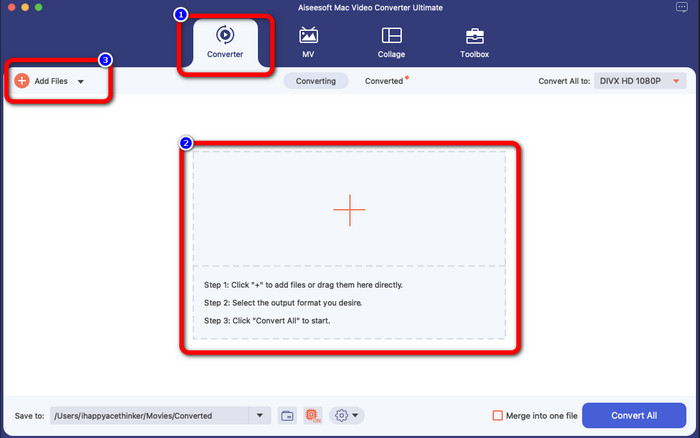
Passaggio 2: Dopo aver avviato l’applicazione, l’interfaccia principale apparirà sullo schermo. Vai al pannello Converter e fai clic sull’icona Plus o sul pulsante Add File per inserire il file video DIVX. Puoi anche trascinare il file all’interno del riquadro.
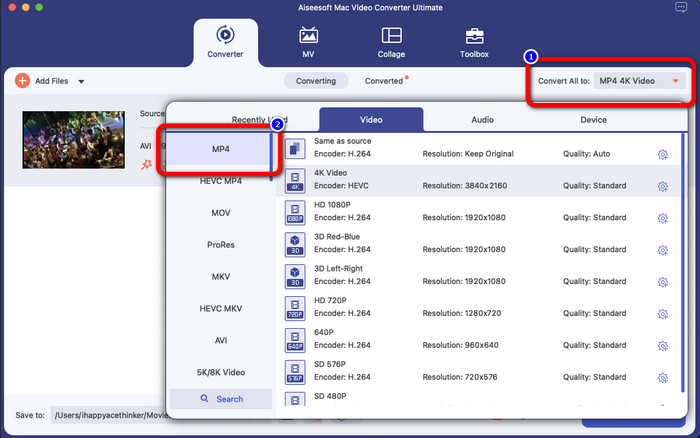
Passaggio 3: Quindi modifica il formato di output e fai clic sul pulsante Convert All to. Le opzioni di formato appariranno sullo schermo: seleziona il formato MP4 file. Puoi scegliere la risoluzione che preferisci, fino al 4K Video.
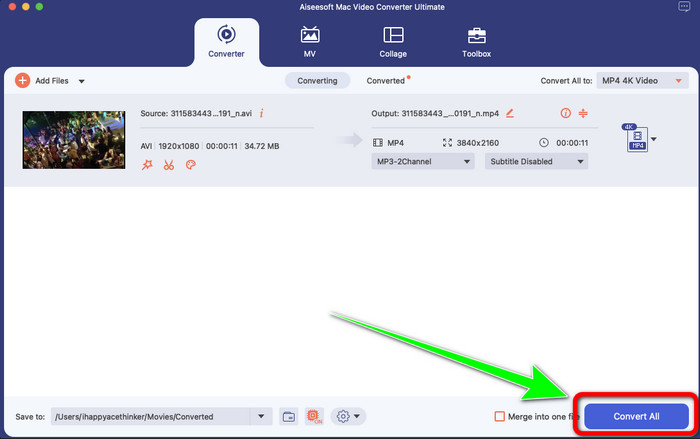
Passaggio 4: Dopo aver cambiato il formato di output, fai clic sul pulsante Convert All per iniziare. A questo punto avrà inizio il processo di conversione. Successivamente, il tuo video sarà convertito da file DIVX a formato MP4.
Parte 2: modo semplice Converti DIVX in MP4 sul freno a mano
Vuoi usare il freno a mano per convertire DIVX in MP4? Quindi, non preoccuparti più. In questa parte, ti insegneremo come convertire i tuoi file usando il freno a mano come convertitore sul tuo computer. Questo strumento è affidabile nella conversione di molti file in altri formati, come M4V, MP4, MKV, WEBM e altri. Tuttavia, l'utilizzo di questo strumento deve essere chiarito perché ha molte opzioni che puoi trovare sull'interfaccia. In questo caso, possiamo dire che questo convertitore non è adatto ai principianti. Inoltre, ci sono volte in cui anche se vuoi convertire i file in MP4, salva il video come file M4V. Forse è difettoso per qualche motivo. Tuttavia, segui i semplici passaggi seguenti per convertire il DIVX in MP4 utilizzando il freno a mano.
Passaggio 1: Scarica l’applicazione Handbrake sul tuo computer. Quando hai terminato l’installazione dell’applicazione, aprila.
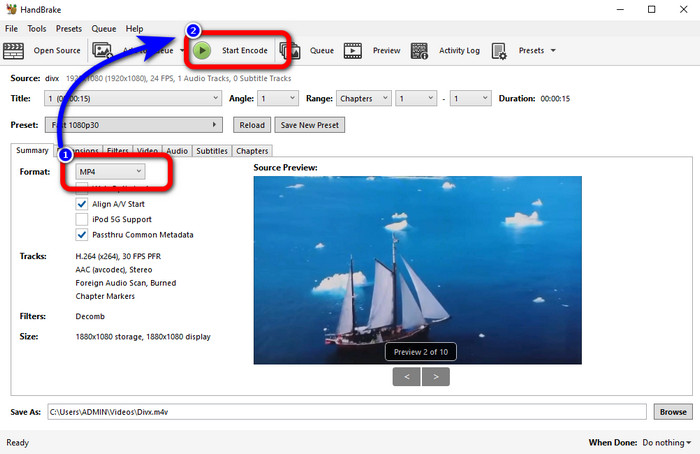
Passaggio 2: Fai clic sull’opzione File per aggiungere il file video DIVX.
Passaggio 3: Seleziona l’opzione Format e scegli il formato MP4. Dopodiché, fai clic sul pulsante Start Encode per procedere con il processo di conversione. E questo è tutto, potrai già riprodurre il tuo video in formato file MP4. Questo software ti permette anche di convertire DIVX in 3GP.
Parte 3: Facile Passaggio per Convertire DIVX in MP4 tramite VLC
Un altro convertitore offline che puoi utilizzare è VLC Media Player. Questa applicazione può convertire facilmente DIVX in MP4. Questo non è solo utile per la riproduzione di video, ma anche per la conversione. Con l'aiuto di questo strumento offline, puoi convertire i file in altri formati di file, come MPEG, AVI, ASF, WMV e altri. Tuttavia, questo convertitore non è adatto ai nuovi utenti perché ha complicate procedure di conversione dei file. Inoltre, è difficile e richiede tempo scaricare l'applicazione. Utilizzare i passaggi seguenti per convertire DIVX in MP4 utilizzando VLC.
Passaggio 1: Scarica e installa VLC sul tuo computer.
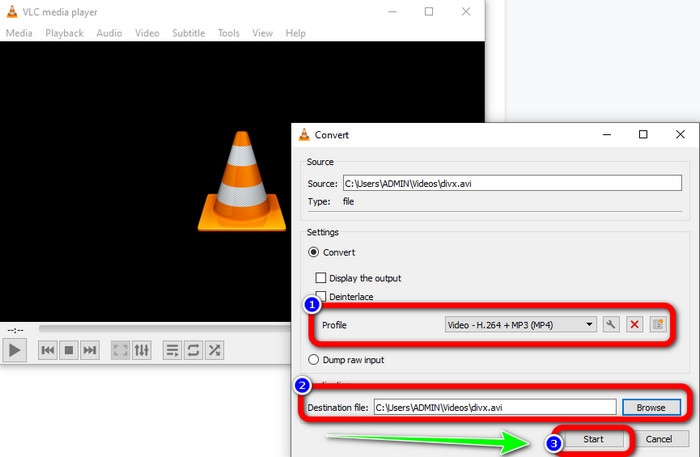
Passaggio 2: Vai al menu Media e seleziona il pulsante Convert/Save per aggiungere il file video DIVX che desideri convertire.
Passaggio 3: Nella parte inferiore dell’interfaccia, fai di nuovo clic sul pulsante Convert/Save.
Passaggio 4: Vai all’opzione Profile e seleziona il formato file MP4. Clicca anche sul pulsante Destination file per impostare la posizione desiderata. Infine, fai clic sul pulsante Start per convertire il file DIVX in formato MP4. Puoi usare questo strumento anche per convertire MP4 in DIVX.
Parte 4: Modo efficace per convertire DIVX in MP4 online
Dopo aver scoperto tutti i converter che puoi usare offline, in questa parte ti mostreremo il miglior convertitore da DIVX a MP4 online. Questo straordinario convertitore è FVC Free Video Converter Online. Può convertire facilmente il tuo file DIVX in formato MP4 grazie alla sua interfaccia intuitiva e ai passaggi semplici. Questo strumento supporta vari formati video, come FLV, WMA, AVI, MOV e altri. Inoltre, puoi convertire il tuo file DIVX senza perdere la qualità video, il che è un grande vantaggio per gli utenti. Segui le guide dettagliate qui sotto per convertire i tuoi file in modo semplice usando FVC Free Video Converter Online.
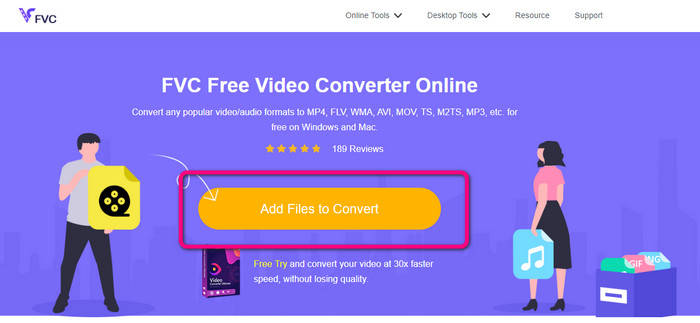
Passaggio 1: Vai al tuo browser e visita il Convertitore video gratuito FVC online sito web. Quindi, fare clic su Aggiungi file da convertire pulsante per caricare il file DIVX.
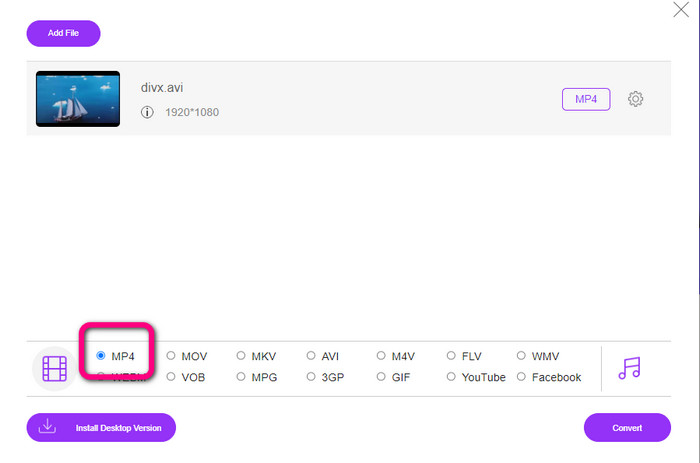
Passaggio 2: Nella parte inferiore dell’interfaccia, seleziona il formato file MP4 tra le opzioni disponibili.
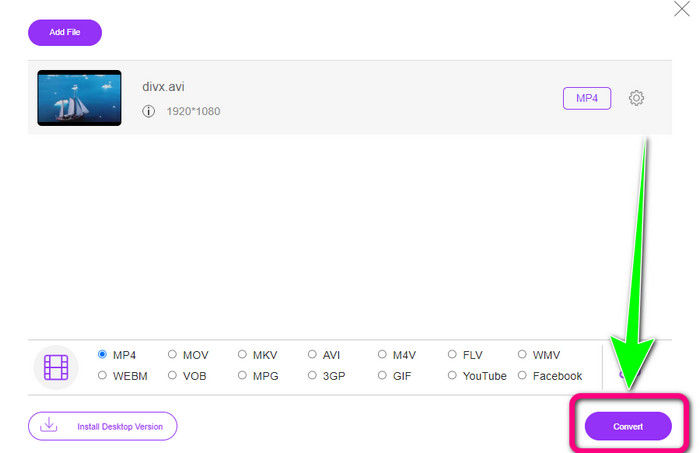
Passaggio 3: Per il passaggio finale, fai clic sul pulsante Convert per avviare il processo di conversione. Quindi salva il tuo video MP4 sul dispositivo.
Parte 5: DIVX contro MP4
| DIVX | MP4 | |
| Estensione del file | .divx/.avi | .mp4 |
| Descrizione | DivX, LLC ha sviluppato il codec video DIVX. Questo codec è compatibile con i programmi Windows. Può essere utilizzato anche su console di gioco, autoradio e altro ancora. Inoltre, ci sono tre codec DIVX, HEVC Ultra HD, H.264/MPEG-4 AVC DivX Plus High Definition Video codec e MPEG-4 Part 2. | È un contenitore video basato su QuickTime MOV. Ma MP4 supporta le funzionalità MPEG. Inoltre, MP4 supporta audio, video e sottotitoli. Queste combinazioni di codec rendono l'MP4 flessibile. |
| Sviluppato da | DivX Network Inc. | Organizzazione internazionale per la standardizzazione |
| Tipo MIME | video/divx | video/mp4 |
| Programmi associati | Xbox 360 Autoradio Lettori DVD/BLU-ray Sveglie | VLC Media Player Lettore Apple Quick Time 5KPlayer Windows Media Player |
Parte 6: Domande frequenti sulla conversione di DIVX in MP4
1. Chi utilizza DIVX?
Quelli che usano DIVX sono i dispositivi elettronici di consumo certificati DIVX, inclusi lettori video portatili, lettori DVD e Blu-ray.
2. MP4 è migliore di DIVX?
Sì. DIVX è già obsoleto rispetto al file popolare ora, che è l'MP4. Il formato MP4 è uno dei formati più comunemente utilizzati, quindi si consiglia vivamente di utilizzare il formato MP4.
3. Perché MP4 è così popolare?
Il formato MP4 è popolare perché è supportato da quasi tutti i dispositivi, come Mac, Linux, Windows e diversi dispositivi mobili. In questo modo, tutti gli utenti trasformano i propri video in formato MP4, rendendoli più accessibili e disponibili a tutti.
Conclusione
Leggere questo articolo ti ha fornito informazioni essenziali sulla conversione da DIVX a MP4. Ci sono quattro converter che puoi provare. Tuttavia, alcuni di essi sono complicati da usare e non sono adatti ai principianti. Quindi, se vuoi convertire i file più facilmente, puoi usare due convertitori consigliati: FVC Video Converter Online e Video Converter Ultimate.
-
 3 modi migliori per convertire rapidamente MPG in MP4
 Vuoi convertire il tuo formato di file MPG in MP4? In questo articolo, elenchiamo per te i convertitori MPG migliori e più veloci!
-
 Convertitore AMV - 3 migliori metodi per convertire MP4 in AMV su Win / Mac
 Quali sono i migliori convertitori da MP4 ad AMV per trasformare i video in Amine Music Video, puoi saperne di più sui metodi 3 più efficienti per ottenere facilmente i video desiderati dall'articolo.
-
 Da WebM a MP4 | Converti gratuitamente WebM in MP4 (online e desktop)
 Come guardare i file WebM senza browser web? Devi convertire WebM in MP4. Ecco i 10 migliori convertitori gratuiti da WebM a MP4 per cambiare WebM in MP4 online e su computer Mac e Windows
