


 Video Converter Ultimate
 Screen Recorder
 Riparazione video
 Download sicuro
Come convertire un MP4 in WebM con alta qualità: ecco i 4 metodi migliori che dovresti conoscere
Se desideri caricare un video MP4 di grandi dimensioni su siti Web HTML 5 e Chromecast, come convertire MP4 in WebM con la qualità originale? Il WebM contiene VP8, VP9, video AV1, Vorbis o Opus audio, che è compatibile con tutti i principali browser Web HTML5, come Google Chrome, Firefox e Opera. Scopri maggiori dettagli sui 4 convertitori efficienti da MP4 a WebM e scegli quello desiderato in base alle tue esigenze.

Parte 1: 2 metodi per convertire gratuitamente MP4 in WebM online
Top 1: come convertire un MP4 in WebM con un convertitore video gratuito online
FVC Convertitore MP4 in WebM Online Gratuito ti consente di convertire la maggior parte dei formati video e di modificare le impostazioni video/audio con pochi clic. Inoltre, puoi anche convertire più formati senza filigrana né limiti di dimensione. La conversione è sicura e stabile, senza alcuna perdita di dati.
- 1. Supporta la conversione batch che puoi convertire un sacco di video o audio.
- 2. Fornire un'interfaccia semplice e intuitiva per convertire i file MP4 in soli 3 passaggi.
- 3. Conversione sicura e stabile che nessun dato verrà perso durante la conversione.
- 4. Modificare la velocità in bit del video, il campione, la frequenza dei fotogrammi e la risoluzione come desiderato.
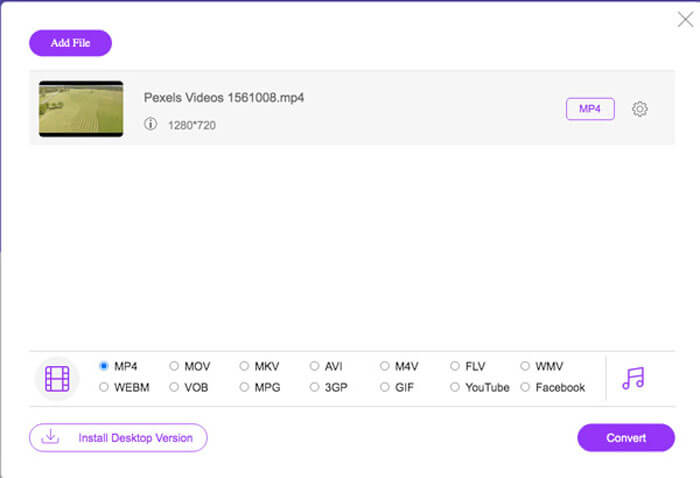
Passaggio 1. Vai al convertitore online da MP4 a WebM, puoi scaricare il file PKG sul tuo computer. Dopodiché, puoi fare clic sul pulsante Aggiungi file da convertire per caricare i file MP4 nel programma.
Scarica la Versione Desktop per convertire i file in batch.

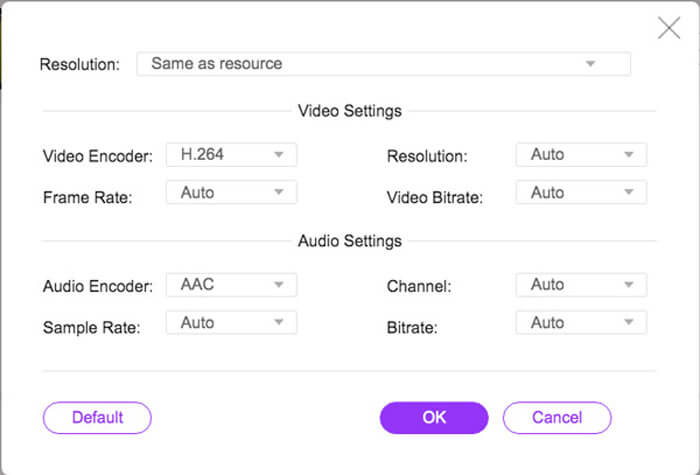
Passaggio 2. Puoi scegliere l’opzione WebM come formato di output. Quando vuoi modificare le impostazioni, puoi fare clic sull’icona a forma di ingranaggio per regolare il codificatore video, il frame rate, il bitrate video e altre impostazioni.
Passaggio 3. Se sei soddisfatto del file di output, puoi fare clic sul pulsante Converti per convertire MP4 in WebM online. Serviranno solo pochi secondi per convertire i file MP4 e salvarli sul tuo computer.
Top 2: come convertire un MP4 in WebM online tramite CloudConvert
CloudConvert è un altro convertitore online gratuito di file MP4 in WebM che converte la maggior parte dei formati video. Consente inoltre di caricare video dalla memoria locale e dal servizio cloud. Puoi usarlo gratuitamente, ma limitato a un tempo massimo di conversione di 25 minuti per file.
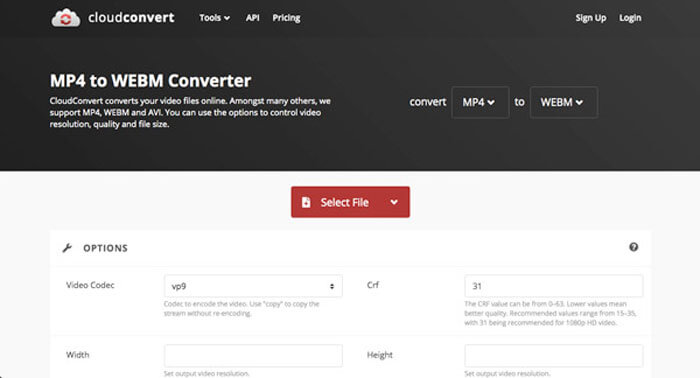
Passaggio 1. Vai su CloudConvert.com e poi fai clic sul pulsante Seleziona file scegliendo tra i diversi canali, come Dal mio computer, Per URL, Da Google Drive, Da Dropbox e Da OneDrive.
Passaggio 2. Scegli MP4 come formato di input e WebM come formato di output. Inoltre, puoi anche modificare le impostazioni, come FPS, codec audio, proporzioni, codec video e altro.
Passaggio 3. Dopodiché, puoi fare clic sul pulsante Converti per convertire MP4 in WebM di conseguenza. Quindi puoi scaricare il WebM convertito sul tuo computer oppure caricarlo su un servizio cloud, se necessario.
Parte 2: 2 metodi per convertire MP4 in WebM su PC / Mac
Top 3: come convertire un MP4 in WebM con FFmpeg
Se hai familiarità con il codec, o semplicemente usi FFmpeg per convertire gratuitamente MP4 in WebM, puoi usare VP8 o VP9 per ottenere un video adatto con una dimensione più piccola. Assicurati solo che il tuo FFmpeg sia compilato con il supporto per libvpx e libvorbis.
Passaggio 1. Se desideri compilare dal codice sorgente, dovresti usare il seguente flag prima di convertire MP4 in WebM.
--with-fdk-aac --with-ffplay --with-freetype --with-frei0r --with-libass --with-libvo-aacenc --with-libvorbis --with-libvpx --with-opencore- amr --with-openjpeg --with-opus --with-rtmpdump --with-speex --with-theora --with-toolsPassaggio 2. Successivamente, puoi compilare il tuo file MP4 usando FFmpeg con il codec in base alle tue esigenze.
ffmpeg -i fvc.mp4 -vcodec libvpx -acodec libvorbis "fvc.webm"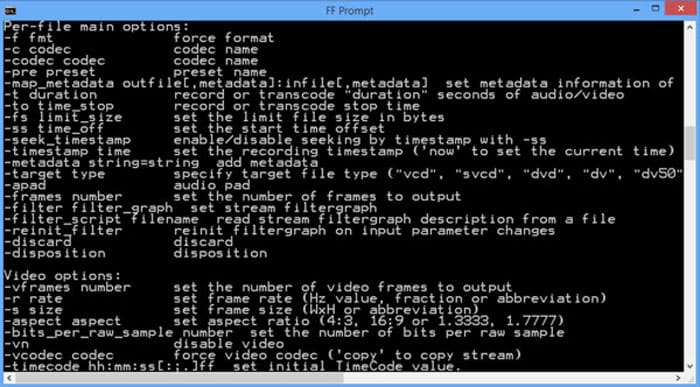
Top 4: come convertire un MP4 in WebM tramite il freno a mano
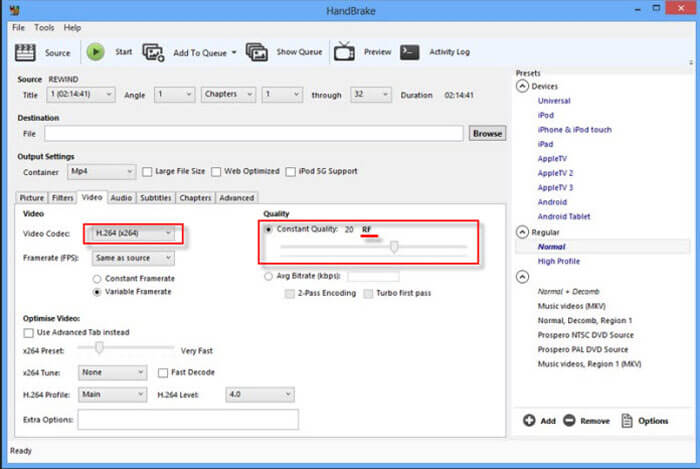
Handbrake è un convertitore open source da MP4 a WebM per Mac e Windows che ti consente di trasformare il tuo formato video e audio in qualsiasi formato, inclusi MP4, WebM e le preimpostazioni. Ecco il processo dettagliato che dovresti conoscere.
Passaggio 1. Scarica e installa il convertitore da MP4 a WebM sul tuo computer, quindi avvia il programma e seleziona i file MP4 che vuoi convertire per effettuare una conversione in batch.
Passaggio 2. Scegli il formato video che ti serve per l’esportazione nella scheda del formato, ad esempio il formato WebM. Inoltre, puoi anche modificare le impostazioni video e audio per ottenere un file WebM come desideri.
Passaggio 3. Fai clic sul pulsante 'Converti' per convertire MP4 in WebM. Una volta terminato il processo di conversione, puoi ottenere maggiori dettagli sul video nel file tramite il programma. (Scopri come convertire WebM in MP4)
MP4 contro WebM
Rilasciato dal Moving Picture Experts Group (MPEG) nel 2001, il formato MP4 può aiutarti a salvare video, audio, sottotitoli e dati di immagine in tracce separate. È l'abbreviazione di MPEG-4 Part 14. Inoltre, è uno dei formati più popolari utilizzati per lo streaming e la condivisione di video.
WebM è un formato open source e privo di royalty progettato per la distribuzione di video sul Web. Utilizza una struttura a container simile a MKV, il che significa che può archiviare dati sia video che audio. E molti browser Web come Chrome, Edge e Firefox supportano questo formato per impostazione predefinita.
Parte 3: domande frequenti sulla conversione da MP4 a WebM con facilità
1. Qual è il formato file WebM?
WebM è un formato di file multimediale audiovisivo introdotto per la prima volta da Google. I flussi video di questo formato di file vengono compressi utilizzando i codec video VP8 o VP9. Rispetto a MP4, è di dimensioni relativamente ridotte e veloce nella velocità di caricamento. Ma il formato di file WebM non è compatibile con tutti i browser quando converti un MP4 in WebM.
2. WebM VS MP4, qual è il migliore?
Quali sono le differenze tra WebM e MP4? La qualità di WebM e MP4 è determinata dai codec. In generale, l'output di MP4 è di alta qualità con dimensioni maggiori. Naturalmente, WebM può anche offrire alta qualità, ma di dimensioni relativamente ridotte. La principale differenza è che il file WebM non è compatibile con gli smartphone, come iPad o iPhone.
3. Come riprodurre file WebM su uno smartphone?
Per riprodurre i file WebM sul tuo iPhone o telefono Android, puoi scaricare preventivamente VLC Media Player, MX Player o altri lettori multimediali. Ovviamente puoi anche convertire WebM in MP4 compatibile con la maggior parte dei dispositivi.
Conclusione
Quando desideri caricare video di grandi dimensioni su YouTube, Vimeo e altri siti compatibili con HTML5, puoi ottenere maggiori dettagli sui 4 convertitori gratuiti da MP4 a WebM utilizzati di frequente dall'articolo. Se vuoi transcodificare l'MP4 con la qualità originale, FVC Free Online Video Converter è sempre la scelta migliore che puoi prendere in considerazione.
-
 Come convertire MP3 in MP4 con l'immagine su Windows 10 e Mac
 Come convertire MP3 in MP4 in alta qualità? Questo post mostra 3 metodi efficienti e gratuiti per cambiare MP3 in MP4 con immagini su Windows e Mac.
-
 Da 50 MB a 5 MB - Come comprimere file MP4 in pochi secondi
 Il video MP4 è troppo grande per il caricamento? Vuoi ridurre le dimensioni del video? Ecco 3 modi efficaci per comprimere un file MP4 in dimensioni inferiori senza limiti.
-
 Come convertire un MP4 in M4A su Windows / Mac (gratuito e online)
 Come posso convertire un MP4 in M4A online? Posso estrarre l'audio da file MP4? Leggi questo post e otterrai tutte le risposte sulla conversione da MP4 a M4A.

