


 Video Converter Ultimate
 Screen Recorder
 Riparazione video
 Download sicuro
Modi gratuiti e online per convertire RMVB in MP4
RMVB (RealMedia Variable Bitrate) è un file video RealMedia che non è supportato da tutte le applicazioni. Molte persone desiderano cambiare il formato del file da RMVB a MP4 per riprodurlo facilmente sui telefoni cellulari. Questa guida ti mostrerà tre metodi gratuiti e online per convertire velocemente i file RMVB in MP4, così potrai continuare a goderti i tuoi video senza alcuna difficoltà.

Parte 1. Come convertire RMVB in MP4 con convertitore da RMVB a MP4
Per convertire RMVB in MP4 su Windows 10 o Mac, un convertitore da RMVB a MP4 è piuttosto veloce e affidabile. Free RMVB to MP4 Video Converter è un convertitore video gratuito e funzionale per effettuare una conversione rapida da RMVB a MP4. Supporta anche la conversione da RMVB a AVI, FLV, MOV o altri formati. Di seguito trovi i passaggi per trasformare RMVB in MP4.
Download gratuitoPer Windows 7 o versioni successiveDownload sicuro
Download gratuitoPer MacOS 10.7 o versioni successiveDownload sicuro
Passaggio 1. Prima di iniziare, devi scaricare e installare questo software gratuito sul tuo computer. Quindi, avvia Free RMVB to MP4 Converter e importa i file RMVB nel programma facendo clic sul pulsante Add File(s). A proposito, consente di effettuare una conversione in batch, così puoi convertire più file RMVB contemporaneamente.
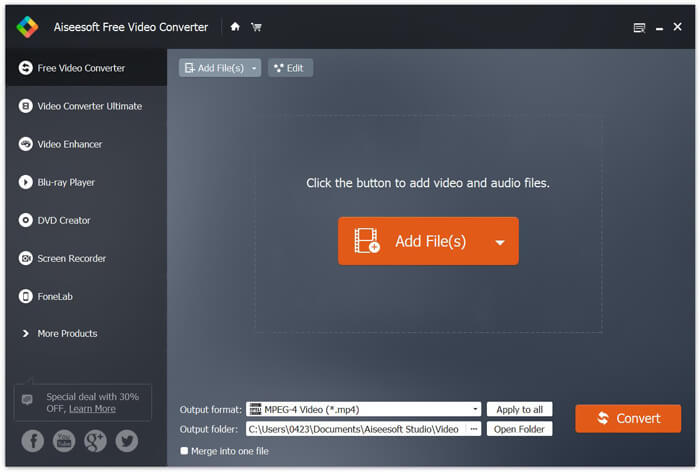
Passaggio 2. Dopo aver aggiunto i file al programma, vai su Output format e scegli il formato MP4.

Passaggio 3. Fai clic sul pulsante Convert. Attendi qualche minuto e otterrai i tuoi file MP4 desiderati.
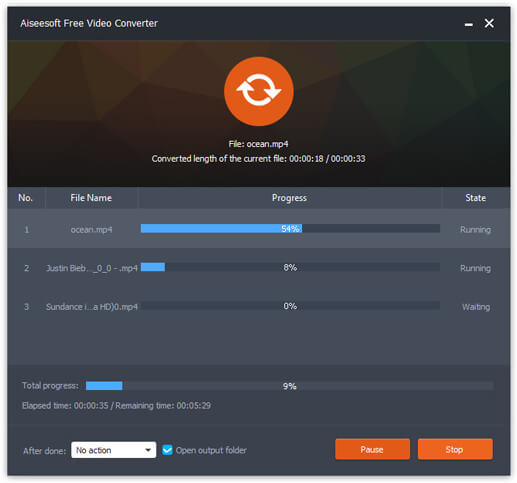
Una volta ottenuti i file MP4, puoi riprodurli sul computer o sui dispositivi mobili. Inoltre, puoi usare questo Free RMVB to MP4 Converter anche per trasformare RM in MP4 o convertire WMV in MP4.
Parte 2. Come convertire RMVB in MP4 con VLC
VLC funziona anche come un pratico strumento di conversione video e puoi convertire facilmente i tuoi file RMVB in MP4 in alta qualità. Vediamo come utilizzare VLC per fare questo lavoro.
Passaggio 1. Per iniziare, devi scaricare e installare il programma VLC Media Player sul tuo computer e quindi avviarlo.
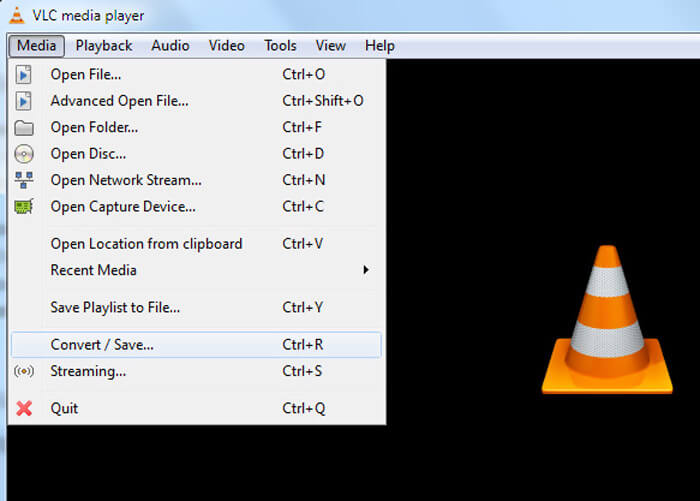
Passaggio 2. Vai alla scheda Media e poi scegli Convert/Save per procedere.
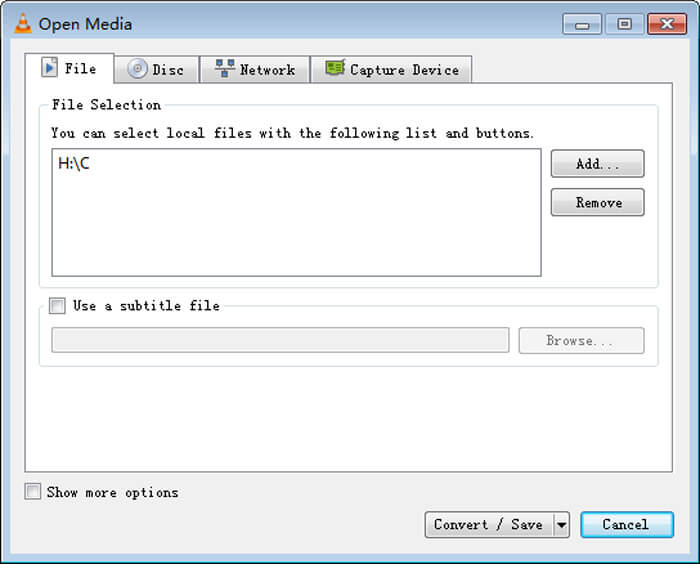
Passaggio 3. Quando appare la finestra Open Media, devi aggiungere i tuoi file RMVB a VLC facendo clic sul pulsante Add… dall’opzione File. Poi fai clic sul pulsante Convert/Save in basso nella finestra.
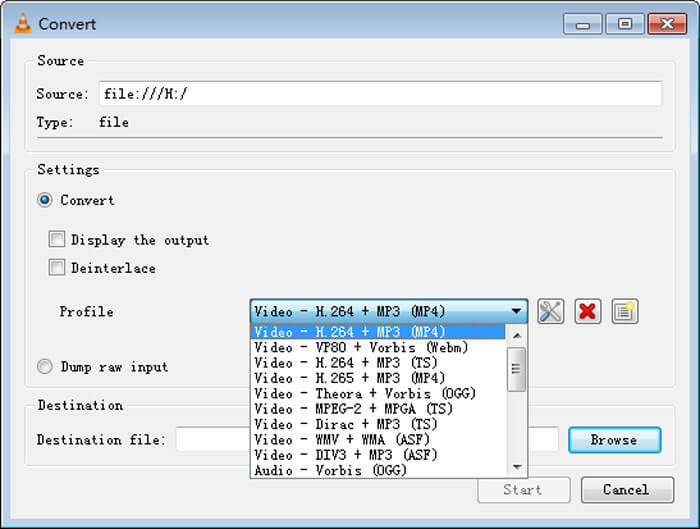
Passaggio 4. A questo punto arriverai alla finestra Convert. Qui devi trovare Settings, andare su Profile e quindi scegliere MP4 come formato di output dal menu a tendina. Infine, fai clic su Start per convertire i tuoi RMVB in MP4 per una riproduzione più semplice.
Parte 3. Come cambiare RMVB in MP4 online
Il convertitore video online supporta anche la conversione dei video RMVB in MP4 ad alta velocità. Free Online Video Converter è un convertitore video basato sul web che può convertire gratuitamente qualsiasi file video o audio più diffuso in MP4, MOV, FLV, AVI, MP3, AAC e molti altri formati. Consente agli utenti di cambiare i file da RMVB a MP4 direttamente dal browser in modo semplice.
Passaggio 1. Visita https://www.free-videoconverter.net/free-online-video-converter/ e fai clic sul pulsante Add Files to Convert per attivare il launcher.
Scarica la Versione Desktop per convertire i file in batch.

Passaggio 2. Dopodiché, importa i tuoi file RMVB in questo strumento online. Poi scegli il formato MP4 nella scheda Video. Quando sei pronto per effettuare la conversione, fai clic sul pulsante Convert per avviare il processo. Una volta completata la conversione, i file convertiti verranno salvati automaticamente sul tuo computer.

RMVB contro MP4
RMVB, una variazione più recente del formato standard Real Media (.RM), è un formato di file video Real Media compresso utilizzando un bitrate variabile. È un formato popolare per film e anime asiatici. I file RMVB sono di dimensioni inferiori e hanno bitrate inferiori ma una qualità migliore.
Rilasciato dal Moving Picture Experts Group (MPEG) nel 2001, il formato MP4 può aiutarti a salvare video, audio, sottotitoli e dati di immagine in tracce separate. È l'abbreviazione di MPEG-4 Part 14. Inoltre, è uno dei formati più popolari utilizzati per lo streaming e la condivisione di video.
Parte 4. Domande frequenti da RMVB a MP4
Cos'è un file RMVB?
RMVB (RealMedia Variable Bitrate) è un formato di file video Real Media che utilizza il bitrate variabile. Un tempo era popolare per la distribuzione di anime asiatiche, film, episodi, torrent, ecc. Sul Web poiché la dimensione del file è più piccola e la qualità è molto migliore.
Come aprire un file RMVB?
RealPlayer supporta la riproduzione di file RMVB in Windows, Mac OS X e Linux. Oppure puoi usare VLC per riprodurre file RMVB.
HandBrake può convertire RMVB in MP4?
HandBrake è un ottimo strumento per convertire i video in modo che funzionino su una serie di dispositivi supportati. È un'ottima scelta per chiunque trasformare RMVB in MP4.
Quindi, è così che converti i file RMVB in MP4. Hai riscontrato problemi seguendo i passaggi sopra menzionati? Sentiti libero di farci sapere i tuoi pensieri.
-
 3 semplici passaggi per masterizzare file / cartelle video _TS su DVD su Mac / Windows
 Come posso convertire e masterizzare file TS su disco DVD? Questa guida passo passo ti mostrerà come copiare file e cartelle TS su DVD su Windows / Mac in modo da poter guardare i file TS su lettore DVD o TV.
-
 6 semplici modi per convertire TS in AVI / MKV / MOV / WMV su Windows / Mac
 Vuoi convertire rapidamente i file TS in AVI / MKV / MOV / WMV? Questo articolo mostra convertitori video online e offline con guida completa. Forse puoi ottenere il miglior convertitore TS gratuito qui.
-
 Come convertire un MP4 in M4A su Windows / Mac (gratuito e online)
 Come posso convertire un MP4 in M4A online? Posso estrarre l'audio da file MP4? Leggi questo post e otterrai tutte le risposte sulla conversione da MP4 a M4A.

