


 Video Converter Ultimate
 Screen Recorder
 Riparazione video
 Download sicuro
Lettore WebEx ARF: riproduci e converti file ARF su Windows e Mac
Se sei l'ospite della riunione WebEx, puoi scaricare il file video registrato da WebEx. Il video della registrazione WebEx verrà salvato nell'estensione file .arf per impostazione predefinita. Il formato Cisco WebEx ARF non è ampiamente supportato da molti lettori multimediali di terze parti. Se si desidera aprire un file di registrazione ARF, è necessario un lettore WebEx ARF. Questo articolo parla principalmente di come ottenere e utilizzare il lettore WebEx per la riproduzione ARF. Basta leggere e seguire.

Parte 1: come aprire e convertire un file ARF con WebEx ARF Player
Cisco WebEx è uno strumento di videoconferenza e riunioni online per webinar interattivi ed eventi virtuali su larga scala. La lunga distanza non è più una questione difficile per i colleghi di tutto il mondo.
Dopo la riunione in linea, è possibile ricevere un'e-mail con un collegamento alla registrazione WebEx. È possibile fare clic sul collegamento e guardare direttamente la riunione WebEx registrata. Non è richiesto un lettore di file ARF di questo tipo.
Se scarichi un file WebEx per la visione offline, devi utilizzare un lettore .ARF per un'ulteriore riproduzione WebEx. Ecco come riprodurre e convertire i file ARF con il software WebEx ARF Player.
Passaggio 1: Visita la tua piattaforma WebEx. Seleziona My WebEx, My Files, e My Recordings. Scegli il file della registrazione. Poi seleziona More e successivamente Download. Puoi scaricare un file WebEx con estensione .ARF.
Passaggio 2: Vai al Meeting Center di WebEx. Seleziona Support e poi Downloads. Vai a Recorder and Players e quindi a Recording and Playback.
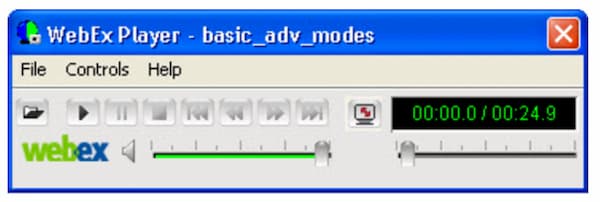
Passaggio 3: Nella sezione for .ARF , scegli Download per scaricare gratuitamente e installare il lettore WebEx per Windows o Mac. Puoi usare questo lettore ARF per aprire immediatamente i file ARF sul PC. Clicca su Pause per mettere in pausa e riprendere la riproduzione dei file ARF.
Passaggio 4: Dopo aver aperto il lettore ARF desktop, puoi cambiare il formato del file da ARF a MP4. Dal menu a discesa File, puoi scegliere .MP4 dall’elenco Convert Format.
Passaggio 5: Specifica il nome del file di output e la cartella. Clicca su OK per confermare e avviare la conversione da ARF a video MP4. Inoltre, puoi convertire i file ARF in formato MP4 anche direttamente all’interno di WebEx ARF Player.
Parte 2: migliore alternativa al lettore WebEx ARF per Windows e Mac
Se stai cercando altri lettori di file ARF, puoi dare un’occhiata a FVC Free Video Player. È in grado di riprodurre online gratuitamente i file ARF. Dopo aver installato un launcher, puoi ottenere la riproduzione dei file ARF di WebEx in pochi clic. Grazie alla più recente tecnologia di codifica audio, puoi guardare i video ARF con effetti sonori senza perdita di qualità. Inoltre, puoi personalizzare in modo flessibile i parametri di riproduzione video e audio. In poche parole, FVC Free Video Player può essere uno dei tuoi migliori lettori ARF per Windows 10/8/7 e Mac.
- 1. Riproduci i video scaricati.
- 2. Ampio supporto di formati audio e video in ingresso, inclusi WebEx ARF, MP4, MOV, AVI, FLV e altro ancora.
- 3. Migliora la qualità audio con la più recente tecnologia di codifica audio DTS-HD e Dolby TrueHD.
- 4. Regola luminosità, contrasto e altri parametri con opzioni e cursori personalizzabili.
- 5. Ottieni la riproduzione di video 3D e il supporto per la cattura dello schermo.
Passaggio 1: Visita il sito ufficiale di FVC Free Video Player nel tuo browser. Clicca su Play Now e Download per installare innanzitutto il launcher di FVC.

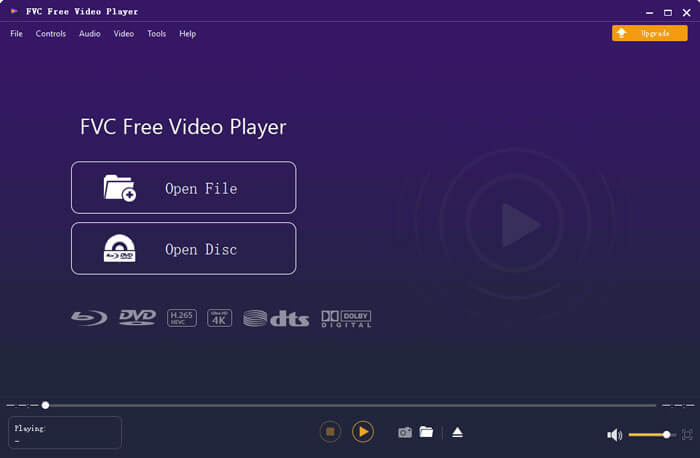
Passaggio 2: Nella finestra popup del lettore di file WebEx, clicca su Open File nell’interfaccia principale. Sfoglia e importa la tua riunione WebEx ARF scaricata.
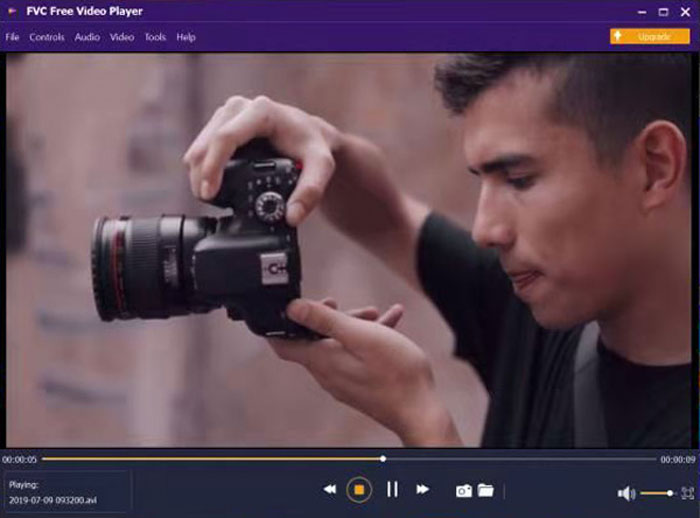
Passaggio 3: Il video ARF inizia automaticamente a essere riprodotto dopo l’importazione. Puoi controllarne la velocità di riproduzione e gli effetti video con le barre degli strumenti in alto e in basso.
Parte 3: domande frequenti sui lettori di file ARF
Dove trovare un lettore ARF per l'estensione Chrome?
Puoi scaricare l'estensione Cisco WebEx direttamente dal Chrome Web Store. ma non esiste ancora un'estensione per Chrome del lettore ARF.
Esiste un lettore ARF per l'app mobile?
Se vuoi riprodurre file ARF e WRF su iPhone o Android, VLC for Mobile può essere una buona scelta. Invece di app portatili specifiche per lettori ARF, puoi convertire i file ARF in formato MP4. Può essere anche la tua app lettore ARF per Android e iPhone. Può inoltre essere un’ottima app per ascoltare musica.
Come posso convertire ARF in MP4?
Esistono molti convertitori ARF in MP4 online e offline sul mercato. Ad esempio, puoi convertire un file ARF in MP4 con FVC Free Online Video Converter, Video Converter Ultimate e altri ancora.
Perché non puoi scaricare la registrazione WebEx?
Solo l'amministratore WebEx può scaricare i file di registrazione WebEx. Nel frattempo, l'amministratore WebEx dovrebbe attivare l'opzione di amministrazione per WebEx che scarica in anticipo i file di registrazione.
Perché la conversione WebEx non riesce su Mac?
Tieni presente che la conversione di WebEx ARF in MP4 richiede un'applicazione basata su Windows. Dovresti installare un convertitore da ARF a MP4 sul tuo computer Windows. Al momento non è supportato convertire ARF in MP4 su Mac. In generale, puoi riprodurre le registrazioni WebEx su Mac. Ma non puoi convertire i file .arf in MP4 e altri formati su Mac.
Questo è tutto sul tutorial e sull'alternativa del lettore WebEx ARF. Puoi riprodurre file WebEx ARF sul tuo computer Windows e Mac con facilità. Inoltre, puoi convertire WebEx ARF in MP4 e altri formati compatibili. Se hai ancora domande sui lettori ARF, puoi lasciare un messaggio qui sotto o non esitare a contattarci.
-
 I migliori 11 software per lettori MP4 per Windows e Mac (gratuiti ea pagamento)
 Leggi e ottieni il tuo miglior lettore MP4 dai consigli degli ultimi 10 software per lettori video MP4. Puoi riprodurre file video MP4 su Windows e Mac senza problemi senza ritardi.
-
 8 migliori lettori Adobe SWF per aprire file video Flash su Windows e Mac
 Quando vuoi goderti i film ei giochi SWF su PC e Mac, puoi saperne di più sulle eccellenti caratteristiche degli 8 migliori lettori di file SWF dall'articolo.
-
 10 migliori lettori video FLV per Windows 10/8/7, Mac, iOS e Android da provare (2021 più recenti)
 Il lettore FLV ti aiuta ad accedere facilmente ai tuoi file FLV sul tuo dispositivo Windows, Mac, Android, iOS. Dai un'occhiata ai migliori lettori di file FLV che puoi scaricare adesso.
