


 Video Converter Ultimate
 Screen Recorder
 Riparazione video
 Download sicuro
Recensione dei 5 migliori lettori DVD gratuiti per Mac
L'unità DVD è un tipo di vecchia funzione abbandonata dalla maggior parte dei computer moderni, incluso il Mac. Ad eccezione del MacBook Pro senza Retina Display, tutti i nuovi Mac non hanno più DVD SuperDrive fisici. Quindi, ti sentirai difficile riprodurre DVD o CD su Mac.
In tal caso, è davvero necessario trovare un lettore DVD affidabile per riprodurre gratuitamente film in DVD o Blu-ray su Mac. Esiste qualche software gratuito di lettore DVD per Mac?

In questo articolo abbiamo selezionato i 5 migliori lettori DVD per Mac da scaricare gratuitamente. Puoi vedere le caratteristiche principali di ciascun lettore DVD e poi scegliere quello che preferisci per guardare i DVD sul tuo Mac.
Parte 1. Lettore DVD ufficiale per Mac - Lettore DVD Apple
Apple DVD Player è il software predefinito e ufficiale di lettore DVD gratuito per Mac. È in grado di riprodurre automaticamente il tuo film in DVD non appena inserisci il disco nel Mac. Considerando che il tuo Mac non dispone di un’unità DVD integrata, devi collegare un’unità DVD esterna come SuperDrive. Si tratta della tecnologia Apple per la lettura e la scrittura di dischi ottici.
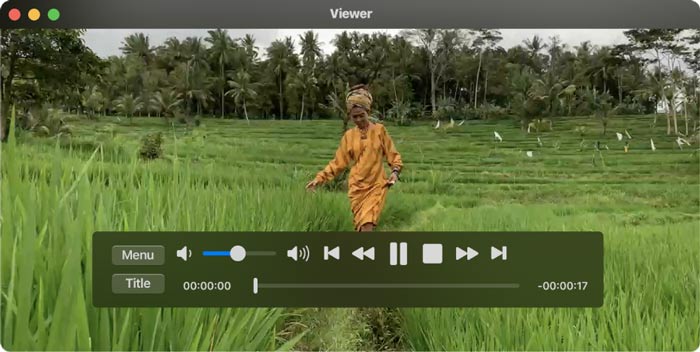
In genere, l’app Apple DVD Player avvia automaticamente la riproduzione del disco dopo che hai inserito il DVD. In caso contrario, puoi premere la barra spaziatrice dopo che il disco è stato riconosciuto. Questo lettore DVD gratuito per Mac può anche riprodurre cartelle DVD. Puoi fare clic su File nella barra dei menu in alto, scegliere l’opzione Apri DVD Media e poi selezionare la cartella VIDEO_TS che contiene il film in DVD che vuoi riprodurre. Durante la riproduzione del DVD, puoi usare i controlli su schermo per gestire l’intero playback.
Parte 2. Lettore DVD gratuito per Mac e PC Windows 10/8/7
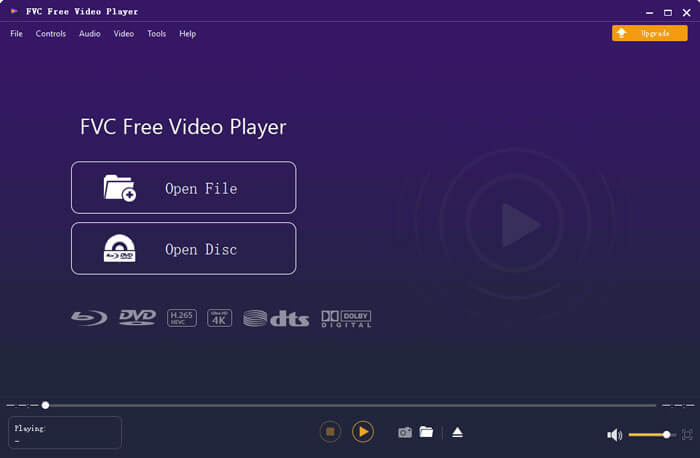
FVC Free DVD Player è un lettore DVD online gratuito che ti consente di guardare qualsiasi disco DVD, cartella DVD e file immagine ISO sul tuo Mac e PC Windows. Quando vuoi riprodurre film in DVD, puoi andare al sito del lettore DVD gratuito e avviare la riproduzione. È compatibile con tutti i browser più utilizzati, tra cui Safari, Chrome, IE e Firefox.

Questo software di lettore DVD gratuito per Mac è dotato di una tecnologia avanzata di codifica video che garantisce una riproduzione DVD di alta qualità. Inoltre, supporta sia DTS-HD che Dolby TrueHD per offrirti un audio senza perdita di qualità. Per riprodurre una cartella DVD, puoi fare direttamente clic sul pulsante Play Now e scaricare gratuitamente un piccolo file di avvio. Dopodiché potrai goderti comodamente i tuoi film in DVD. Per i dischi DVD, devi anche collegare un’unità DVD esterna.
Parte 3. Download gratuito di lettore DVD open source per Mac - VLC Media Player
VLC media player è un diffusissimo strumento di riproduzione video e audio che integra anche la funzione di lettore DVD. Come lettore DVD gratuito, offre diverse versioni per guardare film in DVD su computer Mac, Windows e Linux. Puoi andare sul sito ufficiale, selezionare la versione adatta al tuo sistema e poi installarla gratuitamente sul computer. VLC media player è in grado di riprodurre DVD, VCD e CD audio sul tuo Mac.
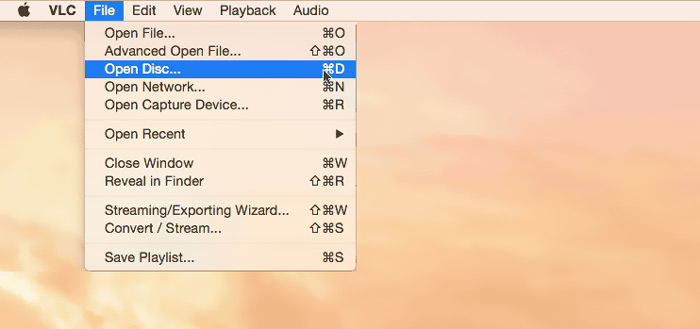
Questo lettore DVD gratuito per Mac può accedere facilmente ai menu DVD, ai capitoli e agli altri contenuti correlati. Ti offre il pieno controllo della riproduzione del DVD. Inoltre, VLC media player ti permette di catturare schermate per salvare un momento specifico come file immagine. Oltre a essere un lettore DVD gratuito, VLC riproduce anche dischi Blu-ray.
Parte 4. Software gratuito per lettore DVD per Mac - KMPlayer
KMPlayer è un altro lettore multimediale open-source che può riprodurre DVD su Mac. Questo lettore DVD gratuito per Mac è progettato con una funzione di decodifica multi-core per riprodurre qualsiasi film in DVD con alta qualità e con un basso consumo di memoria CPU. Dispone anche di una funzione di riproduzione in formato 3D per offrirti un intrattenimento home cinema in 3D.
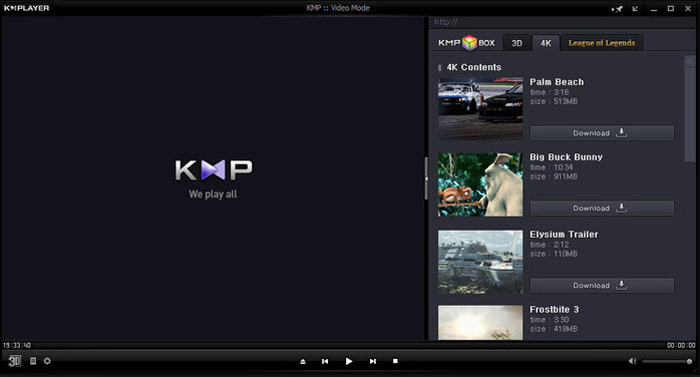
KMPlayer può aiutarti a gestire facilmente la tua collezione di DVD. Mentre il film in DVD viene riprodotto su Mac, ti consente di regolare i menu del DVD, selezionare tracce audio e sottotitoli, effetti video personalizzati e fare più impostazioni. Una cosa che dovresti sapere è che potresti facilmente vedere alcuni annunci pop-up durante l'utilizzo di questo software gratuito per lettore DVD.
Parte 5. Lettore DVD gratuito regionale per Mac - PowerDVD
PowerDVD è un lettore multimediale premium e completo che ti consente di riprodurre vari file multimediali, DVD e film Blu-ray con alta qualità. Questo lettore DVD per Mac è dotato della potente tecnologia TrueTheater, che può offrire dettagli più nitidi e una riproduzione fluida. Ti permette di riprodurre dischi Blu-ray Ultra HD e contenuti HDR sul tuo Mac.
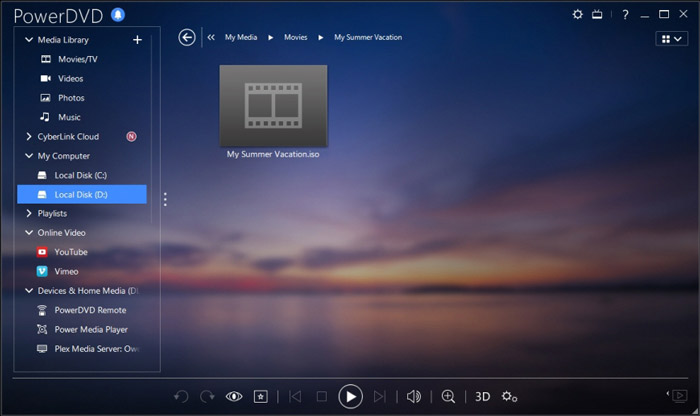
PowerDVD viene fornito con la riproduzione di dischi HD e la modalità di risparmio energetico per il tuo computer. Ma dovresti sapere che non è uno strumento di riproduzione totalmente gratuito. Alcune funzioni sono limitate nella prova gratuita. Anche così, PowerDVD è ancora una buona opzione per goderti i DVD su Mac.
Parte 6. Domande frequenti sul software gratuito per lettore DVD per Mac
Domanda 1. Come utilizzare un lettore DVD esterno con il mio Mac?
Basta collegare l'unità esterna al tuo Mac e puoi usarla proprio come un'unità ottica integrata. Quando vuoi riprodurre un disco DVD, puoi inserirlo nell'unità esterna. L'app di riproduzione multimediale pertinente si avvierà e riprodurrà automaticamente il DVD.
Domanda 2. È possibile collegare un vecchio lettore DVD a un nuovo televisore?
Per collegare un vecchio lettore DVD a una nuova TV, dovresti controllare le porte HDMI. Se il nuovo televisore è dotato di una porta HDMI destra, è possibile effettuare facilmente il collegamento tra lettore DVD e TV.
Domanda 3. Come rippare DVD in video MP4 digitali?
Se vuoi rippare un DVD in un video digitale MP4 o MOV, puoi scaricare il convertitore DVD per convertire il tuo DVD in un file video senza alcuna perdita di qualità.
Domanda 4. Come cambiare la regione dell'unità DVD in DVD Player su Mac?
Quando il codice regionale del DVD non corrisponde al codice regionale corrente dell'unità DVD, ti verrà chiesto di cambiare il codice per la riproduzione del DVD. È possibile selezionare una regione adatta che corrisponda alla regione del DVD. Dovresti sapere che la regione 0 è riproducibile in tutte le regioni e la regione 1 è riproducibile in Canada, Stati Uniti e nei territori degli Stati Uniti.
Conclusione
In questo post abbiamo parlato principalmente di lettori DVD gratuiti per Mac. Ti abbiamo consigliato 5 ottimi lettori DVD per guardare film in DVD sul tuo Mac. Puoi scegliere quello che preferisci per ottenere la riproduzione dei DVD. Se hai qualche altro software di lettore DVD da consigliare, condividilo nei commenti con gli altri lettori.
-
 Recensione dei 10 migliori lettori video WMV nel 2025 (computer e telefono)
 Come posso riprodurre un video WMV? VLC riproduce WMV? Quale app riproduce file WMV? Questo post fa un elenco dei 10 migliori lettori video WMV per riprodurre WMV su Mac, PC Windows, Android e iPhone.
-
 I 10 migliori lettori HD per guardare film in HD su Windows / Mac / iOS / Android
 Questa è la tua ultima recensione del lettore video HD. Puoi ottenere vantaggi e svantaggi imparziali dai 10 migliori lettori HD sul mercato. Basta leggere e scegliere il tuo miglior lettore HD con tutti i formati supportati.
-
 Lettore DivX - Recensione dei 5 migliori lettori di codec DivX nel 2025
 A cosa serve il lettore DivX? Qual è il miglior lettore DivX per Android? Ottieni una recensione dei 5 migliori lettori DivX da questo post.
