


 Video Converter Ultimate
 Screen Recorder
 Riparazione video
Scopri modi su come riprodurre file MKV su PS4
Non solo Xbox One S supporta la riproduzione di film. Ora anche PS4 sta cercando di stare al passo con la tendenza. Con l’uso di un cavo USB e tramite DLNA, PS4 ora può riprodurre MKV, MP4, AVI e molti altri formati. Questo significa che MKV è tra i file che puoi riprodurre. Per vedere l’elenco completo dei formati supportati, visita il sito ufficiale di PS4. Inoltre, non continueresti a leggere questo articolo se non fossi interessato a riprodurre un file MKV su PS4. Continua, man mano che prosegui scoprirai diversi modi su come puoi riprodurre MKV su PS4.

Parte 1. Tutti i file MKV possono essere riprodotti su PS4?
Posso riprodurre file MKV su PS4? Sicuramente puoi. Il formato file MKV è supportato da PS4. Ma non tutti i file MKV possono essere riprodotti correttamente. Potresti riscontrare un fallimento nel suonarlo. Questo perché devi soddisfare lo standard stabilito da PS4. Per lo più, sono supportati H.264/MPEG-4 AVC. Le stesse regole si applicano se si riproducono file MKV da un'unità USB. Nel frattempo sono supportati audio MP3, AAC LC, AC-3. La maggior parte di questi formati sono formati Dolby Digital. Se pensi di aver soddisfatto lo standard, puoi procedere con i passaggi su come riprodurre direttamente MKV su PS4.
Passaggio 1. Scarica e installa DivX Media Server e avvia il player. Poi abilita la condivisione sul tuo computer.
Passaggio 2. Carica o importa il file MKV nel server.
Passaggio 3. Prima di passare al passaggio successivo, assicurati che sia il computer che la PS4 siano connessi alla stessa rete Wi-Fi. Poi scarica e installa il lettore multimediale DivX sulla tua PS4. Successivamente, apri l’app lettore multimediale della PS4 e scegli DivX Media Server dall’elenco dei dispositivi che verranno visualizzati.
Passaggio 4. Infine, cerca Video, quindi seleziona il video che vuoi riprodurre e inizia lo streaming.
Parte 2. Guida passo passo su come riprodurre MKV su PS4 da USB
Nel frattempo, se stai utilizzando un archivio USB, assicurati che sia formattato FAT o exFAT, altrimenti non verrà rilevato. Se pensi di essere pronto e l'unità flash è compatibile, consulta la guida passo passo di seguito.
Passaggio 1. Accendi la PS4 e inserisci la chiavetta USB. Vai al Menu principale. Ora seleziona Video e cerca il nome della tua unità USB.
Passaggio 2. Una volta visualizzato l’elenco dei nomi dei file, fai clic su Mostra tutto per vedere l’intero elenco dei file che hai salvato sulla tua USB. Copia il file e trasferiscilo sulla PS4.
Passaggio 3. Infine, assicurati di avere ancora abbastanza spazio di archiviazione per completare il trasferimento.
Parte 3. Modo alternativo per riprodurre MKV su PS4 tramite Plex Server
Oltre a DivX c’è anche un lettore alternativo che puoi usare per riprodurre MKV su PS4. Si tratta di un server multimediale di streaming chiamato Plex. Questo media server ti permette di trasmettere in streaming video di alta qualità, musica, programmi TV e podcast dal tuo computer. Anche se alcune persone riscontrano problemi nella riproduzione di alcuni file MKV, puoi comunque usarlo come alternativa. Nel frattempo, se vuoi davvero usare Plex e riprodurre il file non compatibile, dovresti prendere in considerazione la conversione del video. Alcuni convertitori sono in grado di trasformare i tuoi file MKV in un formato supportato da Plex. Regolando il codec video, il frame rate, il bitrate e altri parametri, è possibile. Esiste uno strumento in grado di farlo? Sì, esiste, puoi provare Video Converter Ultimate. Sì, questo strumento è in grado di farlo. Prova a usarlo per risolvere questo problema.
Passaggio 1. Scarica e installa Video Converter Ultimate sul tuo PC.
Download gratuitoPer Windows 7 o versioni successiveDownload sicuro
Download gratuitoPer MacOS 10.7 o versioni successiveDownload sicuro
Passaggio 2. Aggiungi i file che vuoi convertire facendo clic su Aggiungi file o semplicemente trascina e rilascia il file nell’interfaccia.
Passaggio 3. Successivamente, scegli il formato supportato da Plex facendo clic sul menu a discesa Converti tutto in.
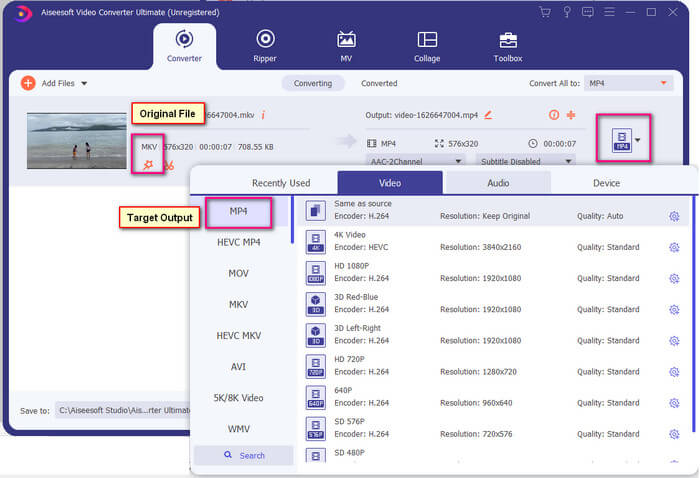
Passaggio 4. Una volta impostato il formato, fai clic sul pulsante Converti tutto per avviare il processo di conversione. Quando la conversione è terminata, si aprirà la cartella in cui è stato salvato il file.
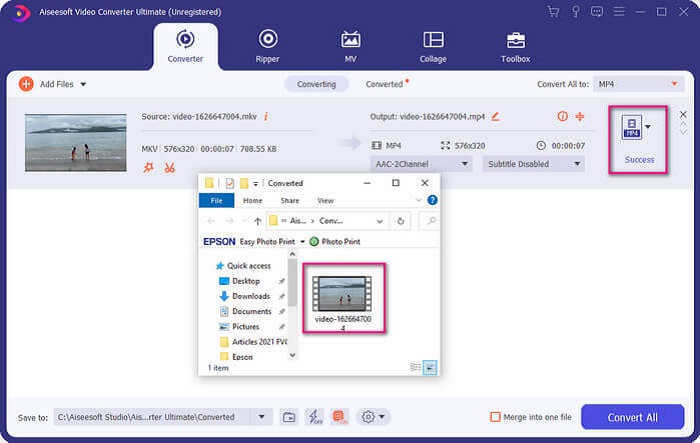
C'è di più con il convertitore video Ultimate. Puoi controllare l'elenco di vantaggi e svantaggi di seguito per conoscere altre buone funzionalità che offre.
● Questo strumento converte in soli tre secondi.
● Dispone di una tecnologia di accelerazione che può migliorare il file convertito.
● Supporta la qualità HD.
● Ha funzioni di modifica come l'aggiunta di filtri ed effetti di base.
● È possibile regolare i sottotitoli e la traccia audio.
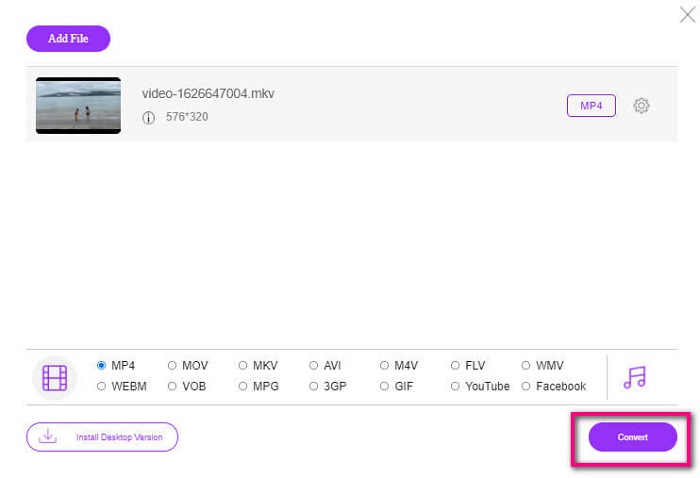
Nel caso in cui tu stia cercando un convertitore gratuito, puoi anche prendere in considerazione FVC Free Online Video Converter. Anche se potrebbe non essere valido quanto Ultimate Video Converter, riesce comunque a tenergli testa. Sicuramente può convertire il file e renderlo compatibile con Plex o DivX. Tutto quello che devi fare è…
Passaggio 1. Avvia lo strumento visitando la pagina ufficiale indicata nella descrizione.
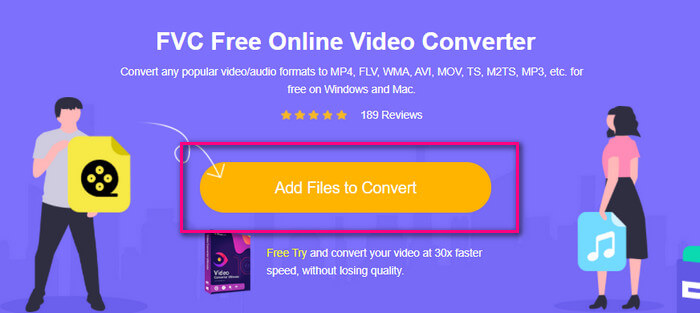
Passaggio 2. Carica il video facendo clic su Aggiungi file da convertire.
Passaggio 3. Cambia il formato selezionando il cerchio sottostante.
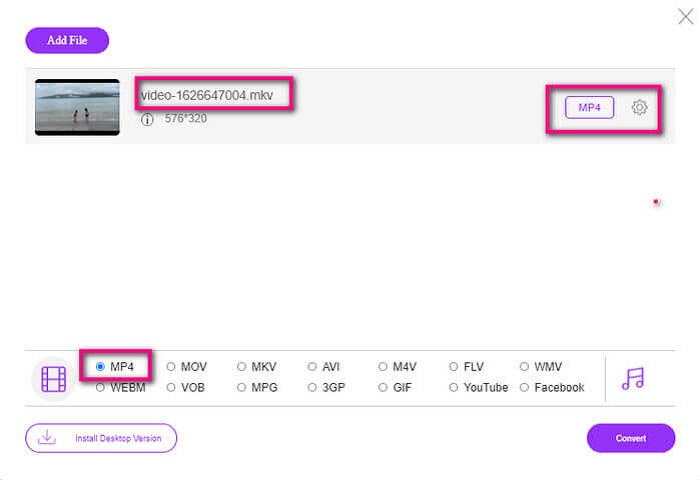
Passaggio 4. Infine, fai clic sul pulsante Converti e seleziona la posizione in cui vuoi salvare il file. Da lì fai clic su OK. Puoi fare clic sull’icona Cartella per vedere il file convertito.
Ulteriori letture
Riprodurre MKV in Windows Media Player
Parte 4. Ulteriori informazioni sulla riproduzione di file MKV su PS4
Quanto costa una PS4?
Il prezzo di mercato al dettaglio è di 399,99 USD negli Stati Uniti e in Canada è di 399,99 CAD. I prezzi possono variare a seconda del prezzo al dettaglio nel tuo paese.
C'è la possibilità di riprodurre CC o Close Caption MKV su PS4?
Sì, esiste. Si trova nelle Impostazioni di Accessibilità. Il percorso è: vai alle Impostazioni della tua PS4, poi Accessibilità e quindi seleziona Mostra sottotitoli. Da lì fai clic su Opzioni per attivare i sottotitoli.
Se PS4 supporta MKV, perché i miei file non vengono riprodotti?
Come accennato in precedenza, devi assicurarti che il file MKV soddisfi lo standard del lettore che stai utilizzando. Devi solo controllare i requisiti di PS4 o di un altro server di streaming multimediale. La maggior parte dei server multimediali ha anche una classificazione per riprodurre file MKV.
Quali sono i formati supportati da PS4?
Esistono diversi formati di file supportati da PS4. Ma noterai che la maggior parte dei formati non sono compressi e contengono un file di grandi dimensioni. Sebbene supporti anche quelli non compressi come Mp4. Intanto ecco l'elenco dei formati di cui stiamo parlando: MKV, AVI, MPEG-2 PS, MPEG-2 TS, AVCHD e XAVC e MP4.
Conclusione
Per concludere, ci sono molti modi in cui puoi riprodurre direttamente o indirettamente i file MKV su PS4. Quelli che sono stati elencati sono i mezzi più comunemente usati. DivX Stream Server e Plex sono solo alcune alternative che puoi utilizzare. Si consiglia vivamente di convertire il file invece per evitare problemi e troppi processi.
-
 [Risolto] VLC Player non riproduce MKV, come risolverlo
 Il lettore VLC supporta i file MKV? Perché VLC non riproduce MKV? Questo post condivide 4 suggerimenti utili per risolvere il problema con il lettore VLC che non riproduce i file MKV.
-
 Come riprodurre file MKV su iPad 2025
 Come riprodurre file MKV su iPad 2? Posso convertire MKV in MP4 per riprodurli su iPad Pro/Air/2? Questo post condivide 2 semplici modi per riprodurre MKV su iPad.
-
 Come scaricare codec MKV in Windows Media Player per una riproduzione fluida
 Non riesci a riprodurre video MKV in Windows Media Player? Puoi scaricare gratuitamente il codec MKV per Windows Media Player. Al contrario, converti MKV per renderlo riproducibile in Windows Media Player.
