


 Video Converter Ultimate
 Screen Recorder
 Riparazione video
 Download sicuro
Correzione del codice di errore 224003: tutto ciò che devi sapere
Il minimo che una persona desidera provare è vedere la comparsa del codice errore 224003 sul proprio schermo. Comprendere le cause più comuni del codice errore 224003, come problemi di rete, compatibilità del browser e software obsoleto, è fondamentale per una risoluzione efficace dei problemi. Conoscere gli strumenti giusti è necessario quando si affronta una questione del genere, che richiede un processo decisionale per garantire di non rovinare completamente il file video.
This article will delve into step-by-step solutions, addressing each potential cause and providing practical tips to resolve the error. By the end of this guide, you'll be equipped with the knowledge to navigate the complexities of Error Code 224003 and ensure a seamless digital experience. Whether you're encountering this error for the first time or have faced it repeatedly, our guide aims to empower you with the tools to troubleshoot, fix, and prevent Error Code 224003 in the future. Be sure to read the whole article today so that you might know how to deal with it for future occurrences.

Parte 1. Comprendere il codice di errore video 224003
Il codice errore 224003 può manifestarsi in varie forme, spesso indicando un problema tecnico o un problema all'interno del sistema. Gli utenti potrebbero riscontrare questo errore durante l'utilizzo di applicazioni, servizi di streaming o browser specifici, causando notevoli inconvenienti. Per affrontare e risolvere in modo efficace questo errore, è fondamentale comprenderne le potenziali cause, elencate di seguito.
Cause comuni del codice di errore 224003
◆ Network Issues: Poor or unstable internet connection can trigger Error Code 224003, especially when streaming content online. This is also the reason for Error code 232404.
◆ Browser Compatibility: Certain browsers may not be fully compatible with the application or service, leading to the error.
◆ Outdated Software: Obsolete software, including browsers and applications, can be a factor in the occurrence of this error.
◆ Corrupted Cache or Cookies: Accumulated cache or corrupted cookies in your browser may interfere with the proper functioning of the application, resulting in Error Code 224003.
In quali situazioni si verifica il codice di errore
◆ Issues with Streaming Platform: Problems on the server side of the streaming platform, such as maintenance, technical issues, or high traffic, can result in error code 224003. In such cases, the user has limited control over resolving the issue and may need to wait for the platform to address it.
◆ Hardware Acceleration: Hardware acceleration in your browser settings may sometimes lead to compatibility issues with certain video content, resulting in error code 224003. Disabling hardware acceleration could be a potential solution in such cases, and other video playback issues like video in green screen, video freezes, and more.
◆ Incompatibility with Device: Certain devices or operating systems may not be fully compatible with the video content, causing errors during playback.
◆ Network Firewall or Security Software: Certain security software or firewalls may block streaming specific video content, resulting in the display of Error Code 224003.
◆ Browser Extensions Interference: Certain browser extensions or add-ons may interfere with the proper functioning of online video players, leading to Error Code 224003.
È fondamentale comprendere che le condizioni specifiche che hanno provocato il codice di errore 224003 possono differire; pertanto, anche le misure di risoluzione dei problemi possono differire. L'identificazione del motivo sottostante dipende dal contesto in cui si verifica l'errore per risolvere adeguatamente il problema.
Parte 2. Guida passo passo per risolvere l'errore 224003
Riparazione video Aiseesoft
Error 224003 can happen to anyone at any time and any video file, and when this error occurs, you may see a message like Error 224003: The video file cannot be played. Aiseesoft Video Repair is a reliable tool to fix issues like corrupted or damaged video files like the error 224003. It can repair videos in various formats, including MP4, MOV, AVI, WMV, MKV, and FLV. It also supports repairing videos damaged by viruses, malware, and other factors. Follow this step-by-step guide to resolve your problem using Aiseesoft Video Repair and get your videos back in pristine condition.
Steps on Resolving Error 224003 Using Aiseesoft Video Repair:
Step 1. Visit Aiseesoft's website, download Video Repair, and follow the installation instructions.
Download gratuitoPer Windows 7 o versioni successiveDownload sicuro
Download gratuitoPer macOS 10.7 o versioni successiveDownload sicuro
Step 2. Open Aiseesoft Video Repair and add the video experiencing the error code 224003 on the red + symbol. Click the purple + symbol on the right to add your sample video.
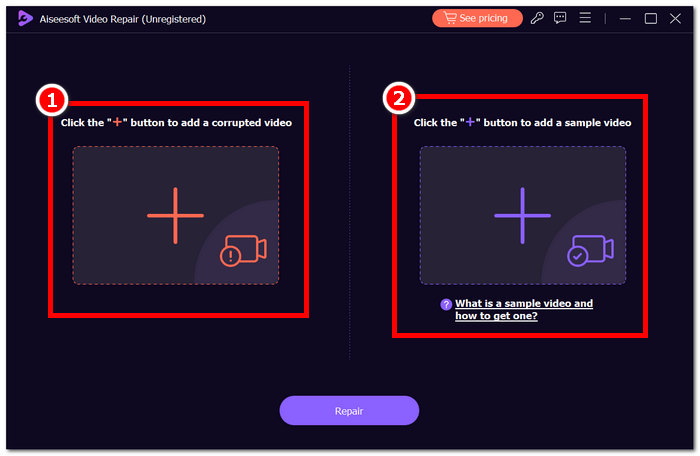
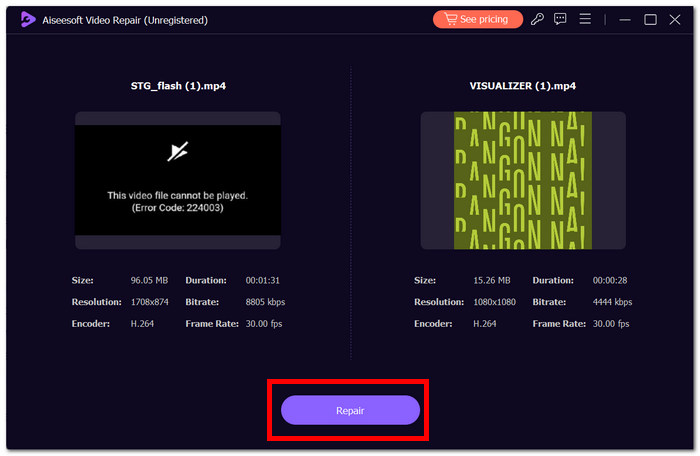
Step 3. Click Repair, and the software will analyze and fix the video.
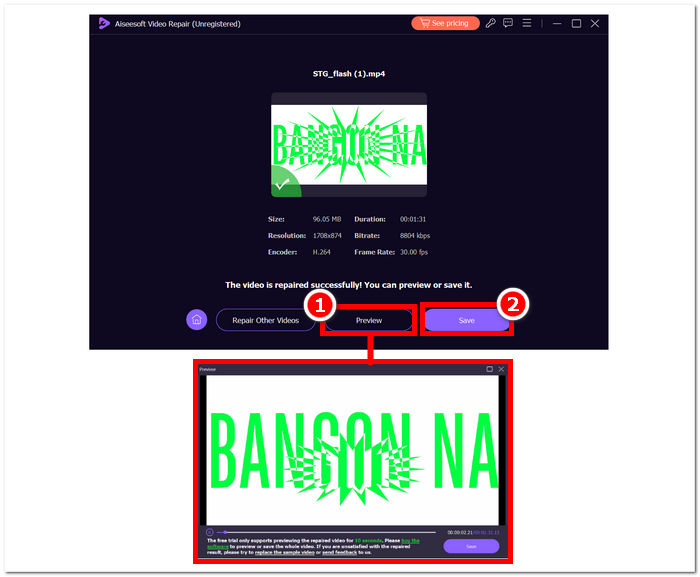
Step 4. After repair, click Preview to verify. Click Save to have it download the repaired video, and open it with your media player to check if Error 224003 is fixed.
Additional Tips:
◆ Conservare un backup del file video originale prima di tentare qualsiasi riparazione.
◆ Assicurati di utilizzare la versione più recente di Aiseesoft Video Repair per prestazioni ottimali.
Seguendo diligentemente queste istruzioni passo passo, puoi utilizzare in modo efficiente Aiseesoft Video Repair per affrontare ed eliminare l'errore 224003, riportando i tuoi file video a uno stato funzionale e divertente. Ricorda di salvare il video riparato nella posizione preferita e goditi la visualizzazione ininterrotta senza la frustrazione dell'errore 224003. Se riscontri problemi durante il processo, consulta la documentazione di Aiseesoft Video Repair o chiedi assistenza alle loro risorse di supporto per ulteriori indicazioni.
Parte 3. Domande frequenti sul codice errore 224003
Perché Firefox continua a dire il codice di errore video 224003?
L'errore video 224003 di Firefox potrebbe verificarsi a causa di problemi di connettività di rete, discrepanze nelle impostazioni del browser o incompatibilità con il contenuto video. Per risolvere questo errore, inizia verificando la stabilità della tua connessione Internet, assicurandoti che il browser sia aggiornato e svuotando la cache e svuotando i cookie del browser. Inoltre, la rimozione temporanea delle estensioni dal browser può aiutare a individuare e risolvere i conflitti di compatibilità, eliminando potenzialmente il verificarsi dell'errore 224003 durante la riproduzione del video.
La correzione del file video diminuisce la qualità del video?
La correzione di un file video può essere eseguita senza compromettere la qualità se eseguita correttamente. Questo processo affronta principalmente problemi come la corruzione o gli errori di formattazione all'interno del file. È fondamentale affidarsi a strumenti di riparazione video affidabili e, come misura precauzionale, creare un backup del file video originale prima di avviare qualsiasi procedura di riparazione.
Puoi correggere un codice di errore video online?
Per risolvere un codice di errore video online come 224003, aggiorna la pagina, controlla la connessione Internet e aggiorna il browser. Se il problema persiste, valuta la possibilità di provare un browser diverso per compatibilità. Se tutto il resto fallisce, contatta il supporto della piattaforma o i forum della community per ricevere assistenza nella risoluzione dell'errore e nel ripristino della riproduzione video senza interruzioni.
Conclusione
Error Code 224003 can be irritating, but you can overcome it with the right information and troubleshooting procedures. You can easily fix this error and restore a flawless digital experience by identifying and correcting potential causes such as network issues, browser compatibility, and outdated software. If you encounter Error Code 224003 again, please see our tutorial for a step-by-step solution. With these insights, your tech-related frustrations will be a thing of the past, allowing you to enjoy uninterrupted digital activities easily.
-
 Cos'è l'errore 0xc10100bf nel video e come risolverlo
 Il tuo video non viene riprodotto a causa dell'errore 0xc10100bf e stai cercando modi per risolverlo? In questo articolo imparerai di cosa si tratta e come risolverlo.
-
 Soluzioni rapide per correggere l'errore 150 dell'impossibilità di riprodurre video
 Hai mai riscontrato la frustrante incapacità di riprodurre l'errore video 150 durante la tua esperienza di visione di video? Non preoccuparti perché ti abbiamo spiegato come risolverlo.
-
 [Guida dettagliata] Come risolvere il video di Google Drive che non viene riprodotto sul computer
 I video su Google Drive non vengono riprodotti con l'errore "Si è verificato un problema durante la riproduzione di questo video". Può essere causato da Google Drive stesso o dai problemi di Chrome. Questo articolo introdurrà 6 soluzioni in dettaglio.
