


 Video Converter Ultimate
 Screen Recorder
 Riparazione video
Revisione esauriente per il software di registrazione audio per registrare l'audio in modo efficace
Che tu sia un professionista o un dilettante, devi avere un software di registrazione audio per gestire e rifinire l’audio in base all’uso specifico. Inoltre, scegliere un registratore audio adatto per il tuo dispositivo può essere impegnativo, perché sul mercato sono disponibili molte opzioni. Invece di provare numerosi programmi di registrazione, ti presentiamo i quattro registratori che abbiamo ritenuto più adatti alle tue esigenze, così da evitare il download o l’uso di software dannosi. L’elenco dei registratori audio qui sotto è stato selezionato con cura per offrirti solo il meglio, escludendo i programmi dalle prestazioni scarse.

Parte 1. 4 Miglior software di registrazione audio su Windows e macOS
1. Registratore dello schermo FVC
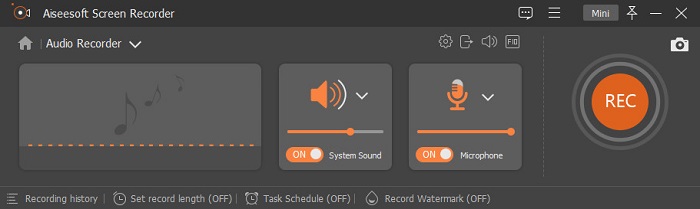
Devi registrare l’audio dal computer ma non sai cosa usare? In tal caso ti presentiamo il migliore e, finora, il registratore più scelto sul mercato, FVC Screen Recorder. Ha un’interfaccia utente eccellente che permette agli utenti di interagire con il software senza operazioni complicate. Inoltre, molti utenti hanno problemi con i rumori di fondo: grazie alla nuova funzione aggiuntiva di riduzione del rumore puoi registrare senza che i piccoli rumori di sottofondo creino fastidio. Oltre a questo, offre numerose funzioni che ti aiuteranno a registrare in modo efficace. Vuoi sapere quali sono? Allora facciamo una panoramica delle funzioni principali di FVC Screen Recorder.

Screen Recorder
4.988.518+ download- Registra i suoni con una qualità audio ultra elevata.
- Registra l'audio 24 ore su 24, 7 giorni su 7, purché disponga di spazio di archiviazione sufficiente sull'unità del computer.
- È possibile registrare l'audio del sistema con un microfono allo stesso tempo.
- Il miglioramento del microfono è disponibile per un'esperienza molto migliore di registrazione della tua voce.
- Puoi controllare l'audio del microfono se necessario.
Download gratuitoPer Windows 7 o versioni successiveDownload sicuro
Download gratuitoPer macOS 10.7 o versioni successiveDownload sicuro
Professionisti
- Il programma consente agli utenti di provare un'esperienza elettrizzante per registrare l'audio su Mac o Windows.
- Sono disponibili funzionalità di modifica di base, come il taglio o il taglio dell'audio.
- Ha una cronologia di registrazione integrata per trovare facilmente l'audio registrato.
Contro
- Non supporta l'aggiunta di effetti sull'audio durante la registrazione.
- Acquista prima dell'uso.
2. Audacia
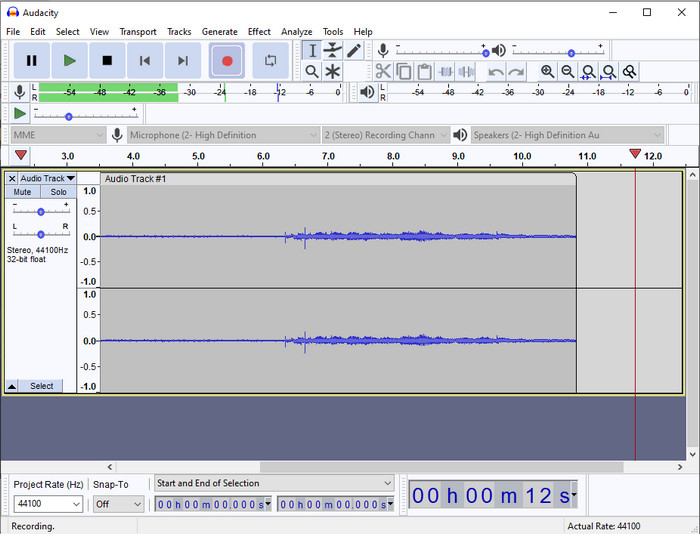
Se ti serve uno strumento professionale per gestire le tue registrazioni audio, allora Audacity può aiutarti. Questo registratore audio professionale ha già supportato milioni di podcaster nel loro percorso di registrazione. Se cerchi un registratore avanzato gratuito, questo è uno dei migliori. Sebbene offra funzioni di registrazione di livello pro, risulta comunque difficile familiarizzare con lo strumento a causa della sua interfaccia grafica poco intuitiva. Anche se risponde alle esigenze di registrazioni professionali, alcune funzioni devono ancora essere migliorate, come la riduzione del rumore. Nonostante ciò, Audacity registra l’audio del computer in modo professionale, come non tutti i registratori sanno fare.
Professionisti
- Scaricabile gratuitamente su tutte le piattaforme desktop.
- Offre funzionalità di editing esperte per i professionisti.
- Ha alcune funzionalità avanzate di cui avrai bisogno per creare un podcast.
Contro
- La GUI del software è obsoleta.
- È necessario un aggiornamento per alcune delle sue funzionalità.
- Non è la scelta migliore per i dilettanti e per coloro che non sanno registrare.
3. Giocatore QuickTime
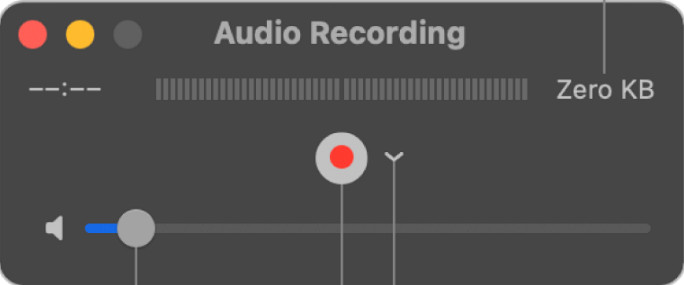
Anche il QuickTime Player può essere utilizzato come registratore audio su Mac, se necessario. Tuttavia, poiché il player non è così avanzato ed efficiente per la registrazione, potresti riscontrare ritardi e una qualità inferiore dell’audio in uscita. Se però hai bisogno di una registrazione veloce su Mac, questa è una buona scelta, perché non devi scaricare nulla ed è sicuramente sicuro da usare. Se invece sei un professionista in cerca del miglior software di registrazione audio, questo non è lo strumento ideale.
Professionisti
- È già disponibile su ogni macOS.
- Gratuito, sicuro e facile da usare.
Contro
- Non è efficace come l'altro registratore audio in questo elenco.
- La qualità di uscita finale dell'audio è bassa.
- Non è la scelta migliore per la registrazione e l'editing professionali.
Correlato:
Come registrare lo schermo con audio su Mac usando QuickTime
Come convertire QuickTime in MP4
4. Ocenaudio
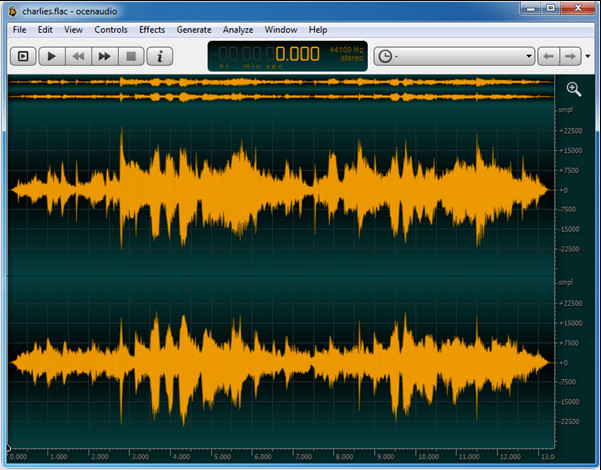
Se ti serve un registratore multifunzione per registrare l’audio su Windows 10 o versioni successive, allora Oceanaudio può aiutarti. Questo strumento ha un’interfaccia molto simile a quella di Audacity, ma la sua GUI è più facile da comprendere. Per spiegare meglio, questo registratore offre funzioni complesse e strumenti utili per la registrazione audio. Anche se è un po’ difficile da usare e dovrai probabilmente guardare un tutorial per imparare a sfruttarlo al meglio, alla fine ne vale la pena. Quindi, se ti serve un editor con un’interfaccia migliore rispetto ad Audacity, questa dovrebbe essere la tua scelta.
Professionisti
- Utilizza una tecnologia avanzata per la registrazione.
- È una scelta esperta per fare la registrazione audio.
- Puoi ascoltare la tua voce durante la registrazione.
Contro
- Non è facile da usare.
- I principianti potrebbero confondersi durante l'utilizzo di questo strumento.
Parte 2. Grafico di confronto sul software di registrazione audio
| Caratteristiche | Registratore dello schermo FVC | Audacia | QuickTime Player | Ocenaudio |
| Registra suono di sistema e microfono |  | | | |
| Modifica la registrazione | | |  | |
| Accelerazione hardware | | | | |
| Pre-ascolto in tempo reale | | | | |
| Salva la qualità originale | | | | |
| Migliore interfaccia utente | | | | |
Parte 3. Domande frequenti sul software di registrazione audio
Cinch Audio Recorder è il miglior registratore audio?
Di recente abbiamo pubblicato una recensione su Cinch Audio Recorder. Se vuoi saperne di più su questo registratore audio, fai clic su questo link e scopri informazioni più dettagliate sul programma.
Quali sono le qualità di un buon registratore audio?
Dovrai conoscere gli standard di base prima di scegliere un buon registratore audio. Innanzitutto, dovrebbe essere in grado di catturare l'audio sul microfono a proprio agio. In secondo luogo, è sicuro e privo di malware. Terzo, se è necessario acquistare lo strumento, lo strumento stesso dovrebbe fornire l'eccellenza agli utenti. In quarto luogo, il tasso di efficacia significa che lo strumento deve essere molto efficace in una registrazione. Quinto, le funzionalità di base o avanzate devono essere disponibili per aiutare gli utenti a registrare. Prima di scegliere un registratore audio per aiutarti, puoi fare affidamento su questi standard.
Come registrare l'audio su Windows 10?
Prima di registrare su Windows 10, devi scegliere il miglior registratore, ad esempio FVC Video Recorder: scaricalo sul desktop, installa rapidamente lo strumento e avvialo. Poi seleziona l’opzione Audio Recorder e cliccaci sopra. Ora puoi facilmente aggiungere il suono di sistema alla registrazione o il microfono, attivandoli sulla barra degli strumenti fluttuante. Quando sei pronto per registrare, clicca il pulsante rosso rotondo per iniziare. Se devi terminare la registrazione, clicca il pulsante quadrato per fermarti; subito dopo, una nuova interfaccia ti mostrerà l’elenco delle registrazioni audio effettuate.
Conclusione
Ora conosci il software di registrazione audio disponibile sul tuo desktop. Tutti gli strumenti presentati qui ti aiuteranno nelle registrazioni. Tuttavia, se stai cercando un registratore che superi le prestazioni degli altri, FVC Screen Recorder fa al caso tuo. Hai ancora dubbi su questo registratore audio? In tal caso, scaricarlo è l’unico modo per metterlo alla prova e verificare se funziona davvero come abbiamo detto in questo articolo.
-
 I 4 migliori registratori di suoni AIFF gratuiti che producono audio di alta qualità
 Questo articolo parla di AIFF e di alcuni degli strumenti più popolari che puoi utilizzare per produrre formati AIFF di alta qualità.
-
 3 delle migliori tecniche su come registrare l'audio su iPhone
 Hai difficoltà perché non riesci a registrare correttamente l'audio su iPhone? Quindi leggi questo articolo per sapere come registrare l'audio su iPhone e quali sono gli strumenti disponibili.
-
 7 del magnifico registratore vocale accessibile in tutte le piattaforme
 Vuoi imparare a fare la registrazione audio? Quindi vai a questo articolo mentre parliamo del miglior registratore audio che può adattarsi alle tue esigenze.
