


 Video Converter Ultimate
 Screen Recorder
 Riparazione video
 Download sicuro
3 migliori registratori di chiamate di Facebook - Come registrare le videochiamate di Facebook Facebook
Come registrare le videochiamate di Facebook per conservare i preziosi momenti tra te, i tuoi amici e la tua famiglia? Da quando Facebook ha introdotto la funzione di videochiamata, sempre più utenti preferiscono contattare gli altri tramite chiamate Facebook piuttosto che tramite telefonate tradizionali. Ma, essendo una funzione di comunicazione aggiuntiva all’interno di una piattaforma social, non dispone della funzione di registrazione come le chiamate telefoniche. Inoltre, l’app autonoma derivata, Facebook Messenger, non ha un registratore integrato. In questo caso, puoi conoscere 3 pratici registratori di chiamate Facebook per computer, dispositivi iOS e telefoni Android, con istruzioni dettagliate in questo articolo.

Parte 1: il miglior registratore di chiamate di Facebook online per Windows/Mac
Senza scaricare alcun software di terze parti, puoi usare FVC Free Screen Recorder per registrare online e gratuitamente le videochiamate di Facebook. È un registratore di chiamate Facebook facile da usare, con un’interfaccia intuitiva e numerose funzioni utili.
- 1. Registra chiamate e video di Facebook online gratuitamente con semplici passaggi.
- 2. Registrazione senza perdita di audio e video per mantenere video di alta qualità.
- 3. Nessuna filigrana per proteggere la tua proprietà.
- 4. Le registrazioni verranno salvate automaticamente nella libreria multimediale e potrai scegliere di eliminare, scaricare e condividere liberamente su SNS.
Passaggio 1: Vai al sito di FVC Free Screen Recorder con qualsiasi browser. Fai clic sul pulsante Start Recording per installare il launcher in pochi secondi, quindi fai di nuovo clic sul pulsante Start Recording per avviare il registratore.

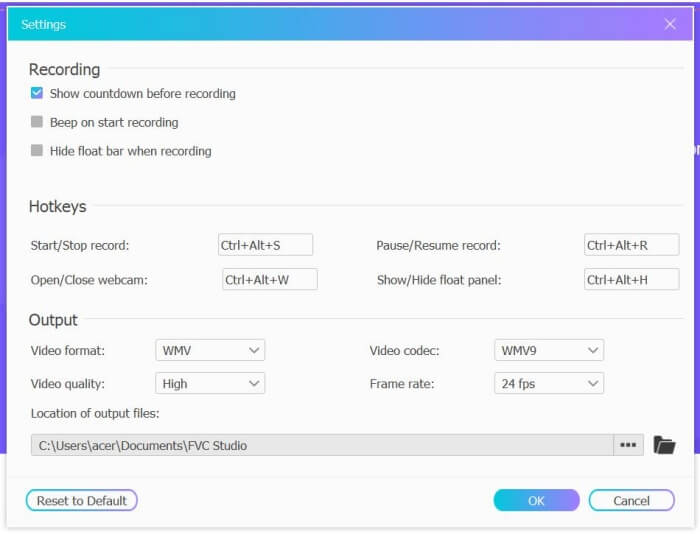
Passaggio 2: Fai clic sul menu Recording Area per scegliere l’intero schermo oppure selezionare liberamente un’area. Poi attiva il Microphone e lo Speaker. Per regolare le impostazioni video, puoi fare clic sull’icona Setting. Puoi scegliere il formato MP4, qualità High e 24 fps per mantenere alta la qualità delle registrazioni. Quindi fai clic sul pulsante REC per iniziare a registrare le chiamate Facebook.
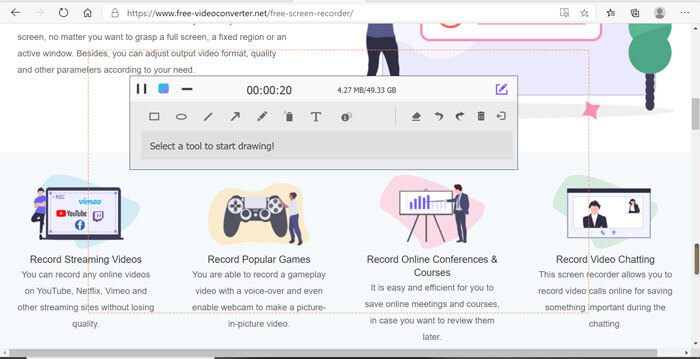
Passaggio 3: Apparirà una barra degli strumenti con diversi strumenti di modifica. Puoi aggiungere forme, testi e linee secondo le tue esigenze. Poi fai clic sull’icona Stop per salvare la registrazione nel cloud. Puoi fare clic con il tasto destro del mouse per scaricarla sul tuo computer.
L'utilizzo di questo registratore di videochiamate di Facebook online gratuito è il modo migliore per gli utenti di computer di registrare le videochiamate di Facebook online. Regolando in anticipo le impostazioni di registrazione, è possibile salvare le chiamate di Facebook in formato MP4 con dimensioni ridotte e alta qualità. Se sei abituato ad avere chiamate Facebook sul cellulare, continua a leggere questo articolo.
Parte 2: Come registrare la chiamata di Facebook per iOS tramite il registratore predefinito
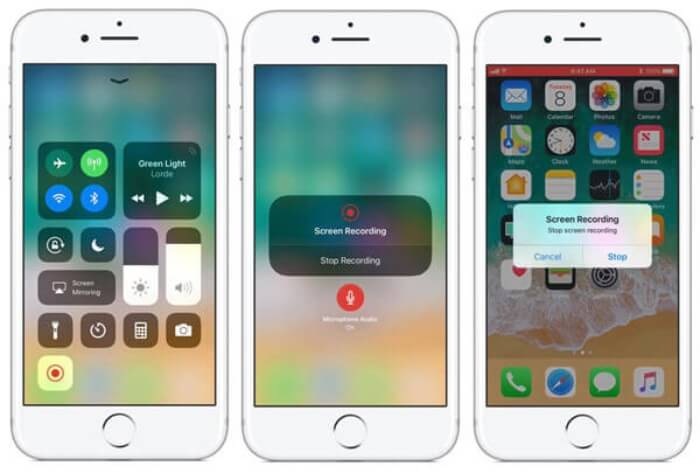
La versione aggiornata di iOS 11 o successiva ha un nuovo registratore predefinito sul tuo iPhone e iPad che è la scelta migliore per catturare videochiamate di Facebook senza scaricare alcuna app. Qui puoi imparare come aggiungere il registratore di chiamate di Facebook alle scorciatoie nel centro di controllo e come usarlo.
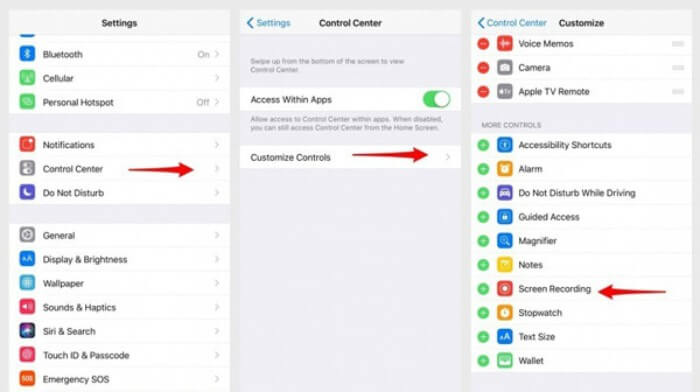
Passaggio 1: Tocca l’app Settings sul tuo iPhone/iPad e scorri verso il basso per scegliere l’opzione Control Center. Quindi tocca la scheda Customize Controls e trova la funzione Screen Recording. Tocca l’icona Plus per aggiungere questa funzione al Centro di Controllo.
Passaggio 2: Scorri verso il basso dalla parte superiore dello schermo per aprire il Centro di Controllo e troverai l’app di registrazione in basso. Tocca l’icona Screen Recording per iniziare la registrazione, e puoi scegliere se catturare i video o registrare solo la traccia audio. Quando vuoi terminare, tocca la Status Bar rossa in alto e seleziona l’opzione Stop nella finestra pop-up.
Parte 3: un facile registratore di Facebook Messenger per Android
Alcuni telefoni Android non hanno registratori integrati e ci sono troppi registratori di videochiamate di Facebook per Android tra cui scegliere. Pertanto, puoi imparare uno dei migliori registratori per cellulari Android con i passaggi dettagliati nella parte seguente.
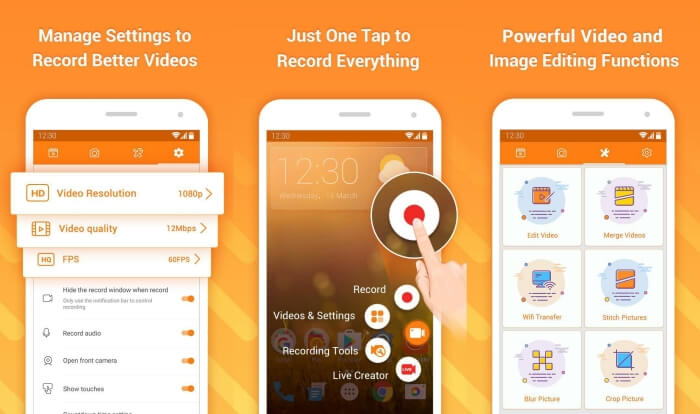
DU Recorder è un registratore di chiamate Facebook per Android facile da usare, famoso per la sua registrazione fluida. Senza bisogno di root, chiunque può usarlo per registrare le chiamate di Facebook Messenger con un solo tocco.
Passaggio 1: Avvia il registratore: vedrai quattro menu, tra cui registrazioni, schermate, strumenti di modifica e impostazioni. Per prima cosa, tocca il menu Settings per regolare i parametri video. Per mantenere un’alta qualità, puoi scegliere la risoluzione 1080p e un frame rate di 30 fps.
Passaggio 2: Non chiudere il registratore e avvia semplicemente Facebook Messenger. A questo punto vedrai l’icona del registratore. Tocca l’icona e scegli l’icona Recording per iniziare a catturare lo schermo e l’audio. Puoi toccarla di nuovo per interrompere la registrazione. Poi puoi toccare l’icona Editing per tagliare la registrazione e aggiungervi musica.
Potrebbe interessarti anche:
Recensione di Action Screen Recorder
Parte 4: Domande frequenti su Facebook Call Recorder
1. Facebook ha il registratore predefinito per registrare le videochiamate sul PC?
No, non è così. Pertanto, devi fare affidamento su altri registratori di chiamate professionali di Facebook. Se non vuoi scaricare altro software che occuperà lo spazio di archiviazione sul tuo computer, FVC Free Screen Recorder è la scelta migliore.
2. Come avviare una chat con un amico sull'app Facebook Messager?
Innanzitutto, apri Facebook Messenger sul tuo telefonino, quindi scegli la chat dell'amico che desideri chiamare su Facebook. E ora puoi vedere l'icona Video, quindi puoi fare clic su di essa per avviare una videochiamata.
3. Quale formato devo scegliere per salvare le registrazioni quando utilizzo i registratori di Facebook Messenger?
Sia che tu stia utilizzando un registratore di chiamate di Facebook su un computer o un cellulare, il formato migliore per salvare le videochiamate di Facebook è MP4. Può risparmiare più spazio di archiviazione ed è compatibile con tutti i dispositivi.
Conclusione
L’articolo sopra ha presentato 3 registratori di videochiamate Facebook. Per iPhone, iPad e alcuni telefoni Android puoi usare facilmente il registratore integrato nel tuo dispositivo. In caso contrario, puoi scegliere qualsiasi registratore, incluso DU Recorder su Google Play. Per PC, FVC Free Screen Recorder è la scelta migliore per catturare le chiamate Facebook. Se riscontri altri problemi nell’uso dei registratori di chiamate Facebook, lascia un commento qui sotto.
-
 Recensione Snagit 2021 - Pro, contro e la migliore alternativa
 Qual è la migliore alternativa a Snagit? Esiste uno strumento di cattura dello schermo come Snagit? Questo post esaminerà Snagit e condividerà la migliore alternativa a Snagit per acquisire lo schermo.
-
 6 migliori registratori WAV da non perdere sul desktop e online
 Il miglior software di registrazione WAV che condividiamo in questo articolo ha una varietà di funzioni utili, che ti aiutano a catturare audio e voce come professionisti.
-
 I 4 migliori registratori di suoni AIFF gratuiti che producono audio di alta qualità
 Questo articolo parla di AIFF e di alcuni degli strumenti più popolari che puoi utilizzare per produrre formati AIFF di alta qualità.
