


 Video Converter Ultimate
 Screen Recorder
 Riparazione video
 Download sicuro
M4A vs. MP3 Revisione approfondita e confronto di due formati audio
A causa della proliferazione della musica digitale, la selezione di un formato audio appropriato è ora più cruciale che mai. Mentre M4A e MP3 sono ampiamente utilizzati, ci sono importanti distinzioni tra i due. Mentre MP3 è lo standard de facto per i file musicali, M4A viene spesso utilizzato per una qualità audio superiore.
In M4A vs. MP3 comparison, we'll examine the finer points between the M4A and MP3 file formats so you can make an informed decision. We'll also present a comprehensive analysis of the differences and similarities between the two file types regarding audio quality, compatibility, file size, and more. If you're a music lover or a working musician, you'll want to read on to find out which format is ideal for you.

Parte 1. M4A contro MP3
Ecco una semplice tabella che confronta questi formati in diversi aspetti importanti per una decisione informata. Dai un'occhiata alla tabella qui sotto.
| M4A | MP3 | |
| Qualità del suono | Alto | Buono |
| Dimensione del file | Grande | Piccolo |
| Compatibilità | Limitato | Ampiamente compatibile |
| Metadati | Supportato | Limitato |
| Protezione DRM | sì | No |
| Usi popolari | Musica, audiolibri, podcast | Musica, podcast, suonerie |
Parte 2. Introduzione a M4A e MP3
Basta con la battaglia tra MP3 e M4A. Fermiamoci un attimo e impariamo di più su questi formati attraverso una breve introduzione di ciascuno di essi.
M4A Introduction
Il formato audio digitale proprietario di Apple è MPEG-4 Audio (o M4A in breve). È un ottimo formato audio per musica, audiolibri e podcast perché può ospitare molti bitrate e frequenze di campionamento. I file M4A possono essere aperti in iTunes, QuickTime e altri lettori multimediali, rendendoli ideali per i dispositivi Apple.
MP3 Introduction
MP3, che sta per "MPEG-1 Audio Layer 3", è un formato audio digitale che è diventato lo standard per l'audio compresso grazie alla sua diffusa adozione e alla compressione a basso bit rate. I file MP3 sono ottimi per musica, podcast e suonerie grazie alle loro dimensioni compatte rispetto ad altri formati audio. Possono essere riprodotti su molti dispositivi diversi e scaricati rapidamente e facilmente da Internet. I file MP3, d'altra parte, hanno spesso una qualità audio inferiore rispetto a formati alternativi come M4A.
Parte 3. M4A è migliore di MP3?
M4A e MP3 hanno diversi punti di forza e di debolezza. M4A è noto per la sua qualità audio superiore ed è preferito da appassionati di musica e professionisti. MP3, d'altra parte, ha una dimensione del file più piccola ed è ampiamente compatibile con vari dispositivi e lettori multimediali.
La scelta tra M4A e MP3 dipende da ciò che è più importante per te: alta qualità del suono o dimensioni e compatibilità dei file più piccole.
Parte 4. La differenza tra MP3 e M4A
I popolari formati di musica digitale MP3 e M4A hanno caratteristiche distinte. Quanto segue è una spiegazione dettagliata delle distinzioni tra MP3 e M4A:
Sound Quality: M4A is known for its superior sound quality compared to MP3. M4A uses a better compression algorithm and supports a broader range of bitrates and sample rates. M4A also supports lossless compression, which preserves the original audio quality, while MP3 uses lossy compression, which reduces the file size but also reduces the audio quality.
File Size: MP3 files are smaller in size compared to M4A files. This is because MP3 uses a more efficient compression algorithm that reduces the file size without significantly affecting the audio quality. M4A, on the other hand, uses a less efficient compression algorithm that results in larger file sizes but better audio quality.
Compatibility: MP3 is widely recognized as the industry standard for digital audio and is compatible with a wide range of devices and media players, including smartphones, tablets, and computers. M4A, on the other hand, is less widely compatible and is primarily used on Apple devices and software, such as iTunes and QuickTime.
Metadata: M4A supports a wider range of metadata compared to MP3. This means that M4A files can store more information about the audio, such as album art, lyrics, and track information.
DRM Protection: M4A supports Digital Rights Management (DRM) protection, which allows copyright holders to control the use and distribution of their audio files. MP3, on the other hand, does not support DRM protection.
Parte 5. Come convertire M4A in MP3 o MP3 in M4A
Più che confrontare e rivedere questi due formati audio, è anche importante imparare a convertire da M4A a MP3 o viceversa. Ecco alcuni dei programmi che puoi utilizzare:
Whether you are online or offline, Video Converter Ultimate is a great tool you can use to convert between M4A and MP3. This utility comes with a lot of features you can take advantage of. The tool offers the capability to convert multiple files into batches, which means you can transform a collection of music files. What is intriguing is that it grants you access to the output settings of your audio files. Find out how this tool works by looking at the steps below.
Step 1. Initiate the download by clicking one of the Free Download buttons and then following the on-screen instructions. The next step is launching the app and getting used to its simple interface.
Download gratuitoPer Windows 7 o versioni successiveDownload sicuro
Download gratuitoPer MacOS 10.7 o versioni successiveDownload sicuro
Step 2. Click the add button on the main screen, then find the audio file you want to convert. A preview of an uploaded file will be displayed on the UI shortly after the upload. You can convert multiple M4As at once to MP3 by uploading a folder.
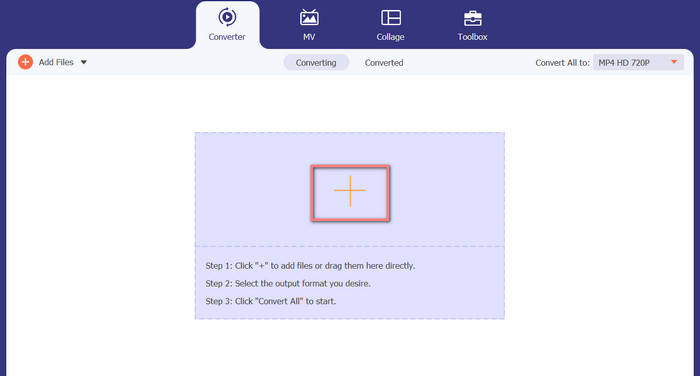
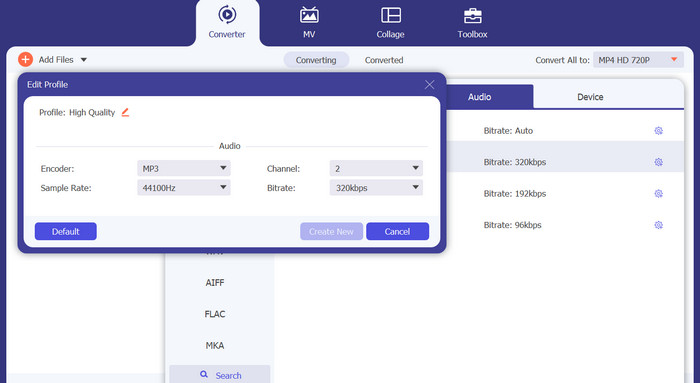
Step 3. To change the tool's output format, go to the Profile menu's Audio tab (found in the tool's upper right). You can change an M4a file into an MP3 file and vice versa.
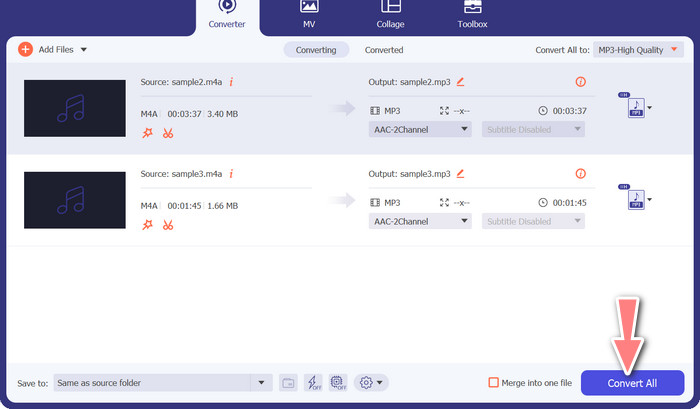
Step 4. Select the desired location at the very bottom of the screen. To get started with the conversion, select Convert All.
Convertitore video gratuito online (online)
No room for another show to air? The good news is that using a web-based converter can prevent downloading software altogether. The Free Video Converter Online web tool allows for in-browser conversion. It also supports a wide variety of music and video file types. In addition, this web tool supports batch conversions. In addition, the user can alter the final audio file's settings. Learn how to convert MP3 to M4A online.
Step 1. First, fire up your preferred web browser and navigate the Free Video Converter Online website.
Step 2. Click the Add Files to Convert option, then navigate to the M4A file you want to convert and select it.
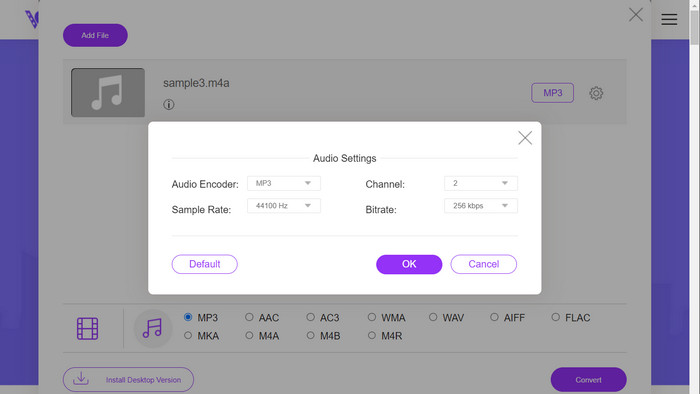
Step 3. Select MP3 as the output file type from the Audio format menu. It is also possible to adjust the bitrate, or output quality, of the MP3 file.
Step 4. To start the conversion process, click the Convert button. That's the procedure for changing M4A to MP3 on the web.
Ulteriori letture:
Linee guida su come convertire M4A in WAV [PC e Mac]
Best Tools that You Can Use to Batch Convert MP3 to M4R Files
Parte 6. Domande frequenti su M4A e MP3
Che cos'è MP3 rispetto a M4A in termini di metadati?
M4A supporta una gamma più ampia di metadati rispetto a MP3, il che significa che i file M4A possono memorizzare più informazioni sull'audio.
Posso modificare file MP3 o M4A?
Puoi modificare i file MP3 e M4A utilizzando vari software di editing audio.
Quale è meglio per i podcast, MP3 o M4A?
MP3 è migliore per i podcast grazie alle dimensioni ridotte del file e alla maggiore compatibilità.
Conclusione
Understanding the MP3 vs. M4A comparison can help you choose the best digital audio format. Whether you're streaming music or producing it, selecting the right format is crucial for ensuring the best possible audio quality and compatibility.
-
 MP3 VS MP4: qual è la differenza tra MP3 e MP4
 MP3 o MP4, che è meglio? Qual è la differenza tra MP3 e MP4? Questo articolo confronterà MP3 con MP4 da tutti gli aspetti che puoi immaginare.
-
 Lettore M4A - I 5 migliori lettori M4A per Android e computer
 Come riprodurre file M4A sul telefono Android? Quale giocatore può giocare a M4A? Questo post condivide i 5 migliori lettori M4A gratuiti per Android, Mac e PC.
-
 4 metodi migliori per correggere e modificare i metadati MP3 su Windows e Mac
 Vuoi conoscere a tuo agio i segreti della modifica dei metadati MP3? Questo blog ti insegnerà diverse tecniche con i diversi strumenti a cui accedi facilmente.
