


 Video Converter Ultimate
 Screen Recorder
 Riparazione video
Come convertire 3GP in WMV in modo professionale [online e offline]
3GP è un diffuso formato mobile che trasferisce dati sui telefoni cellulari senza consumare troppa larghezza di banda e risparmiando spazio. Inoltre, questo formato è standardizzato per la registrazione di video sui telefoni cellulari di terza generazione, ma, stai tranquillo, puoi riprodurre i video anche sulla seconda e sulla quarta generazione. Sebbene sia eccellente sui telefoni, è limitato essenzialmente agli smartphone. Quindi non è una sorpresa se il file .3gp non risulta ottimale sul desktop. Tuttavia, puoi imparare a convertire i 3GP in un formato che abbia un supporto molto più ampio su computer desktop, come il WMV. Vuoi imparare a convertire 3GP in WMV in modo professionale? In tal caso, diamo subito un’occhiata senza perdere tempo.

Parte 1. Che cos'è 3GP
È un formato basato su ISO che memorizza flussi multimediali come H.263 o H.264 per video e AMR o AAC per audio, perfetto per la compressione con perdita di dati. Inoltre, questo formato di terza generazione è di facile archiviazione per l'archiviazione dei dati su unità portatili sui nostri telefoni, anche su IOS. Anche se 3GP è ancora disponibile, il tasso di efficacia di questo formato ha iniziato a diminuire e, per questo motivo, 3GPP è entrato in scena e ne è diventato una versione migliore.
Parte 2. Che cos'è WMV
È un formato multimediale proprietario sviluppato da Windows per lo streaming di video online. A differenza di qualsiasi altro formato, come 3GP, WMV utilizza un codificatore multifold per rendere il file ancora più compresso. Grazie alla possibilità di utilizzare molti codificatori, è più accessibile condividere in modo efficiente video in questo formato. Tuttavia, c'è uno svantaggio nell'uso di molti codificatori, in particolare per la modifica e la riproduzione, perché non tutti i lettori multimediali e gli editor supportano un'ampia gamma di codec. Sebbene il formato utilizzi un compressore, la qualità del supporto non verrà modificata o ridotta.
Parte 3. Modo professionale per convertire 3GP in WMV con Video Converter Ultimate
Vuoi ottenere un convertitore professionale 3GP in WMV da scaricare gratuitamente sulla tua piattaforma? FVC Video Converter Ultimate offre una procedura di conversione di livello esperto senza richiedere troppi sforzi. Questo convertitore ti porta a un livello di conversione che nessun altro convertitore online o offline è in grado di offrirti. Inoltre, questo strumento “ultimate” supporta oltre 200 formati multimediali tra cui scegliere, a differenza di molti altri strumenti.
Finché hai questo convertitore, aspettati sempre un output professionale sul tuo formato multimediale convertito. Vuoi utilizzare il convertitore professionale per convertire i tuoi file 3GP? In tal caso, puoi seguire i passaggi seguenti per convertire con successo con lo strumento definitivo.
Passaggi su come convertire file 3GP in WMV con FVC Video Converter Ultimate
Passaggio 1. Di seguito sono presentati i pulsanti di download; scegli quello corrispondente alla piattaforma che stai usando. Ad esempio, fai clic sul pulsante di download per Windows se sei un utente Windows. Se invece utilizzi un Mac, fai clic sull’altro pulsante. Dopo il download, installa il convertitore e avvialo facendo clic su Start Now. Ancora più importante, dopo l’avvio, dovrai familiarizzare con l’interfaccia prima di procedere ai passaggi successivi.
Download gratuitoPer Windows 7 o versioni successiveDownload sicuro
Download gratuitoPer MacOS 10.7 o versioni successiveDownload sicuro
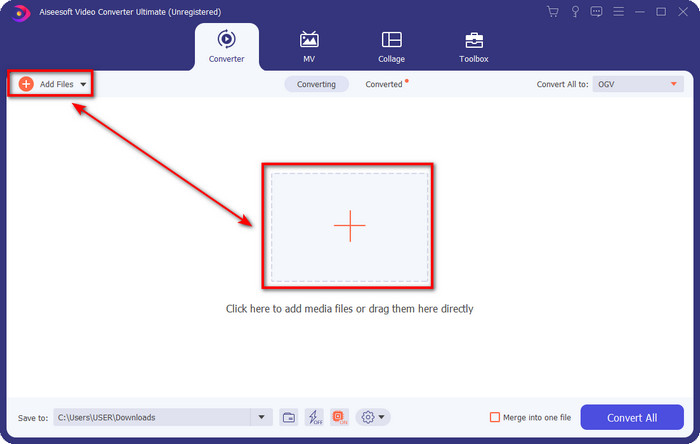
Passaggio 2. Vedrai Add Files nella parte in alto a sinistra dell’interfaccia; fai clic lì e si aprirà una cartella. Cerca il file .3gp nell’unità del tuo computer, quindi caricalo premendo Open.
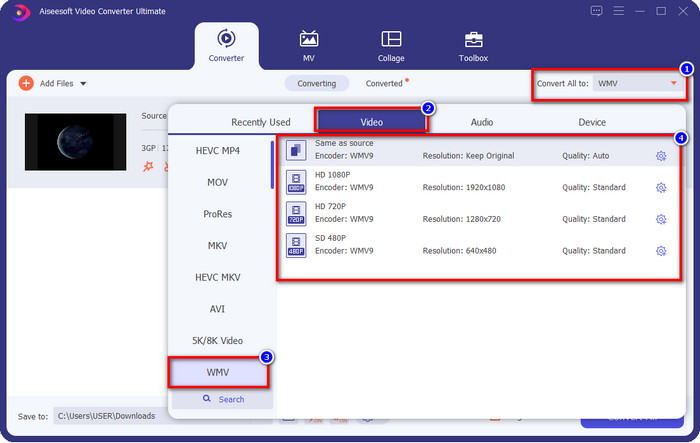
Passaggio 3. Fai clic su Convert All to per scegliere il formato WMV che desideri oppure WMV come output finale.
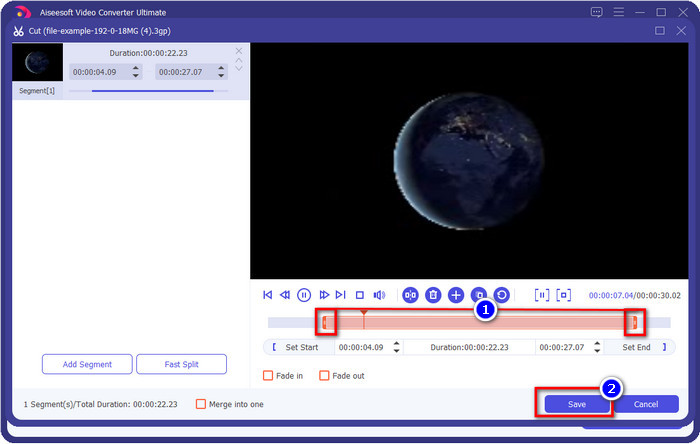
Opzionale. Prima di convertire il file 3GP in WMV, vediamo brevemente le altre funzioni offerte da questo strumento. Devi tagliare il video? Nessun problema. Premi il pulsante scissor, trascina la slide bar su entrambi i lati, se lo desideri, e premi Save per applicare il taglio effettuato.
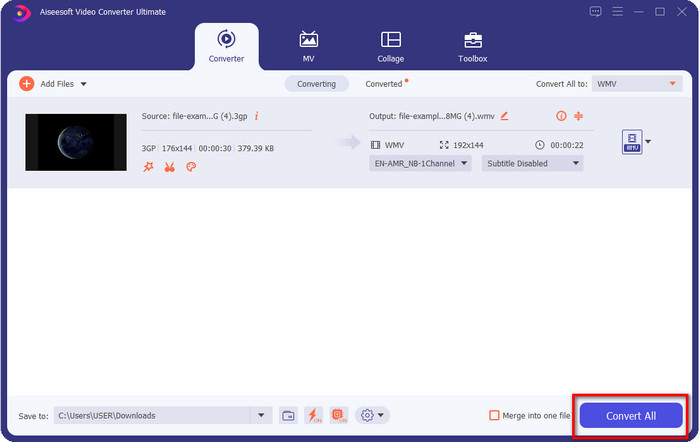
Passaggio 4. Avvia il processo di conversione facendo clic sul pulsante Convert All. La conversione terminerà in breve tempo e, voilà, il file WMV verrà salvato nell’unità del tuo computer.
Parte 4. Modo online per convertire MXF in WMV con il convertitore video gratuito online
Un altro prodotto FVC, ma questa volta una soluzione online, è il FVC Free Video Converter Online. Questo convertitore online professionale offre un’interfaccia ordinata e pulita rispetto ad altri convertitori web. Inoltre, non è necessario scaricare il convertitore sul tuo dispositivo per utilizzarlo; ti basta aprire il browser e avviare il convertitore. Sebbene il convertitore web sia ottimo, ci sono molte funzioni avanzate che questo strumento non può offrire. Tuttavia, se desideri convertire 3GP in WMV online, questa è la scelta giusta; segui i passaggi riportati di seguito per utilizzare questo strumento.
Passaggi su come convertire 3GP in WMV online gratuitamente con FVC Free Video Converter Online
Passaggio 1. Fai clic su questo link per aprire il convertitore online.
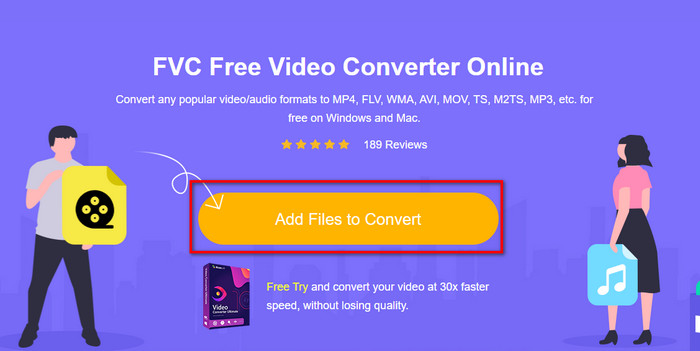
Passaggio 2. Dopo aver fatto clic, premi Add Files to Convert per avviare il convertitore. Se è la prima volta che utilizzi questo convertitore, dovrai installare il launcher facendo clic su Add Files to Convert, ma è molto più leggero rispetto allo strumento ultimate. Cerca il file 3gp che desideri convertire e fai clic su Open.
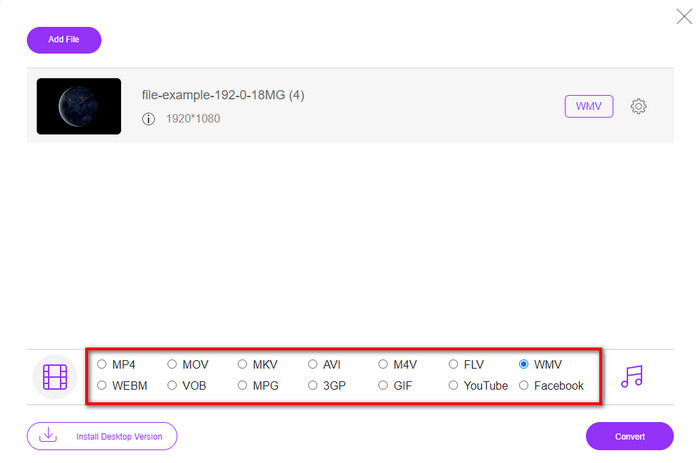
Passaggio 3. Dopo aver caricato il file 3GP, è il momento di scegliere uno dei formati presentati in basso oppure di fare clic su WMV.
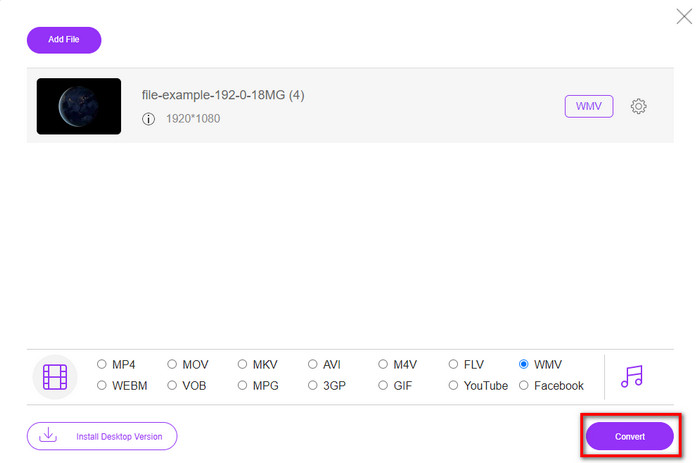
Passaggio 4. Hai già scelto un formato? Se sì, fai clic su Convert per iniziare il processo di conversione del file.
Parte 5. Domande frequenti sulla conversione da 3GP a WMV
È una buona idea utilizzare un convertitore da 3GP a WMV online?
Se non vuoi scaricare un convertitore sul tuo dispositivo, è l'ideale utilizzare un convertitore online. Ma ricorda, non tutti i convertitori online o offline sono sicuri da usare. Il più delle volte, hanno virus se li installi o non esegui l'operazione in modo efficace. Ma se vuoi la sicurezza sulla tua conversione, ti consigliamo di utilizzare i prodotti di conversione FVC perché questo è privo di malware 101% e garantisce il successo del tuo processo di conversione.
È possibile unire più video 3GP?
Sì, con l’aiuto degli strumenti di unione FVC, che possono aiutarti a combinare più video in formato 3GP. Quindi ora, se vuoi sapere come unire diversi video 3GP, devi leggere questo articolo per imparare come procedere.
I video 3GP hanno una buona qualità?
3GP ha una buona qualità, ma non può memorizzare la qualità ad alta definizione, quindi aspettati che la qualità video di un 3GP sia bassa.
Conclusione
In conclusione, i convertitori elencati in questo articolo sono stati selezionati con cura seguendo un preciso standard di risultato professionale. Inoltre, abbiamo utilizzato personalmente gli strumenti qui citati per presentare e riportare solo fatti sulle loro caratteristiche. Inoltre, se non vuoi scaricare un convertitore sul tuo desktop per risparmiare spazio e desideri comunque un risultato professionale, ti consigliamo vivamente di usare FVC Free Video Converter Online. Ma se vuoi transcodificare i tuoi 3GP in modo ancora più professionale, ti suggeriamo vivamente di usare FVC Video Converter Ultimate. Non sei ancora soddisfatto delle informazioni che ti abbiamo fornito? In tal caso, devi provarlo di persona per sperimentare la conversione di livello esperto che questo strumento offre e imparare come convertire 3GP in WMV.
-
 I 4 modi più efficaci per convertire il formato 3GP in AVI [2025]
 Posso convertire i miei file 3GP in AVI? Bene, puoi convertirlo facilmente se provi questi strumenti disponibili poiché abbiamo raccolto tutte le possibili soluzioni al tuo problema di conversione da 3GP a AVI.
-
 Il miglior convertitore 3GP in FLV da utilizzare per convertire 3GP in FLV [2025]
 Hai mai provato a convertire 3GP in FLV, ma non sai che tipo di convertitore utilizzerai? Leggi questo articolo per conoscere tutti i dettagli sulla conversione da 3GP a FLV.
-
 2 migliori modi possibili per convertire 3GP non supportato in DivX [2025]
 Molti utenti chiedono come convertire 3GP in DivX. Quindi ora forniamo un articolo per aiutarti a convertire il tuo file .3gp senza problemi.
