


 Video Converter Ultimate
 Screen Recorder
 Riparazione video
Guida completa su come convertire AMV in WMV con i passaggi [Risolto]
Vuoi goderti i file video AMV sul tuo Windows o usarli per lo streaming online? In tal caso, devi leggere questo articolo per sapere come convertire AMV in WMV, migliorarne la qualità e renderli compatibili. In questa guida scoprirai i software che puoi usare per convertire i tuoi file AMV. Quindi, senza ulteriori indugi, allaccia le cinture e scopri molto di più sui formati AMV e WMV.

Parte 1. Converti AMV in WMV con FVC Video Converter Ultimate
FVC Video Converter Ultimate è la nostra prima scelta per convertire AMV in WMV perché ti consente di transcodificare formati multimediali e formati specifici per i dispositivi. Inoltre, è in grado di convertire non solo uno, due o tre file contemporaneamente, ma molti di più. Inoltre, questo convertitore è pensato per offrire agli utenti solo il massimo in termini di conversione. Vuoi sapere perché? Allora leggi le caratteristiche principali qui sotto.

FVC Video Converter Ultimate
4.355.888+ download- Può aiutarti con il tuo problema di conversione su AMV in WMV, AVI, FLV, SWF, MP4, AVI.
- Supporta la conversione ultraveloce per convertire il formato ancora più velocemente.
- Modifica i tuoi video AMV con le esclusive funzionalità di editing fornite da questo strumento.
- Aiutarti a diventare un esperto in pochi clic.
- Supporta tutte le piattaforme come Windows e macOS.
Download gratuitoPer Windows 7 o versioni successiveDownload sicuro
Download gratuitoPer MacOS 10.7 o versioni successiveDownload sicuro
Sei stupito dalle caratteristiche dello strumento? In tal caso, leggiamo la procedura per convertire i file AMV e copiamo i passaggi per riuscire a convertire.
Passaggio 1. Scarica FVC Video Converter Ultimate sull’unità del tuo computer facendo clic sul pulsante di download riportato di seguito. Procedi facendo clic sul file di installazione per installare il programma e premi Avvia ora per avviare lo strumento.
Download gratuitoPer Windows 7 o versioni successiveDownload sicuro
Download gratuitoPer MacOS 10.7 o versioni successiveDownload sicuro
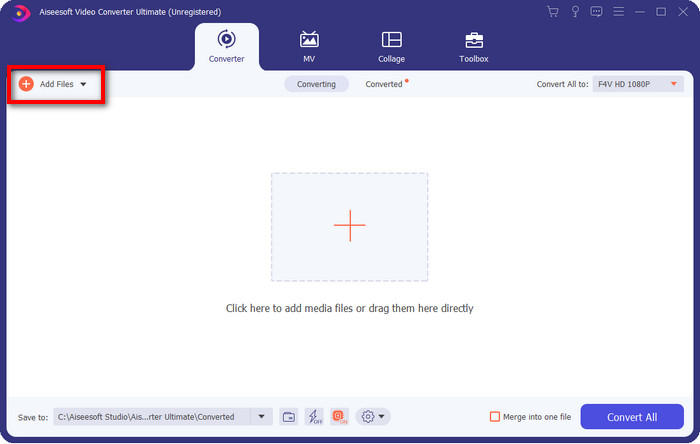
Passaggio 2. Dopo aver avviato il software, puoi aggiungere uno o più file facendo clic sull’opzione Aggiungi file. La cartella del computer verrà visualizzata sullo schermo, seleziona il file AMV e premi Apri per caricarlo.
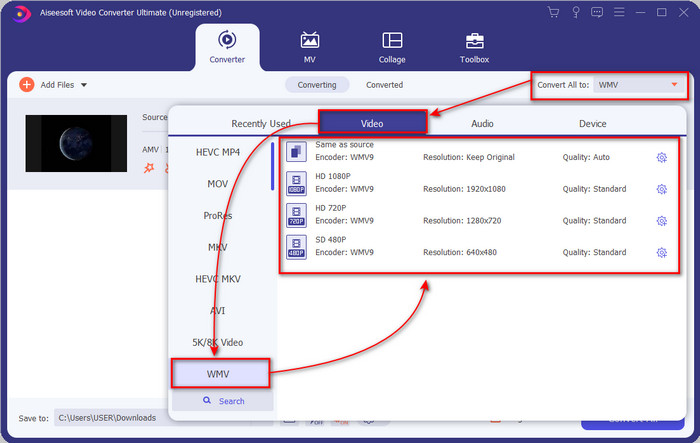
Passaggio 3. Facendo clic sull’opzione Converti tutto in verrà mostrato un elenco di formati. Trova il formato WMV e scegli la risoluzione, il codificatore e la qualità che desideri ottenere.
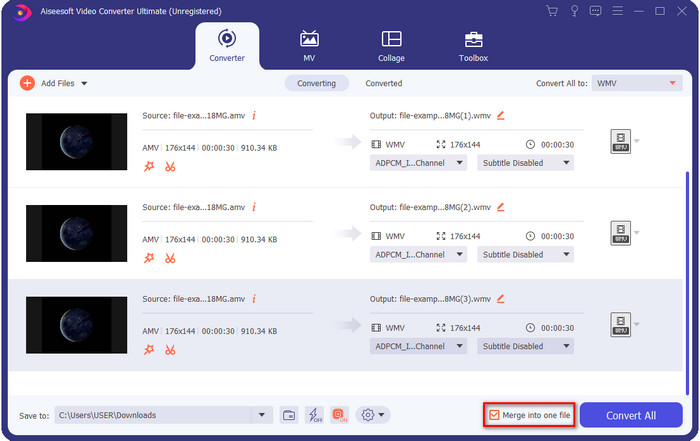
Opzionale. Vuoi unire i tuoi file AMV in un unico file WMV? Allora devi spuntare la casella con scritto unisci in un unico file.
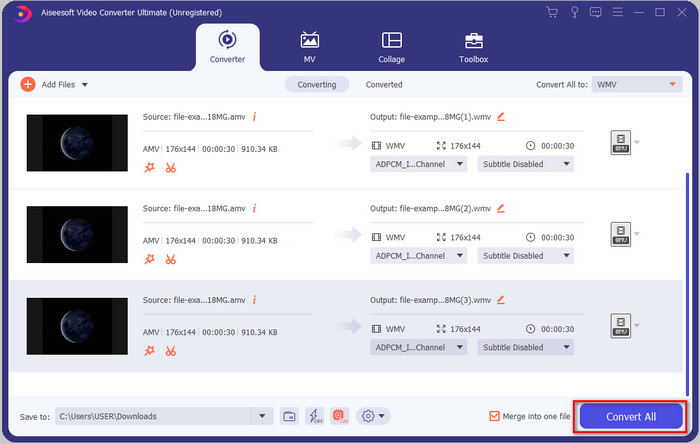
Passaggio 4. Premi Converti tutto per avviare il processo di conversione. Al termine, una cartella verrà visualizzata sullo schermo con il file WMV convertito.
Parte 2. Converti AMV in WMV online
Non vuoi scaricare un convertitore offline perché non hai abbastanza spazio di archiviazione per installarlo? Allora usa FVC Free Online Video Converter. Non dovrai scaricare l’intero convertitore; ti servirà solo il launcher, che è molto piccolo e non influisce sulla memoria del computer. Inoltre, questo convertitore online trasforma i file AMV in WMV regolando la risoluzione. Tuttavia, la velocità di conversione dipenderà dalla tua connessione a Internet. Hai una connessione Internet? Allora dovresti provare questo strumento e sperimentare la conversione online.
Passaggio 1. Fai clic su questo link per aprire il sito principale del convertitore.
Passaggio 2. Facendo clic su Aggiungi file da convertire, si aprirà una cartella in cui potrai trovare il file AMV e poi premere Apri.
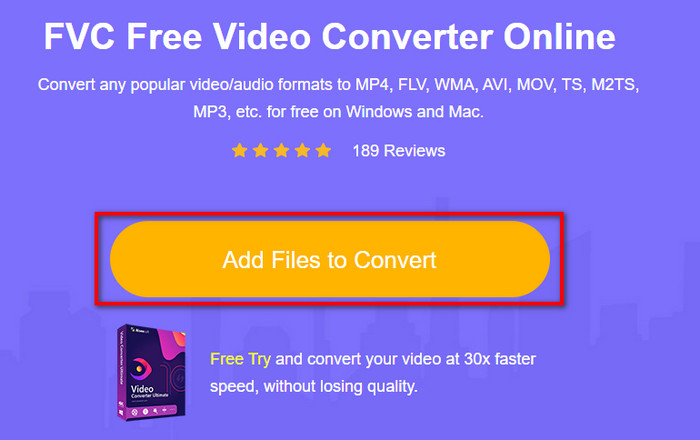
Passaggio 3. Scegli il formato WMV che verrà visualizzato sullo schermo.
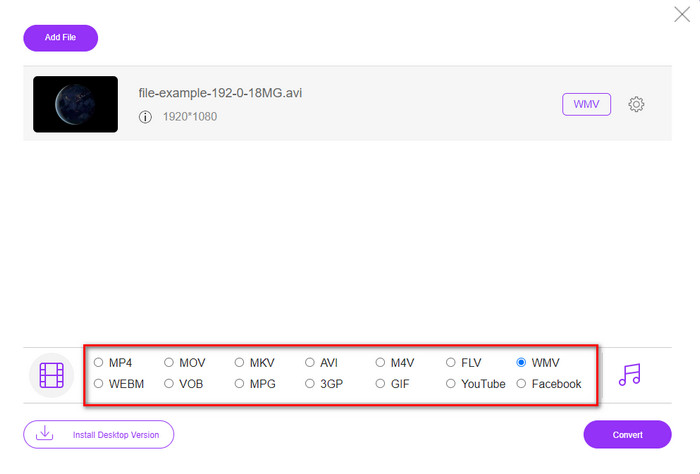
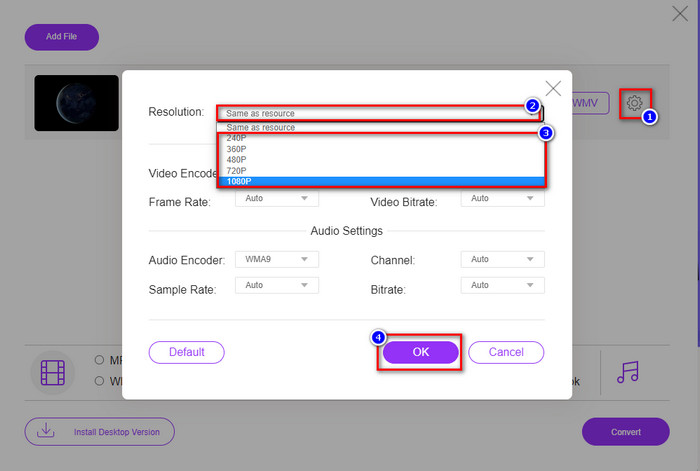
Opzionale. Come abbiamo detto in precedenza, qui puoi regolare la risoluzione. Ora quindi modifichiamo la risoluzione facendo clic sul pulsante a forma di ingranaggio. Nella parte superiore, fai clic sul pulsante a discesa e verrà mostrato un elenco di risoluzioni; scegline una e premi OK per procedere.
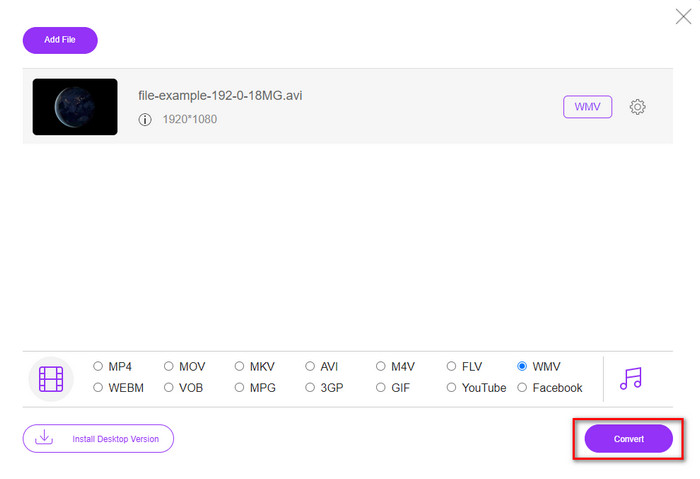
Passaggio 4. Ora, se vuoi avviare la conversione, puoi fare clic sul pulsante Converti e il processo inizierà.
Parte 3. Qual è la differenza tra AMV e WMV
Prima di tutto, questi due contenitori multimediali sono diventati popolari grazie alle loro capacità uniche come formato. Ma oggi studieremo quali sono i vantaggi e gli svantaggi del formato stesso. Inoltre, specificheremo tre aspetti rendendo una domanda per saperne di più su AMV e WMV.
Quale formato ha una risoluzione multimediale migliore?
Tra i due formati, senza dubbio, il WMV ha una qualità migliore. Un file WMV può archiviare e trasmettere in streaming una risoluzione video fino a 300.000 pixel per un output visivo più dettagliato. Ma puoi impostare la velocità con una risoluzione dello schermo di 528x576. E per AMV, la qualità che può contenere va da 96x96 a 320x240, che è piuttosto bassa rispetto alla bassa risoluzione del WMV. Uno dei motivi per cui AMV ha una risoluzione inferiore è che deve adattarsi allo schermo del lettore multimediale cinese.
Quale formato ha una dimensione del file più piccola?
Questa vittoria andrà con l'AMV perché questo formato è super compresso. Sebbene WMV abbia un compressore, le dimensioni dell'AMV sono più economiche, specialmente sull'unità del tuo computer, rispetto al WMV.
Quale formato è più compatibile?
Possiamo dire che, parlando di compatibilità, hanno punti di forza diversi, perché WMV è pensato solo per i programmi Windows. Se utilizzi Mac, non puoi semplicemente usare questo formato e riprodurlo su QuickTime o montarlo su iMovie. Dovrai invece convertire WMV in MOV per renderlo compatibile. Nel caso dell’AMV, questo formato veniva riprodotto originariamente su lettori multimediali portatili cinesi. Oggi però puoi usare un comune lettore multimediale portatile invece di comprare un lettore specifico per AMV. Tuttavia, trovare un lettore AMV è estremamente scomodo, perché sono pochissimi i player che supportano questo tipo di formato e il relativo codificatore. Possiamo affermare che WMV ha ottenuto una compatibilità decisamente maggiore rispetto ad AMV, soprattutto quando trasferiamo il file su Windows.
E ora che sappiamo il motivo, in questo caso è necessario convertire il file in un nuovo formato. Per questo motivo, devi imparare come convertire AMV in WMV per rendere il file multimediale compatibile con il software Windows.
Parte 4. Domande frequenti sulla conversione AMV e WMV
Come trasformare il mio AMV in MOV?
Sul web possiamo trovare e provare molte tecniche e metodi disponibili se li cerchiamo. Ma è difficile scegliere quale strumento sia migliore per convertire AMV in MOV. Per farla breve, fai clic su questo link e scopri come convertire AMV in MOV e renderlo compatibile con macOS.
Posso usare un lettore multimediale VLC per guardare e riprodurre AMV?
Certo che sì: puoi scaricare il lettore multimediale VLC sul tuo desktop per riprodurre i file AMV senza dover installare codec aggiuntivi. Ma se vuoi sapere di più su VLC e sulle sue alternative, prova a leggere questo articolo facendo clic su questo link.
Perché devo comprimere AMV?
Compriamo o comprimiamo i nostri file multimediali e gli AMV perché abbiamo bisogno di liberare spazio sull’unità di archiviazione. Vuoi quindi imparare come comprimere i file AMV? Allora fai clic su questo link.
Conclusione
Queste due soluzioni forniscono l'eccellenza per rendere la tua conversione da AMV a WMV facile e di successo. Inoltre, queste sono le migliori soluzioni che possiamo trovare sul web. Quindi ora sta a te scegliere quale convertitore utilizzare per convertire il tuo file AMV in WMV. Per raggiungere il successo, è necessario utilizzare gli strumenti FVC forniti sopra.
-
 Metodo migliore da utilizzare per convertire AMV in AVI [Approvato]
 Hai difficoltà a convertire il tuo file video in formato AMV in AVI? Ecco alcuni suggerimenti forniti che puoi trovare solo in questo articolo.
-
 [Dimostrato] 2 modi per convertire AMV in FLV offline e online
 Hai mai pensato di provare un convertitore per convertire i tuoi file AMV in formato FLV. Per risolvere il tuo problema nel guardare un video AMV, leggi questo articolo per conoscere i convertitori adatti che dovresti usare.
-
 Gratuito | 3 migliori metodi per convertire MP4 in WMV senza perdere la qualità
 Questo post condivide come convertire i video MP4 in formato WMV su Mac o Windows. Ti offriremo anche diverse opzioni, inclusi sia software desktop che convertitori online basati sul web. Pronto a conoscere i migliori strumenti di conversione da MP4 a WMV?
