


 Video Converter Ultimate
 Screen Recorder
 Riparazione video
 Download sicuro
Da MOV a MPG: la guida rapida su come convertire questi formati nel 2023
Per la cronaca, oggi i file MOV ottengono ottime reazioni perché sono considerati uno dei formati più adatti per l’archiviazione di film. Questo tipo di file è ampiamente riconosciuto come formato predefinito per i prodotti Apple come iPhone, iPad e MacBook. Tuttavia, quando provi a caricare file MOV su Internet, potresti incontrare difficoltà, poiché hanno dimensioni maggiori rispetto ad altri formati video. Per ovviare a questo problema, puoi scegliere di convertire MOV in MPG. Per questo motivo resta su questa guida: ti aiuteremo a imparare come riuscirci.

Parte 1. Converti MOV in MPG
1. Convertitore video definitivo
Video Converter Ultimate è la soluzione offline definitiva per soddisfare tutte le tue esigenze di conversione da MOV a MPG. In pochi clic, il programma ti permette di trasformare un file, sia esso di grandi o piccole dimensioni. Inoltre, questo strumento è dotato di impostazioni di personalizzazione dell’output, che consentono agli utenti di ottenere un formato di uscita di alta qualità e di soddisfare le proprie preferenze. Ecco una guida semplificata per convertire rapidamente MOV in MPG.
Passaggio 1. Installa il programma
Per iniziare, fai clic sul pulsante di Download adatto al tuo dispositivo qui sotto. Successivamente, fai clic sul file di installazione ed eseguilo per avviare il programma sullo schermo.
Download gratuitoPer Windows 7 o versioni successiveDownload sicuro
Download gratuitoPer MacOS 10.7 o versioni successiveDownload sicuro
Passaggio 2. Carica i file MOV da convertire
Dopo aver installato il programma, seleziona il pulsante Più al centro dell’interfaccia. Quando viene visualizzata la directory del computer, scegli il file MOV da caricare. Inoltre, puoi caricare più di un file per effettuare una conversione in blocco.
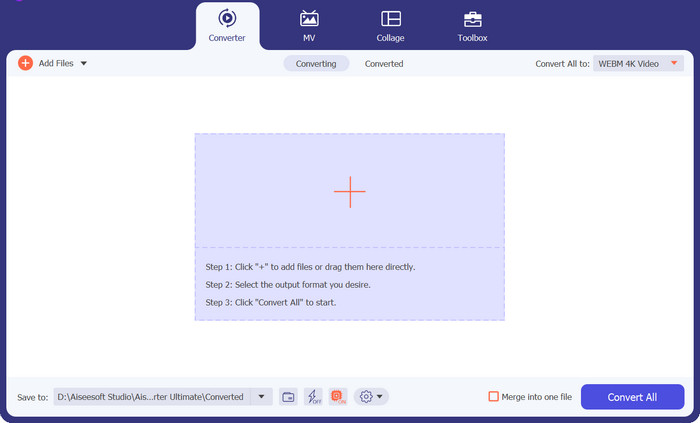
Passaggio 3. Seleziona l’output
Una miniatura del tuo file MOV verrà mostrata nel programma, a conferma del corretto caricamento. Per selezionare il formato di uscita, espandi la scheda Output e fai clic sul pannello Video. Da lì scorri l’elenco e seleziona MPG.
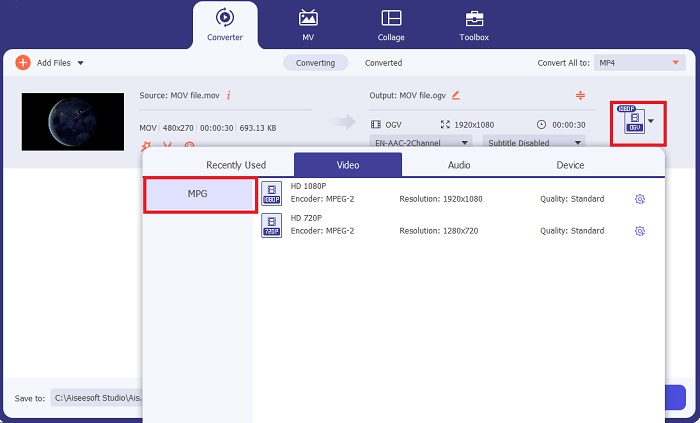
Passaggio 4. Avvia la conversione
Infine, modifica la qualità dell’output regolando le impostazioni di uscita. Quando hai finito, premi il pulsante Converti per avviare la conversione da MOV a MPG.
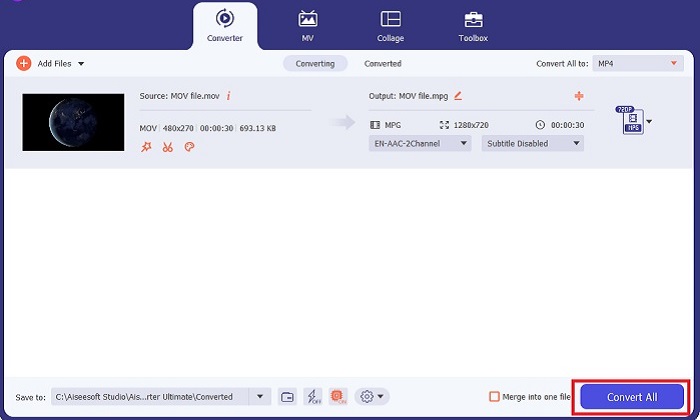
Funzioni principali
◆ Conversione senza interruzioni da MOV a MPG: una cosa che amiamo di Video Converter Ultimate è la sua interfaccia intuitiva. Questo strumento è il migliore per tutti, sia principianti che utenti esperti.
◆ Velocità di conversione 50 volte più veloce: grazie all'aiuto della tecnologia di codifica dell'accelerazione GPU, Video Converter Ultimate supera in astuzia qualsiasi altro convertitore offline grazie alla sua conversione rapida senza ritardi e arresti anomali.
◆ Funzione di conversione in blocco: con Video Converter Ultimate, puoi anche convertire una cartella di file MOV in una scelta di oltre 100o formati diversi da MPG.
2. Convertitore video online gratuito
Free Video Converter Online è un altro software che rivoluziona l’attività di conversione dei formati. Sebbene questo programma online non offra strumenti completi come quelli presenti nei software offline, si dimostra comunque un programma affidabile per convertire MOV in MPG online. Offre una funzione di conversione in blocco e ti dà il pieno controllo sul tuo output.
Passaggio 1. Per prima cosa, vai al sito principale di Free Video Converter Online. Prima di caricare il file MOV, fai clic su Add Files e ti verrà chiesto innanzitutto di avviare lo strumento online.
Passaggio 2. Per caricare il file che desideri convertire, seleziona di nuovo il pulsante Add Files e carica il tuo file. Puoi anche usare la funzione di trascinamento (drag-and-drop).
Passaggio 3. Una volta visualizzato il file sorgente, seleziona il formato di uscita nell’angolo inferiore dello schermo. Nel pannello Video vedrai tutti i formati disponibili e, nel nostro caso, scegli MPG. Infine, premi il pulsante Convert e attendi il download del file.
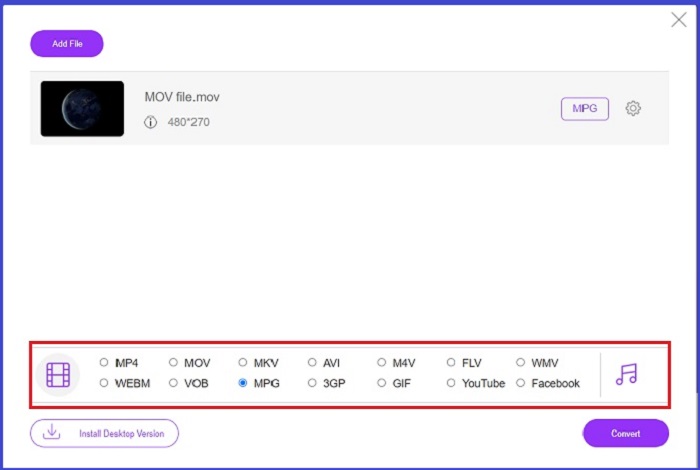
Funzioni principali
◆ Convertitore online multipiattaforma: che tu sia sul tuo telefono, tablet o computer, questo strumento funziona perfettamente, il che rende possibile la conversione video o audio.
◆ Garanzia della privacy: chi vuole che le informazioni private vengano invase? Con Free Video Converter Online, non dovresti affrontare dilemmi su questo problema. Questo strumento online consente agli utenti di convertire MOV in MPG gratuitamente senza richiedere processi di registrazione.
◆ Nessun requisito di installazione: questo strumento è un altro convertitore senza problemi che ti aiuta a farla franca con installazioni frenetiche, soprattutto se esaurisci lo spazio digitale.
Parte 2. Converti MPG in MOV
1. Convertitore video definitivo
Ancora una volta, Video Converter Ultimate rimane la soluzione migliore che possiamo consigliarti per convertire MOV in MPG su dispositivi Mac e Windows. Questo strumento supporta più di 1000 formati video e audio, inclusi quelli specifici per dispositivi come Samsung, Apple, Sony e molti altri. Segui la guida qui sotto per convertire qualsiasi tuo file MPG in MOV.
Download gratuitoPer Windows 7 o versioni successiveDownload sicuro
Download gratuitoPer MacOS 10.7 o versioni successiveDownload sicuro
Passaggio 1. Clicca sul pulsante Add Files per importare l’MPG nel programma.
Passaggio 2. Dopo che il file è stato caricato sullo schermo, seleziona l’output facendo clic su Output > Video > MOV. Per una qualità migliore, puoi anche modificare i parametri video.
Passaggio 3. Seleziona il pulsante Convert per far eseguire al programma la conversione dei file da MPG a MOV. Una volta terminata la conversione, potrai controllare l’output direttamente nel programma.
2. AnyConv
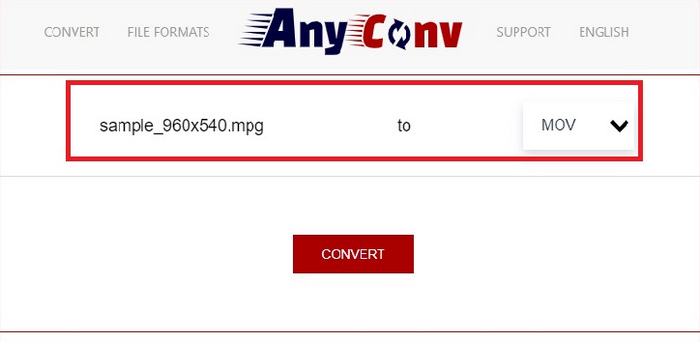
AnyConv è un convertitore online gratuito da MPG a MOV. Questo programma funziona bene su qualsiasi dispositivo e offre una funzione di trascinamento della selezione quando carichi i tuoi file MPG. Inoltre, questa soluzione online protegge i dati degli utenti eliminando i file convertiti dopo un'ora. Oltre a MOV, puoi convertire i tuoi file MPG in 3GP, AVCHD, MP4, MKV e altro.
Passaggio 1. Per prima cosa, apri il sito web di AnyConv. Quando appare sullo schermo, fai clic su Choose File e seleziona il filmato MOV che vuoi convertire.
Passaggio 2. Una volta caricato il file MOV, scegli MPG dall’elenco dei formati di uscita nella colonna Output al centro.
Passaggio 3. Infine, fai clic sul pulsante Convert e attendi il download del file.
Ulteriori letture:
3 modi migliori per convertire rapidamente MPG in MP4
5 migliori convertitori definitivi da MOV a 3GP da non perdere
Parte 3. Domande frequenti su come convertire MPG in MOV
Esiste un convertitore gratuito da MOV a MPG?
Decisamente sì! I convertitori online sono la scelta migliore per evitare di pagare commissioni. Puoi scegliere il convertitore video online gratuito per convertire gratuitamente MOV in MPG.
MPG è meglio di MOV?
MOV è migliore di MPG a causa delle loro differenze di tipo. MOV è un formato contenitore che salva tutti i tuoi dati originali. Allo stesso tempo, MPG è un codec compresso utilizzato per ridurre le dimensioni del file di un video per un trasferimento più veloce dei file tramite Internet.
Qual è il vantaggio di un file MOV?
I file MOV sono adatti per l'editing e sono considerati standard per la scelta del miglior formato video. Uno svantaggio di questo file è che solo pochi lettori multimediali aprono questo formato.
MOV to MPG riduce la qualità?
SÌ. La conversione dei tuoi file da MOV a MPG non solo ridurrà le dimensioni del file del tuo video, ma ne ridurrà anche la qualità. Entrambi i file sono fantastici in ogni caso potresti averne bisogno.
Posso riprodurre MOV in Windows Media Player?
Fortunatamente, i file MOV su Windows Media Player possono essere riprodotti purché siano nella versione 12 o successiva.
Conclusione
Ecco quindi i possibili modi per convertire MPG in MOV o viceversa. Entrambi i formati possono soddisfare al meglio le tue diverse esigenze. Con i converter online puoi ottenere una conversione semplice e immediata. D’altro canto, se desideri rifinire i tuoi file modificandone la qualità e persino effettuando qualche modifica di montaggio, ti consigliamo Video Converter Ultimate.
-
 FLV in MPG - Come convertire FLV in MPG su Mac, PC e online gratuitamente
 Come convertire FLV in MPEG? Posso convertire FLV in MPG gratuitamente? Questo post condivide 3 convertitori video gratuiti per aiutarti a convertire FLV in MPG senza perdita di qualità.
-
 Come convertire MPG in M4V su Mac e utilizzare lo strumento online
 Sei un nuovo utente Mac e non sai come convertire MPG in M4V? Allora puoi leggere questo articolo per saperne di più e scoprire come convertire i file usando il tuo Mac.
-
 8 migliori lettori MOV per riprodurre file MOV QuickTime con qualità originale
 Scopri di più sugli 8 migliori lettori MOV disponibili per Windows e Mac. È possibile scegliere quello desiderato e appropriato per riprodurre file MOV con la qualità originale.
