


 Video Converter Ultimate
 Screen Recorder
 Riparazione video
 Download sicuro
Converti DIVX in 3GP con le procedure più efficaci
Non riesci a riprodurre il tuo video DIVX sul dispositivo perché non è supportato? Molte persone hanno lo stesso problema. Ma sei fortunato, perché illustreremo il metodo più efficace e semplice per convertire DIVX in 3GP. Non perdere questa occasione e scopri di più sulla conversione di vari tipi di file utilizzando diverse applicazioni affidabili e collaudate che ti presenteremo.

Parte 1: Miglior software per convertire DIVX in 3GP
Vuoi convertire DIVX in 3GP sui tuoi dispositivi, come computer Windows e Mac? Allora il tuo problema è già risolto. Per convertire il tuo file DIVX puoi usare Video Converter Ultimate. Già dal nome dello strumento si capisce che è un’applicazione completa, con cui puoi convertire oltre 1000 formati video, inclusi DIVX, 3GP, MP4, MOV, MTS, WEBM e altri ancora. Puoi anche convertire due o più file contemporaneamente, perché questo strumento offre la conversione in batch. Inoltre, Video Converter Ultimate dispone di un processo di conversione rapido, ideale se prevedi di convertire numerosi formati di file.
Inoltre, puoi ancora utilizzare questa applicazione offline se sei interessato a modificare il tuo file DIVX prima di convertirlo. Supponendo che tu voglia correggere il colore del tuo video, puoi procedere al pannello Casella degli strumenti e selezionare lo strumento Correzione colore per regolare la luminosità, il contrasto e la saturazione del tuo video. Inoltre, supponi di voler sincronizzare l'audio nel tuo file video DIVX prima di convertirlo. In tal caso, puoi farlo perché offre una funzione di sincronizzazione audio, quindi sincronizzare l'audio con il video è facile per te.
Funzioni:
◆ Converti i formati di file video, inclusi MP4, M4V, FLV, AVI, ecc.
◆ Può creare video musicali con vari temi.
◆ La Casella degli strumenti contiene un potenziatore video, un dispositivo di rimozione della filigrana, un compressore e altro ancora.
◆ Capace di fare un collage.
Professionisti
- Supporta vari formati di file, come MP4, AVI, FLV, MOV, MTS, DIVX, 3GP, ecc.
- Ha un'interfaccia utente amichevole adatta ai principianti.
- Ha un processo di conversione 30 volte più veloce
- Accessibile sia su Windows che su Mac.
- Può convertire più video in una volta sola.
Contro
- Acquista Video Converter Ultimate per godere di funzionalità più uniche.
Per convertire facilmente DIVX in 3GP, devi seguire queste semplici guide qui sotto.
Passaggio 1: Per prima cosa devi solo scaricare Video Converter Ultimate sui tuoi dispositivi, come computer Windows o Mac. Poi procedi con l’installazione e apri l’applicazione.
Download gratuitoPer Windows 7 o versioni successiveDownload sicuro
Download gratuitoPer MacOS 10.7 o versioni successiveDownload sicuro
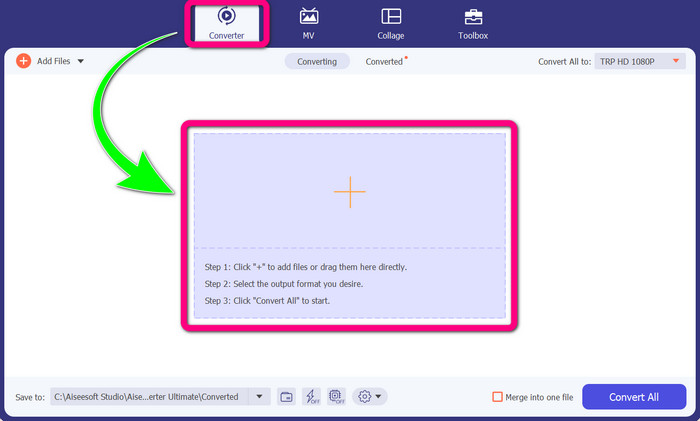
Passaggio 2: Quando hai già aperto Video Converter Ultimate sul dispositivo, seleziona il pannello Converter. Quindi fai clic sull’icona + per aggiungere il tuo file video DIVX.
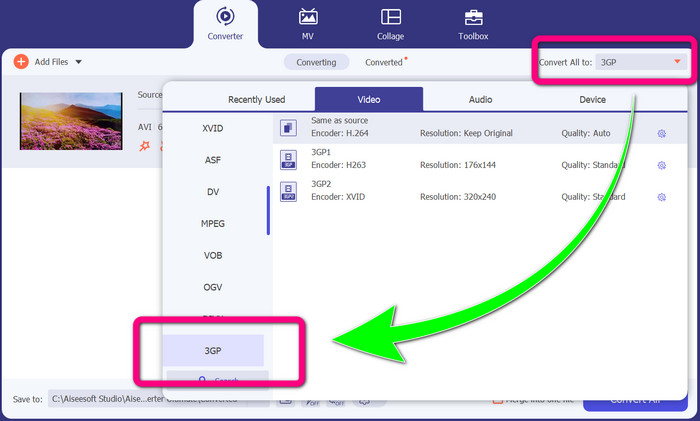
Passaggio 3: Dopo aver aggiunto il tuo file video, fai clic sull’opzione Converti tutto in, cerca il formato 3GP e selezionalo.
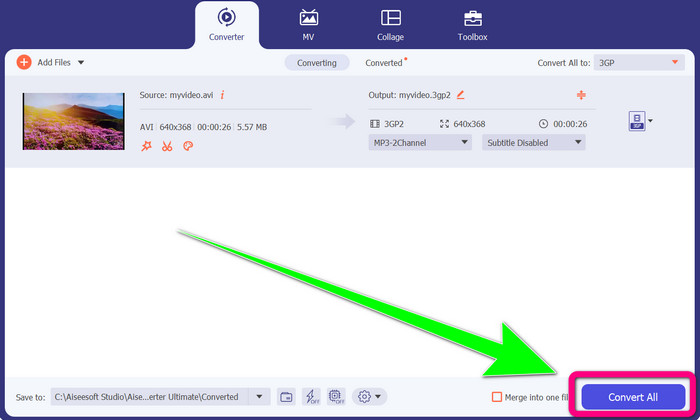
Passaggio 4: Quando hai finito di selezionare il formato 3GP, fai clic sul pulsante Converti tutto. Attendi il processo di conversione e salva il video finale sul tuo dispositivo.
Parte 2: eccellenti convertitori online per convertire DIVX in 3GP
Utilizzo di FVC Free Video Converter online
Uno dei migliori strumenti online per convertire DIVX in 3GP è FVC Free Video Converter Online. Questo strumento può aiutarti a convertire diversi formati di file in pochi clic. Supporta quasi tutti i principali formati video e audio in MP4, MOV, MKV, FLV, VOB, MP3, AAC e altri. FVC Free Video Converter Online è semplice e facile da usare. Anche i principianti sono in grado di utilizzare questa applicazione. Inoltre, sia che tu sia un utente Windows sia che tu sia un utente Mac, puoi fare affidamento su questo strumento perché è disponibile sia per Windows che per Mac. Segui i semplici metodi qui sotto per convertire DIVX in 3GP.
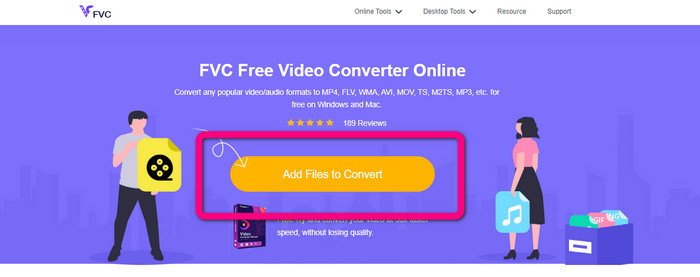
Passaggio 1: Visita FVC Free Video Converter Online. Quindi seleziona il pulsante Add Files to Convert per importare il file DIVX che vuoi convertire.
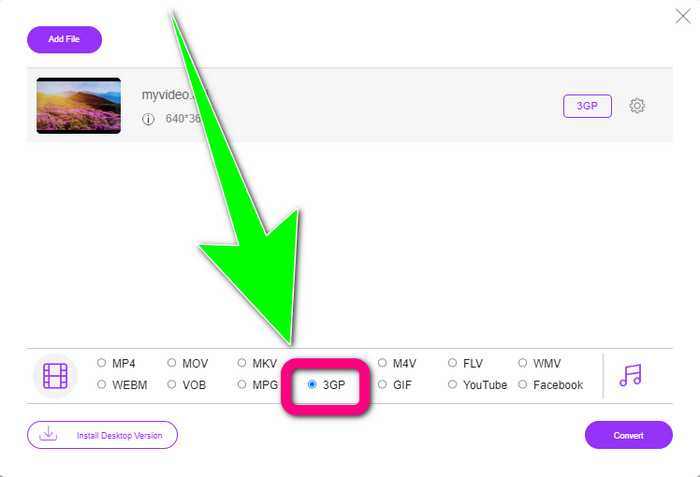
Passaggio 2: Dopo aver aggiunto il tuo file DIVX, fai clic sul formato 3GP tra le opzioni di formato in basso.
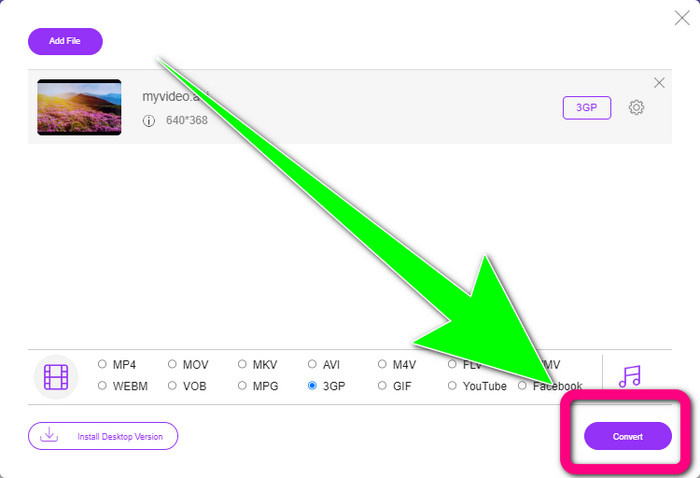
Passaggio 3: Procedi facendo clic sul pulsante Convert. Attendi il processo di conversione e salva il video convertito.
Utilizzando Convertio
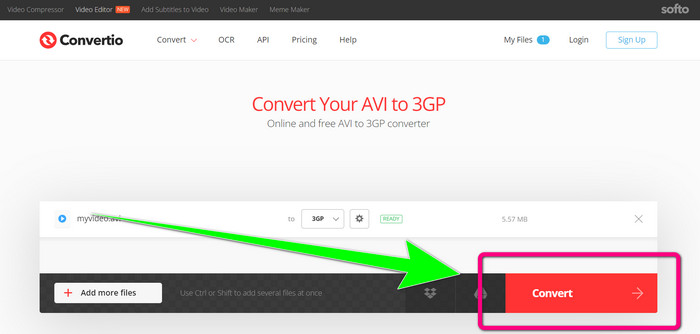
Se vuoi convertire DIVX in 3GP online, Convertio è uno degli strumenti che puoi utilizzare. Supporta molti formati, come 3GP, DIVX, XVID, AVID, MP4, M4V, ASF, HEVC e altri. Oltre a convertire file video, puoi convertire immagini, audio, documenti, archivi e altri tipi di file. Convertio è anche uno strumento semplice, perché puoi convertire in pochi passaggi, quindi non dovrai affaticarti per convertire il tuo file DIVX in un file 3GP. Tuttavia, come per gli altri strumenti online, non puoi usare questo software se non hai accesso a Internet. Inoltre, ci sono alcune situazioni in cui questo strumento online non funziona in modo ottimale. La versione gratuita di Convertio ha dei limiti: puoi convertire solo file con una dimensione massima di 100 MB. Devi acquistare il software per aumentare la dimensione massima dei file e ottenere prestazioni migliori. Segui i passaggi qui sotto per convertire il file DIVX in formato 3GP.
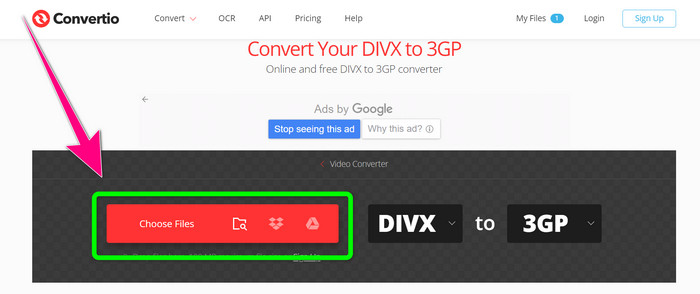
Passaggio 1: Vai al sito web di Convertio. Fai clic sul pulsante Choose Files e aggiungi il tuo video in formato DIVX.
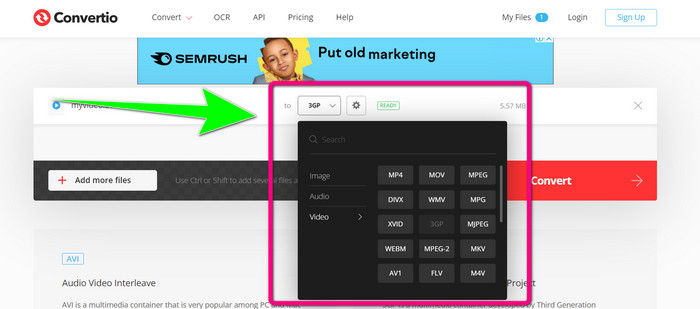
Passaggio 2: Dopo aver aggiunto il tuo video, vai alle opzioni di formato e seleziona il formato 3GP.
Passaggio 3: Quando hai selezionato il formato 3GP, fai clic sul pulsante Convert, attendi il processo di conversione e salva il tuo file video 3GP.
Parte 3: Panoramica dei formati di file DIVX e 3GP
DIVX
DIVX è un software di compressione video in grado di comprimere i file video fino a un dodicesimo del video originale con una perdita minima di qualità. Questo formato video è comune tra le grandi case cinematografiche come Disney, Dreamworks SKG, Universal e Paramount.
3GP
3GP è un contenitore multimediale. È stato sviluppato nel 1998 dal Third Generation Partnership Project per i telefoni basati su GSM (Global System for Mobile Communications). Il contenitore 3GP richiede poco spazio di archiviazione, poco traffico dati e poca larghezza di banda, il che è ideale per i telefoni cellulari.
Ulteriori letture
Converti facilmente MTV in MKV usando questi convertitori definitivi
Come convertire TRP in MKV senza perdere qualità
Parte 4: Domande frequenti sulla conversione di DIVX in 3GP
Cos'è un convertitore DIVX?
È un eccellente strumento in grado di convertire diversi tipi di file in numerosi altri formati. Questi includono AVI, MP4, MPEG, MOV, FLV e altri. Una volta terminata la conversione, puoi riprodurre il tuo video su qualsiasi altro lettore multimediale che supporti il formato specifico. FVC Free Video Converter Online è uno dei migliori converter che puoi utilizzare.
Il formato del file DIVX è lo stesso dell'AVI?
Il formato del file DIVX si basa sul contenitore AVI, ma può contenere grandi funzionalità come capitoli e sottotitoli. Inoltre, entrambi i formati di file AVI e DIVX possono essere riprodotti su dispositivi certificati DIVX.
Posso convertire il file DIVX in 3GP senza perdere la qualità?
Sì, certo che puoi. Usando Video Converter Ultimate, puoi convertire il file DIVX in 3GP senza preoccuparti di un eventuale cambiamento di qualità. Questo eccellente converter può convertire diversi file senza perdere la qualità del tuo video.
Conclusione
Come puoi vedere, esistono vari metodi efficaci per convertire DIVX in 3GP usando strumenti offline e online. Tuttavia, a volte alcuni strumenti online risultano poco pratici, soprattutto se hai una connessione Internet lenta; in questo caso puoi usare un’applicazione scaricabile. Se stai cercando un eccellente strumento offline, puoi provare Video Converter Ultimate.
-
 4 dei migliori convertitori da MKV a 3GP per Windows e Mac
 Se stai cercando convertitori da MKV a 3GP facili da usare, sei fortunato! Abbiamo trovato i migliori e gratuiti convertitori da MKV a 3GP che devi provare.
-
 5 migliori convertitori da MOV a 3GP da non perdere
 Se stai cercando i migliori convertitori da MOV a 3GP online e offline, sei sulla strada giusta. Leggi questo articolo per convertire il tuo MOV in un file 3GP.
-
 3 modi per convertire MPG in 3GP su Windows e Mac [gratuito]
 Se stai cercando modi per convertire MPG in 3GP, leggi questo articolo per conoscere i modi migliori per convertire MPG in 3GP su Windows e Mac.
