


 Video Converter Ultimate
 Screen Recorder
 Riparazione video
 Download sicuro
Semplici modi per convertire M4V in DivX gratuitamente
Poiché i file M4V sono protetti da DRM, i lettori Blu-ray e i lettori DVD non riescono a leggere questo formato. Quindi, se vuoi riprodurre i tuoi file M4V su un lettore DVD o Blu-ray, devi convertirli in formato DivX. Fortunatamente abbiamo testato i più conosciuti convertitori online, offline e gratuiti e selezionato i migliori da usare. Perciò leggi questo articolo fino alla fine per conoscere i modi più semplici per convertire M4V in DivX gratis, utilizzando i migliori convertitori.

Parte 1. Come convertire file M4V in DivX utilizzando un programma desktop
Se stai cercando il miglior convertitore offline sul mercato, FVC Video Converter Ultimate è la risposta per te. Questo convertitore offline ti permette di convertire il tuo file M4V in un file DivX perché supporta oltre 1000 formati. È inoltre disponibile su tutte le principali piattaforme, compresi Mac e Windows. Inoltre, dispone di una funzione per creare GIF e video 3D. Quindi, se sei interessato a usare questo convertitore per convertire M4V in DivX su Mac, segui questi semplici passaggi qui sotto.
Passaggio 1. Scarica FVC Video Converter Ultimate su Mac facendo clic sul pulsante Download qui sotto. Segui la procedura di installazione, quindi apri l’applicazione.
Download gratuitoPer Windows 7 o versioni successiveDownload sicuro
Download gratuitoPer MacOS 10.7 o versioni successiveDownload sicuro
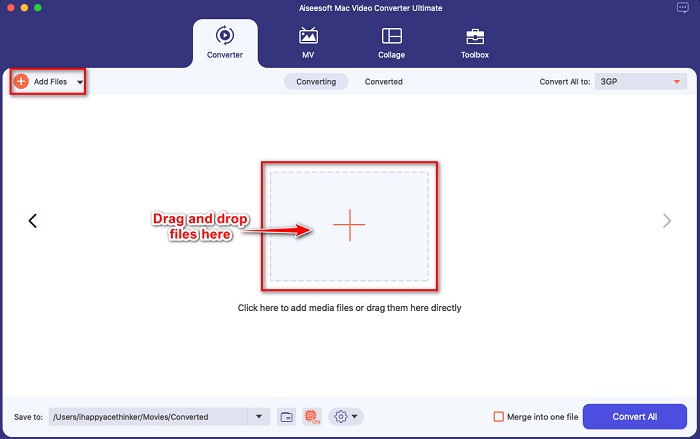
Passaggio 2. Dopo aver aperto l’app, carica il tuo file M4V facendo clic sul pulsante Add Files, oppure trascina e rilascia il file sul pulsante con il simbolo +. Il file verrà quindi caricato nell’interfaccia del software.
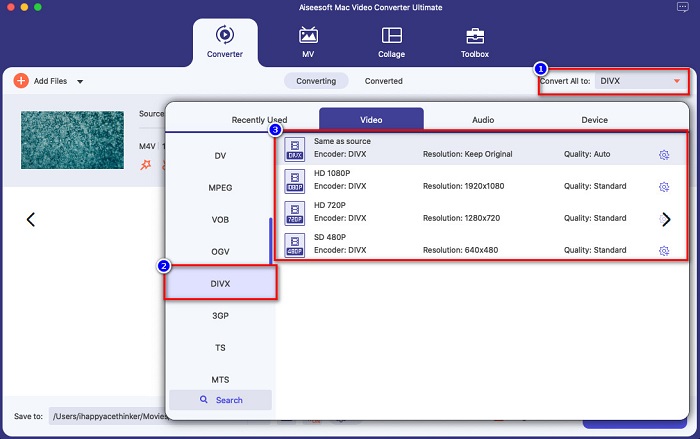
Passaggio 3. Successivamente, scegli il formato di output che desideri facendo clic sul pulsante Convert All to. Poi seleziona il formato di file DivX. Puoi anche scegliere la qualità video che preferisci.
Passaggio 4. Per l’ultimo passaggio, fai clic sul pulsante Convert All per convertire il tuo file M4V in formato DivX. Poi attendi qualche secondo per completare il processo di conversione.
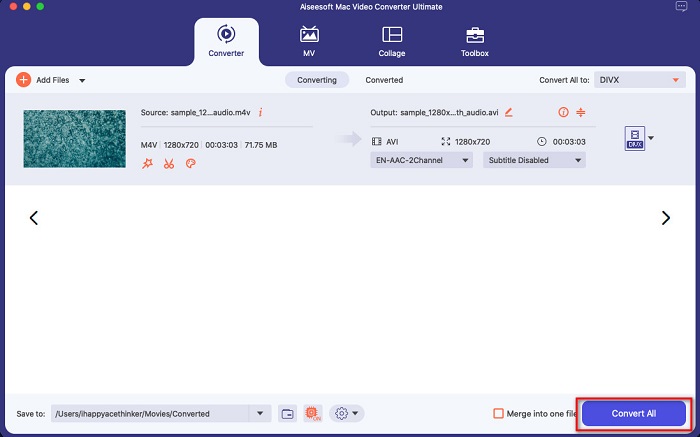
E questo è tutto! Per convertire M4V in DivX, segui i semplici passaggi sopra.
Professionisti
- Supporta molti formati di file, inclusi M4V, DivX, WMV, AVI, FLV, MOV, MP4 e oltre 1000 altri.
- Può unire più formati di file in uno.
- Ha una funzione in cui puoi comprimere i file.
- Disponibile su tutte le piattaforme crossmediali come Mac e Windows.
Contro
- Avvalersi dell'applicazione per utilizzare le sue funzioni speciali.
Parte 2. Come convertire M4V in DivX utilizzando un convertitore online
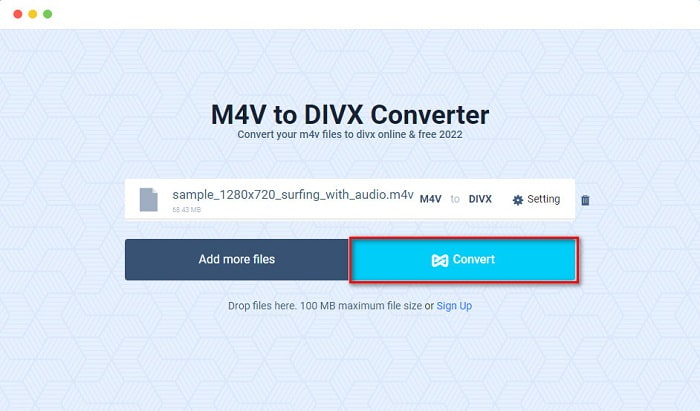
Uno dei motivi per cui molte persone scelgono di convertire i file online è la maggiore comodità. Pertanto ti presentiamo uno strumento online che può soddisfare i tuoi standard per il miglior servizio online, cioè Evano. Questo convertitore online è facile da usare e non contiene pubblicità. Tuttavia, essendo basato sul web, potresti avere un processo di conversione piuttosto lento. Inoltre, supporta solo pochi formati, come M4V, DivX, XviD, WebM, FLV e altri. Ciononostante, è ancora un modo efficace per convertire M4V in DivX.
Ecco i passaggi per convertire M4V in DivX usando Evano:
Passaggio 1. Nel tuo browser, cerca Evano. Quindi, nell’interfaccia principale del sito, fai clic sul pulsante Choose Files. Si apriranno le cartelle del computer, quindi seleziona il tuo file M4V.

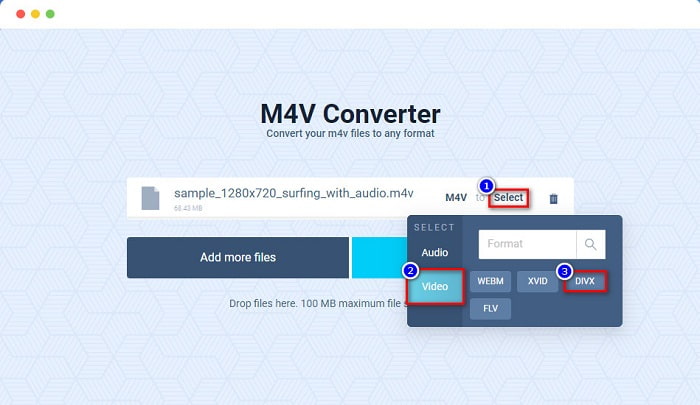
Passaggio 2. Poi fai clic sulla voce Select per scegliere il formato di output desiderato. Seleziona il formato di file DivX.
Passaggio 3. Per concludere, fai clic sul pulsante Convert per convertire il tuo file M4V in formato DivX.
Parte 3. Come convertire M4V in DivX usando uno strumento freeware
Un altro modo per convertire M4V in DivX è utilizzare un convertitore freeware. Uno dei convertitori freeware più conosciuti è Prism. Questo convertitore gratuito supporta numerosi formati di file come M4V, DivX, AVI, MP4, MOV, SWF, VOB e altri, e puoi scaricarlo senza costi. Tuttavia, potresti avere qualche difficoltà a capire l’interfaccia del programma, perché ha una GUI poco intuitiva.
Passaggi per usare Prism per convertire un file M4V in formato DivX:
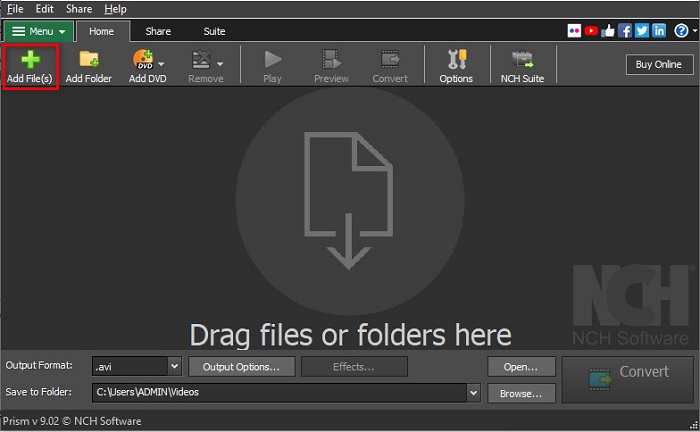
Passaggio 1. Scarica il convertitore di file Prism cercandolo nel tuo browser. Poi segui la procedura di installazione e apri l’app. Nella prima schermata del software, fai clic sull’opzione Add Files. Si apriranno i file del tuo computer, da cui caricherai il tuo file M4V.
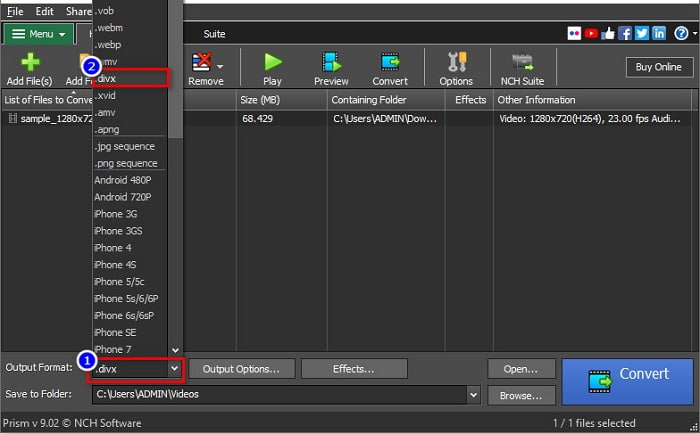
Passaggio 2. Poi, nel pulsante drop-down accanto a Output Format, scegli il formato di file .divx.
Passaggio 3. Infine, fai clic sul pulsante Convert nell’angolo in basso a destra dell’interfaccia del software. A questo punto la conversione da M4V a DivX avrà inizio.
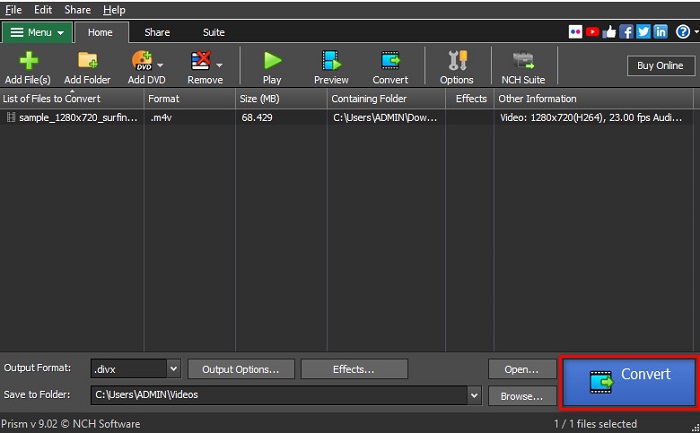
Ed è così che puoi convertire M4V in DivX usando un convertitore freeware.
Parte 4. M4V contro DivX
Hai confusione se vuoi convertire il tuo file M4V nel formato file DivX? Questa sezione imparerà la differenza tra il formato file M4V e il formato file DivX.
Il file M4V è un formato contenitore di file, noto anche come file video di iTunes. Apple sviluppa questo formato di file; quindi, rendendolo riproducibile nei dispositivi macOS. Lo scopo principale della creazione di questo tipo di file era quello di mettere la protezione DRM Fair Play di Apple su qualsiasi cosa dall'iTunes Store, impedendo così a chiunque di copiare questo tipo di file su qualsiasi dispositivo non realizzato da Apple.
Mentre d'altra parte, DivX è un formato di file che comprime i file al dodicesimo della loro dimensione originale senza rovinare la qualità. Inoltre, non occupa molto spazio sul tuo dispositivo, con un file di alta qualità.
| M4V | VS | DivX |
| Non compresso | Compressione | compresso |
| Mela | Sviluppatore | DivX, Inc. |
| ◆ Lettore multimediale VLC VideoLAN ◆ Lettore multimediale classico ◆ Giocatore KM | Programmi supportati | ◆ Lettore multimediale VLC VideoLAN ◆ DivX Riproduttore Apple QuickTime ◆ RealNetworks RealTimes Video Maker |
Parte 5. Domande frequenti sulla conversione di M4V in DivX
Riesci a riprodurre file M4V su Windows Media Player?
Sì. Windows Media Player può aprire file M4V in modo nativo, proprio come il lettore multimediale QuickTime su Mac.
Puoi usare il freno a mano per convertire M4V in DivX?
Purtroppo no. Handbrake non supporta il formato di file DivX perché può gestire solo un numero limitato di formati. Fai clic qui per scoprire di più sui lettori M4V disponibili.
Quale è meglio M4V o MP4?
M4V e MP4 hanno quasi la stessa qualità video ma estensioni di file diverse. Tuttavia, M4V memorizza più dati per i sottotitoli e la protezione DRM per la privacy dei dati. Inoltre, più dispositivi supportano ampiamente il formato M4V rispetto al formato MP4.
La modifica di M4V in DivX influisce sulla dimensione del file?
Sì. Quando si converte il file M4V nel formato file DivX, la dimensione del file si riduce.
Conclusione
Puoi infatti trovare molti convertitori di file online e offline sul web. Ma solo pochi possono ottenere il meglio dal tuo file. Molti convertitori non hanno funzionalità per migliorare il tuo file video e altri non supportano molti formati di file. Pertanto, se stai cercando il convertitore definitivo per convertire M4V in DivX, potresti voler utilizzare FVC Video Converter Ultimate. Non c'è dubbio che questa sia la prima scelta per ogni utente che ha bisogno di aiuto per convertire i propri formati di file. Allora, cosa stai aspettando? Scarica subito questa app e prova le fantastiche funzionalità che offre.
-
 2 convertitori M4V in FLV approvati per convertire M4V in FLV [2022]
 Vuoi conoscere il segreto su come convertire M4V in FLV? Per riprodurre il file sul tuo lettore multimediale? Quindi segui questo articolo poiché forniamo idee sufficienti su come farlo.
-
 Come convertire M4V in WMV velocemente senza distruggere la qualità
 Cerchi un modo semplice per convertire i video M4V in WMV? In questo articolo imparerai come cambiare i video M4V scaricati da iTunes in WMV in modo che tu possa goderteli su altri dispositivi.
-
 Come cambiare iTunes M4V in MKV su Mac e Windows [il modo più rapido]
 Se devi convertire M4V in MKV su Mac devi leggere questo articolo. Poiché forniamo informazioni sui convertitori che ti aiuteranno con il tuo processo di conversione.
