


 Video Converter Ultimate
 Screen Recorder
 Riparazione video
 Download sicuro
I modi più eccellenti per convertire rapidamente MPG in M4V
Stai cercando la procedura migliore per convertire rapidamente MPG in M4V su Mac e Windows? Non preoccuparti più, perché ti presenteremo la soluzione migliore per convertire i tuoi file. Inoltre, ti mostreremo anche il modo più efficace per convertire MPG in M4V online. In questo modo, avrai un’idea chiara su come convertire i tuoi file sia online che offline. Tutto ciò che devi fare è rilassarti mentre leggi fino in fondo questo articolo illuminante.

Parte 1: Modo efficace per convertire MPG in M4V utilizzando il Mac
Al giorno d'oggi, alcuni utenti Mac hanno difficoltà a convertire il loro MPG in M4V perché non sanno quale applicazione possono utilizzare. Se anche tu appartieni a quegli utenti, allora il miglior convertitore che puoi utilizzare è Video Converter Ultimate. Puoi utilizzare facilmente questo meraviglioso strumento sul tuo Mac perché ha un'interfaccia facile da usare. Inoltre, oltre ai formati di file MPG e M4V, puoi convertire più file video, inclusi MP4, MOV, AVI, FLV, MKV, WMV, DIVX e altro. Inoltre, se desideri convertire più file MPG in un M4V, è anche possibile. Questo convertitore offre un processo di conversione batch in cui è possibile convertire più file MPG contemporaneamente. Inoltre, questo convertitore non è accessibile solo agli utenti Mac. Gli utenti Windows possono anche utilizzare questo convertitore, il che lo rende più conveniente per tutti gli utenti.
Oltre a convertire video, puoi anche convertire vari file immagine. Questo strumento supporta diversi formati di immagine, come BMP, JPG, PNG, WEBP e altri. Inoltre, anche se si tratta di un'applicazione di conversione, ci sono più cose che può fare. Se il tuo video MPG è troppo lento e vuoi accelerarlo, puoi farlo con questo strumento. Ti consente di regolare la velocità del tuo video da 0,125x, 0,25x, 0,5x, 0,75x, 1x, 1,25x, 1,5, 2x, 4x, a 8 volte più veloce della velocità media del tuo video. In questo modo, puoi facilmente regolare la velocità del tuo video. Un'altra caratteristica che puoi goderti con questo strumento è lo strumento Video Enhancer. Questo strumento ti consente di aumentare la risoluzione del tuo video, puoi anche ottimizzare la luminosità e il contrasto del tuo video, puoi anche ridurre le vibrazioni del video. Infine, puoi rimuovere facilmente il rumore dal tuo video. Con la guida di questo software, puoi riprodurre il tuo video in modo migliore e più soddisfacente da guardare. Vedi altre funzionalità di seguito.
Funzioni
◆ Converti oltre 100 file video, inclusi M4V, MPG, MP4, AVI, MOV, FLV, MKV, WMV, OGV, VOB, 3GP, SWF, ecc.
◆ Convertire più file contemporaneamente.
◆ Può convertire i file 30 volte più velocemente della velocità di conversione media.
◆ Offre creatore di collage.
◆ Può creare un video musicale.
◆ Converti file immagine, come JPG, PNG, TIF, BMP e altro.
◆ Fornisce strumenti di modifica, come controller di velocità video, ottimizzatore video, compressore, trimmer, cropper e altro ancora.
Usa le semplici guide qui sotto per convertire MPG in M4V su Mac usando FVC Video Converter Ultimate.
Passaggio 1: Fai clic sul pulsante di download per Mac qui sotto per scaricare Video Converter Ultimate sul tuo Mac. Successivamente, procedi con l’installazione e avvia l’applicazione.
Download gratuitoPer Windows 7 o versioni successiveDownload sicuro
Download gratuitoPer MacOS 10.7 o versioni successiveDownload sicuro
Passaggio 2: Seleziona la scheda Converter quando l’interfaccia principale compare sullo schermo. Poi, hai tre opzioni per inserire il file video MPG. Fai clic sul pulsante Add File, sull’icona con il segno Più oppure trascina semplicemente il file nel riquadro.
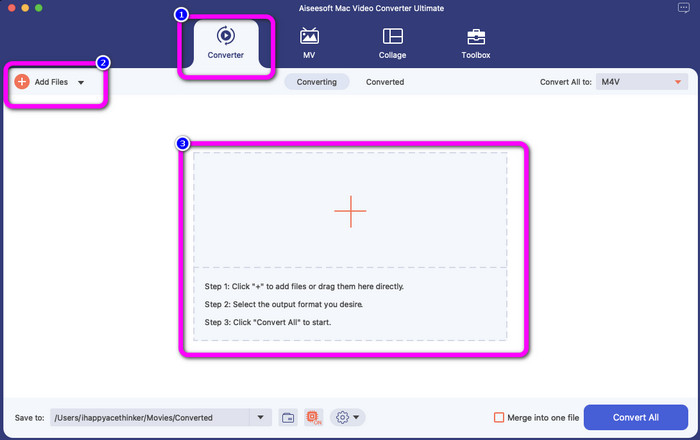
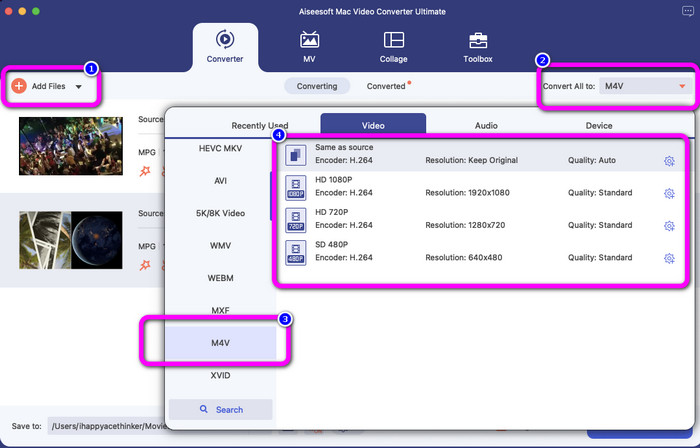
Passaggio 3: Fai clic sul pulsante Add Files per convertire più file MPG. Quindi, per convertirli in un file M4V, seleziona il pulsante Convert All to. Controlla le opzioni di formato, seleziona il formato M4V e scegli la risoluzione video desiderata da 480p a 1080p.
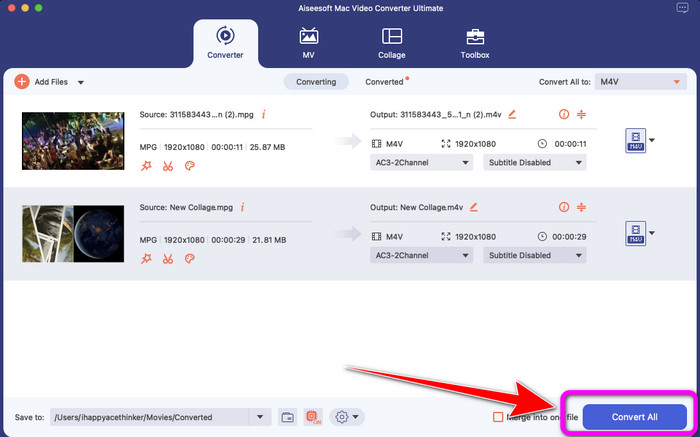
Passaggio 4: Dopo aver convertito tutti i file in formato M4V, fai clic sul pulsante Convert All. In questo modo inizierà il processo di conversione. Successivamente, salva il tuo video. Se vuoi convertire MXF in M4V, puoi usare questo software.
Parte 2: modo gratuito per convertire MPG in M4V online
Se vuoi convertire MPG in M4V gratuitamente online, utilizza FVC Free Video Converter. Puoi trovare questo strumento gratuito in tutti i browser, come Mozilla Firefox, Google Chrome, Safari, Microsoft Edge e altri ancora. Puoi facilmente convertire il tuo file MPG in formato M4V in pochi clic, perché ha un’interfaccia semplice, comprensibile per tutti. Questo strumento online supporta molti formati, come WMA, MP4, FLV, AVI, MOV, TS e altri. Questo convertitore ti consente anche di convertire numerosi file con un solo clic.
Inoltre, durante il processo di conversione, puoi modificare e modificare il bitrate, il frame rate e la risoluzione del tuo video andando alle impostazioni video. Puoi anche modificare il bitrate e la frequenza di campionamento dell'audio. Con queste fantastiche funzionalità, puoi assicurarti che il tuo video migliorerà. Inoltre, nessuna filigrana verrà aggiunta ai tuoi video dopo la conversione, il che è fantastico, soprattutto se non vuoi vedere elementi di disturbo dalla tua foto.
Funzioni
◆ Converti file video, come MPG, M4V, MP4, MOV, AVI, FLV, MKV e altro.
◆ Offre il processo di conversione batch.
◆ Modifica il bitrate, il frame rate e la risoluzione del video.
◆ Converti formati audio, come MP3, AAC, AC3, WAV, FLAC, ecc.
◆ Modificare il bitrate e la frequenza di campionamento dell'audio.
Segui le semplici guide di seguito per convertire MPG in M4V utilizzando FVC Free Video Converter Ultimate.
Passaggio 1: Carica il file MPG che vuoi convertire facendo clic sul pulsante Add Files to Convert.
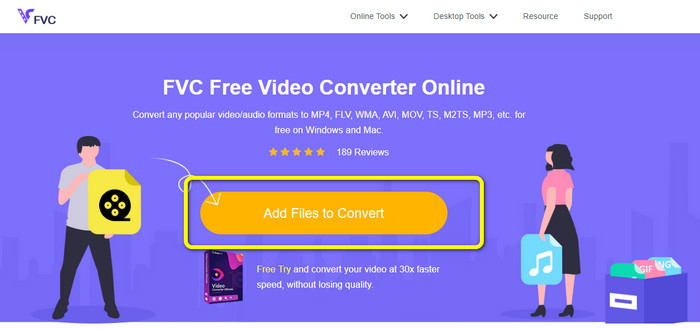
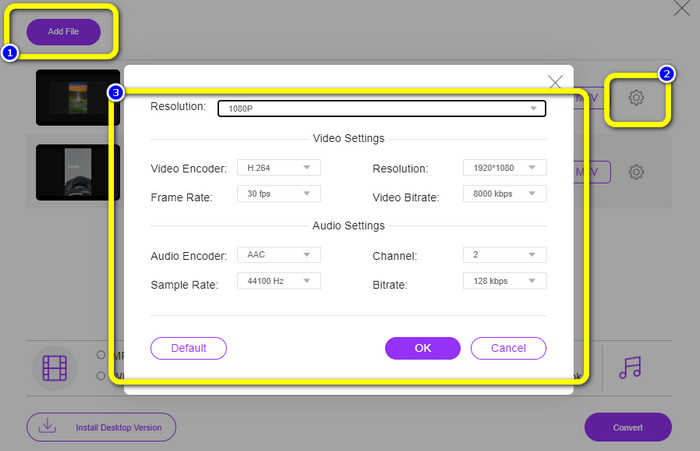
Passaggio 2: Seleziona il pulsante Add File per aggiungere altri file che desideri convertire. Poi fai clic sull’icona Setting, modifica le impostazioni in base alle tue preferenze e fai clic su OK.
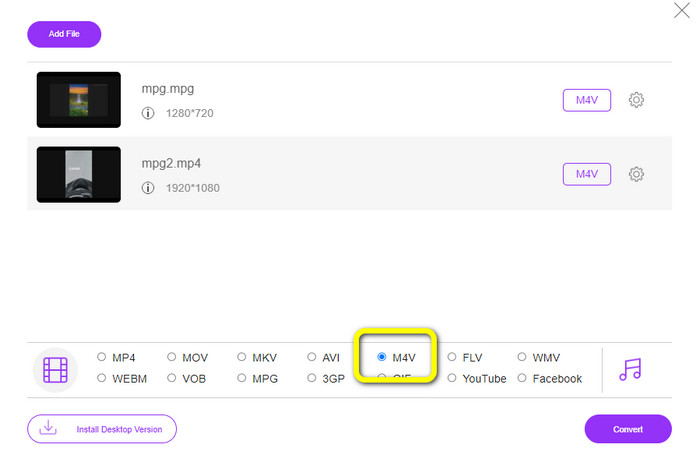
Passaggio 3: Successivamente, consulta le opzioni di formato nella parte inferiore dell’interfaccia e seleziona il formato file M4V.
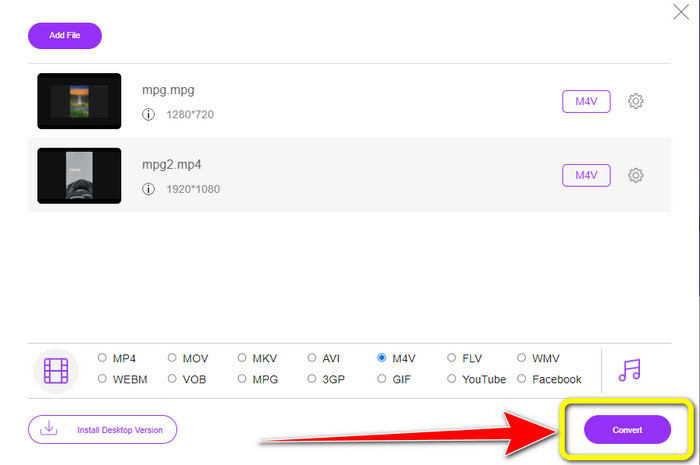
Passaggio 4: Quando hai terminato di scegliere M4V come formato file desiderato, fai clic sul pulsante Convert. Scegli la posizione in cui salvare il file e attendi il completamento della conversione. Puoi usare questo convertitore anche per trasformare OGV in M4V.
Parte 3: Qual è il migliore?
I due convertitori menzionati sopra sono i migliori che puoi utilizzare sia offline che online. Se vuoi convertire il tuo file MPG in M4V usando uno strumento online, puoi usare FVC Free Video Converter. Questo strumento offre la conversione in batch, che ti aiuta a convertire più file contemporaneamente. Se invece desideri convertire i tuoi file utilizzando un convertitore scaricabile, puoi usare Video Converter Ultimate. Questo strumento offline è disponibile sia su Mac che su Windows, il che lo rende accessibile a tutti gli utenti.
Parte 4: MPG contro M4V
| MPG | M4V | |
| Estensione del file | .mpg | .m4v |
| Descrizione | Il formato di file MPG è un file di un gruppo di esperti di immagini in movimento. È una distribuzione online comune perché può essere scaricata e trasmessa in streaming più velocemente rispetto ad altri formati video. | Apple ha creato il formato file M4V. Questo contenitore video è quasi simile al formato file MP4. L'unica differenza principale tra i due è che il formato M4V era protetto dalla protezione dalla copia DRM. |
| Sviluppatore | ISO, CEI | La società Apple. |
| Programmi associati | VLC Media Player VideoLAN Windows Media Player | Lettore Apple Quick Time VLC Media Player Apple iTunes |
Parte 5: Domande frequenti sulla conversione di MPG in M4V
1. Quale formato è migliore, MPG o MP4?
In termini di qualità, il formato file MP4 può offrire una qualità migliore rispetto al formato MPG. È perché MP4 supporta più codec video come H.265.
2. Perché i file MPG sono così grandi?
È grande perché MPG è associato a MPEG2. È un vecchio formato di compressione che richiede una piccola quantità di potenza di elaborazione per codificare e crea comunque file di grandi dimensioni.
3. Quale lettore è il migliore per i file MPG?
VLC Media Player
Apple QuickTime Player
Media Player Lite
PotPlayer
FX Player
Video LAN
Conclusione
Convertire MPG in M4V è impegnativo, ma grazie a questi metodi efficaci che utilizzano ottimi convertitori, la conversione dei file è diventata semplice. Se vuoi convertire facilmente i tuoi file, utilizza i due convertitori menzionati sopra.
-
 4 modi per convertire MPG in MKV utilizzando convertitori online/offline
 Stai cercando un convertitore facile da usare in grado di convertire i file MPG in MKV? Questo articolo elenca i modi migliori e più semplici per convertire rapidamente i file MPG in MKV.
-
 3 modi per convertire MPG in 3GP su Windows e Mac [gratuito]
 Se stai cercando modi per convertire MPG in 3GP, leggi questo articolo per conoscere i modi migliori per convertire MPG in 3GP su Windows e Mac
-
 Come convertire MPG in DivX senza perdere qualità
 Stai cercando un'applicazione senza problemi che puoi usare per convertire MPG in DivX? Questo articolo ti fornirà diversi metodi efficaci che devi provare
