


 Video Converter Ultimate
 Screen Recorder
 Riparazione video
Scopri come convertire MPG in WMV con i 2 migliori convertitori
If we compare MPG files with the other formats, they are outdated. Furthermore, many users ask how to convert MPG to WMV for free without losing the quality of the video. So now, let's not wait anymore longer, and let's discuss the tools you can use to convert your .mpg files and more details about the two formats. Keep the ball rolling and the pace as we proceed to the converters you can use.

Parte 1. Converti MPG in WMV gratuitamente online
If you wish to convert MPG to WMV online, you must consider boundaries, especially the file size. Since MPG files are big depending on the bitrate, so you will need an online converter that doesn't limit the file size. FVC Free Video Converter Online doesn't limit the size you can upload and the times you convert. Although the tool has no limitations, it still lacks supported formats you can choose from. However, suppose you don't want to spend a penny on your conversion. In that case, you must select this converter because this is the only online converter that provides excellence in your conversion needs. Want to know how to use this online MPG converter? If so, continue reading the succeeding details below and learn how to use this online converter.
Step 1. First, you can click this link, and a new tab will automatically open.
Step 2. Tick the Add Files to Convert button to allow the tool to run into your system. After that, you can choose the .mpg file you want to convert on the computer folder that will pop up on your screen. Once you've already selected the file, click Open to upload it.
Scarica la Versione Desktop per convertire i file in batch.
Step 3. Under there is a setlist of the format you can choose on; click MKV to proceed to the last step.
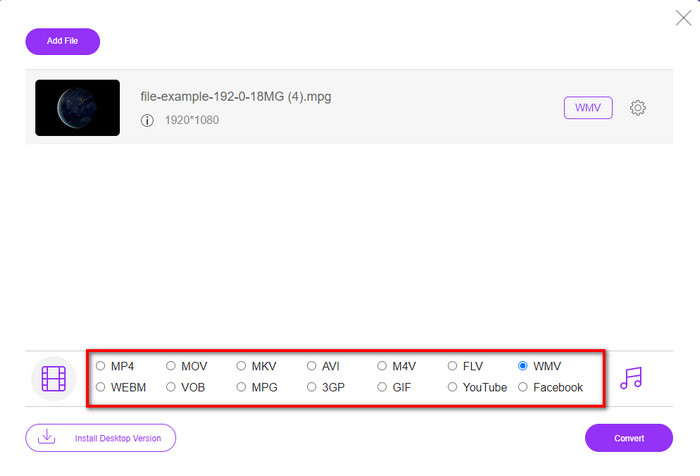
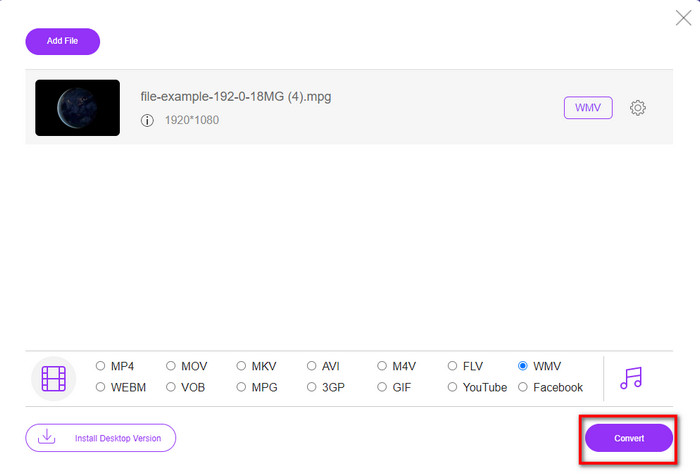
Step 4. Start converting your file by clicking the Convert button below.
Parte 2. Converti MPG in WMV su Windows 11/10 senza perdita di qualità [Consigliato]
Still not satisfied with the converter online? What if we tell you that you can use an MPG to WMV converter free download instead of much faster with other functions. FVC Video Converter Ultimate will help you with many problems regarding your videos, especially converting the format. Although the tool can convert, there are many areas we need to explore in this tool. Want to know more about these? Then read the key features available below.

FVC Video Converter Ultimate
4.255.366+ download- Supporta la conversione di MPG, WMV, AVI, MP4, MOV, MKV, FLV, M4V, ecc. In oltre 200 formati.
- È semplice da usare e ha un'interfaccia molto intuitiva che molti utenti amano.
- Ottimo per modificare i tuoi video, come tagliare, unire, ritagliare, creare GIF e molti altri.
- La conversione ultraveloce e l'accelerazione hardware sono disponibili per un processo di conversione alla velocità della luce.
- Accessibile su tutte le piattaforme come Windows e macOS.
- Converti più file MPG o WMV in una volta sola con la conversione batch supportata.
Download gratuitoPer Windows 7 o versioni successiveDownload sicuro
Download gratuitoPer MacOS 10.7 o versioni successiveDownload sicuro
Puoi avere tutte queste funzionalità se hai questo strumento definitivo. Ma prima, leggiamo l'ambito dettagliato completo e i passaggi per utilizzarlo per convertire MPG in WMV.
Step 1. You can click the download button below and select which platform you are using. After downloading, install the converter next, and run the tool.
Download gratuitoPer Windows 7 o versioni successiveDownload sicuro
Download gratuitoPer MacOS 10.7 o versioni successiveDownload sicuro
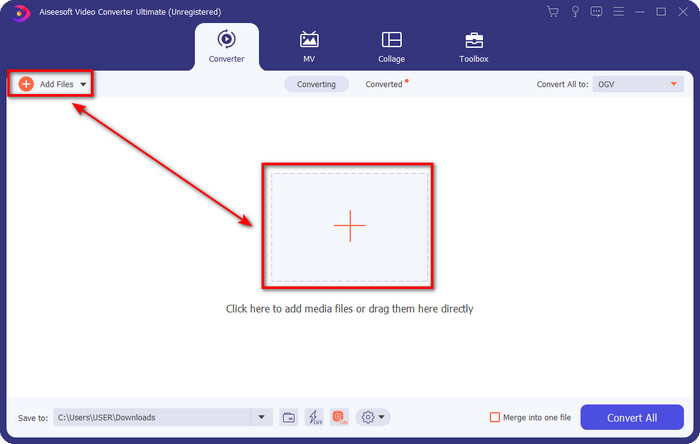
Step 2. To upload the MPG file, you can click the Add Files or the + button in the middle. Instantly a folder will show, select the file, and press Open to proceed.
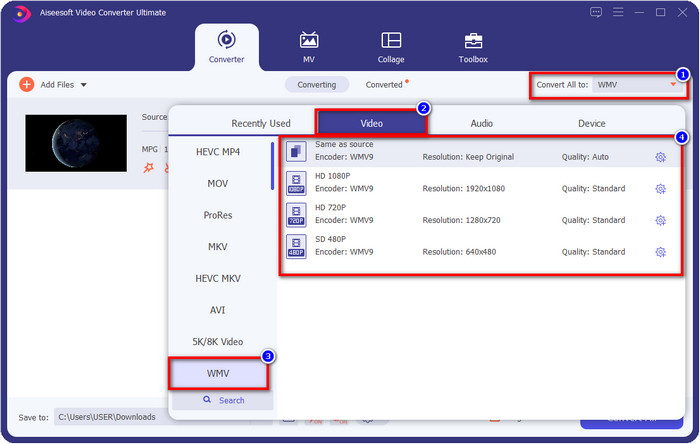
Step 3. Before you convert the file, you will need to select the format in the setlist by clicking the Convert All to button. Select WMV format, then choose the encoder you want to have.
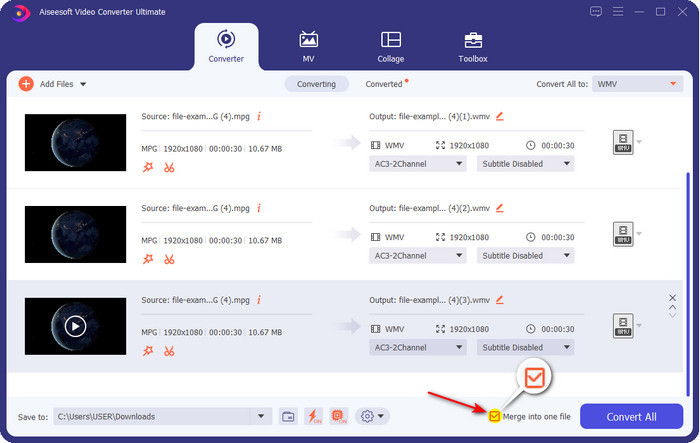
Optional. Need to merge different sets of MPG files? In that case, you can tick the box to join the final output.
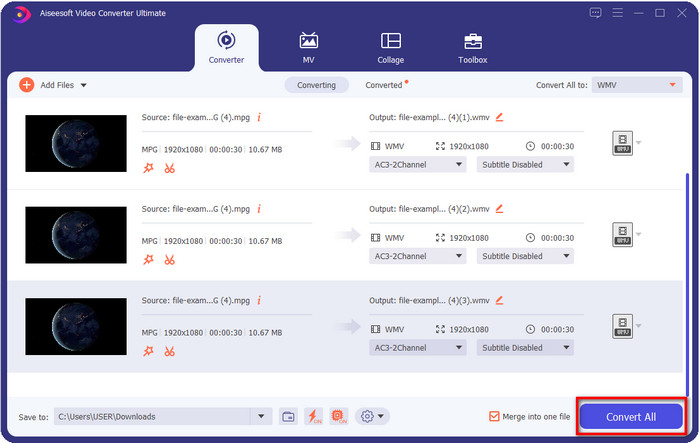
Step 4. Hit Convert All to start the converting process. After converting MPG to WMV, a computer folder will show on your screen.
Parte 3. Qual è la differenza tra MPG e WMV
MPG and WMV are both media containers for audio and video. Even though these formats mentioned can store still there are many differences between the two formats. Do you want to know more? The following details will discuss the MPG and WMV more and what you need to reconsider before choosing a free online or offline MPG to WMV converter.
MPG is known for being one of the first formats developed in the early years. This format uses two types of encoder that is under MPEG, and that is the MPEG-1 and the MPEG-2. It uses two compressors to suffice the needs that MPEG-1 can't do, which means the MPEG-2 is a backup for the MPG. Furthermore, it is said to be one of the high-quality videos before, but many formats have become better; a great example is the WMV. To play your MPG files, you can read on the best MPG/MPEG players.
WMV può anche utilizzare due compressori di Windows e molti in un unico file. È noto a tutti gli utenti Windows perché è un formato di prim'ordine disponibile su Windows. Sebbene utilizzi due o più compressori, non distrugge mai la qualità dopo aver utilizzato un codec. Inoltre, questo formato è più compatibile con tutti i desktop Windows ed è ottimo per lo streaming video.
MPG contro WMV
Realizzato dal Moving Picture Experts Group (MPEG), MPG è un formato video digitale comune per archiviare informazioni su video, audio e metadati. È molto utile quando si creano filmati da condividere su Internet. Questi file in MPG di solito contengono la compressione video/audio MPEG-1 o MPEG-2.
Prodotto da Microsoft, WMV era uno dei formati video più comuni negli anni 2000. Può essere visto sul Web e riprodotto da vari lettori multimediali su Windows. Ed è anche il formato di file video predefinito di Windows Media Player. Ma è stato recentemente rilevato da altri formati.
Parte 4. Domande frequenti sulla conversione da MPG a WMV
Come convertire MPG in WMV utilizzando Windows Media Player?
First, you can't convert format on Windows Media Player, but you can rip the CD and change the format if you want to save it into your desktop. To begin with, open the Windows Media Player on your PC, click Organize, then Options. Under it, click Rip Music, choose the format by clicking the dropdown button, and press OK. Now you can insert the CD, and it will automatically rip the file from the CD.
Dove posso guardare il mio file video MPG?
You can use the native media player on Windows to play the .mpg file, which is the Windows Media Player. But if you want a much better option, click and read this article to know more about the possible MPG/MPEG player available on all platforms.
Come convertire MPG in WMV in Windows Movie Maker?
Although the Windows Movie Maker is for editing, you can change the format here. Still, it is not the typical converting process you will expect like the other converters online and offline. Moreover, this editor is only available on Windows 10 and less, so if you have the latest version of Windows, you can't download this editor. To convert your MPG video to WMV format, follow the succeeding steps. Open the editor and drag the file to the blank interface. Click File, then Save Movie, choose the device settings you want, and wait for the process to end. Thus, all of the files you render will save as .wmv.
Conclusione
All of the tools presented above are assured to help you change MPG to WMV as we try them ourselves to make sure that all of the details in this article will only state facts. Suppose you don't want to download a converter on your device to save some space, then we recommend using the FVC Free Video Converter Online. However, suppose you want to add a professional touch that the online converter can't provide. In that case, FVC Video Converter Ultimate is the perfect tool for the job. Still, were you not convinced with the ultimate tool? In that case, you need to download the software on your desktop to use and have the ultimate experience in converting.
-
 [2022] Scelte rapide del convertitore da MPG a AVI per aiutarti a convertire MPG in AVI
 Ti sei mai chiesto di convertire il tuo MPG in un file video AVI solo per riprodurlo sul tuo lettore video? Ecco il miglior articolo che puoi trovare che parla del problema di cui sopra.
-
 3 Semplici Modi su Come Convertire MPG in MOV sul Tuo Mac/Windows/Online
 Vuoi convertire i tuoi file MPG e successivamente trasportarli sul tuo iOS, iPod, iPad o Mac? Questo articolo ti aiuterà a capire come convertire MPG in MOV con passaggi.
-
 Come convertire MPG in FLV senza perdere qualità [Dimostrato]
 Devi guardare il tuo film preferito su questo lettore multimediale, ma non supporta MPG. Prova a convertire il tuo file MPG in FLV usando questi convertitori presentati in questo articolo.

