


 Video Converter Ultimate
 Screen Recorder
 Riparazione video
 Download sicuro
3 metodi semplici per convertire TRP in MKV
Hai difficoltà con il tuo file TRP perché non riesci a riprodurlo sul lettore multimediale o in altri programmi? Se sei uno degli utenti che incontrano questo tipo di problema, ti consigliamo vivamente di leggere questo articolo. Puoi convertire il tuo file TRP in MKV, perché la maggior parte dei programmi supporta il formato MKV. In questo articolo ti mostreremo metodi semplici per convertire TRP in MKV usando Windows, Mac e strumenti online. Cosa aspetti? Non perdere tempo e inizia subito a leggere questo articolo!

Parte 1: Definizione di TRP e MKV
Cos'è TRP?
Il formato TRP è un file multimediale ad alta definizione codificato nel formato di trasporto MPEG-2 parte 1. Viene spesso utilizzato nella diffusione video digitale. Inoltre, è impiegato per flussi audio, per sincronizzare l’uscita e per il multiplexing digitale dei video, e include ottime funzionalità per la correzione degli errori. TRP contiene anche dati audio AC3 e video H.264. Può essere riprodotto con diversi programmi di riproduzione video.
Cos'è MKV?
MKV, o Matroska, è un contenitore multimediale che gestisce numerosi file audio, sottotitoli e video in un unico formato di file. MKV è anche diverso da altri standard multimediali come MP4 e AVI perché è open-source e può essere personalizzato dagli utenti grazie a software a sorgente aperta. Infine, il formato di file MKV è usato soprattutto per video in HD e per lo streaming video online.
Parte 2: Modi più semplici per convertire TRP in MKV offline
Utilizzo di Video Converter Ultimate
Devi scaricare e utilizzare Video Converter Ultimate per convertire TRP in MKV senza perdite. Utilizzando questa applicazione, puoi convertire qualsiasi formato di file video che desideri, inclusi TRP e MKV. Puoi convertire più file video in un unico processo perché questo strumento ha una funzione di conversione batch. Inoltre, ha un processo di conversione 30 volte più veloce, quindi non devi perdere più tempo per convertire file diversi. Questa applicazione supporta diversi formati diversi da TRP e MKV, come video 5K/8K, ProRes, DV, ASF, M4V, MXF, MP4, MOV e altro. La parte migliore è che puoi utilizzare questa applicazione utilizzando Windows e Mac, il che è una buona notizia per tutti gli utenti. Inoltre, se desideri modificare la velocità dei tuoi video, puoi utilizzare la funzione Video Speed Controller. Puoi rallentare il tuo video da 0,125x e accelerarlo fino a 8 volte più velocemente della velocità originale. Inoltre, se vuoi ritagliare il tuo video, puoi farlo. Questo strumento offre anche una funzione di ritaglio video,
Per saperne di più su questo fantastico software, devi scaricarlo e provarlo tu stesso.
Funzioni:
◆ Converti numerosi formati di file.
◆ Può creare un collage creativo.
◆ Offre Music Video Creator.
◆ Fornisce Toolbox per migliorare i video.
Professionisti
- 30 volte più veloce di altri convertitori software.
- Ha un'interfaccia utente amichevole, adatta a utenti non professionisti.
- Ha caratteristiche diverse oltre alla conversione.
- Disponibile sia su Windows che su Mac.
- Converti vari formati di file, come FLV, MP4, MOV, WBM, GIF, AMV, ecc.
- Può modificare i dettagli della data singolarmente o in batch.
Contro
- Acquista l'abbonamento per utilizzare funzionalità più avanzate.
Se desideri convertire TRP in MKV, segui questi semplici passaggi di seguito.
Passaggio 1: Su Windows o Mac, scarica Video Converter Ultimate facendo clic sul pulsante Download qui sotto. Apri l’applicazione dopo averla scaricata e installata.
Download gratuitoPer Windows 7 o versioni successiveDownload sicuro
Download gratuitoPer MacOS 10.7 o versioni successiveDownload sicuro
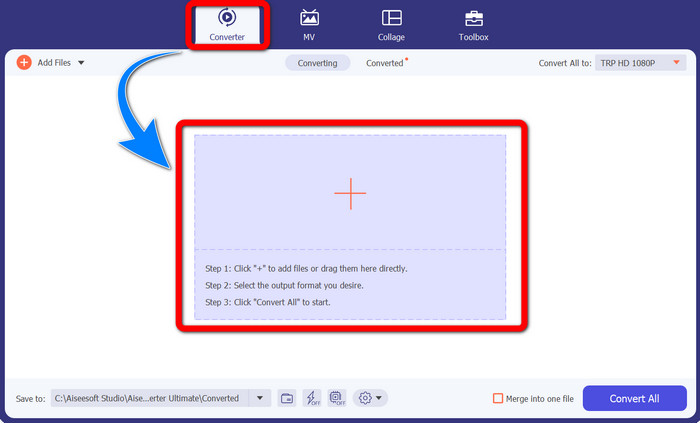
Passaggio 2: Una volta avviato Video Converter Ultimate, seleziona il pannello Converter. Poi fai clic sul segno + per importare il tuo video in formato TRP.
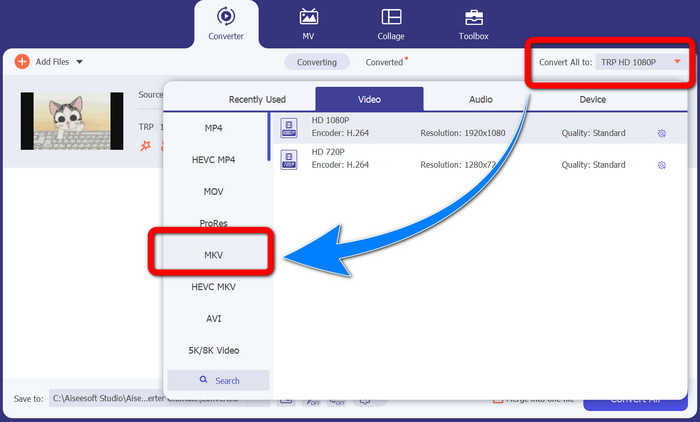
Passaggio 3: Dopo aver importato il video, fai clic sull’icona Converti tutti in. Trova il formato MKV tra le opzioni di formato e selezionalo.
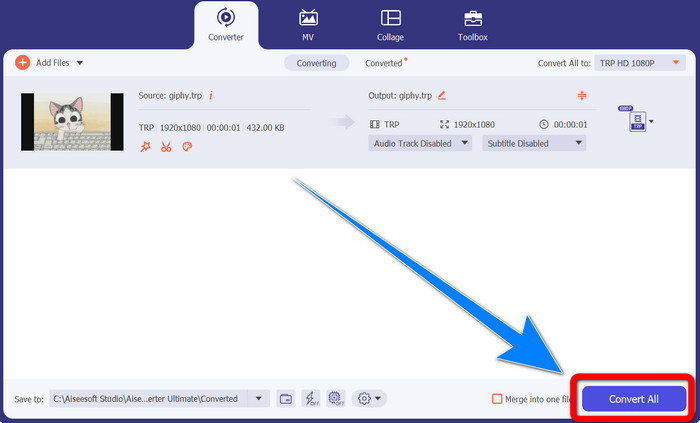
Passaggio 4: Quindi fai clic sul pulsante Converti tutto per convertire il tuo TRP in formato MKV.
Utilizzo di Prism Video Converter
Prism è un’altra applicazione che puoi scaricare su Windows e Mac. Questa applicazione può aiutarti a convertire facilmente i file TRP in MKV. Inoltre, supporta vari formati di file, come AMV, MP4, DVD, VOB, MOV, DIVX, AVI, 3GP e molti altri. Tuttavia, questa applicazione è molto lenta quando viene installata su Windows o Mac. Anche il processo di conversione richiede tempo. Inoltre, ha un’interfaccia complicata, che può confondere i principianti; quindi devi cercare alcune guide o chiedere aiuto a utenti esperti. Se vuoi scaricare e usare questa applicazione, segui i semplici passaggi qui sotto.
Passaggio 1: Scarica Prism Video Converter sul tuo Mac o Windows.
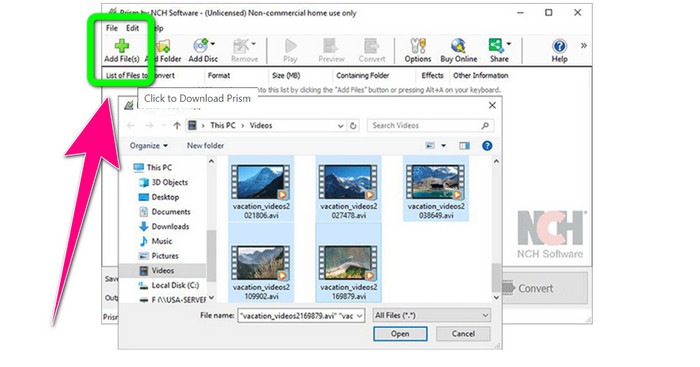
Passaggio 2: Fai clic sul pulsante verde Add Files e inserisci il tuo file TRP.
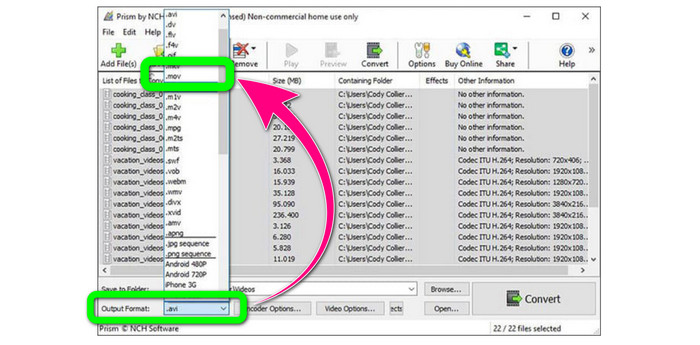
Passaggio 3: Imposta il formato di output. Fai clic sul file MKV dalle opzioni di formato.
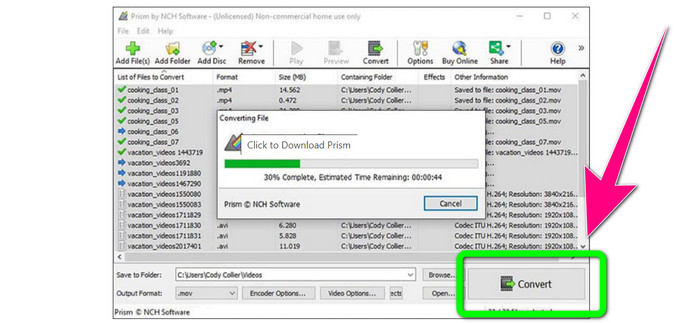
Passaggio 4: Infine, seleziona il pulsante Convert per convertire il tuo file TRP in formato MKV.
Parte 3: Applicazioni online per convertire TRP in MKV
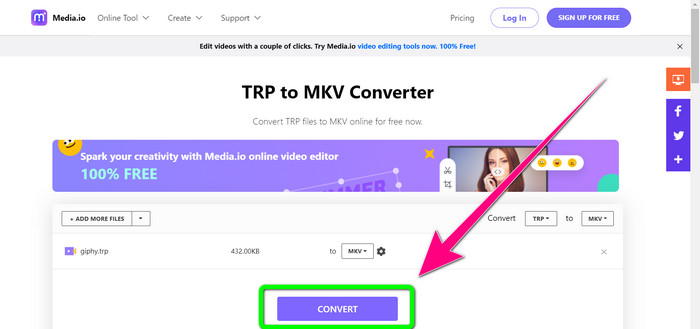
Ti interessa convertire TRP in MKV online? Allora puoi usare Media.io. Con l’aiuto di questa applicazione, puoi convertire TRP in MKV. Inoltre, supporta numerosi altri formati, come MP4, AVI, WMV, MOV, FLV, DIVX, XVID, 3GP, ecc. È anche un convertitore di audio e immagini.
Inoltre, è anche in grado di eseguire l'editing video. Puoi ritagliare, tagliare, unire, ripetere i video e altro ancora. Tuttavia, quando si tratta del processo di conversione è lento. Devi aspettare ancora un po' per completare il processo. Ha anche annunci inquietanti che vengono visualizzati sullo schermo. Inoltre, ha bisogno di una connessione Internet veloce per funzionare bene. Se desideri convertire TRP in MKV utilizzando Media.io, segui i passaggi seguenti.
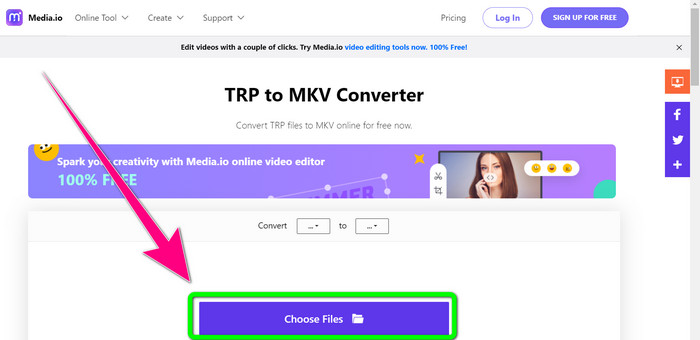
Passaggio 1: Vai al sito web di Media.io. Poi fai clic sul pulsante Choose Files per aggiungere il tuo video in formato TRP.
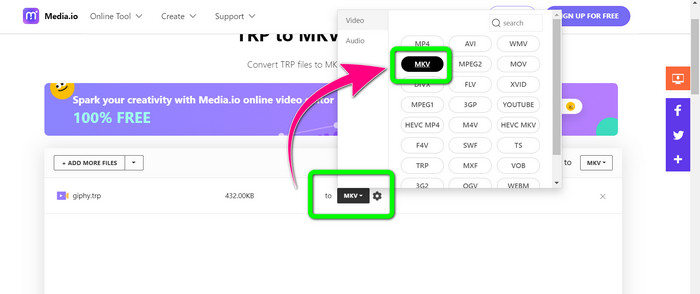
Passaggio 2: Dopo aver aggiunto il video, vai alle opzioni di formato, cerca il file MKV e selezionalo.
Passaggio 3: Per il passaggio finale, fai clic sul pulsante Convert. Attendi il processo di conversione e salva il tuo video in formato MKV.
Ulteriori letture
Le migliori procedure su come convertire AMV in MKV gratuitamente
Converti facilmente MTV in MKV usando questi convertitori definitivi
Parte 4: Domande frequenti sulla conversione di TRP in MKV
Perché il file MKV non è supportato sulla mia TV?
Un file MKV è solo un contenitore video che può essere codificato con molti codec, come HEVC, MPEG-4, VP9, ecc. La TV ha una scarsa compatibilità con questi codec, ecco perché non puoi riprodurre MKV sulla tua TV.
Il file MKV è di buona qualità?
Il formato di file MKV è popolare nei video di alta qualità. Ha anche una dimensione del file più grande. Significa che MKV è un contenitore e non ha alcun effetto sulla qualità.
C'è un convertitore veloce che posso usare sul mio computer?
Decisamente sì! Se stai cercando un convertitore software veloce, allora Video Converter Ultimate è la migliore applicazione. Puoi convertire i tuoi file molte volte più velocemente e più facilmente.
Conclusione
Con tutte le applicazioni e i metodi di conversione da TRP a MKV descritti sopra, ti consigliamo vivamente di usare Video Converter Ultimate. Può convertire numerosi file in una volta sola con una velocità di conversione ultra-rapida. Allora, cosa aspetti? Provalo tu stesso per scoprire ancora di più.
-
 2 dei software più impressionanti disponibili per convertire TRP in MOV
 Impossibile convertire i file TRP in MOV? Quindi segui la guida fornita in questo articolo. Mentre selezioniamo i migliori strumenti che puoi utilizzare per convertire i tuoi file TRP.
- 2 dei software più impressionanti disponibili per convertire TRP in MOV
Impossibile convertire i file TRP in MOV? Quindi seguire la guida fornita in questo articolo. Mentre selezioniamo i migliori strumenti che puoi utilizzare per convertire i tuoi file TRP
-
 2 convertitori professionali per convertire il formato TRP in WMV [Guida]
 Sei uno degli utenti che sta attraversando un periodo complicato con il file TRP? Se è così, continuiamo a leggere questo articolo per sapere come convertire TRP in WMV e saperne di più
