


 Video Converter Ultimate
 Screen Recorder
 Riparazione video
Scopri i 3 modi su come convertire VOB in AVI online e offline
I file VOB vengono utilizzati per archiviare flussi privati e utilizza la compressione video con perdita di dati come MPEG-2. Inoltre, hanno quasi la stessa struttura se dovessimo confrontare i due. Tuttavia, i file .vob hanno una limitazione e una specifica prima ancora che tu possa usarli. E per questo motivo non puoi riprodurre facilmente un file VOB sul tuo lettore multimediale locale. Quindi ora, per risparmiare tempo nella ricerca di come aprirlo, ti suggeriamo di convertirlo scegliendo un convertitore di seguito. In tal caso, ti presentiamo il miglior convertitore che possiamo inventare e impariamo come convertire VOB in AVI online o offline con gli strumenti presenti nell'elenco.

Parte 1. Come convertire VOB in AVI online
Se hai un budget limitato, ti consigliamo di utilizzare uno strumento gratuito. Cercando su Internet, abbiamo scoperto che esiste uno strumento considerato il miglior convertitore online, ovvero FVC Free Video Converter. Inoltre, questo strumento offre estrema semplicità a ogni utente che lo ha già utilizzato, e tutti rimangono colpiti da quanto funzioni bene. Quindi, se vuoi restare anche tu impressionato da quanto sia valido questo convertitore, prova a trasformare un file VOB in formato AVI seguendo i passaggi indicati di seguito.
Passaggio 1. Per accedere direttamente al sito del convertitore, fai clic su questo link.
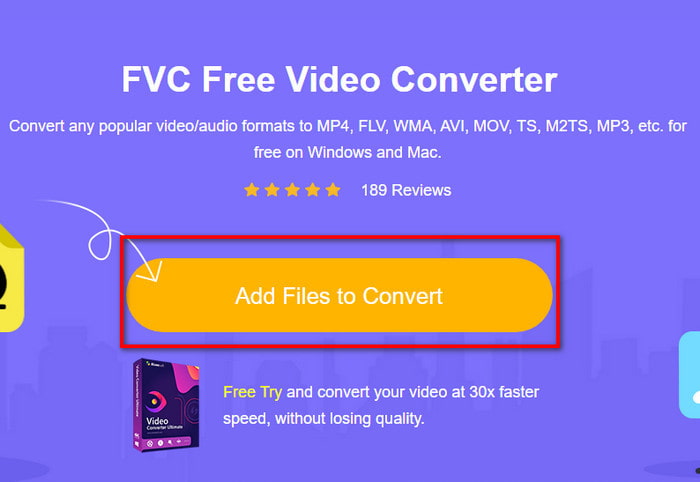
Passaggio 2. Sul sito, fai clic su Add Files to Convert per scaricare il programma di installazione. Non preoccuparti, pesa solo pochi KB. Poi fai di nuovo clic per avviare lo strumento e individua il file nella cartella; una volta trovato, fai clic su Open.
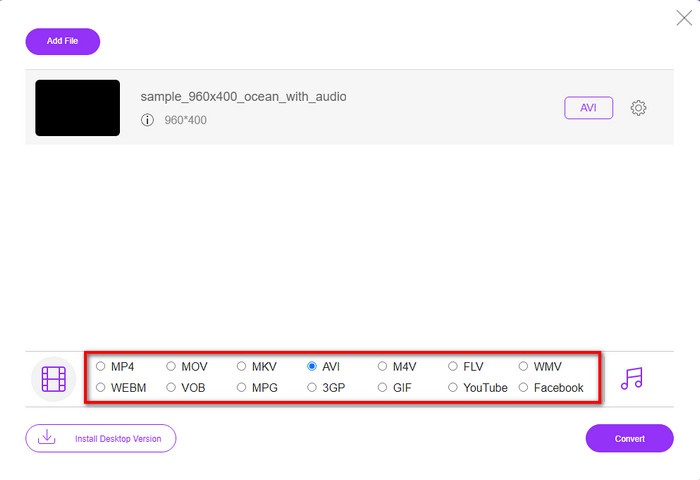
Passaggio 3. Una nuova interfaccia di FVC verrà visualizzata sullo schermo. Nell’elenco in basso, scegli il formato AVI o qualsiasi altro formato in cui desideri convertire il file.
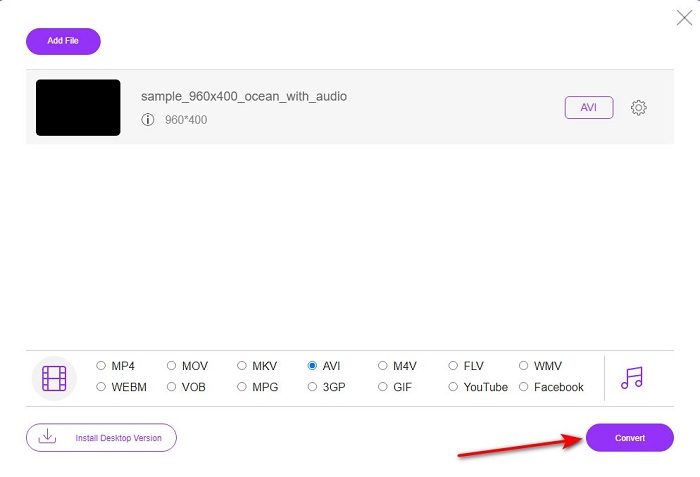
Passaggio 4. Dopo aver scelto il formato, avvia la conversione del file facendo clic su Convert.
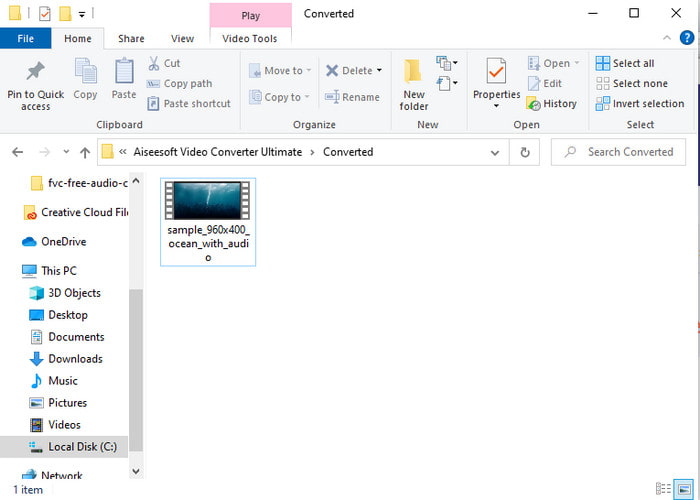
Passaggio 5. L’operazione richiederà meno di un minuto; al termine della conversione si aprirà una cartella contenente il file appena convertito.
Parte 2. Come convertire VOB in AVI su Windows e Mac
Usa il convertitore fenomenale: FVC Video Converter Ultimate
Se stai cercando di scaricare il convertitore VOB in AVI, questa deve essere la scelta migliore che ti piacerebbe fare. FVC Video Converter Ultimate è sempre all'altezza del suo nome come lo strumento definitivo che risolve ogni situazione finale che puoi inventare, in particolare sulla conversione. Questo software è molto diverso dai due strumenti citati. Forse stai pensando perché, ed è solo perché si adatta perfettamente a chiunque sia un professionista o un principiante. Le prestazioni complessive che sperimentiamo quando proviamo questo strumento sono già sorprendenti e siamo impressionati dalla velocità con cui può essere eseguita la conversione. E ora, se vuoi sperimentare la conversione fenomenale, di cui stiamo parlando, segui i passaggi indicati di seguito.
Passaggio 1. Prima di poterlo utilizzare, devi innanzitutto scaricarlo. Una volta completato il download, installalo, esegui la configurazione e fai clic su Start Now.
Download gratuitoPer Windows 7 o versioni successiveDownload sicuro
Download gratuitoPer MacOS 10.7 o versioni successiveDownload sicuro
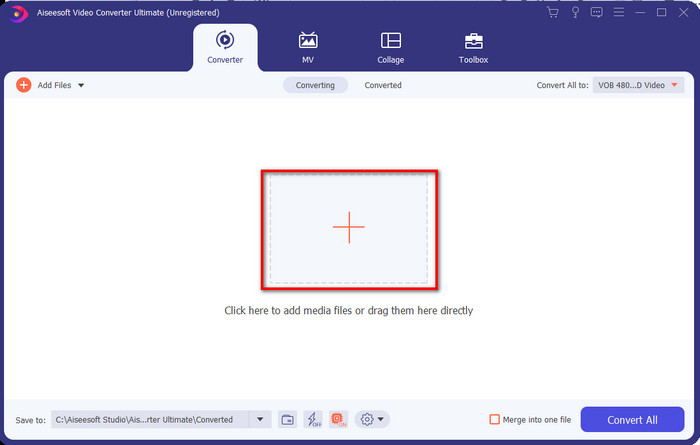
Passaggio 2. Una volta terminata l’installazione, apri il software. Sullo schermo comparirà un’interfaccia come questa. Nella parte centrale dell’interfaccia fai clic sul pulsante + e si aprirà una cartella sullo schermo. Fai clic su Open per procedere con il passaggio successivo.
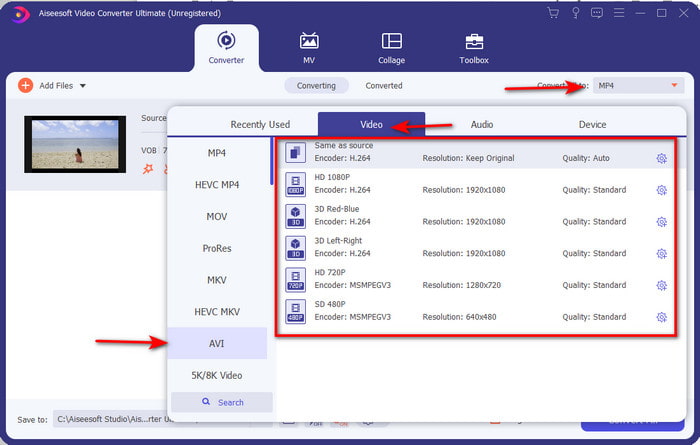
Passaggio 3. Fai clic sul pulsante Convert All nell’angolo in alto a sinistra dell’interfaccia e scegli il formato AVI dall’elenco delle categorie video.
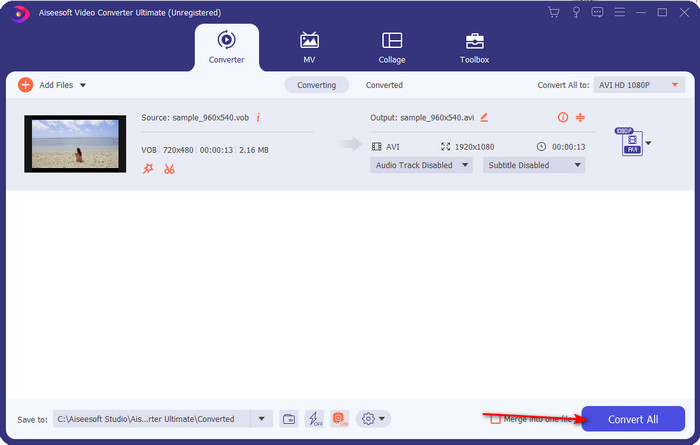
Passaggio 4. Una volta scelto il formato, premi Convert All per avviare la conversione.
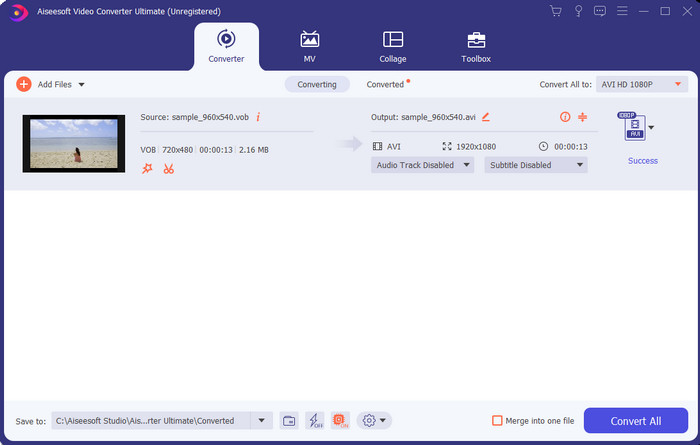
Passaggio 5. Non devi preoccuparti dei tempi di attesa, perché la procedura richiede solo pochi secondi. Successivamente, sullo schermo si aprirà automaticamente una cartella con il file multimediale convertito che hai appena creato. Fai clic sul file per guardarlo e goderti la nuova versione del tuo file .vob.
Usa lo strumento gratuito: freno a mano
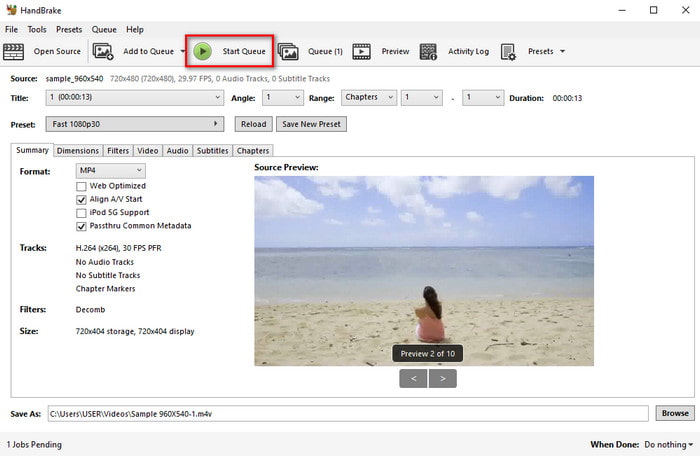
Se stai cercando uno strumento gratuito, allora HandBrake può aiutarti, e non è necessaria la connessione a Internet per farlo funzionare, proprio come FVC Video Converter Ultimate. Inoltre è gratuito da scaricare e utilizzare per chiunque disponga di un computer, a casa, al lavoro o altrove. Tuttavia, per utilizzare il programma, è necessario scaricare prima un file separato, noto come .NET 5.0. Alcuni utenti trovano questo un po’ fastidioso, perché dopo aver scaricato lo strumento è necessario scaricare un altro file. Ma se desideri un processo di conversione efficace e gratuito, prova a usare HandBrake per convertire da VOB a AVI seguendo i passaggi qui sotto.
Passaggio 1. Installa prima il programma sull’unità del tuo computer.
Passaggio 2. Fai clic su File e individua il file .vob nella tua cartella.
Passaggio 3. Fai clic su Format, scegli uno dei formati disponibili nell’elenco e poi fai clic su Start Queue.
Parte 3. Qual è il miglior convertitore da utilizzare per convertire i file VOB in formato AVI
| Caratteristiche | Convertitore video gratuito FVC | FVC Video Converter Ultimate | Freno a mano |
| Conversione del formato |  | | |
| Accelerazione hardware e conversione |  | | |
| Connettività Internet | | | |
| Video Enhancer o Editing | | | |
| Programma supportato | Strumento basato sul Web | Strumento basato su desktop | Strumento basato su desktop |
Parte 4. Domande frequenti su VOB e AVI
Quali sono gli altri file che può contenere VOB?
VOB è un formato DVD multi-plex e per questo può contenere non solo video e audio, ma anche sottotitoli, contenuti di navigazione e menu.
Perché non riesco a riprodurre i file VOB sul mio lettore multimediale?
Uno dei motivi per cui i file VOB non sono riproducibili sul tuo lettore multimediale è che questo formato gode di un supporto piuttosto limitato da parte dei player. Puoi cliccare qui per ottenere i lettori VOB disponibili. Se il problema persiste, una soluzione praticabile è convertire il file con uno dei convertitori indicati sopra.
Perché i file VOB sono troppo grandi?
L'unico motivo per cui questo formato è così grande è che contiene dati diversi che un DVD dovrebbe avere. Inoltre, non possiamo tralasciare la possibilità della lunghezza del video. Oppure fai clic qui per sapere come comprimere i file VOB.
Conclusione
Quindi ora, se vuoi convertire il file VOB, puoi farlo facilmente con l'aiuto degli strumenti disponibili sopra. Oltre a questo, FVC Video Converter Ultimate è il convertitore che si distingue davvero dagli altri strumenti online e offline menzionati. Perché puoi convertire facilmente VOB in AVI in Windows e anche su Mac. Se ancora non hai idea di cosa usare, ti consigliamo vivamente di scaricare lo strumento fenomenale per sperimentare un output esplicito e rimanere stupito.
-
 Da VOB a MP4 - 3 modi per convertire i file VOB in MP4 gratuitamente in blocco
 Questo articolo introduce 3 convertitori gratuiti da VOB a MP4 e i relativi tutorial. Puoi convertire gratuitamente file VOB in MP4 gratuitamente su Windows / Mac / online con facilità.
-
 Modi migliori per convertire VOB in FLV [gratuito e online inclusi]
 Vuoi convertire un file VOB in un file FLV? Puoi facilmente completare l'attività con convertitori desktop o online. Leggi questa guida e impara come trasformare VOB in FLV in modo facile e veloce.
-
 Che cos'è il file VOB e come trasformare un file VOB in GIF gratuitamente?
 Vuoi saperne di più sui file VOB e su come condividerli dopo essere stati copiati? o Perché hai bisogno di convertire VOB in GIF? Allora leggi attentamente questo articolo.
