


 Video Converter Ultimate
 Screen Recorder
 Riparazione video
 Download sicuro
I 5 migliori prodotti per la rimozione di filigrane di Arnold Maya che vale la pena provare
Arnold è un renderer di Autodesk. Il renderer viene utilizzato per grafica, video e persino audio. Inoltre, Arnold è un'app di rendering avanzata che puoi utilizzare con VFX e rendering di animazioni. Inoltre, produce output di alta qualità, rendendolo popolare per gli editori professionisti. Inoltre, ha molte funzionalità di modifica avanzate che puoi utilizzare per eseguire il rendering di un'animazione.
Arnold richiede che i suoi utenti paghino per l’app; per questo lascia una filigrana sulle loro immagini. Di conseguenza, molte persone cercano dei remover di filigrana in grado di eliminare la filigrana Arnold dalle loro foto. Leggi questo post per conoscere i cinque migliori e più efficaci Arnold Maya watermark remover.

Parte 1. I 5 migliori prodotti per la rimozione di filigrane di Arnold
Sebbene tu possa scaricare molti strumenti per rimuovere la filigrana di Arnold dall'immagine, non tutti producono un output pulito, quindi abbiamo cercato i dispositivi di rimozione della filigrana più utilizzati e abbiamo scelto i migliori tra loro. Questa parte ti presenta i cinque migliori prodotti per la rimozione di filigrane di Arnold.
Movavi
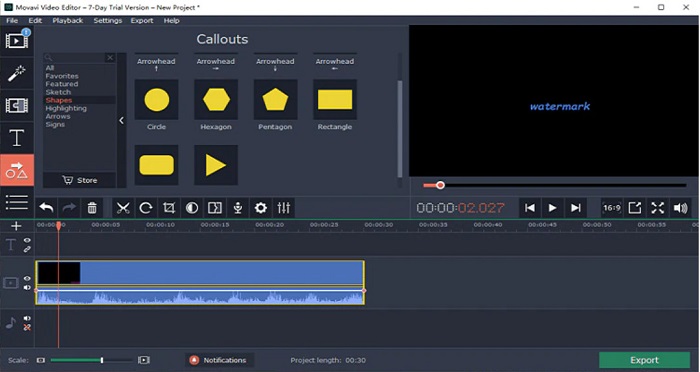
Movavi è un editor video di riferimento che può aiutarti a rimuovere la filigrana Arnold dalla tua immagine. Inoltre, offre un’opzione per aggiungere filigrane alle tue immagini o ai tuoi video. In più, contiene molte funzioni di editing che puoi usare per migliorare le tue immagini. Tuttavia, devi utilizzare lo strumento di correzione del colore per attenuare la filigrana nel tuo video. È anche uno strumento facile da usare grazie alla sua interfaccia utente semplice.
Professionisti
- Ha un processo di esportazione veloce.
- Disponibile per il download su tutte le piattaforme multimediali, inclusi Windows e Mac.
Contro
- Acquista la versione completa prima di poter utilizzare la funzione di rimozione della filigrana.
- Ha problemi con la politica di rimborso.
Watermark Remover.io
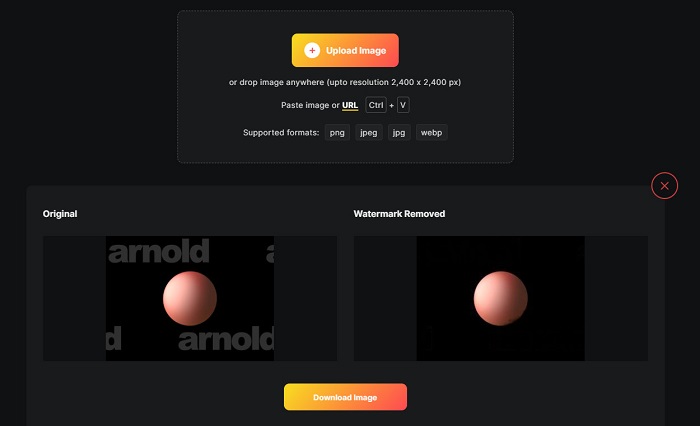
Se vuoi ottenere un render Maya Arnold senza filigrana, allora Watermark Remover.io può aiutarti. Molti principianti preferiscono usare questo strumento perché ha un’interfaccia software facile da usare. Inoltre, Watermark Remover.io è uno strumento online accessibile da tutti i browser web, come Google, Firefox e Safari. Funziona anche su dispositivi Mac, Windows, iPhone e Android.
Inoltre, questo dispositivo di rimozione della filigrana ti consente di rimuovere tutti gli oggetti indesiderati dalle tue foto, come loghi, testi o immagini. Lo svantaggio di questa app online è che potresti riscontrare un processo di caricamento lento poiché si tratta di un'app basata sul Web.
Professionisti
- È gratuito e facile da usare.
- Supporta i formati di immagine più comuni, come PNG, JPEG, JPG e WEBP.
- Ha un'interfaccia di elaborazione veloce.
- Ha una funzione di previsione dell'area.
Contro
- È uno strumento dipendente da Internet.
Rimozione filigrana HitPaw
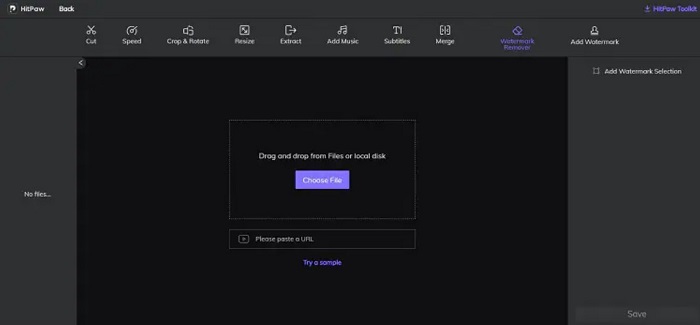
HitPaw è un altro watermark remover che ti permette di rimuovere facilmente la filigrana Arnold dalla tua immagine. Ti consente di eliminare in modo professionale qualsiasi filigrana presente sulle tue immagini. Inoltre, ha un’interfaccia semplice e intuitiva, quindi non avrai difficoltà a utilizzare questo strumento online. Se hai un video Arnold, questo strumento rimuove efficacemente quella filigrana. Ciò che colpisce è che dispone di una versione online e di una offline. Tuttavia, la versione offline ha un’interfaccia software difficile da gestire, il che la rende complicata da usare per i principianti. Nonostante ciò, molti utenti continuano a usare questo strumento per rimuovere le filigrane.
Professionisti
- Ha versioni online e offline.
- La sua versione online è accessibile su tutti i browser web, come Google e Safari.
- Non lascia segni di sfocatura nell'area della filigrana.
Contro
- Devi registrarti prima di poter modificare i tuoi video o foto.
Dipingi
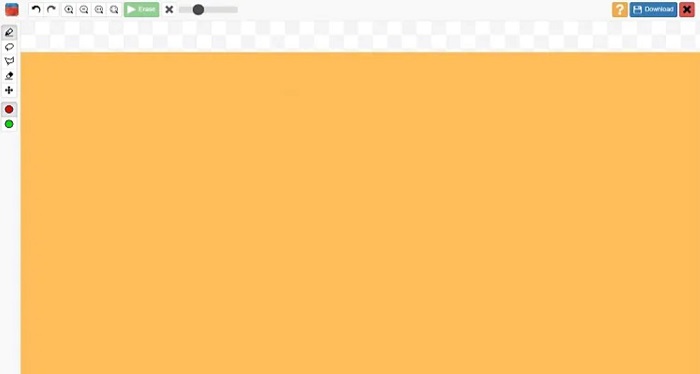
Inpaint è uno dei watermark remover più popolari che puoi scaricare su Windows e Mac. Questo strumento offline supporta numerosi formati video e immagine, come MP4, MKV, AVI, PNG, JPG, ecc. Molti utenti apprezzano questo strumento perché rimuove gli elementi indesiderati dalle immagini o dai video. Inoltre, dispone di altre funzioni di editing che puoi usare per migliorare le tue immagini o i tuoi video.
Professionisti
- Scaricabile su quasi tutte le piattaforme multimediali, inclusi Windows e Mac.
- Esporta output professionale.
Contro
- Ha un'interfaccia software difficile da usare.
- A volte non è in grado di rimuovere elementi complicati dai tuoi video o immagini.
Parte 2. Come rimuovere la filigrana di Arnold con un clic
Abbiamo lo strumento consigliato se desideri un modo più semplice per rimuovere la filigrana di Arnold sulla tua immagine. Leggi questa parte di seguito per conoscere questo strumento e come rimuovere le filigrane utilizzando questo strumento.
FVC Video Converter Ultimate è uno strumento completo che puoi usare per rimuovere qualsiasi oggetto indesiderato dalle tue immagini. Supporta molti formati video, come MP4, MKV, AVI, MOV, M4V e oltre 1000 altri. Grazie alla sua interfaccia intuitiva, molti principianti utilizzano questo strumento per rimuovere le filigrane dai video. Inoltre, offre molte funzioni avanzate di editing, come il remover di filigrane video, la correzione del colore, il taglio video e altro ancora. Quindi, se vuoi usare questo software per rimuovere la filigrana Arnold, segui la semplice guida qui sotto.
Come rimuovere la filigrana di Arnold utilizzando FVC Video Converter Ultimate:
Passaggio 1. Scarica FVC Video Converter Ultimate sul tuo dispositivo facendo clic sul pulsante Download qui sotto.
Download gratuitoPer Windows 7 o versioni successiveDownload sicuro
Download gratuitoPer MacOS 10.7 o versioni successiveDownload sicuro
Passaggio 2. Vai al pannello Toolbox nell’interfaccia principale del software e seleziona Video Watermark Remover.
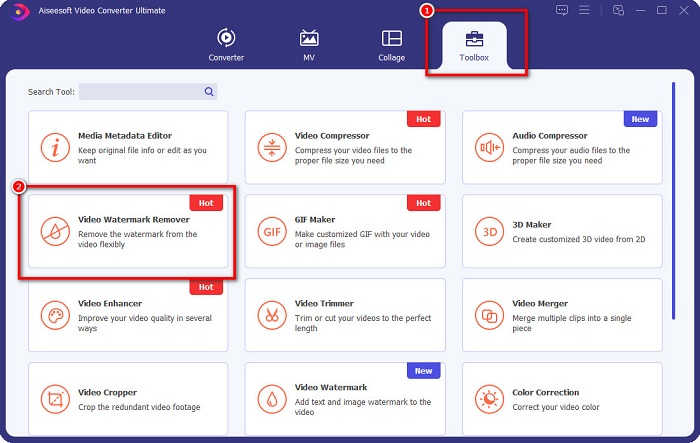
Passaggio 3. Quindi, fai clic sul pulsante con il simbolo + per caricare il video Arnold che vuoi senza filigrana.
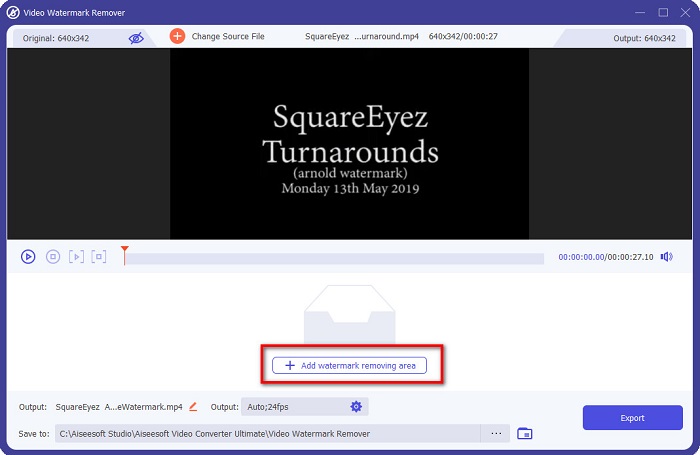
Passaggio 4. Dopodiché vedrai l’anteprima del tuo video. Fai clic sul pulsante Add watermark removing area per aggiungere un’area di rimozione.
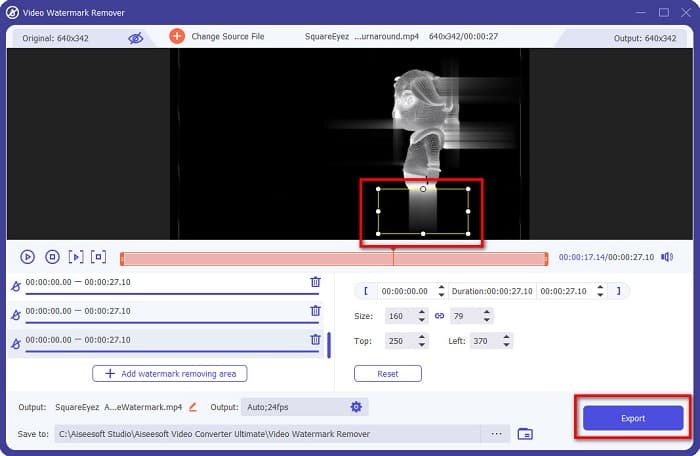
Passaggio 5. Posiziona l’area di rimozione della filigrana sulla zona della filigrana nel tuo video. Se nel video sono presenti due o più filigrane, fai clic nuovamente su Add watermark removing area. Poi fai clic sul pulsante Export una volta che avrai coperto tutte le filigrane nel video. Inoltre, puoi usare questo strumento per rimuovere le filigrane Dxtory.
Parte 3. Come rimuovere la filigrana di Arnold utilizzando lo strumento Sequenza di rendering
Le filigrane Arnold compaiono solo sul prodotto renderizzato senza licenza quando si usa Maya. Quindi, per eliminare la filigrana, devi eseguire il processo di render sequence. Dopo aver creato un’animazione, devi regolare le impostazioni di rendering. Le impostazioni includono il formato immagine, l’estensione per fotogramma o animazione, i fotogrammi di inizio e fine, i preset e altro. Dopo aver regolato le impostazioni di rendering, fai clic su Render > Batch Render. Dopo averlo fatto, tutte le immagini avranno una filigrana.
Per rimuovere la filigrana Arnold, devi effettuare il rendering della tua animazione. Vai su Render Settings e assicurati di selezionare la camera che vuoi renderizzare. Poi fai clic su Render Sequence. Successivamente, apri le immagini e vedrai che non avranno filigrane incorporate. Ora puoi usare queste immagini per creare un’animazione.
Parte 4. Domande frequenti su Arnold Watermark Remover
Puoi eseguire il rendering in batch con Arnold?
Sì. È possibile utilizzare il renderer batch Maya per eseguire il rendering di un fotogramma di sequenza. Puoi farlo andando su Maya facendo clic su Render > Batch Render sulla riga di comando.
Arnold è incluso in Maya?
In un'installazione predefinita, Arnold per Maya è incluso tramite mtoa. mll plug-in. In questo plug-in, Arnold è il renderer preferito in Maya.
Quanto costa Arnaldo?
L'abbonamento annuale è 380$, mentre l'abbonamento mensile è 50$ al mese.
Conclusione
Tutti i Arnold Maya watermark remover sopra menzionati offrono risultati promettenti nella rimozione delle filigrane. Ma se vuoi utilizzare un software ricco di funzioni che rimuova le filigrane senza compromettere la qualità, scarica subito FVC Video Converter Ultimate.
-
 Rimozione di filigrane 123rf - Revisione approfondita degli strumenti definitivi
 Se vuoi sapere quali sono i più eccezionali dispositivi di rimozione di filigrane 123rf, leggi attentamente questo articolo. Questo articolo fornisce una revisione approfondita degli strumenti.
-
 Come rimuovere la filigrana DeviantArt su Windows e Mac
 Vuoi imparare come rimuovere la filigrana DeviantArt dalle tue immagini? Usando i più eccezionali prodotti per la rimozione di filigrane DeviantArt, puoi rimuovere facilmente quelle fastidiose filigrane.
-
 Come rimuovere la filigrana Pond5 utilizzando gli strumenti definitivi
 Scopri come rimuovere la filigrana Pond5 seguendo i semplici passaggi seguenti. Puoi facilmente rimuovere la filigrana Pond5 sulla tua immagine usando questi straordinari strumenti.
