


 Video Converter Ultimate
 Screen Recorder
 Riparazione video
 Download sicuro
2 modi efficienti per combinare video per Instagram
“Come posso combinare i video per Instagram? Ho fatto una festa di compleanno indimenticabile e ho fatto molti video durante questa. Ora voglio combinare i video clip in uno completo e pubblicarlo su Instagram. Per favore, insegnami come farlo… ”Ci sono molte occasioni in cui molti video clip aspettano di essere uniti in uno solo. Per soddisfare tale esigenza, questo articolo parlerà di 2 metodi efficienti per unire i video per Instagram.

Parte 1: combina video per Instagram senza danni alla qualità
Per cominciare, ti serve un’App per unire i video per Instagram. Non hai bisogno di un programma di montaggio video complicato come Adobe Premiere Pro o Final Cut Pro per un compito così semplice. Video Converter Ultimate è più che sufficiente per te.
Può aiutarti a unire facilmente più video per Instagram. La velocità di elaborazione e la qualità dell'immagine sono entrambe perfette. Indipendentemente dal formato, puoi utilizzare questa app per unirti ai video per Instagram senza alcuna limitazione.
Caratteristiche principali:
- • Combina video per Instagram indipendentemente dal formato e dalla risoluzione
- • La tecnologia di accelerazione hardware garantisce una velocità di processo 70 volte superiore
- • Modifica e unisciti ai video per Instagram senza lasciare alcuna filigrana
- • Ritaglia e unisci video con diverse risoluzioni per renderli perfetti
- • Unisci i video con la funzione di ritaglio per eliminare i segmenti indesiderati
- • Interfaccia utente fluida e intuitiva sia per principianti che per professionisti
Download gratuitoPer Windows 7 o versioni successiveDownload sicuro
Download gratuitoPer MacOS 10.7 o versioni successiveDownload sicuro
Passaggi per combinare video per Instagram senza perdita di qualità
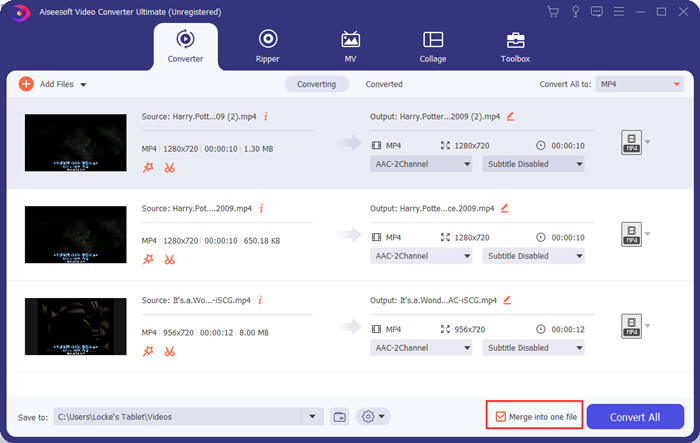
Passaggio 1. Scarica gratuitamente, installa e avvia Video Converter Ultimate. Clicca sul pulsante Aggiungi file per aggiungere i video che vuoi unire per Instagram.

Passaggio 2. Nell’interfaccia principale puoi trascinare i video importati per cambiarne liberamente l’ordine. Seleziona la casella Unisci in un unico file in modo che i video non vengano convertiti separatamente.
Passaggio 3. Clicca sul riquadro Converti tutto in per aprire il menu del profilo. Qui puoi selezionare il formato, la risoluzione e il codec che desideri. Per unire video per Instagram, il formato MP4 è una buona scelta. Puoi anche cliccare uno dei pulsanti Profilo personalizzato per modificare le impostazioni.
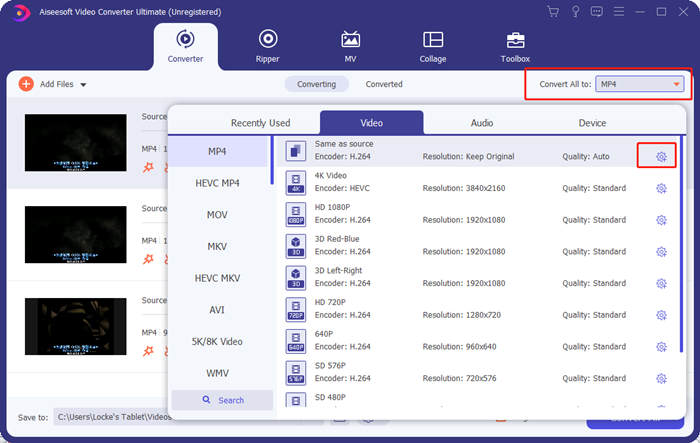
Nella finestra Modifica profilo puoi personalizzare codec, risoluzione, frame rate, bitrate e alcuni parametri audio.

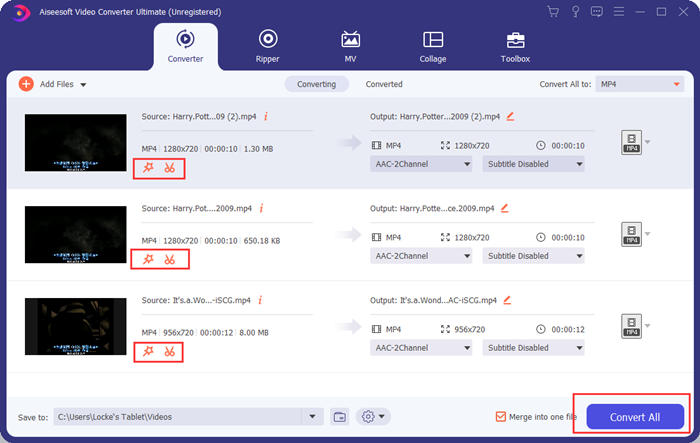
Passaggio 4. Tornando all’interfaccia principale, puoi cliccare sul pulsante Converti tutto per iniziare a unire i video per Instagram. Prima di farlo, puoi anche usare i pulsanti Taglia e Modifica per rifilare, ritagliare, ruotare e applicare altre funzioni che possono migliorare l’aspetto del tuo video.
Video Converter Ultimate è comodo e potente, ma a nessuno piace aspettare di scaricare un programma enorme. Nemmeno noi. Quindi è possibile unire video per Instagram senza scaricare un programma? Sì, continua a leggere!
Parte 2: unisci video per Instagram online e gratuitamente
Ecco un altro pratico strumento, FVC Free Online Video Merger, un fantastico tool web‑based per unire video per Instagram. Puoi caricare questo strumento in un secondo e poi caricare i tuoi video in un altro secondo. Ti basta regolare le impostazioni e lasciare che il programma faccia il resto. La cosa più importante è che questo strumento è completamente gratuito da usare.
Passaggi per unire video per Instagram online e gratis
Passaggio 1. Clicca su FVC Free Online Video Merger per aprirlo. Al centro della pagina web dello strumento, clicca sul pulsante Carica video da unire. Si aprirà così la finestra dell’esplora file, in cui dovrai selezionare i video e caricarli.

Passaggio 2. Quando i video sono stati importati, puoi regolare la loro sequenza. Per farlo, puoi rimuovere un video importato nella posizione sbagliata e reinserirlo nello spazio corretto.

Passaggio 3. Questo strumento online per unire video ti consente di decidere la Risoluzione e il Formato del video unito per Instagram. Puoi selezionare Auto per mantenere la risoluzione originale oppure scegliere una delle altre cinque opzioni di risoluzione.
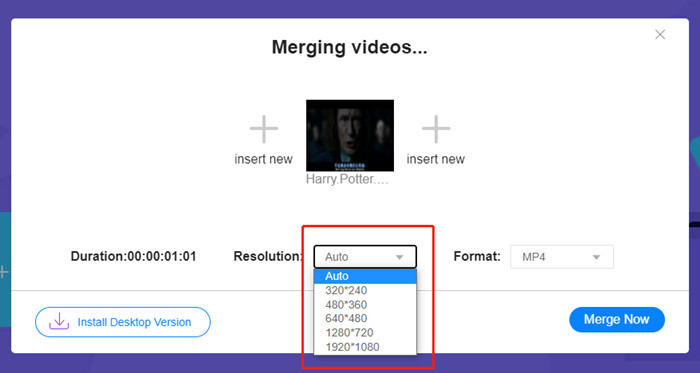
La fusione di video online attualmente fornisce nove formati di output tra cui scegliere. MP4 potrebbe essere il migliore per i tuoi post su Instagram.
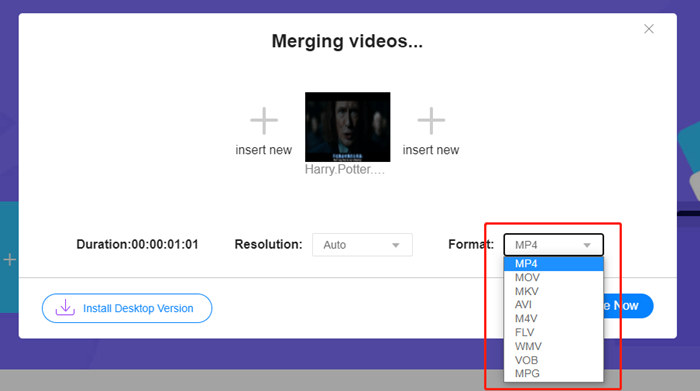
Passaggio 4. Clicca sul pulsante Unisci ora e attendi la notifica Unione riuscita.
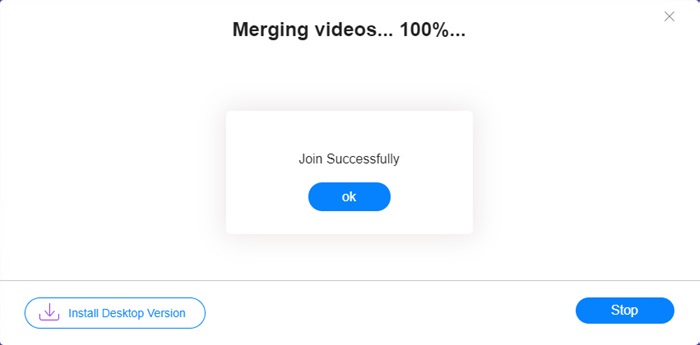
Sebbene conveniente, questo strumento online non è perfetto come Video Converter Ultimate. Nello strumento online, non è possibile regolare comodamente l'ordine dei video, modificare il codificatore o la frequenza dei fotogrammi o modificare i video. Inoltre, Video Converter Ultimate ti offre più scelte in termini di risoluzione e formati ed elabora i video molto più velocemente.
Parte 3: domande frequenti sulla combinazione di video per Instagram
Quali specifiche sono buone per i video di Instagram?
Le proporzioni di 9:16 sarebbero perfette. Più esattamente, usa 1080 * 1920 se è possibile. Il miglior formato video è MP4, sebbene siano accettati anche altri formati popolari.
Cosa fare se il mio video combinato è troppo grande per Instagram?
Nella parte superiore dell’interfaccia principale di Video Converter Ultimate c’è una Casella degli strumenti in cui puoi trovare un Compressore video. Puoi usarlo per comprimere il tuo video fino alla dimensione desiderata. Per quanto riguarda Instagram, assicurati che non superi i 4 GB.
Quanto può durare il mio video unito per Instagram?
Dipende da dove pubblichi il video. Il limite per i video dei feed è compreso tra 3 secondi e 1 minuto e per le storie è inferiore a 15 secondi. I video IGTV possono contenere 60 minuti, il che è molto probabile che soddisferà le tue esigenze.
Conclusione
Questo articolo ha presentato due metodi efficaci per combinare video per Instagram. Puoi usare Video Converter Ultimate per combinare video per Instagram senza perdere qualità d’immagine e per apportare alcune regolazioni e modifiche ai video. L’altro strumento, FVC Free Online Video Merger, è la soluzione più rapida, ma offre meno opzioni per quanto riguarda risoluzioni e formati. Inoltre, non può modificare né il codec né il frame rate. Infine, se hai qualsiasi difficoltà nel unire video per Instagram, lasciaci semplicemente un commento per farcelo sapere.
-
 Come unire video su iPhone con o senza iMovie
 Leggi e ottieni 4 semplici modi per unire i video su iPhone. Sono supportati tutti i modelli di iPhone e le versioni di iOS. Puoi combinare 2 e più video su iPhone in un nuovo video rapidamente.
-
 2 modi migliori per unire file MKV per guardare film incessantemente
 Quando scarichi il tuo film preferito con file MKV separati e desideri unire file MKV insieme per guardarlo incessantemente, puoi imparare 2 modi efficienti per unire file MKV da questo articolo.
-
 I migliori 6 migliori video joiners MP4 per combinare video MP4 gratuitamente
 Sono disponibili molti joiners MP4 per collegare diversi clip MP4. In questo articolo, abbiamo selezionato alcuni joiners MP4 gratuiti per Windows 10/8/7 e Mac.
