


 Video Converter Ultimate
 Screen Recorder
 Riparazione video
2 semplici modi per comprimere i file MKV senza perdere la qualità
Vuoi ridurre le dimensioni di un file MKV ma non vuoi perdere la qualità video? Esiste un modo semplice, soprattutto gratuito, per comprimere i file MKV?
Un file MKV offre un'ottima qualità video e audio, ma in genere ha dimensioni piuttosto grandi. Quando desideri caricare e condividere un video MKV, è spesso necessario comprimerlo. La domanda è: come comprimere i file MKV senza perdere qualità?

In realtà, sul mercato sono disponibili numerosi compressori video, inclusi strumenti online gratuiti, che possono aiutarti a ridurre le dimensioni dei tuoi video MKV. In questo post, vogliamo condividere con te 2 modi semplici per comprimere MKV.
Parte 1. Come comprimere gratuitamente file MKV online
Come accennato sopra, molti compressori o editor video online gratuiti possono aiutarti a comprimere i file MKV e a ridurne le dimensioni. Per iniziare, ti consigliamo un popolare Compressore Video Gratuito online per portare a termine il lavoro.
Questo compressore di file MKV online gratuito è appositamente progettato per la compressione video. Supporta altamente quasi tutti i formati video inclusi MKV, MP4, MOV, FLV, AVI e altri. Ha la capacità di ridurre la dimensione del file di file video 4K, HD o SD senza perdere la qualità. Inoltre, questo strumento di compressione MKV include una funzione di compressione batch per assicurarti di poter completare la compressione del video con una velocità maggiore.
Passaggio 1. Apri il browser e vai al sito ufficiale di questo compressore di file MKV. È compatibile con i browser più comuni come Google Chrome, IE, Firefox, Safari e altri.

Passaggio 2. Clicca sul pulsante Aggiungi file da comprimere per scaricare e installare un piccolo launcher per la compressione dei file MKV.
Passaggio 3. Seleziona e aggiungi il file MKV che desideri comprimere. Potrai vedere le dimensioni del file MKV e la durata del video nell'angolo in alto a destra.

Passaggio 4. Puoi modificare la risoluzione video MKV, il frame rate e il bitrate. Inoltre, puoi selezionare un formato di output adatto per il video compresso. Dopo tutte queste operazioni, fai clic sul pulsante Comprime per avviare la compressione MKV.

In pochi clic, puoi comodamente comprimere un file MKV per ridurne le dimensioni. Ancora più importante, nessuna filigrana verrà aggiunta al tuo video compresso. Dovresti sapere che, la maggior parte dei compressori video online inserirà una filigrana nel tuo file di output.
Parte 2. Modo professionale per comprimere i file MKV
Con il metodo sopra, puoi facilmente comprimere gratuitamente un file MKV online. Tuttavia, se comprimi eccessivamente il tuo video MKV, è probabile che tu ottenga un file compresso di bassa qualità. In realtà, puoi scegliere di tagliare le parti non necessarie per ridurre le dimensioni del file senza alcuna perdita di qualità. Qui ti presentiamo un potente strumento di conversione e montaggio video, Video Converter Ultimate, per aiutarti a comprimere i tuoi file MKV senza perdere qualità.
Video Converter Ultimate è progettato appositamente per gestire varie operazioni di conversione e modifica video. È in grado di tagliare i video e salvare solo le parti utili. Inoltre, è dotato di una funzione Video Compressor per la compressione dei file MKV.
Download gratuitoPer Windows 7 o versioni successiveDownload sicuro
Download gratuitoPer MacOS 10.7 o versioni successiveDownload sicuro
Passaggio 1. Fai doppio clic sul pulsante di download qui sopra per installare gratuitamente e avviare questo software di compressione dei file MKV sul tuo computer. Questo compressore video ti consente di comprimere file MKV sia su PC Windows che su Mac.
Passaggio 2. Una volta entrato nella finestra principale, fai clic sulla scheda Toolbox e poi seleziona la funzione Video Compressor.
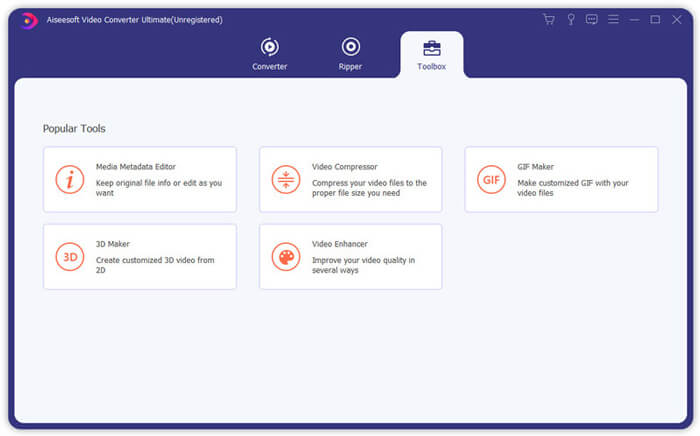
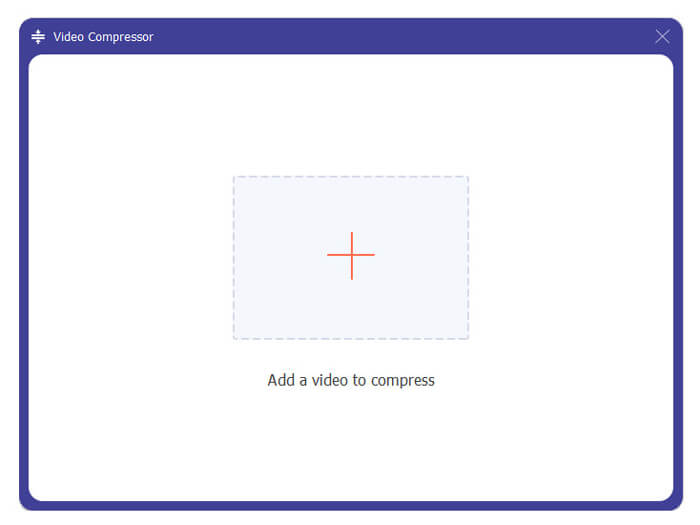
Passaggio 3. Clicca sull'icona + per importare un file MKV da comprimere.
Ora puoi facilmente ridurre le dimensioni del file MKV in base alle tue necessità. Durante questo passaggio, puoi anche personalizzare la risoluzione video, il bitrate, la durata e il nome del file come preferisci. Inoltre, è possibile selezionare un formato di output adatto per il video compresso.
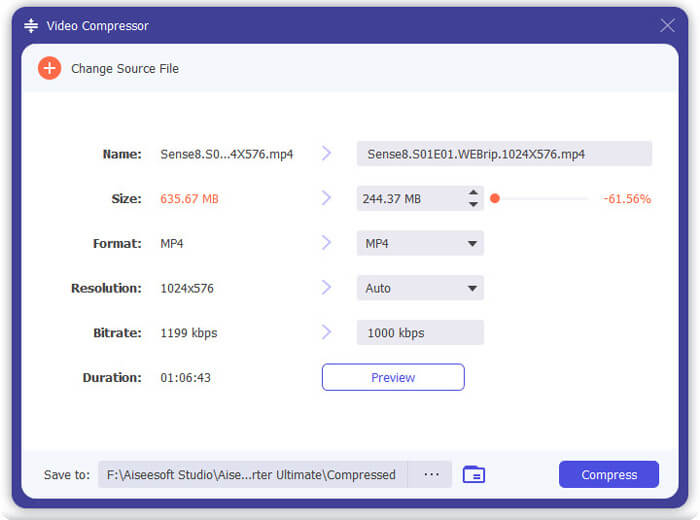
Passaggio 4. Clicca sul pulsante Comprime per iniziare a comprimere il tuo video MKV in un file di dimensioni ridotte.
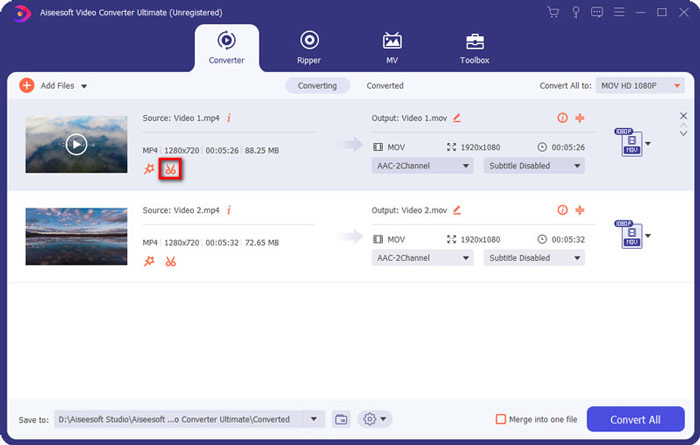
Passaggio 5. Se vuoi ridurre le dimensioni del file MKV usando la funzione di taglio, puoi tornare alla finestra principale e scegliere l'opzione Converter. Dopo aver importato il video MKV, puoi cliccare sull'icona Cut per rimuovere le parti inutili.
Passaggio 6. Puoi trascinare il cursore sulla barra di avanzamento o inserire direttamente l'ora di inizio e di fine per tagliare il tuo file MKV. Poi puoi cliccare sul pulsante Save per confermare l'operazione.
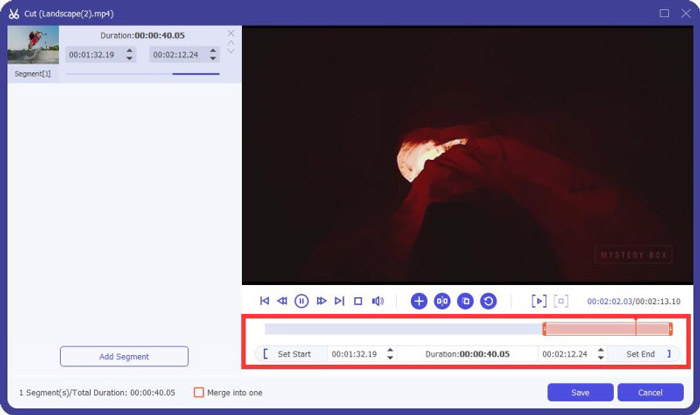
Dopodiché verrai reindirizzato alla finestra principale. Qui puoi cliccare sul pulsante Convert All per esportare il video MKV. Questo software di compressione dei file MKV è dotato di un lettore multimediale integrato che ti consente di visualizzare direttamente l'effetto della compressione.
Che tu voglia comprimere un video per l'email o per WhatsApp, puoi farlo facilmente con questo programma.
Parte 3. Domande frequenti sulla compressione di file MKV
Domanda 1. Come comprimere un video senza perdere la qualità?
Puoi scegliere di tagliare il video per ridurre le dimensioni del file. In questo modo, puoi comprimere un video senza alcuna perdita di qualità. Se scegli un compressore video online o professionale gratuito, il video perderà sicuramente un po 'di qualità dell'immagine o del suono. Ma potresti non notare la perdita di qualità dai tuoi occhi.
Domanda 2. Come convertire gratuitamente un file MKV in MP4?
Per convertire gratuitamente un file MKV in un video MP4, puoi affidarti al valido Free Online Video Converter. È in grado di effettuare la conversione da MKV a MP4 e altre conversioni video/audio con facilità.
Domanda 3. Perché i file MKV sono così grandi?
MKV è un formato contenitore che utilizzava un codec migliore con un rapporto di compressione più elevato. I file MKV sono generalmente presi da Blu-Rays e hanno una risoluzione più alta.
Conclusione
Dopo aver letto questo post, puoi ottenere 2 modi semplici per comprimere i file MKV. Con i compressori video consigliati, puoi ridurre facilmente le dimensioni dei tuoi file MKV. Se conosci un metodo migliore per comprimere i file MKV, condividilo nei commenti con gli altri lettori.
-
 Tutorial per comprimere un video per e-mail su iPhone / Android / Online
 Non riesci a inviare un video tramite e-mail che è troppo grande? Se hai questo problema, puoi trovare modi praticabili per comprimere un video per e-mail qui. Questo articolo ti mostrerà come ridurre gratuitamente i file video di grandi dimensioni nei dettagli.
-
 Tutorial per comprimere GIF e ridurre le dimensioni del file con alta qualità
 Ecco 2 semplici modi per comprimere GIF sul tuo computer o telefono cellulare. Puoi utilizzare FVC Free Online Video Compressor e Photoshop riduce le dimensioni del file GIF in diversi aspetti.
-
 2 modi per comprimere gratuitamente i video AVCHD in file di piccole dimensioni
 Leggi e ottieni 2 semplici modi per comprimere i file video AVCHD. Puoi utilizzare compressori video online e offline per ridurre gratuitamente le dimensioni del video AVCHD sul tuo computer.
