


 Video Converter Ultimate
 Screen Recorder
 Riparazione video
 Download sicuro
Come comprimere file WebM online con 2 compressori video gratuiti
WebM è un formato di file multimediale audiovisivo solitamente utilizzato per i contenuti multimediali nelle pagine web. È compatibile con tutti i browser più popolari, come Chrome, IE, Safari, Firefox e altri. Quando vuoi che il tuo video venga riprodotto in streaming più velocemente, devi comprimerlo. La domanda è: sai come comprimere WebM senza perdite significative di qualità?

Vuoi comprimere un file WebM e ridurne le dimensioni? In questo post vogliamo condividere 2 metodi gratuiti che ti aiutano a comprimere WebM online.
Parte 1. Come comprimere gratuitamente file WebM online
Per comprimere un WebM e ridurne le dimensioni mantenendo comunque la qualità originale di immagine e suono, puoi affidarti al popolare Free Video Compressor. È stato progettato appositamente per comprimere video in qualsiasi formato video più usato, inclusi WebM, AVI, MP4, FLV, MKV, MOV e altri.
Questo compressore di file WebM facile da usare ha la capacità di ridurre le dimensioni del file video senza perdita di qualità. Ti consente di comprimere video 4K UHD e 1080p, 720p HD e comuni SD. Puoi accedere alla pagina Free Video Compressor per comprimere direttamente WebM con facilità.
Passaggio 1. Apri il browser sul computer e vai al sito ufficiale di questo compressore di file WebM online gratuito.

Passaggio 2. Una volta arrivato lì, puoi fare clic sul pulsante Add Files to Compress per installare un piccolo launcher per la compressione WebM. Quindi puoi selezionare e aggiungere il file WebM che desideri comprimere dalla finestra pop-up.

Passaggio 3. Puoi comprimere liberamente il tuo file WebM in base alle tue esigenze. Inoltre, puoi personalizzare la risoluzione video, il frame rate e il bitrate, il nome del video e il formato di output. Dopo tutte queste operazioni, puoi semplicemente fare clic sul pulsante Compress per iniziare a comprimere WebM online.

Diversamente da molti altri strumenti di compressione video WebM online, questo compressore video gratuito non aggiungerà alcuna filigrana al tuo file WebM compresso.
Parte 2. Come comprimere WebM con WebM Compressor
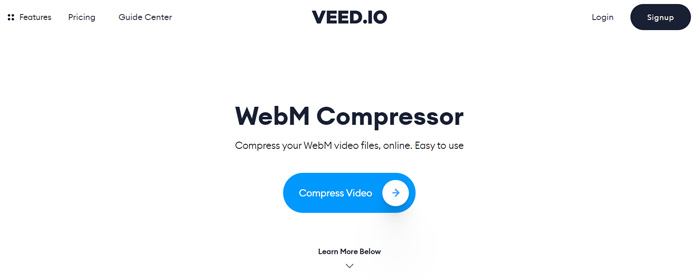
Per comprimere un file WebM online, puoi anche affidarti al VEED WebM Compressor. Che i tuoi file superino i limiti degli allegati e-mail, i limiti di Facebook Messenger o altri limiti di caricamento, puoi usare questo WebM Compressor per ridurre le dimensioni del tuo video WebM.
Passaggio 1. Apri il browser e vai al sito di VEED WebM Compressor. Fai clic sul pulsante Compress Video per passare alla fase successiva di caricamento.
Passaggio 2. Puoi cliccare sul pulsante Upload Your File per caricare il tuo video WebM. Qui puoi anche trascinare e rilasciare il file per caricarlo. Questo compressore video WebM gratuito ti consente anche di caricare video da DropBox e tramite URL.

Passaggio 3. Puoi regolare liberamente il livello di compressione video in base alle tue esigenze. Inoltre, puoi personalizzare la risoluzione video. Puoi anche tagliare il tuo file WebM facendo clic su Edit Video. È dotato di un lettore multimediale che ti permette di visualizzare il video caricato.
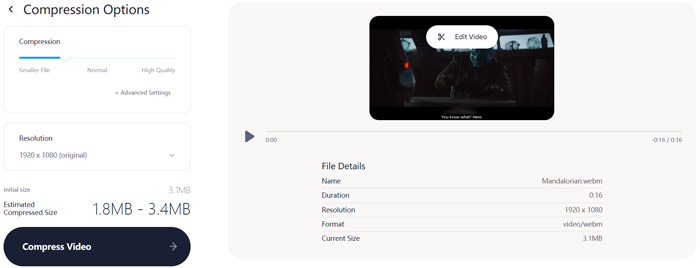
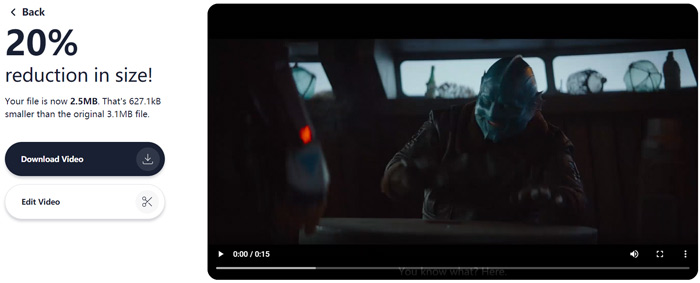
Passaggio 4. Fai clic sul pulsante Compress Video nell’angolo in basso a sinistra per iniziare la compressione del file WebM. Dopodiché, puoi fare clic sul pulsante Download Video per salvare il video WebM compresso sul tuo computer.
Parte 3. Domande frequenti sulla compressione di file WebM
Domanda 1. Cos'è il formato WebM?
WebM è un formato open source che contiene video compresso con codec VP8 o VP9 e audio compresso con codec Vorbis o Opus. WebM è originariamente concepito per offrire un'alternativa esente da royalty da utilizzare nel video HTML5 e negli elementi audio HTML5. Il file WebM viene utilizzato principalmente per i contenuti multimediali sulle pagine web.
Domanda 2. Come convertire gratuitamente WebM in MP4 online?
Per convertire gratuitamente un file WebM in MP4, puoi affidarti al popolare convertitore video Free Online Video Converter. È in grado di effettuare la conversione da WebM a MP4 e altre conversioni video/audio con facilità.
Domanda 3. Qual è il formato video più piccolo di alta qualità?
MP4. In genere offre la migliore qualità video con la dimensione del file più piccola.
Conclusione
Quando decidi di condividere un video WebM su Facebook, Instagram, Twitter o un altro social media, è meglio comprimerlo prima. In questo post puoi imparare 2 semplici metodi per comprimere gratuitamente WebM online. Puoi usare il compressore video che preferisci per ridurre le dimensioni dei tuoi file WebM.
-
 Tutorial per comprimere un video per e-mail su iPhone / Android / Online
 Non riesci a inviare un video tramite e-mail che è troppo grande? Se hai questo problema, puoi trovare modi praticabili per comprimere un video per e-mail qui. Questo articolo ti mostrerà come ridurre gratuitamente i file video di grandi dimensioni nei dettagli.
-
 Convertitore da MP4 a WebM - 4 metodi migliori per convertire un MP4 in WebM
 Quando vuoi convertire un MP4 in WebM gratuitamente, puoi saperne di più sui 4 metodi usati più di frequente per ottenere i video desiderati gratuitamente dall'articolo.
-
 3 modi per comprimere e convertire file video di grandi dimensioni per WhatsApp
 Da questo articolo puoi ottenere 3 semplici modi per comprimere video online per WhatsApp. Perché non puoi inviare video su WhatsApp? Cosa puoi fare per correggere il limite di dimensione dei video di WhatsApp? Basta leggere e controllare.
