


 Video Converter Ultimate
 Screen Recorder
 Riparazione video
4 metodi per modificare o correggere i metadati MP3 su Windows e Mac
Ognuno è Musicphile, il che significa che amiamo la musica perché ci aiuta a sentire le emozioni dei cantanti e degli scrittori anche se non li vediamo visivamente. Attraverso la musica, tutti possono rimanere in contatto e può aiutarci ad alleviare lo stress, migliorare il nostro QI ed essere produttivi ogni giorno. La maggior parte della musica è nel formato MP3 perché è il contenitore audio standard per esso. Sebbene tu possa riprodurre l'MP3 sul tuo dispositivo, non riproduci correttamente l'arrangiamento corretto se i metadati sono errati. Non puoi impostare l'atmosfera giusta se la tua libreria musicale è in disordine, quindi cosa dovresti fare? Perché non provi a correggere i tag per disporli correttamente? Se vuoi sapere come modificare i metadati MP3 su Windows e Mac, questo è l'articolo giusto per te, poiché mostriamo quattro diversi metodi che puoi utilizzare.

Parte 1. Il metodo migliore per correggere o modificare i metadati MP3 su Windows e macOS [Consigliato]
FVC Video Converter Ultimate ha già fatto un passo avanti per diventare uno dei migliori programmi per correggere i tag MP3 su Windows e Mac. Questo strumento supporta il caricamento di MP3, WAV, WMA, AAC e molti altri formati audio per risolvere lo stesso problema relativo ai metadati. È anche possibile rimuovere i metadati nascosti a cui non puoi accedere con gli altri editor di tag.
Non solo, può convertire l'MP3 in un altro formato audio se lo desideri, e offre anche molte funzioni e caratteristiche che sono all'interno di Toolbox; puoi controllarli se lo scarichi. In pochi minuti, puoi fare in modo che questo programma risolva il problema il più velocemente possibile. Non sei sicuro che sia vero? Fortunatamente, il tutorial scritto di seguito insegnerà come modificare i metadati MP3 per dimostrare che puoi farlo rapidamente, come diciamo.
Passaggio 1. Fai clic sul pulsante di download qui sotto, scegli quale dei due sistemi operativi stai utilizzando. Installalo rapidamente dopo il download, apri lo strumento e procedi al passaggio successivo.
Download gratuitoPer Windows 7 o versioni successiveDownload sicuro
Download gratuitoPer MacOS 10.7 o versioni successiveDownload sicuro
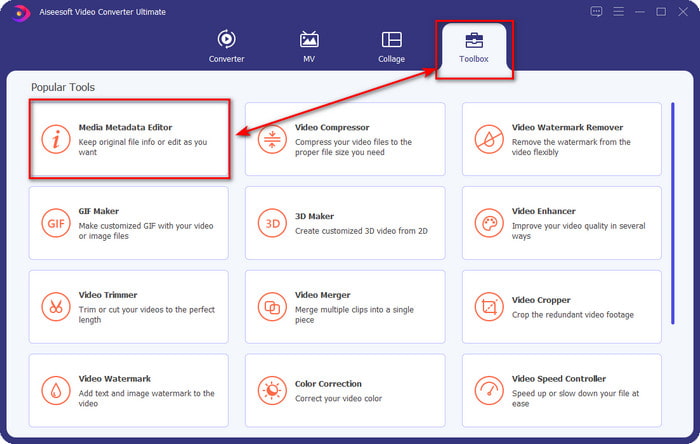
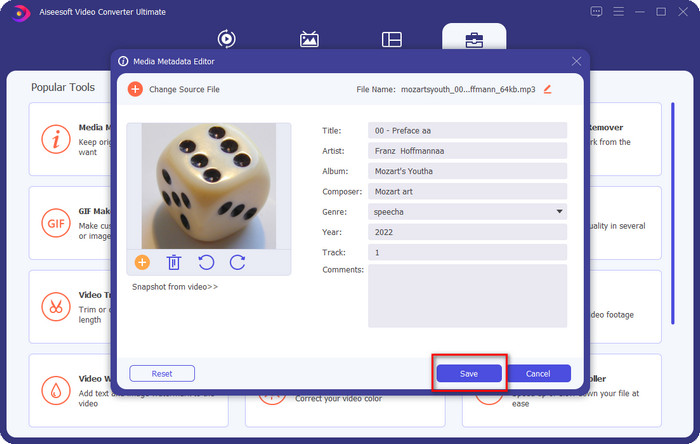
Passaggio 2. Seleziona Strumenti e sotto di esso fai clic su Editor metadati multimediali. Come abbiamo detto nell’introduzione, ci sono molte funzioni che puoi usare presenti nella sezione Strumenti che gli altri editor non offrono.
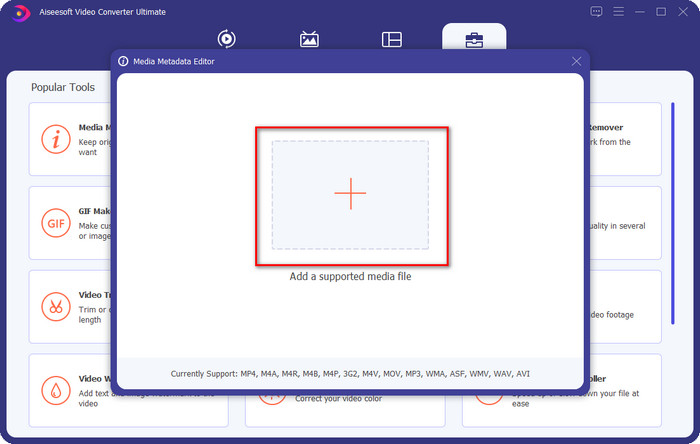
Passaggio 3. Sullo schermo verrà visualizzata una mini finestra; fai clic sull’icona +. Individua l’audio o il file MP3 nella cartella che apparirà sul display, fai clic sul file e premi Apri per caricarlo.
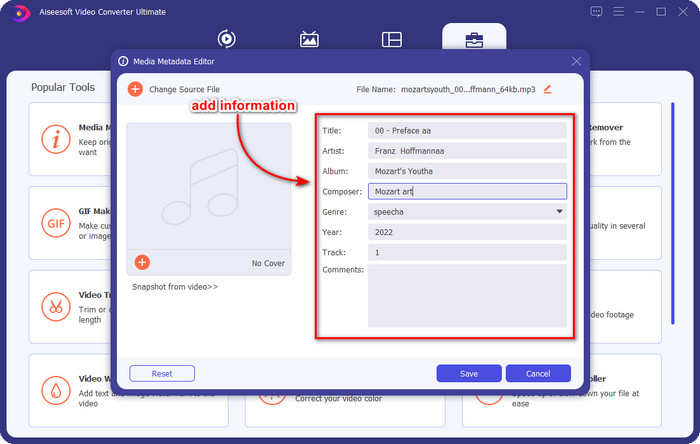
Passaggio 4. Modifica e correggi i metadati in base alle tue esigenze; fai clic su ogni casella di testo per aggiungere le informazioni.
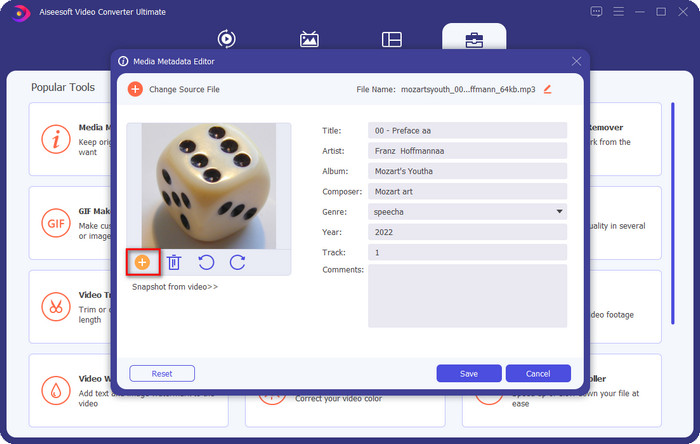
Opzionale. Con questo strumento puoi anche aggiungere o correggere i metadati della copertina dell’album MP3 sul tuo file MP3 facendo clic sull’icona +; seleziona l’immagine che vuoi usare come copertina nella cartella e fai clic su Apri per procedere.
Passaggio 5. Quando hai finito di aggiungere e correggere i metadati del tuo file MP3, premi il pulsante Salva per salvare le modifiche apportate al file audio. Et voilà, in questo modo hai corretto i tag audio senza sforzo con l’aiuto di questo strumento definitivo.
Parte 2. 3 metodi gratuiti per modificare i tag MP3 sul desktop
iTunes
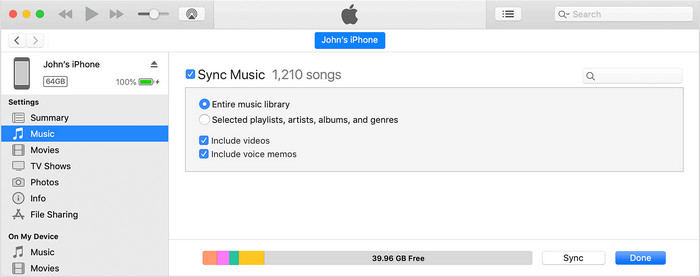
iTunes è uno strumento integrato che può aiutarti a modificare i tag MP3 su macOS X. Per la modifica dei metadati dei tuoi file audio funziona allo stesso modo di Groove Music. Ma con questo strumento puoi acquistare musica e riprodurla qui nel modo più rapido possibile. Inoltre, la musica che proviene da questa app ha già i tag e, se la musica che hai scaricato non li ha, puoi usare iTunes per aggiungerli. Segui i passaggi seguenti per sapere come fare.
Passaggio 1. Apri iTunes sul tuo Mac.
Passaggio 2. Fai clic sul file audio e seleziona Ottieni informazioni.
Passaggio 3. Correggi i tag e fai clic su OK per salvare le modifiche.
Tag MP3
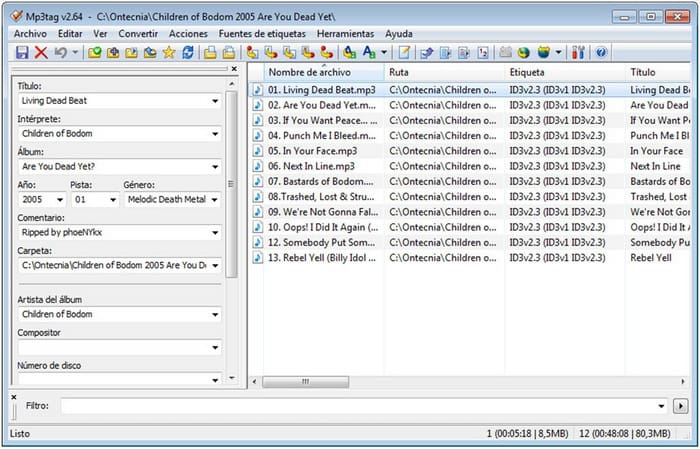
MP3 Tag è un correttore di tag MP3 dedicato e tra i migliori che puoi scaricare su Windows. Con questo strumento puoi accedere automaticamente al database musicale per ottenere i metadati corretti. Sebbene lo strumento non sia simile agli altri software integrati, possiamo comunque vedere che è possibile regolare i metadati con il suo aiuto per i formati normalmente supportati. Se vuoi scaricare e usare questo strumento, segui i passaggi seguenti.
Passaggio 1. Scarica il software sul tuo computer e aprilo.
Passaggio 2. Trascina e rilascia il file MP3 al centro, fai clic sul file audio e, sul lato sinistro, puoi modificare i tag.
Passaggio 3. Per salvare le modifiche che hai effettuato, fai clic sull’icona Salva.
Musica Groove
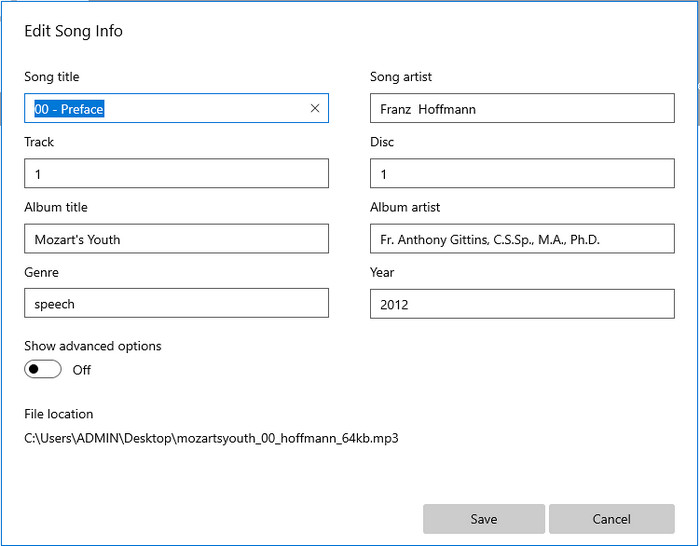
Supponiamo che tu non abbia abbastanza spazio sul tuo disco. È possibile imparare come modificare i tag MP3 su Windows 10? Allora Groove Music è qui per aiutare gli utenti Windows a cambiare i tag dei propri file audio. Con questo strumento puoi riprodurre con facilità quasi qualsiasi file audio salvato sull’unità. Se vuoi sapere come usare questa app integrata, segui i passaggi riportati di seguito.
Passaggio 1. Fai clic sull’icona Windows sullo schermo e digita Groove Music per aprirla. Dopo averci fatto clic, lo strumento verrà automaticamente configurato.
Passaggio 2. Fai clic con il tasto destro sul file audio e vai su Modifica info.
Passaggio 3. Modifica i metadati di Modifica informazioni brano e fai clic su Salva quando hai terminato.
Parte 3. Domande frequenti sulla modifica dei metadati su MP3
È sicuro modificare i metadati MP3 online?
Bene, sì, puoi modificare i metadati sul tuo MP3 online se lo desideri. Ma ricorda che ci sono siti Web con una rete non protetta, quindi l'accesso è una decisione sbagliata che prenderai. Quindi, per evitare ciò, devi utilizzare gli strumenti che abbiamo presentato sopra per correggere i tuoi metadati mp3 in modo sicuro.
I metadati sono importanti?
Certo che lo è. I metadati svolgono un ruolo significativo in ogni file multimediale che possediamo. Grazie ad essi puoi facilmente determinare cosa contiene un file, come posizione, ora, data, informazioni e altro. Inoltre, le informazioni che aggiungiamo qui sono solo semplici nozioni sui metadati e, se vuoi sapere di più sui metadati, devi fare clic su questo link e leggere che cosa sono i metadati.
Posso visualizzare i metadati sul mio MP3?
Assolutamente sì, puoi farlo e, se non sai come visualizzare i metadati, puoi leggere questo articolo e seguire i passaggi indicati per visualizzarli correttamente.
Conclusione
In effetti, ora hai a portata di mano tutti e quattro i migliori correttori di tag .mp3, il che significa che puoi scegliere lo strumento più adatto alle tue esigenze. Con le informazioni concrete che forniamo in questo articolo, possiamo modificare o correggere facilmente i tag dei nostri file MP3. Sebbene i metodi che proponiamo siano ottimi, scegliamo comunque FVC Video Converter Ultimate rispetto agli altri strumenti integrati o alle app di terze parti. Perché questo strumento offre la funzione di modifica dei tag più avanzata e potente di cui avrai bisogno, senza richiedere troppo sforzo. Quindi, se vuoi avere questo strumento, puoi fare clic sul pulsante di download e seguire i passaggi che abbiamo descritto sopra.
-
 5 migliori editor di metadati MP4 [Aggiornato 2022]
 Come posso modificare i miei metadati MP4? Il modo migliore per modificare i metadati del tuo MP4 è utilizzare un editor di tag che supporti il formato MP4 come l'esempio che elenchiamo di seguito.
-
 I 5 migliori editor di tag video AVI scelti dagli utenti per il 2022
 Qual è il miglior editor di tag AVI che posso usare? Il mercato degli editor di tag per i file AVI è troppo ampio. Quindi oggi presenteremo i cinque editori più selezionati nell'anno 2022.
-
 4 efficaci editor di metadati MKV per Windows e macOS
 Non riesco a trovare un editor di metadati MKV sul mercato. Cosa dovrei usare? Hai lo stesso problema? Se è così, continua a leggere questo blog per conoscere gli strumenti da utilizzare.
