


 Video Converter Ultimate
 Screen Recorder
 Riparazione video
Recensione sugli editor di metadati FLV per modificare i metadati FLV [senza sforzo]
FLV è un formato molto diffuso usato per distribuire contenuti digitali tramite Adobe Flash Player incorporato nei file SWF. Sebbene sia preferibile trasferire i file con estensione .flv, alcuni contenuti possono andare persi, soprattutto in caso di interruzioni. Se questo accade, cosa dovresti fare? Per fortuna, sul mercato sono disponibili i metadati. Vuoi sapere quali strumenti per Windows, Mac e online puoi usare? Continua a leggere per scoprire i modi migliori per modificare facilmente il formato dei metadati FLV.

Parte 1. 3 del miglior editor di metadati video disponibile su Windows/Mac/Online
Video Converter Ultimate
Video Converter Ultimate è uno dei più potenti editor di metadati FLV per aggiornare e modificare facilmente i tag FLV. Questo strumento è disponibile sia su Windows che su Mac OS. Usando questo strumento avanzato, puoi rapidamente aggiungere, rimuovere o aggiornare i metadati in oltre 1000 formati, non solo su FLV. A differenza di altri editor di metadati, questo strumento offre una varietà di opzioni perfette per qualsiasi tipo di problema video, come conversione, velocizzazione o rallentamento, reverse e altri straordinari filtri per rendere il tuo video davvero unico, che gli altri editor di tag non ti offrono.
Inoltre, pianifica di apportare alcune modifiche al tuo video FLV, come aggiungere effetti, filtri, tagliare, unire, aggiungere testo o filigrana. Questo strumento può aiutare a svolgere facilmente l'attività in qualsiasi utente. Tutte queste cose sono possibili con l'aiuto dello strumento definitivo. Non dovrai cercare nulla con la migliore GUI e funzionalità. Se ti stai chiedendo e vuoi provare a utilizzare questo strumento, puoi seguire i passaggi seguenti per sapere come utilizzare lo strumento.
Passaggio 1. Premi il pulsante di download per avere l’iniettore di metadati FLV sul tuo desktop; scegli Windows o Mac. Installa lo strumento facendo clic sul file, segui le istruzioni e avvialo.
Download gratuitoPer Windows 7 o versioni successiveDownload sicuro
Download gratuitoPer MacOS 10.7 o versioni successiveDownload sicuro
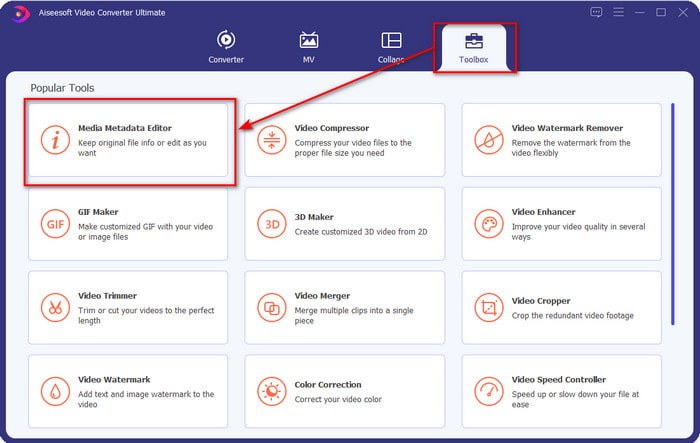
Passaggio 2. Dopo aver aperto il software, vai alla sezione Toolbox e seleziona Media Metadata Editor per modificare i tag del tuo FLV.
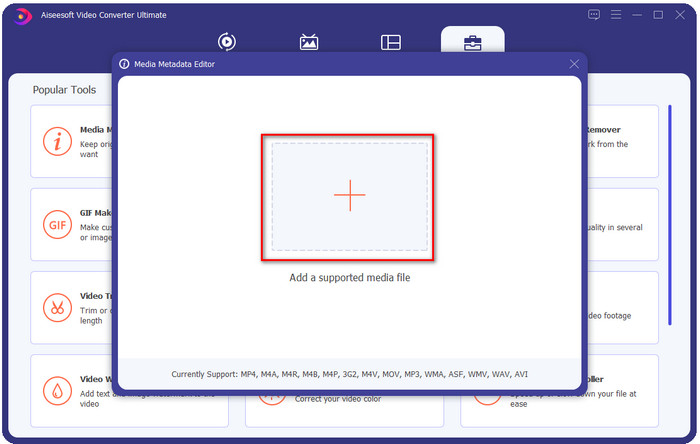
Passaggio 3. Aggiungi i file FLV premendo l’icona +, individua il file nella cartella che apparirà sullo schermo e fai clic su Apri.
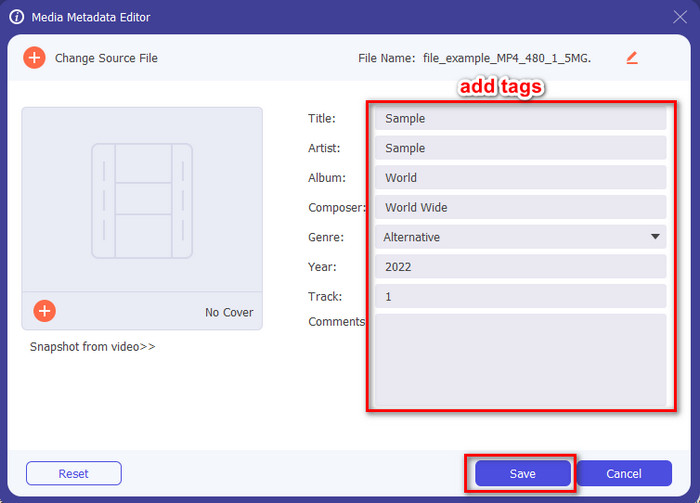
Passaggio 4. Aggiungi, modifica o rimuovi le informazioni nella casella di testo e premi Salva. In questo modo, avrai aggiunto i tag al tuo file FLV in modo semplicissimo.
FLVMeta - Editor di metadati FLV
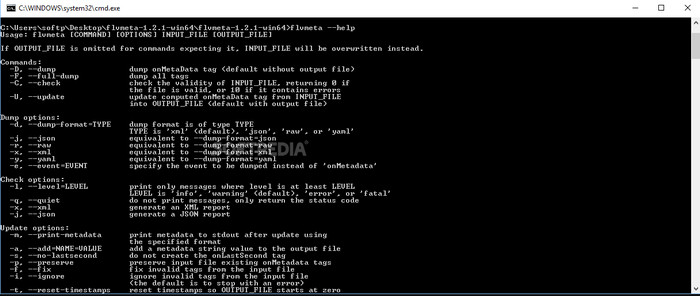
Se sei un utente esperto e vuoi provare un editor di metadati FLV dedicato da scaricare, ti presentiamo FLVMeta – FLV Metadata Editor. Questo strumento non è il classico editor che hai già incontrato, perché è un tool da riga di comando. Ciò significa che, per impartire comandi allo strumento, dovrai inserire un codice specifico. Analogamente a FFmpeg, dovrai inserire il percorso, il nome del file, i dati e molte altre informazioni complesse. Anche se non è la scelta migliore per i principianti che devono modificare i metadati FLV, merita di essere menzionato perché svolge il suo lavoro in modo impeccabile.
Inoltre, il software non funziona con gli altri formati; puoi usarlo solo su FLV se vuoi usare lo strumento. Se hai molti file FLV e vuoi cambiare i loro tag e hai una conoscenza di base sulla manipolazione di uno strumento da riga di comando, ti suggeriamo di usarlo. In caso contrario, avrai bisogno di tempo per studiare lo strumento per eseguire un'attività semplice come l'aggiunta di metadati.
Editor di metadati FLV online
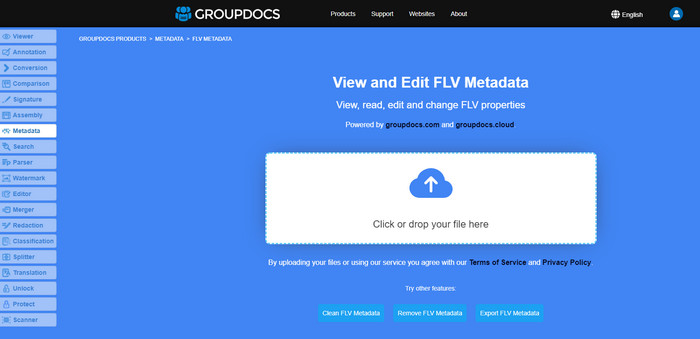
Non vuoi scaricare uno strumento per modificare il formato dei metadati FLV? In tal caso, puoi usare Online FLV Metadata Editor. Con questo strumento puoi modificare i metadati del tuo FLV senza installare alcun software e gratuitamente, perché è uno strumento web‑based. Anche se lo strumento è gratuito online, non funziona senza connessione a Internet e il processo può essere interrotto se la connessione è lenta.
A differenza di FLVMeta, questo strumento supporta più formati e non solo FLV; non supporta ampiamente come lo strumento definitivo. Quindi, se desideri completare la modifica dell'attività senza scaricare il software, ti consigliamo di utilizzarlo, poiché è anche sicuro accedervi. Ma ricorda di evitare problemi imprevisti, assicurati di avere una connessione Internet stabile.
Parte 2. Grafico di confronto sui 3 principali editor di metadati FLV
| Caratteristiche | Video Converter Ultimate | FLVMeta – Editor di metadati FLV | Editor di metadati FLV online |
| Sicuro da usare |  | | |
| Facile da usare | |  | |
| Dipendente da Internet | | | |
| Funzioni di modifica, come taglio, ritaglio, ritaglio, unione, ecc. | | | |
| Migliore interfaccia utente grafica | | | |
Parte 3. Domande frequenti sull'editor di metadati FLV
FLV e F4V sono gli stessi?
Sebbene siano entrambi legati ad Adobe Flash, il loro scopo è diverso. Per esempio, FLV utilizza lo stesso encoder dei file SWF, ed è ideale per il trasferimento di dati su Internet. Al contrario, F4V è un formato basato su ISO che assomiglia all’MP4. Anche se entrambi sono validi per trasferire file su Internet, il loro aspetto e la loro struttura sono diversi. Se desideri convertire il tuo F4V in FLV, fai clic qui e scopri come trasformare il formato in FLV.
Dove posso giocare a FLV?
Non tutti i lettori multimediali possono riprodurre il formato FLV a causa del supporto limitato. Tuttavia sei fortunato, perché abbiamo raccolto i migliori lettori FLV che puoi usare sul tuo dispositivo per riprodurre i file FLV senza preoccuparti della compatibilità. Questi strumenti sono stati testati per garantire che possano riprodurre file FLV su Windows, Mac, Android e iPhone; per saperne di più, fai clic su questo link.
FLV è il formato di condivisione video standard?
Prima lo consideravamo il miglior formato di condivisione video che puoi utilizzare sul web per riprodurre video di alta qualità; tuttavia, ci sono formati ancora migliori in questa nuova era, come l'MP4. Poiché è più compatibile con i diversi dispositivi degli utenti, questo è noto come formato video standard. Sebbene tu possa ancora condividere i file FLV sul Web, dovrai comunque riconsiderare il dispositivo del destinatario di quel file. E se sei il ricevitore, dovrai scaricare uno strumento di terze parti per riprodurlo o convertirlo in un formato riproducibile.
Conclusione
Sebbene ci siano strumenti limitati che supportano FLV, siamo ancora fortunati; perché possiamo ancora modificare i metadati FLV grazie agli strumenti di cui sopra. Ma ci rattrista il cuore che dobbiamo sceglierne uno da usare, anche se possono aiutarci. Se non hai deciso cosa usare, devi invece utilizzare lo strumento definitivo. È la scelta più sicura perché è semplice ma può aiutarti facilmente a gestire l'attività. Non credi ancora a quali siano le capacità di questo strumento? In tal caso, è necessario scaricarlo sul desktop per utilizzarlo e testarlo personalmente per vedere se esegue l'attività. Ti saremmo grati se potessi inviarci un messaggio in merito al tuo suggerimento, raccomandazione e altro sull'app.
-
 Che cosa sono i metadati: scopri le informazioni di base sui metadati
 Cosa sono i metadati? È importante? Quali sono le parti dei metadati? Hai la stessa domanda? In questo articolo imparerai le informazioni di base sui metadati.
-
 4 dei migliori visualizzatori di metadati online e offline [Aggiornato 2025]
 Posso controllare i metadati del mio file? Sì, puoi, con l'aiuto di questo post ti presenteremo i diversi visualizzatori di metadati che puoi utilizzare.
-
 6 Filtri Snapchat animati Snapchat preferiti su Snapchat
 Vuoi conoscere i modi migliori per aggiungere filtri ai video di Snapchat? Bene, puoi fare clic su questo e imparare i diversi filtri che puoi utilizzare per applicare sui video Snapchat.
