


 Video Converter Ultimate
 Screen Recorder
 Riparazione video
 Download sicuro
2 migliori metodi per unire più file ASF su Windows/Mac
È normale che una storia lunga, che dovrebbe essere conservata in un unico file video completo, ci arrivi invece sotto forma di clip video incomplete e sparse. Magari hai appena scaricato un video UHD da un sito di film e hai scoperto che il video è stato spezzato in diversi file ASF contenuti in archivi ZIP. Come unire i file ASF per rendere di nuovo completo il video e riprodurlo senza interruzioni? Questo articolo ti viene in aiuto. Abbiamo riassunto i 2 metodi migliori per unire clip video ASF in un unico file completo.

Parte 1: Combina più file ASF online gratuitamente
La soluzione più rapida è usare FVC Free Online Video Merger, un leggero strumento online che ti permette di unire file ASF gratis. Non è necessario scaricare o installare alcun programma. Ti basta caricare i tuoi file video e iniziare a unirli con un clic.
Caratteristiche principali
- • Unisciti a file video ASF senza alcuna perdita di qualità video
- • Non lasciare filigrana nel video combinato
- • Salva il video unito in 9 formati
- • Aggiungi i tuoi video in 1 secondo e non è necessario caricare i file sul server
Passaggio 1. Apri FVC Free Online Video Merger nel tuo browser. Al centro della pagina web vedrai un grande pulsante Upload Videos to Merge. Cliccaci sopra.
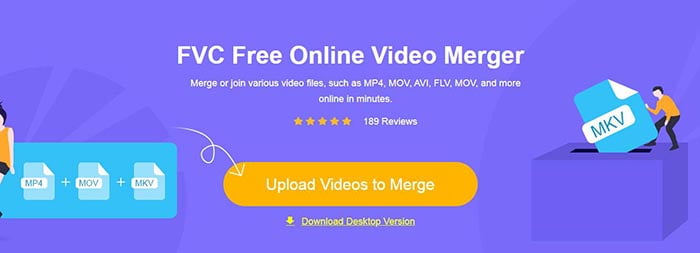
Nota: Se è la prima volta che utilizzi questo strumento, devi scaricare e installare un launcher.
Passaggio 2. Si aprirà una finestra di Esplora file. Da lì puoi selezionare i file ASF e caricarli. Per selezionare più file, tieni semplicemente premuto il tasto Ctrl sulla tastiera e clicca sui file uno per uno.
Passaggio 3. Clicca sul pulsante Open per aggiungere i file selezionati e vedrai quindi l’interfaccia di unione ASF. Qui puoi impostare l’ordine dei video rimuovendo quelli esistenti e inserendone di nuovi.
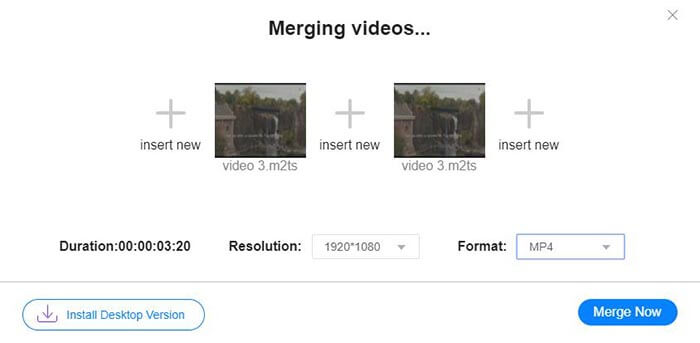
Passaggio 4. A questo punto puoi scegliere il formato e la risoluzione di output. Puoi tranquillamente lasciare la risoluzione originale. Tuttavia, questo strumento online per unire ASF non ti permette di esportare il file unito in formato ASF. Devi quindi scegliere un altro formato dall’elenco per convertire il video.
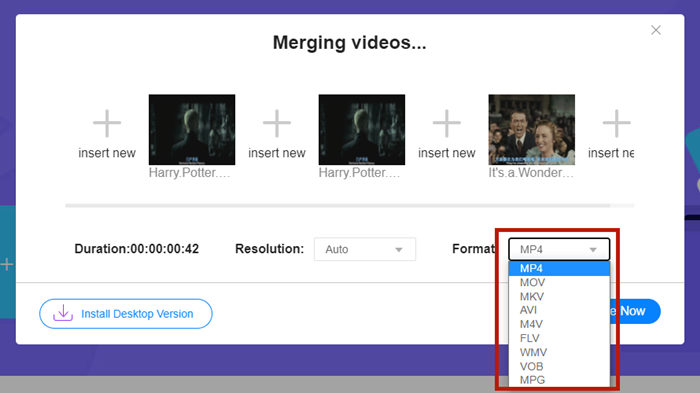
Passaggio 5. Clicca sul pulsante Merge Now nell’angolo in basso a destra dell’interfaccia per unire i file ASF. Lo strumento ti chiederà di impostare una cartella di destinazione per il file esportato.
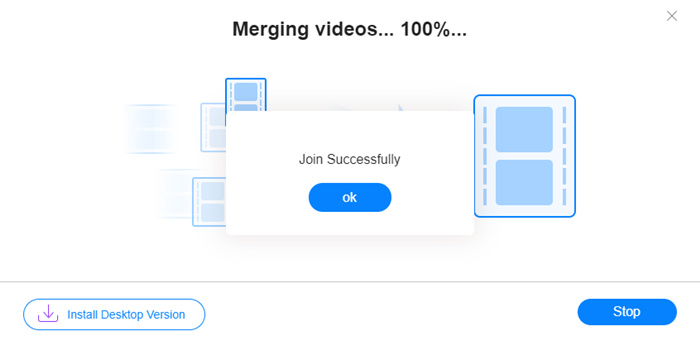
Quando compare l’avviso Join Successfully, puoi andare nella cartella di destinazione e trovare il file unito.
Questo metodo è davvero il modo più rapido per unire file ASF. L'intero processo è semplice come hai visto. Tuttavia, essendo facile da usare e leggero ne limitava le caratteristiche. Non è possibile organizzare comodamente la sequenza dei video. Potrebbe non essere possibile applicare la risoluzione o il formato di output desiderati. Il peggio è che, quando vuoi combinare video ASF di diverse risoluzioni e orientamenti, questo strumento può rovinare tutto. Quindi potresti aver bisogno di un altro strumento per farlo.
Parte 2: unisci file ASF in modo semplice e veloce
Video Converter Ultimate può aiutarti a ruotare, ritagliare, tagliare e, soprattutto, unire i file ASF. Con questo programma puoi salvare il file ASF unito in qualsiasi formato e a qualsiasi risoluzione. Inoltre, il processo di unione in Video Converter Ultimate è straordinariamente rapido.
Caratteristiche principali
- • Tagliare l'inizio e la fine indesiderati prima di unire file ASF.
- • Ruotare i video in diversi orientamenti.
- • Ritaglia per fare in modo che tutti i clip video abbiano la stessa risoluzione.
- • Comprimi il file ASF a una dimensione più piccola per YouTube, Facebook, ecc.
- • L'accelerazione hardware offre una velocità di fusione video 70 volte superiore.
Download gratuitoPer Windows 7 o versioni successiveDownload sicuro
Download gratuitoPer MacOS 10.7 o versioni successiveDownload sicuro
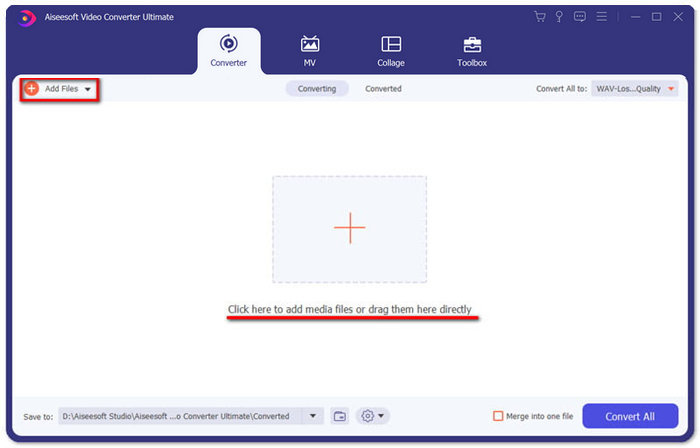
Passaggio 1. Scarica, installa e avvia Video Converter Ultimate. Clicca il grande pulsante + al centro dell’interfaccia principale per aggiungere i file ASF da unire. Dopo averli aggiunti, puoi trascinare le clip importate per impostarne l’ordine.
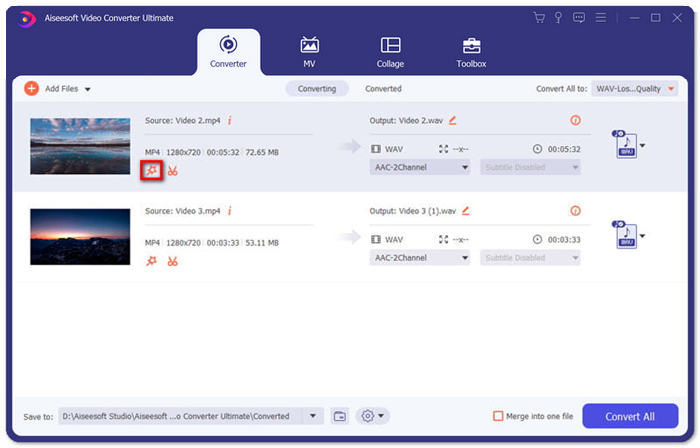
Passaggio 2. Per le clip che vuoi ritagliare, ruotare o di cui desideri modificare il rapporto d’aspetto, clicca sul pulsante Edit. Verrai così reindirizzato alla pagina Rotate & Crop.
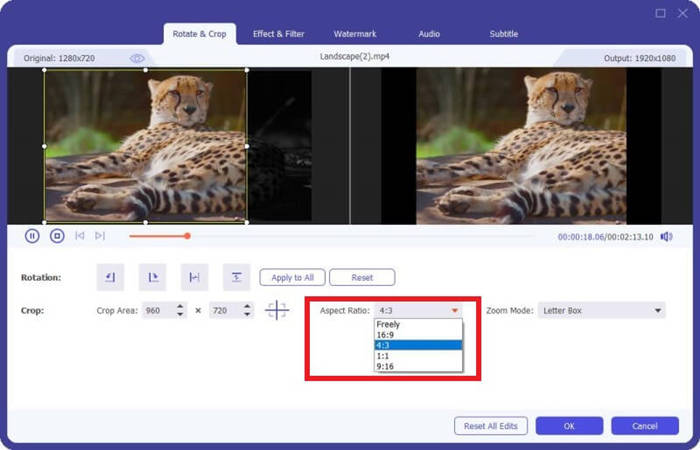
Qui puoi modificare il rapporto d’aspetto nella sezione Aspect Ratio. Per cambiare la risoluzione, puoi trascinare liberamente il riquadro dello schermo di anteprima sulla sinistra. Anche la rotazione è disponibile qui. Non dimenticare di cliccare sul pulsante OK per salvare le impostazioni.
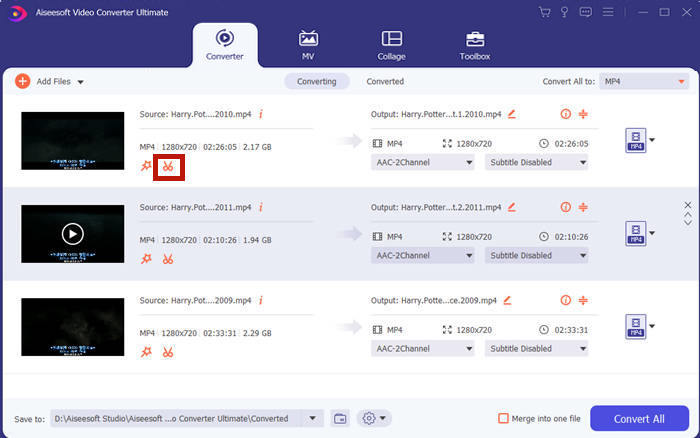
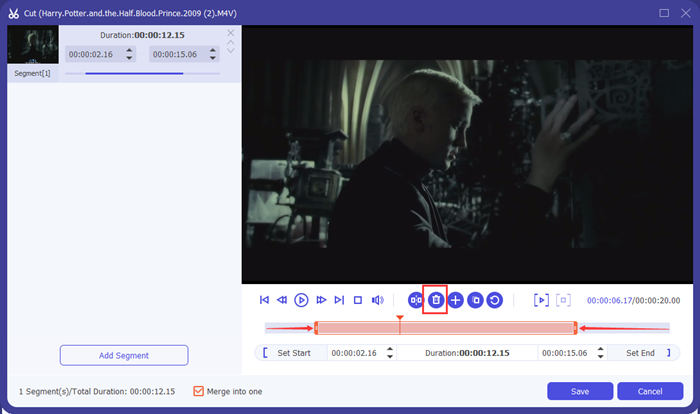
Passaggio 3. Per tagliare i segmenti indesiderati, utilizza la funzione Cut. Clicca sul pulsante Cut per passare alla pagina Cut.
Qui puoi selezionare un segmento e cliccare sul pulsante Delete (l’icona del cestino) per rimuoverlo. Infine, clicca su salva per tornare indietro.
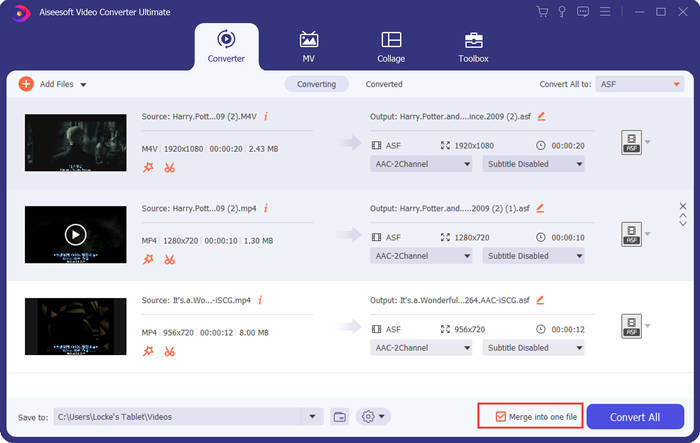
Passaggio 4. Nell’interfaccia principale, spunta la casella Merge into one file nell’angolo in basso a destra.
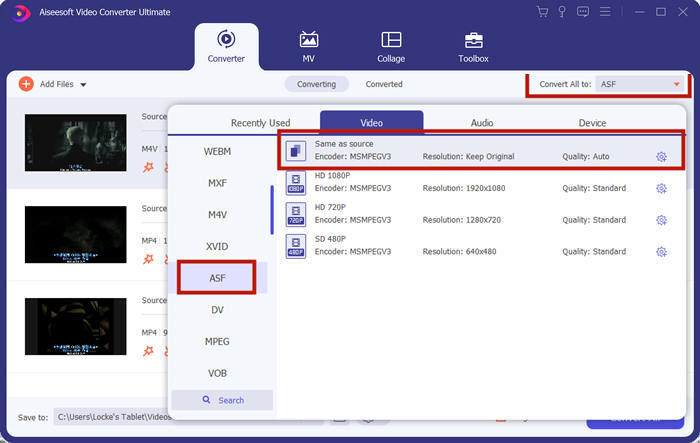
Passaggio 5. Quindi puoi selezionare il formato di output tramite l’opzione Convert All to nell’angolo in alto a destra dell’interfaccia. Trova ASF e cliccaci sopra.
Infine, puoi cliccare sul pulsante Convert All per iniziare a unire i file ASF. Al termine, il risultato verrà salvato nella cartella che hai impostato nell’angolo in basso a sinistra dell’interfaccia principale. Concludendo, abbiamo raccolto 3 domande frequenti sull’unione dei file ASF.
Parte 3: Domande frequenti sull'unione di file ASF
Perché non riesco a riprodurre un file ASF in qualsiasi app del lettore?
Esistono tre tipi di file che utilizzano l'estensione ASF. Si tratta di Advanced Systems Format, Acclaim Skeleton File e Electronic Arts Sound File. Forse il tuo ASF non è affatto un file video in formato Advanced Systems.
Perché non riesco a vedere alcuna immagine durante la riproduzione di un file ASF?
Perché non riesco a vedere alcuna immagine durante la riproduzione di un file ASF? Non tutti i file ASF contengono almeno un video. A volte un ASF può contenere solo un pezzo di audio WMA. Alza il volume degli altoparlanti o degli auricolari e trova se c'è qualche suono dalla riproduzione del file.
Posso riprodurre un file ASF sulla mia smart TV?
Dipende. Alcune smart TV supportano i file ASF, mentre altre no. Se la tua smart TV non riproduce il file ASF, puoi convertire il file in MP4 in anticipo.
Conclusione
Un file ASF spesso contiene un file WMV o WMA. È ampiamente supportato da molti dispositivi e programmi. Questo articolo ti propone i due metodi più efficienti per unire diversi file ASF in uno solo, senza ridurre la qualità né applicare watermark. FVC Free Online Video Merger è senza dubbio la soluzione più rapida. Tuttavia, se vuoi tagliare o ruotare i video per combinarli in modo perfettamente uniforme, è meglio usare Video Converter Ultimate. Hai incontrato difficoltà nell’unire file ASF? Raccontacelo nei commenti.
-
 Come unire video su iPhone con o senza iMovie (gratuito)
 Tutorial - 4 modi gratuiti per unire i video su iPhone in uno nuovo
-
 2 modi migliori per unire file MKV per guardare film incessantemente
 Fusione di file di filmati MKV: come unire più file MKV in uno solo
-
 Come unire clip WMV online? Ecco 3 metodi comprovati
 3 metodi migliori per unire file WMV online gratuitamente (aggiornamento 2021)
