


 Video Converter Ultimate
 Screen Recorder
 Riparazione video
 Download sicuro
Come unire file video MXF dalla videocamera Sony con la qualità 4K originale
D: "Ho ordinato la Sony X70 in questo momento per sostituire la mia fotocamera Canon XF100. Con Canon XF100, posso utilizzare Canon XF Utility per unire tutti i file MXF ad alta velocità. Esiste un software simile per unire i file MXF creati dalla Sony X70?"
Quando utilizzi la modalità 4K per registrare video con fotocamere professionali come Sony XDCAM (inclusa Sony X70), Canon XF305 e Panasonic AG-HPX500M, i file video verranno salvati in formato MXF con alta qualità. Ma la maggior parte dei video joiner non supporta i file MXF. Ecco i combinatori MXF più usati che dovresti conoscere.

Parte 1: Come unire file MXF gratuitamente online
If you simply join some large MXF files without size limitation, FVC Free Online Merger is a versatile method you can take into consideration. It enables you to upload videos in multiple formats. Moreover, you can produce an impressive video with no watermark added.
- 1. Metti i file video MXF fianco a fianco online senza alcun limite di dimensione.
- 2. Unisci più file video MXF in formato MP4 con risoluzione 1080p.
- 3. Configurare e regolare le impostazioni di risoluzione con vari preset.
- 4. Proteggi la privacy per rimuovere l'MXF caricato entro 24 ore.
Step 1: Head to FVC Free Online Merger and click the Upload Videos to Merge button to install the browser plugin, and choose the MXF files you want to join.

Step 2: Click the Plus icon to insert other MXF files in the desired order. Then choose the MP4 format to ensure the videos can be uploaded and played smoothly on YouTube. To keep a high quality of videos, you can choose the 1920*1080P resolution.

Step 3: After that, you can set the path to save your combined videos to the computer and click the Merge Now button at the bottom right corner to start joining MXF files automatically.

Parte 2: Come unire file MXF senza qualità originale
When you need to preserve the original 4K-quality of MXF videos to create movies or televisions, FVC Video Converter Ultimate is a versatile way to combine video files, including MXF, MKV, MP4, and more. It enables you to trim the desired part, compress the file, and convert it to another video format. Moreover, it enables you to join MXF files with 1080P or 4K-resolution.
- 1. Combina diversi formati video, inclusi MXF, MKV, MP4 e altri.
- 2. Fornire 4 metodi per aumentare la risoluzione, rimuovere il rumore video, ecc.
- 3. Modifica la risoluzione video, il bitrate, il frame rate e altri parametri.
- 4. Converti il video combinato in un altro formato video per i siti di social media.
Download gratuitoPer Windows 7 o versioni successiveDownload sicuro
Download gratuitoPer MacOS 10.7 o versioni successiveDownload sicuro
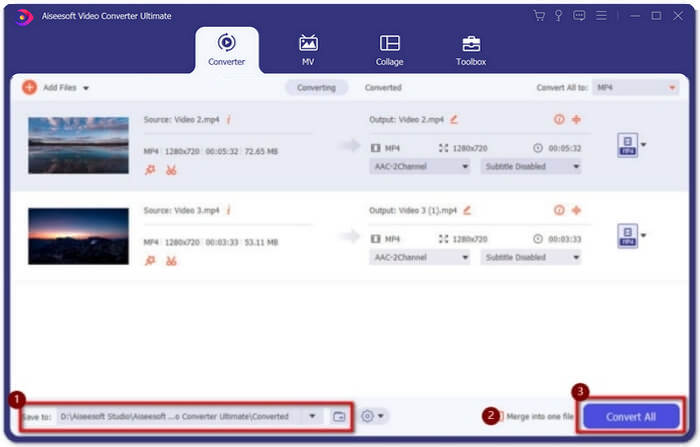
Step 1: Download and launch Video Converter Ultimate. Click the Add Files button to choose all the MXF files you want to merge. You can also drag the files into the software. If you want to adjust the order, just pull the videos and release them in the right order.

Step 2: After that, you can click the Convert All to button and find MXF format in the video line. Choose the 4K or Same as Source button to keep the original high quality. Moreover, you can also upscale the video resolution according to your requirement.

Step 3: After choosing the desired storage path, tick the Merge into one file box and then click Convert All button to combine MXF files. Once you have merged the videos, you can save the files to your computer or share them on social media websites.
Parte 3: Domande frequenti per l'unione di file video MXF
1. Che cos'è MXF?
MXF è l'abbreviazione di Material Exchange Format, che è un formato multimediale audio e video professionale. I video ripresi da telecamere professionali in modalità 4K sono sempre in formato MXF, quindi viene spesso utilizzato per produrre e modificare video nell'industria cinematografica e televisiva.
2. Se voglio unire video MXF per YouTube, quale formato devo scegliere?
MXF è troppo grande per YouTube, faresti meglio a scegliere di unire i file MXF in MP4 per mantenere una qualità relativamente alta con dimensioni ridotte. Inoltre, la maggior parte dei dispositivi e dei lettori supporta la riproduzione di video MP4.
3. Posso riprodurre file video MXF con QuickTime Player?
Yes, you can. Although it’s an uncommon format, some video players can support playing MXF videos including QuickTime on Mac and Zoom player on Windows. If you can’t play MXF videos, you can try to convert the MXF files to some common formats like MP4, and AVI.
Conclusione
Per combinare i file video MXF ripresi da fotocamere professionali, puoi trovare i falegnami MXF più utilizzati nell'articolo. Se desideri solo caricare questi video uniti su YouTube, l'utilizzo del joiner online gratuito è la scelta migliore perché può aiutarti a unire i file MXF in MP4 con dimensioni più piccole. Tuttavia, se desideri creare un film o un televisore professionale, dovresti scegliere Video Converter Ultimate per mantenere la qualità 4K originale.
-
 6 migliori fusioni AVI: come unire file video AVI su Windows e Mac
 Quando si desidera unire video AVI per un DVD, è possibile conoscere le funzionalità dei 6 migliori joiner AVI tra cui strumenti online gratuiti e programmi desktop dall'articolo.
-
 Come comprimere MXF con Premiere Pro e online gratuito
 Come comprimere MXF con file di dimensioni inferiori? Come comprimere i file MXF in Adobe Premiere Pro? Questo post condivide 2 modi per comprimere i file MXF.
-
 Come unire i file M2TS insieme gratuitamente
 Vuoi unire gratuitamente i file M2TS / MTS catturati dalle videocamere? Questo post condivide modi efficienti per unire 2 file M2TS in uno senza ricodificarli.
